

WhatsApp Business is secure for most customer messages, but only under specific conditions. The Signal end-to-end encryption protocol protects messages, media, calls, and documents in transit, meaning nobody outside the conversation, including WhatsApp itself, can read them. The critical caveat: if your business uses the Cloud API with Meta-hosted storage, or enables AI assistance or certain optional services, those chats are received by Meta and are no longer end-to-end encrypted. Under Australia's Privacy Act and the Notifiable Data Breaches (NDB) scheme, that distinction carries real compliance weight.
Take these four actions right now:
- Enable two-step verification on your WhatsApp Business account (Settings > Account > Two-step verification).
- Review your linked devices and log out of any session you do not recognise.
- Check whether your current setup uses Cloud API hosted by Meta or AI assistance, and update your privacy policy to disclose this if it does.
- Register for Meta Verified to reduce impersonation risk and signal legitimacy to customers.
If you are unsure where your messages are being stored or processed, a quick review with an Australian IT partner like Myitbutler can clarify your exposure before it becomes a problem.
Key takeaways
WhatsApp Business is secure for direct app-to-app messages using the Signal protocol, but Cloud API and Meta-hosted services remove end-to-end encryption and create Australian Privacy Act obligations that most businesses have not yet addressed.
| Point | Details |
|---|---|
| Signal encryption covers direct chats | Text, media, calls, and documents are end-to-end encrypted in the standard Business app. |
| Cloud API changes the encryption model | Meta-hosted storage and AI assistance mean Meta receives messages; disclose this in your privacy policy. |
| Enable 2FA and manage sessions | Two-step verification and regular linked device reviews are the highest-impact immediate actions. |
| NDB obligations apply to WhatsApp breaches | A compromised account holding customer personal information likely triggers an NDB notification to the OAIC. |
| Myitbutler provides Australian-standard support | Fixed-price security reviews, DPIA support, and incident response planning with no lock-in contracts. |
Table of Contents
- How does WhatsApp Business protect your messages?
- When does end-to-end encryption actually apply?
- Which WhatsApp Business security features should you enable?
- What are the main security risks for businesses on WhatsApp?
- What are your Australian compliance obligations when using WhatsApp Business?
- Step-by-step checklist to harden your WhatsApp Business setup
- When should you hire a managed IT partner for WhatsApp Business security?
- The real gap most businesses miss
- Myitbutler can help you secure WhatsApp Business
- Sources
- FAQ
How does WhatsApp Business protect your messages?
The platform's baseline security is genuinely strong. Every message between a customer and a business using the WhatsApp Business app is protected by the Signal protocol, the same encryption standard used by Signal itself and widely regarded as the gold standard for messaging security. It covers text, images, video, voice calls, documents, and live location, all encrypted on the device before transmission.
Beyond encryption, the WhatsApp Business Platform uses a Defence in Depth approach, the Cloud API is hosted by Meta, and the platform holds SOC 2 certification with regular penetration testing is conducted by Meta. Meta documents its controls through recognized industry questionnaires, which gives enterprise buyers a structured way to assess vendor risk.
The WhatsApp Business Data Security Terms set minimum security standards for businesses using the platform, covering personnel screening, physical security, password management, and vulnerability management programmes. These are contractual obligations, not optional guidelines.
What the platform does not control is what happens after delivery. Once a message lands on a device or is stored by a third-party integration, the business is responsible. SOC 2 certification and penetration testing are meaningful trust signals, but they do not cover your staff's devices, your CRM integrations, or your team's password hygiene.
Platform security controls at a glance:
- Signal end-to-end encryption for all direct app-to-app messages
- SOC 2 certification and regular penetration testing (Cloud API hosted by Meta)
- Defence in Depth architecture
- Business Data Security Terms (contractual minimum standards)
- UI indicators when encryption status changes
When does end-to-end encryption actually apply?
The answer depends on how your business has set up WhatsApp, not just whether you use it.
Encrypted by default:
- Direct chats between a customer and a business using the WhatsApp Business app with self-hosted or on-device storage
- Voice and video calls
- Media files and documents sent within those chats
- Group chats where all participants use the standard app
Not end-to-end encrypted:
- Messages processed through the Cloud API when Meta hosts the storage, because Meta receives the messages to deliver them
- Chats where the business has enabled AI assistance (Meta receives the content to process it)
- Payment flows and certain automation or ad-linked optional services
- Chat exports or backups saved outside the app in an unencrypted format
WhatsApp does surface indicators in the chat UI when a conversation is not end-to-end encrypted, so customers can see when their messages are being handled differently. Businesses that choose Meta-hosted workflows must disclose this in their privacy notices and customer consent flows.
How to verify encryption status for a specific chat:
- Open the chat and tap the contact or business name at the top.
- Select "Encryption" or "View Security Code."
- Compare the 60-digit security code with the other party, or scan each other's QR code.
- A match confirms the chat is end-to-end encrypted between those two devices.
The WhatsApp Help Centre explains that this verification step is optional but worth doing for high-sensitivity conversations, such as sharing financial details or personal health information with a client.
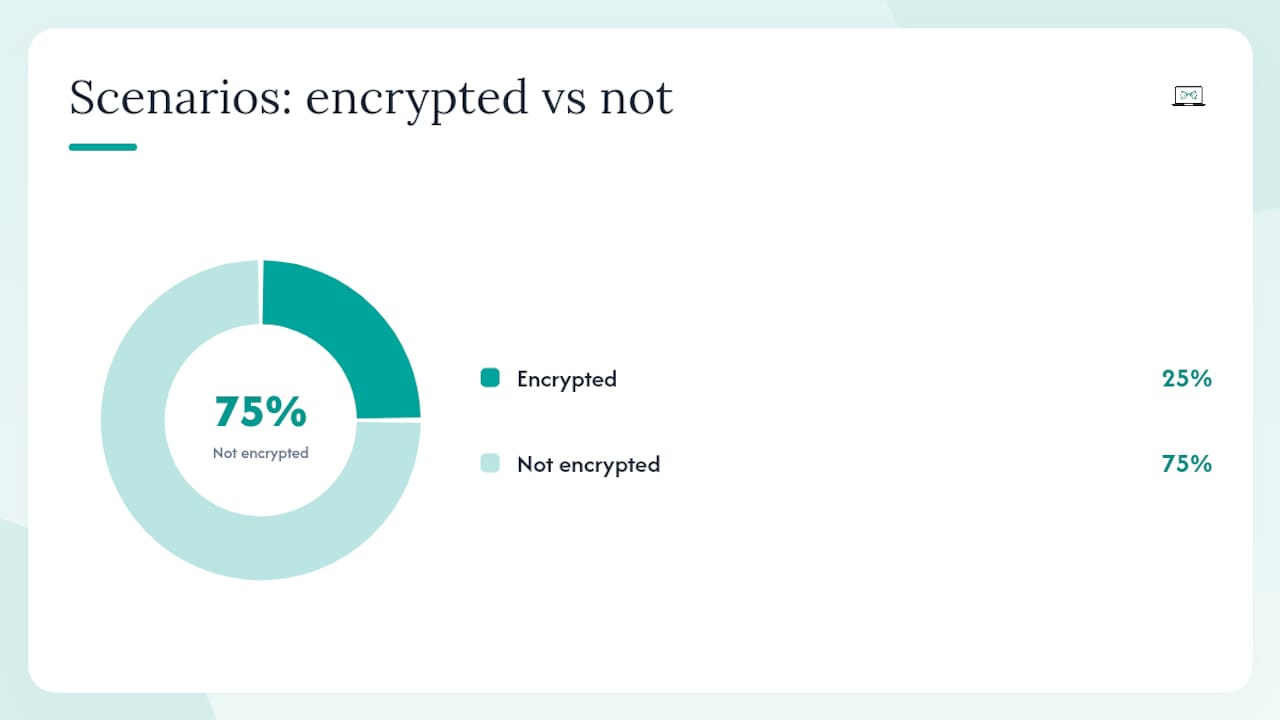
| Scenario | End-to-end encrypted? | Business must configure | Compliance impact (Australia) |
|---|---|---|---|
| WhatsApp Business app, self-hosted | Yes | Nothing extra | Lower risk; standard APP obligations apply |
| Cloud API, Meta-hosted storage | No | Disclose in privacy policy; obtain consent | Cross-border disclosure obligations under APPs |
| AI assistance enabled | No | Disclose to customers; update DPA | NDB obligations if breach occurs |
| Unencrypted chat export/backup | No | Secure storage policy required | Data breach risk; NDB notification may apply |
Pro Tip: When you notify customers that you use WhatsApp for support, state clearly whether you use Meta-hosted services. A one-line disclosure in your privacy policy and a brief note in your onboarding message covers this cleanly.
Which WhatsApp Business security features should you enable?
WhatsApp recommends small businesses enable various security features that materially reduce risk. Here is how to action each one.
Two-step verification
Go to Settings > Account > Two-step verification > Enable. You will set a PIN as part of two-step verification that is required whenever your number is re-registered. Add an email address as a recovery option. For teams using the Cloud API, enforce 2FA at the admin level and require it for every user with account access.
Device and session management
Open Settings > Linked Devices to see every active session. Remove any unknown linked devices immediately. Do this as a routine check every month, and always revoke sessions when a staff member leaves.
Meta Verified and verified business profiles
Meta Verified provides a badge that can help signal business identity to customers. It reduces impersonation risk because customers can see the badge before they share personal details. Apply through the WhatsApp Business app under Settings > Business Tools > Meta Verified. The badge also signals to customers that your account has passed identity checks.
Message controls and privacy settings
- Disappearing messages: Turn on by default for new chats (Settings > Privacy > Default message timer). This limits how long sensitive information sits on customer devices.
- Group privacy: Adjust group addition permissions to control who can add you to groups.
- Read receipts: Consider your policy on read receipts for customer service contexts.
- Last seen and profile photo: Restrict to contacts only to reduce reconnaissance by bad actors.
Pro Tip: When offboarding a staff member who had access to WhatsApp Business, revoke their linked device session, change the account PIN, and review any API keys or integrations they had access to. Do this on their last day, not a week later.
What are the main security risks for businesses on WhatsApp?
WhatsApp's encryption makes it one of the more secure messaging platforms, but the encryption only covers the wire. The risks that actually hurt businesses sit at the edges.
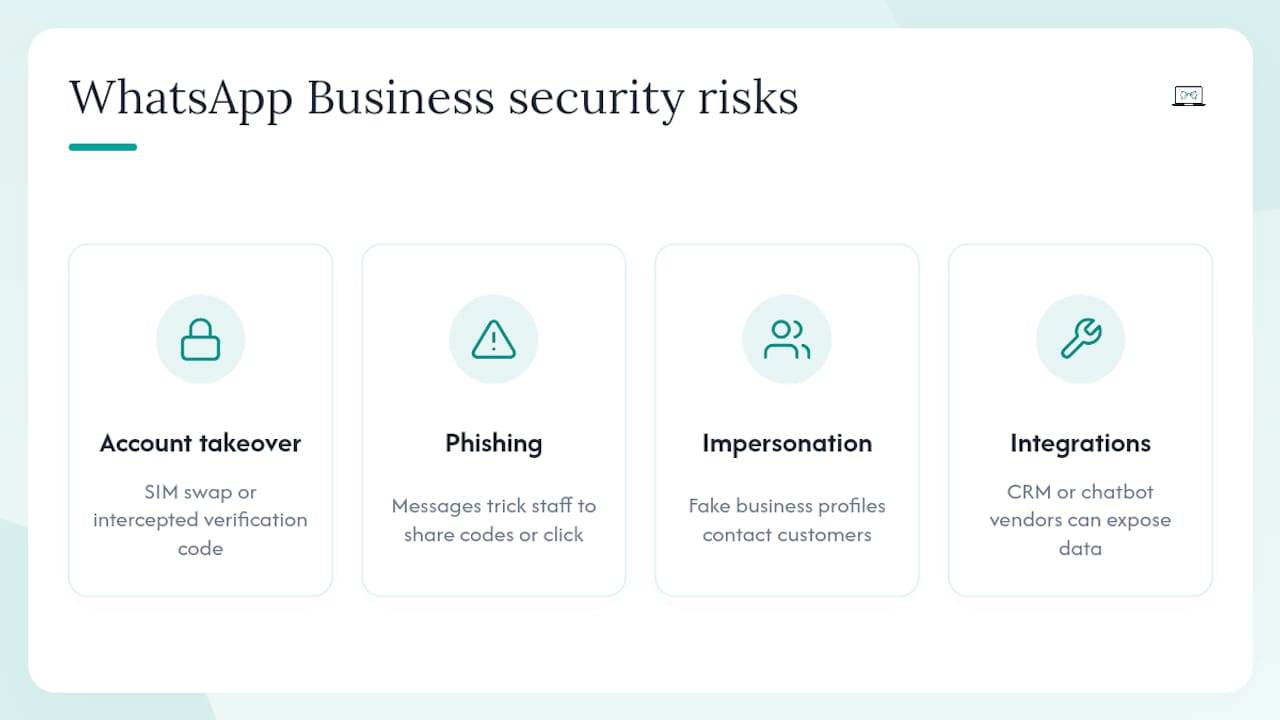
Account takeover is the most common serious threat. Attackers use SIM swapping (convincing a telco to transfer your number to their SIM) or intercept the SMS verification code during re-registration. Once they have your number, they own the account.
Phishing and social engineering target staff directly. A message posing as WhatsApp support, a supplier, or a customer can trick an employee into sharing a verification code or clicking a malicious link. This is how most credential compromises begin.
Impersonation and brand spoofing affect your customers, not just your account. Someone creates a WhatsApp Business profile using your logo and a similar number, then contacts your customers. Without a verified badge, customers have no easy way to tell the difference.
Data leakage from employee devices is a quieter risk. If a staff member uses a personal phone for WhatsApp Business, and that device is lost, stolen, or compromised by malware, every customer conversation on it is exposed. This is especially relevant for remote teams where device oversight is harder.
Insecure third-party integrations are a growing problem as businesses connect WhatsApp to CRMs, chatbots, and automation tools. Each integration is a potential access point. If the integration vendor has weak security, your customer data is only as safe as their weakest control.
The regulatory consequences in Australia are concrete. A breach involving customer personal information may trigger an NDB notification to the Office of the Australian Information Commissioner (OAIC), and reputational damage from a spoofing incident can be immediate and lasting.
What are your Australian compliance obligations when using WhatsApp Business?
Using WhatsApp Business to communicate with customers means you are collecting and storing personal information, which brings you squarely under the Australian Privacy Act 1988 and its Australian Privacy Principles (APPs).
Key obligations triggered by WhatsApp use:
- APP 1 (Open and transparent management): Your privacy policy must state that you use WhatsApp to communicate with customers and describe how those messages are handled.
- APP 8 (Cross-border disclosure): If you use Cloud API hosted by Meta, customer messages are processed on Meta's servers, which are located outside Australia. This is a cross-border disclosure and must be disclosed in your privacy policy.
- APP 11 (Security of personal information): You must take reasonable steps to protect personal information from misuse, interference, loss, and unauthorised access.
When does a WhatsApp incident trigger an NDB notification?
An An NDB notification to the OAIC is required if a data breach is likely to cause serious harm to individuals whose information is involved. A compromised WhatsApp Business account containing customer names, contact details, financial information, or health information would almost certainly meet this threshold. You must notify the OAIC and affected individuals as soon as practicable.
Independent security guidance recommends conducting a Data Protection Impact Assessment (DPIA) before deploying WhatsApp Business for customer communications, particularly if you handle sensitive categories of personal information.
Practical compliance steps:
- Update your privacy policy to name WhatsApp as a communication channel and describe data handling.
- Add a Data Processing Agreement (DPA) clause covering Meta as a data processor if you use the Cloud API.
- Conduct a DPIA for any Cloud API or AI-assisted workflow.
- Obtain explicit customer consent before initiating WhatsApp conversations for marketing or support.
- Limit data collection: do not ask customers to share more personal information via WhatsApp than the task requires.
Security review frequency: Audit your WhatsApp Business configuration, linked devices, integrations, and privacy policy at least every six months. After any staff change involving WhatsApp access, conduct an immediate partial review. For cross-border compliance considerations affecting distributed teams, a quarterly check is more appropriate.
Step-by-step checklist to harden your WhatsApp Business setup
Work through this in order. The immediate steps take under 30 minutes.
Immediate (do today):
- Enable two-step verification with appropriate security measures.
- Open Linked Devices and remove every session you cannot account for.
- Ensure your WhatsApp Business app is kept updated to the latest version.
- Add a one-line WhatsApp disclosure to your privacy policy.
Short term (this week):
- Decide whether you need Cloud API hosted by Meta or whether the standard Business app meets your needs. If you use the Cloud API, document this in your DPA.
- Apply for Meta Verified to get the verified badge.
- Set a device policy: company-owned devices for WhatsApp Business where possible, or a Mobile Device Management (MDM) solution for personal devices. Endpoint security guidance covers the MDM options worth considering.
- Enable disappearing messages as the default for new chats.
Medium term (this month):
- Conduct a DPIA for any Cloud API or AI-assisted workflow.
- Run a 30-minute staff training session covering phishing recognition, verification code security, and the offboarding process.
- Write a simple WhatsApp incident response playbook (see below).
Ongoing:
- Review linked devices and integrations every month.
- Audit privacy policy and DPA language every six months.
- Run a breach simulation annually to test your incident response.
Incident response plan for a WhatsApp Business breach
If a WhatsApp Business account is compromised, act in this order: (1) Revoke all linked device sessions immediately. (2) Re-register the account with a new PIN. (3) Notify affected customers if their personal information was exposed. (4) Assess whether the incident meets the NDB threshold and notify the OAIC if required. (5) Document the incident and review what control failed.
Privacy policy wording (brief example): "We may communicate with you via WhatsApp Business. Messages are protected by end-to-end encryption where the standard WhatsApp Business app is used. If we use Meta-hosted services, messages may be processed by Meta. Please see Meta's Privacy Policy for details."
Pro Tip: When onboarding a new staff member to WhatsApp Business, create a linked device session for them rather than sharing the account phone. This way you can revoke their access individually without disrupting the whole account.
Backing up chat data safely:
- Use WhatsApp's built-in encrypted backup to Google Drive or iCloud, with end-to-end encrypted backup enabled (Settings > Chats > Chat Backup > End-to-end Encrypted Backup).
- Never export chat histories to unencrypted CSV or email unless required for a specific legal purpose, and delete the export immediately after use.
- Store any exported data in an access-controlled, encrypted location, not a shared drive folder.
When should you hire a managed IT partner for WhatsApp Business security?
If your business handles sensitive customer data, operates across multiple time zones, or uses the Cloud API with integrations, the configuration and compliance work goes beyond a one-time setup. A managed IT partner takes ongoing responsibility for the controls you cannot easily monitor yourself.
What a qualified Australian provider should cover:
- Account hardening and periodic configuration reviews
- DPA and privacy policy updates as WhatsApp's terms evolve
- DPIA support for Cloud API and AI-assisted workflows
- Incident response planning and breach simulation
- Secure vetting and ongoing monitoring of third-party integrations
- Staff training on phishing, credential security, and offboarding procedures
Questions to ask any provider before engaging them:
- Can you demonstrate familiarity with SOC 2 controls and ISO 27001 frameworks?
- Have you handled a messaging platform security incident before? Walk me through it.
- What certifications do your engineers hold? (Look for CCNA, CompTIA Security+, or equivalent.)
- What is your SLA for responding to a suspected account compromise?
- How do you stay current with changes to WhatsApp's Business Data Security Terms?
Myitbutler holds CCNA and CompTIA Security+ certifications and has over 15 years of enterprise IT experience. The team works with distributed businesses, remote teams, and expats across multiple time zones, which means WhatsApp Business security is not a theoretical exercise for them. It is part of how they coordinate with clients every day.
For securing customer data across messaging platforms, having a provider who understands both the technical controls and the Australian regulatory context saves significant time when something goes wrong.
The real gap most businesses miss
WhatsApp's Signal encryption is genuinely excellent. The problem is that most businesses treat "end-to-end encrypted" as a full stop, when it is really just the beginning of the security conversation.
The incidents that cause real damage are almost never a flaw in the encryption itself. They are a staff member who shared a verification code because the request looked legitimate. A personal phone lost at an airport with two years of customer conversations on it. A CRM integration that was set up quickly and never reviewed. A privacy policy that still does not mention WhatsApp, three years after the business started using it.
WhatsApp's platform controls, SOC 2 certification, and penetration testing are meaningful. They tell you Meta is doing its part. What they cannot tell you is whether your team is doing theirs. That gap, between platform security and operational security, is where Australian businesses get caught.
The businesses that handle this well are not necessarily the ones with the biggest IT budgets. They are the ones who have thought through the failure modes, trained their staff on the specific risks, and have a clear plan for what to do when something goes wrong. That is achievable for any size business, with or without a dedicated IT team.
Myitbutler can help you secure WhatsApp Business
Running WhatsApp Business securely across a distributed team is genuinely manageable, but it takes more than enabling 2FA once and moving on. Myitbutler offers fixed-price remote IT support with no long-term contracts, covering WhatsApp Business security reviews, privacy policy and DPA updates, DPIA support, incident response planning, and staff training, all delivered to Australian standards.

Whether you need a one-off configuration review or ongoing managed oversight, Myitbutler works with small businesses, remote teams, and expats across multiple time zones. There is no retainer lock-in and no minimum term. Book a free chat to talk through your current setup, or visit Myitbutler to see the full range of services.
Sources
- Trust & Safety | WhatsApp for Business
- About end-to-end encryption | WhatsApp Help Center
- WhatsApp Business Data Security Terms
- Protect your business series: How to secure information (yours and your clients') on WhatsApp Business
- Is WhatsApp secure enough for businesses to use safely?
FAQ
How secure is WhatsApp Business for customer messages?
WhatsApp Business is secure for direct app-to-app messages, which are protected by the Signal end-to-end encryption protocol. Security weakens when businesses use Cloud API hosted by Meta, AI assistance, or unencrypted backups, as those messages are received and processed by Meta.
Is it safe to chat with a WhatsApp Business account?
Generally yes, provided the business uses the standard WhatsApp Business app without Meta-hosted services. Customers can check encryption status by tapping the contact name and selecting "Encryption" to verify the security code.
What are the main risks of using WhatsApp for business?
The main risks are account takeover via SIM swap or verification code interception, phishing targeting staff, impersonation of your brand by bad actors, data leakage from employee devices, and insecure third-party integrations. None of these are flaws in WhatsApp's encryption; they are operational risks that require process controls.
Can a WhatsApp Business account be trusted by customers?
A verified WhatsApp Business account with a Meta Verified badge gives customers a reliable signal of legitimacy. Without the badge, customers cannot easily distinguish a genuine business account from an impersonator, which is why applying for Meta Verified is one of the first steps worth taking.
When does a WhatsApp incident require an NDB notification in Australia?
An NDB notification to the OAIC is required when a data breach involving personal information is likely to result in serious harm to affected individuals. A compromised WhatsApp Business account containing customer names, contact details, or financial information would typically meet this threshold under the Privacy Act 1988.