
TL;DR:
- Losing customer trust can happen instantly, but regaining it typically takes years or may be impossible. Small businesses are frequent targets for cybercriminals due to limited security resources, making data protection vital. Implementing basic controls, fostering cybersecurity awareness, and consulting remote IT support can significantly strengthen data security and compliance efforts.
Losing a customer's trust takes seconds. Earning it back can take years, if it happens at all. Cybercriminals target businesses of every size, and small businesses are often easier targets precisely because they lack the dedicated security teams that larger organisations employ. If you collect names, email addresses, payment details, or any personal information from customers, you have a legal and ethical obligation to protect it. This guide covers the practical steps to secure customer data in your small business, from understanding your obligations through to implementing the right controls and maintaining them over time.
Table of Contents
- Securing customer data in your small business starts with knowing what you hold
- Building a cybersecurity culture and team with limited resources
- Implementing core cybersecurity controls to protect customer data
- Navigating payment card data security and compliance
- Verifying and continuously improving your data security efforts
- Why many small businesses overlook the real cybersecurity risks
- Trusted remote IT support to secure your small business data
- Frequently asked questions
Key Takeaways
| Point | Details |
|---|---|
| Document your obligations | Identify your legal and regulatory cybersecurity obligations and critical assets before planning security measures. |
| Build a cybersecurity culture | Train staff and foster awareness to make cybersecurity part of everyday business operations. |
| Use practical security controls | Implement strong passwords, two-factor authentication, and protect against phishing and ransomware. |
| Simplify payment security | Use PCI-compliant payment processors to reduce compliance scope and protect cardholder data. |
| Maintain and monitor | Regularly scan for vulnerabilities, log access, and keep training and policies up to date. |
Securing customer data in your small business starts with knowing what you hold
Before you can protect customer information, you need to know exactly what you are dealing with. Many small business owners are surprised when they actually catalogue their data: old email lists in a spreadsheet on someone's laptop, payment records stored in an unencrypted folder, customer addresses sitting in a cloud tool nobody has reviewed permissions for in two years.
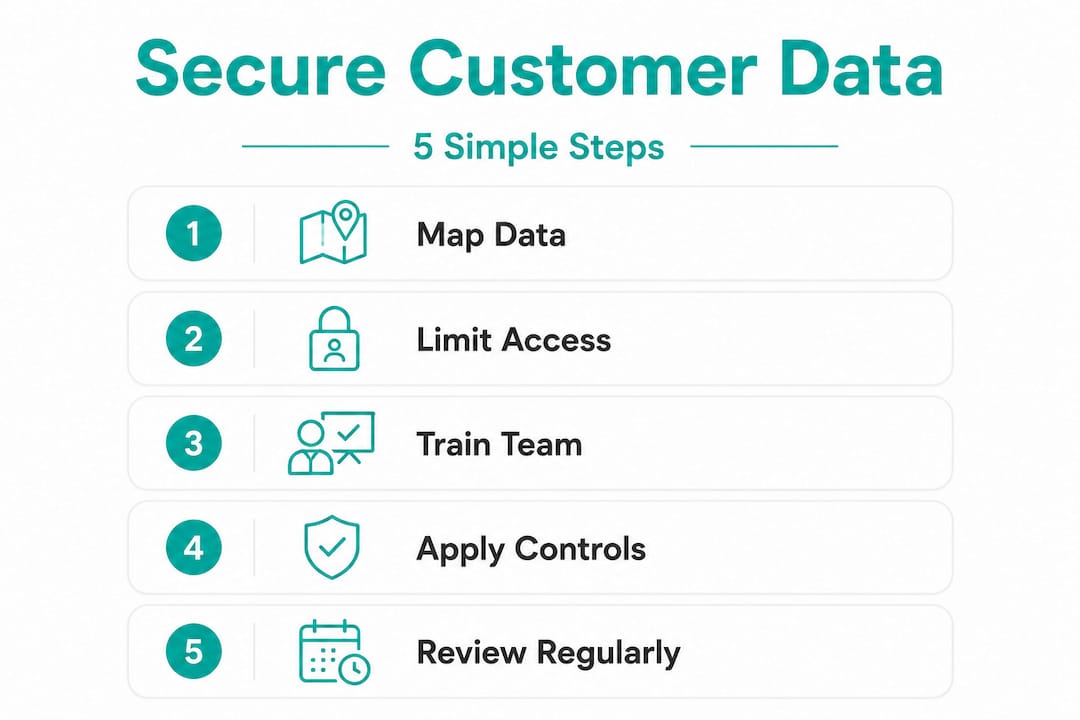
Start by mapping the data you collect, where it lives, and who can access it. Ask yourself: do you collect payment card details, health information, or government identifiers? Each of those categories carries different legal obligations depending on your industry and jurisdiction.
Then consider your contractual and regulatory requirements. In Australia, the Privacy Act 1988 applies to most businesses handling personal information. If you process card payments, PCI DSS applies to you regardless of size. If you work with clients in the European Union, GDPR may also apply.
Before choosing in-house or outsourced security, NIST recommends that small businesses document how cybersecurity supports their resilience, along with their specific obligations and critical assets. This documentation step is not bureaucratic box-ticking. It is the foundation that stops you spending money on tools that do not match your actual risk profile.
Key questions to answer during this mapping process:
- What personal data do you collect, and is all of it actually necessary?
- Where is that data stored, backed up, and transmitted?
- Who inside and outside your business has access to it?
- What are your legal reporting obligations if a breach occurs?
- Which vendors or third-party tools handle your customer data on your behalf?
Once you have answers, you are in a far better position to make smart decisions about choosing IT support packages or evaluating remote IT support considerations for your team.
Building a cybersecurity culture and team with limited resources
Knowing your obligations is one thing. Acting on them consistently, day after day, is another. The biggest gap in small business data security is not usually technology. It is people.

Many SMBs outsource cybersecurity needs while also upskilling existing staff and using community resources. That hybrid approach makes sense for most small teams: you cannot hire a full-time security analyst, but you can train your bookkeeper to spot a phishing email and your operations manager to follow a basic incident checklist.
Here is a practical sequence to build your cybersecurity culture without breaking the budget:
- Run a cybersecurity awareness session quarterly. Cover phishing recognition, password hygiene, and what to do when something looks suspicious. Short and practical beats long and theoretical every time.
- Assign a cybersecurity point of contact. This person does not need to be a technical expert. Their job is to keep security on the agenda, escalate concerns, and liaise with your external IT support provider.
- Create a simple incident response checklist. When something goes wrong at 9pm, nobody should be figuring out what to do from scratch. A one-page checklist covering "isolate the device, call IT support, notify the owner" is enough to prevent panic-driven mistakes.
- Review access permissions every six months. Former employees, old contractors, and unused app integrations accumulate access over time. Revoke what is not needed.
- Explore community resources if budget is tight. Some universities run cybersecurity clinics for small businesses. Industry associations in Australia occasionally offer subsidised security audits. These are worth investigating before assuming professional support is out of reach.
Pro Tip: Do not wait for a breach to train your staff. The cost of a one-hour training session is trivial compared to the average cost of a small business data incident, which can run into tens of thousands of dollars once you account for notification obligations, legal advice, and reputational damage.
Consider your IT support options carefully. For distributed teams, remote system administration strategies can deliver enterprise-grade oversight without the cost of on-site staff.
Implementing core cybersecurity controls to protect customer data
With your team primed, the next layer is technical controls. These are the mechanisms that make it harder for attackers to get in, and limit the damage when something slips through.
Two-factor authentication (2FA) should be your first move. 2FA prevents account takeover even when passwords are stolen by requiring a second verification step. Use an authenticator app rather than SMS where possible, since SMS codes can be intercepted via SIM-swapping attacks. Security keys like YubiKey are even stronger and worth the cost for accounts that access customer data directly.
Email authentication is underused and critically important. Small businesses should apply email authentication to prevent spoofing and phishing. The three standards to implement are SPF, DKIM, and DMARC. These work together to verify that emails sent from your domain are legitimate, reducing the chance that criminals can impersonate your business to your customers. Detailed guidance on email authentication setup covers common edge cases like how mail forwarding can break these checks.
Phishing and ransomware are the two most common attack vectors against small businesses. Both rely on one thing: getting a human to click something they should not. Technical controls reduce the damage, but staff awareness reduces the frequency.
Essential controls to implement this month:
- Enable 2FA on every account that stores or accesses customer data, including email, accounting software, and CRM platforms.
- Install and maintain antivirus software on all business devices, and configure automatic updates for operating systems and applications.
- Back up customer data to a separate location (not just the same device or network), and test those backups regularly. An untested backup is not a backup.
- Segment your network so that customer-facing systems are not on the same network as staff devices. See guidance on setting up secure office networks for practical steps.
- Use a password manager and enforce unique, complex passwords for every system. Credential reuse is one of the most common causes of account compromise.
Pro Tip: Set a calendar reminder to check for software updates and review active user accounts at the start of each month. Fifteen minutes of maintenance prevents hours of incident response.
Navigating payment card data security and compliance
If you accept credit or debit card payments, the Payment Card Industry Data Security Standard (PCI DSS) applies to your business. There are no exemptions for size. PCI DSS 4.0 became mandatory in 2024, and all card-accepting businesses must comply, though smaller merchants have access to simplified self-assessment options.
The good news is that most small businesses can significantly reduce their compliance burden by making smart architecture choices upfront.
| Approach | Compliance level | Card data touches your systems? | Relative risk |
|---|---|---|---|
| Self-hosted payment form | SAQ D (most complex) | Yes | High |
| Hosted payment page (e.g. Stripe, PayPal) | SAQ A (simplest) | No | Low |
| Semi-integrated terminal | SAQ B or C | Minimal | Medium |
| Manual card entry by staff | SAQ C-VT | Yes | Medium-high |
If you use a hosted payment page where card details are entered directly on your provider's platform, you qualify for SAQ A, the shortest self-assessment questionnaire available. Your customer's card number never passes through your server, which dramatically reduces your compliance scope.
The risks of non-compliance are concrete:
- Fines from card networks ranging from $5,000 to $100,000 per month until compliance is achieved
- Liability for fraudulent transactions if a breach occurs while non-compliant
- Potential termination of your merchant account, meaning you can no longer accept card payments
For guidance on the network infrastructure that supports small business network security, securing the environment where payments flow is as important as choosing the right payment processor.
Verifying and continuously improving your data security efforts
Implementing controls is not a one-time event. Attackers adapt. Your systems change. Staff turn over. The only way to know your protections are working is to test and review them regularly.
Regular vulnerability scans, access logging, and staff training are among the most effective ongoing measures for small business data security. Logging who accesses what and when gives you visibility into unusual behaviour before it becomes a breach. A quarterly vulnerability scan (automated tools can do this affordably) identifies weaknesses before attackers do.
Here is a practical review cycle for most small businesses:
- Monthly: Review active user accounts, check for software updates, verify backups completed successfully.
- Quarterly: Run a vulnerability scan, review staff awareness, check that your incident response checklist is current.
- Annually: Conduct a fuller security review or penetration test (a controlled simulated attack to find real weaknesses), update your privacy policy and data handling documentation, and review vendor contracts for security clauses.
- After any incident or major change: Review what happened, update controls, and brief staff. A new integration, a staff departure, or a near-miss are all triggers for a quick review.
Continuous awareness training ensures staff understand evolving threats and know what protective steps to take, keeping your human layer as strong as your technical one.
Pro Tip: Document your reviews, even briefly. A short note saying "quarterly scan completed, no critical findings, access list reviewed" creates an audit trail that demonstrates due diligence to regulators, insurers, and clients if questions arise later.
Your cybersecurity maintenance options matter here. A managed IT provider can automate much of this monitoring and alert you to issues before they escalate.
Why many small businesses overlook the real cybersecurity risks
After working with small businesses across industries, one pattern stands out repeatedly: the businesses most likely to suffer a significant breach are not the ones who ignored cybersecurity entirely. They are the ones who thought they had it covered.
They ticked the compliance boxes. They had antivirus installed. They could say, hand on heart, that they had "done something" about cybersecurity. But compliance theatre is a real and dangerous failure mode, where businesses satisfy the form of security requirements without the substance. The most common missed step? Asking vendors about their security practices.
Your accounting software provider, your email marketing platform, your cloud storage service: every one of these holds or processes customer data on your behalf. A breach at any of them is effectively a breach of yours. Yet most small business owners never ask their vendors a single security question before signing up.
NIST advises SMBs to map their obligations, assets, and dependencies before investing in tools. That mapping often reveals surprising concentrations of risk: a single SaaS application that holds your entire customer database, a freelancer with admin access who left two years ago, a backup system that has not been tested since it was set up.
The uncomfortable truth is that most data security failures in small businesses come down to planning gaps, not technology gaps. A modest, well-maintained set of controls beats an expensive, poorly understood one every single time. The businesses that weather incidents best are not the ones with the most tools. They are the ones with clear procedures, trained staff, and a realistic picture of what they are actually protecting.
Understanding cybersecurity planning pitfalls and choosing support that matches your real risk profile will always outperform checkbox compliance alone.
Trusted remote IT support to secure your small business data
Applying everything in this guide is achievable, but it takes time, expertise, and consistency that most small business owners are stretched to provide on their own. That is where remote IT support for small businesses makes a genuine difference.

My IT Butler provides expert remote IT support built around the needs of small to medium businesses, distributed teams, and international operations. With over 15 years of enterprise experience, certifications in CompTIA Security+, CCNA, and PRINCE2, and services delivered globally to Australian standards, My IT Butler can help you implement the right controls, maintain compliance, and respond confidently to incidents. There are no lock-in contracts, transparent fixed pricing, and support available across time zones via WhatsApp, email, and direct messaging. Whether you need a security audit, help configuring 2FA and email authentication, or ongoing IT supervision to protect customer information, book an IT support consultation and get the right expertise behind your business today.
Frequently asked questions
What is the easiest way for a small business to secure payment card data?
The simplest path is to use a PCI-compliant payment processor like Stripe or PayPal so card data never touches your systems. This qualifies most small businesses for SAQ A, the shortest self-assessment questionnaire, reducing both compliance burden and risk substantially.
How often should small businesses train staff on cybersecurity?
At a minimum, quarterly awareness sessions covering current threats and your internal procedures are recommended. Continuous awareness training is the standard because threats and staff understanding both change throughout the year.
Why should small businesses ask vendors about their cybersecurity practices?
Many breaches originate through third-party vendors who hold or process your customer data. The FTC advises businesses to ask vendors directly about their security controls to avoid indirect breaches through your supply chain.
What is two-factor authentication and why is it important?
Two-factor authentication (2FA) requires a second verification step beyond a password, such as an authenticator app code or a security key. 2FA stops hackers from accessing accounts even when passwords have been stolen, making it one of the highest-value controls available for the effort involved.