
TL;DR:
- Remote workforce cybersecurity involves protecting data and systems accessed outside traditional offices, with tools like MFA and ZTNA now essential. Organizations face challenges like increased attack surfaces, phishing, shadow IT, and policy workarounds that require layered, user-friendly controls. Implementing Zero Trust, endpoint security, and continuous policy refinement effectively defends remote employees against evolving threats.
Remote workforce cybersecurity is the practice of protecting digital assets, data, and systems accessed by employees working outside a traditional office environment. As distributed teams become the norm for Australian businesses and global organisations alike, the threat surface has grown sharply. 78% of organisations reported at least one security incident linked to remote work in 2025, costing an average of $4.56 million per breach. That figure alone reframes cybersecurity for remote teams from a technical concern into a direct business risk. Tools like multifactor authentication (MFA), Zero Trust Network Access (ZTNA), and endpoint detection and response (EDR) are now the baseline, not the premium option.
What are the main cybersecurity challenges for remote workforces?
Remote work fundamentally changes the attack surface your organisation must defend. In an office, traffic flows through a managed network with firewalls, monitoring, and physical access controls. At home or in a café, your team member is on an untrusted network, often using a personal router with default credentials and no segmentation.

The threat data is clear. Phishing affects 71% of organisations with remote teams, while malware is cited by 61%. These are not abstract risks. Phishing has become more dangerous because AI now generates hyper-personalised attacks, including deepfake video calls and voice cloning that are nearly indistinguishable from legitimate communications. A remote worker receiving a convincing video message from their "CEO" has far less context to question it than a colleague sitting in the same office.
Shadow IT compounds the problem. When employees cannot access the tools they need through approved channels, they use personal apps, free file-sharing services, and unvetted browser extensions. These create data exposure points that IT teams cannot monitor or control.
The most telling statistic in remote workforce security challenges is this: 52% of tech leaders report that employees actively bypass security policies. That number does not mean your team is careless. It means your controls are creating too much friction.
- Expanded attack surface: Home routers, shared devices, and public Wi-Fi all introduce vulnerabilities that a managed office network would block.
- Phishing and malware: The two most common threats, now amplified by AI-generated attacks that are harder to detect.
- Policy workarounds: More than half of organisations see employees circumventing controls, signalling a design problem, not a people problem.
- Shadow IT: Unvetted apps and personal devices used for work create blind spots in your security posture.
- Enforcement gaps: Without physical proximity, enforcing policies consistently across time zones and device types is genuinely difficult.
How does Zero Trust architecture protect remote teams?
Traditional perimeter-based security is obsolete for remote work. The old model assumed that anyone inside the network could be trusted. Remote work destroyed that assumption the moment employees started connecting from home networks, airports, and co-working spaces in different countries.
Zero Trust operates on a single principle: never trust, always verify. Every user, device, and connection is treated as potentially compromised until proven otherwise through continuous authentication and device compliance checks. This is not paranoia. It is an accurate reflection of how modern attacks work, where compromised credentials are the most common entry point.
ZTNA vs traditional VPN
| Feature | Traditional VPN | ZTNA |
|---|---|---|
| Access model | Full network access | Application-level access only |
| Lateral movement risk | High | Low |
| User experience | Often slow, friction-heavy | Faster, context-aware |
| Visibility | Limited | Continuous monitoring |
| Best suited for | Legacy on-premise setups | Distributed remote teams |
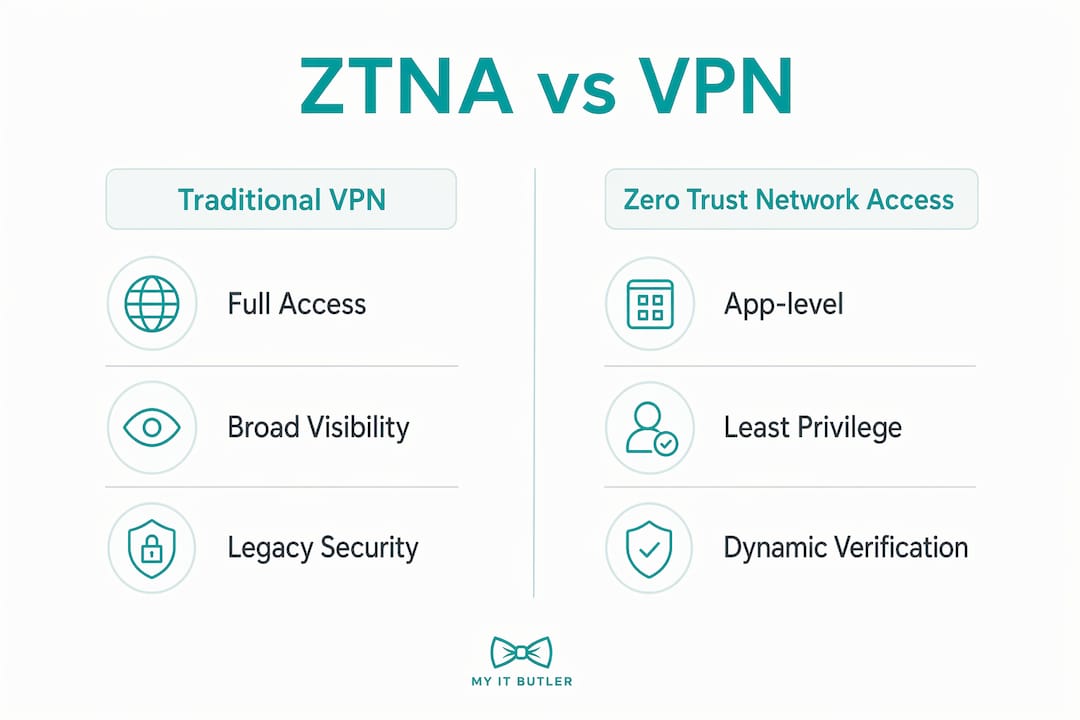
ZTNA grants application-level access rather than broad network visibility. If a user's credentials are stolen, the attacker reaches only the specific application that user was authorised to access, not the entire network. For organisations managing remote access technology across multiple time zones, this containment is critical.
Endpoint protection sits alongside Zero Trust as a non-negotiable layer. EDR tools monitor device behaviour in real time and can isolate a compromised machine before damage spreads. Mobile Device Management (MDM) enforces encryption, auto-lock policies, and remote wipe capabilities. Secure Web Gateways (SWG) apply consistent browsing policies regardless of where the employee connects from.
A minimum viable security stack for a small remote team, covering MFA, a business password manager, VPN or ZTNA, EDR, and email security, costs $20–$150 per user per month depending on tool depth. That range reflects the difference between entry-level tools and enterprise-grade platforms with full policy management.
Pro Tip: Deploy DNS filtering as your first layer of defence. It blocks malicious domains before a connection is even established, requires no agent installation on most platforms, and is one of the lowest-friction security controls available.
What practical steps can organisations take to secure remote workers?
Securing a remote workforce is not a one-time project. It is an ongoing practice that requires policy design, phased deployment, and regular refinement based on how your team actually works.
Start with your security policy design. Security controls that frustrate users lead directly to workarounds, and workarounds create the exact vulnerabilities you are trying to prevent. The goal is to make the secure path the easiest path. If your VPN is slow and your approved file-sharing tool is clunky, employees will use Dropbox personal accounts and disable the VPN. Design for the behaviour you want, not the behaviour you assume.
- Audit your current state. Map every device, application, and network your team uses. Include personal devices used for work. You cannot protect what you cannot see.
- Deploy security agents in monitor mode first. Running tools in monitor mode for 14–30 days before enforcement captures real behaviour, identifies false positives, and reduces employee pushback when controls go live.
- Implement Conditional Access. Require device compliance checks before granting access to corporate applications. A device without current patches or encryption should not reach your systems.
- Run phishing simulation training. Tools like KnowBe4 and Proofpoint Security Awareness Training send realistic phishing emails to your team and track who clicks. The data informs targeted training rather than generic annual compliance modules.
- Harden home networks. Advise your team to change default router passwords, enable WPA3 encryption where available, and create a separate network segment for work devices.
- Begin migrating from VPN to ZTNA. Start with your highest-risk applications and most mobile users. A phased migration reduces disruption and lets IT teams tune policies before full rollout.
- Track workaround rates as a governance metric. If employees are bypassing controls, that is data. Use it to redesign the control, not to discipline the employee.
Pro Tip: Pair phishing training with entitlement limits. Even a well-trained employee who clicks a malicious link causes far less damage if their account only has access to what they genuinely need.
For a deeper look at remote network security strategies across distributed teams, the principles above apply regardless of geography or team size.
What role does endpoint security play in protecting remote employees?
Endpoint security is the primary line of defence for remote employee data protection. When your team works from home, the endpoint, meaning the laptop or mobile device, is the last managed layer between your data and an attacker. The home network behind it cannot be trusted.
Home Wi-Fi networks are inherently vulnerable and should not be treated as secure perimeters. VPNs encrypt traffic in transit but do not protect against malware already on the device or against router-level vulnerabilities. Endpoint protection must therefore operate independently of the network the device is connected to.
| Endpoint control | What it does | Why it matters for remote teams |
|---|---|---|
| EDR | Monitors and responds to device-level threats in real time | Detects attacks that bypass perimeter controls |
| MDM | Enforces encryption, lock policies, and remote wipe | Protects data if a device is lost or stolen |
| Patch management | Automates OS and software updates | Closes known vulnerabilities before attackers exploit them |
| SWG agent | Applies web filtering policies on-device | Consistent policy enforcement regardless of location |
| Full-disk encryption | Encrypts all data stored on the device | Renders stolen hardware useless without credentials |
Patch management is consistently underestimated. The majority of successful malware attacks exploit known vulnerabilities for which patches already exist. Automating patch deployment through tools like Microsoft Intune or Jamf removes the human delay from this process.
For organisations managing endpoint security across remote work environments, the combination of EDR, MDM, and automated patching forms the foundation. Remote IT management tools then provide the oversight layer, allowing IT teams to monitor device health, push configurations, and respond to incidents without requiring physical access to the device.
Key takeaways
Securing a remote workforce requires layered controls across devices, networks, and user behaviour, with Zero Trust architecture and endpoint protection forming the non-negotiable foundation.
| Point | Details |
|---|---|
| Zero Trust is the baseline | Treat every user and device as untrusted until verified through continuous authentication and compliance checks. |
| ZTNA outperforms VPN | Application-level access limits the damage from compromised credentials by preventing lateral movement across the network. |
| Workarounds signal poor design | A 52% policy bypass rate means controls need redesigning, not stricter enforcement against employees. |
| Monitor before enforcing | Deploy security tools in monitor mode for 14–30 days to tune policies and reduce disruption before going live. |
| Endpoints are the last line | EDR, MDM, and automated patching protect remote devices independently of the untrusted networks they connect through. |
Security that employees actually use
The most underrated problem in remote workforce cybersecurity is not the technology. It is the assumption that deploying a tool equals deploying a control.
I have seen organisations roll out enterprise-grade security stacks and then discover, months later, that employees had found workarounds within the first week. The tools were technically sound. The policies were not designed around how people actually work. A remote employee in a different time zone, under deadline pressure, will always find the path of least resistance. If that path bypasses your security controls, the fault lies with the control design, not the employee.
The organisations that get this right treat policy friction as a governance signal. They measure workaround rates, investigate the cause, and redesign the control. They also deploy in phases, starting in monitor mode, gathering real-world data, and adjusting before enforcement. This approach produces controls that employees follow because they do not feel like obstacles.
For Australian businesses managing teams across multiple time zones, the added complexity of different regulatory environments and network conditions makes this even more important. A trusted IT partner who understands both the technical and human dimensions of remote security is worth more than any single tool. The threat landscape in 2026, with AI-enabled phishing and deepfake social engineering, is moving faster than most internal IT teams can track alone. Staying current requires both the right tools and the right expertise behind them.
— Thomas
How Myitbutler supports remote team security
Managing cybersecurity across a distributed team is genuinely complex. Policy design, endpoint management, Zero Trust migration, and ongoing monitoring all require specialist knowledge that most small and mid-sized businesses do not have in-house.

Myitbutler provides remote IT support and security services for distributed businesses, international teams, and digital nomads, backed by over 15 years of enterprise experience and certifications including CompTIA Security+ and CCNA. Services cover security policy consultation, endpoint management, vendor liaison, and proactive monitoring, all at transparent fixed pricing with no long-term contracts. If your team is ready to move beyond basic controls and build a security posture that actually holds, book a consultation to get started.
FAQ
What is remote workforce cybersecurity?
Remote workforce cybersecurity is the practice of protecting an organisation's data, devices, and systems when employees work outside a traditional office. It covers network security, endpoint protection, access controls, and user behaviour management.
Why is phishing the biggest threat for remote teams?
Phishing affects 71% of organisations with remote workers and is now amplified by AI-generated attacks including deepfake video calls and voice cloning. Remote employees have fewer environmental cues to question suspicious communications compared to colleagues in a shared office.
What is Zero Trust and why does it matter for remote work?
Zero Trust is a security model that requires continuous verification of every user and device, regardless of location. It is the recommended replacement for perimeter-based security because remote workers connect from untrusted networks that a traditional firewall cannot protect.
How much does a basic remote security stack cost?
A minimum viable security stack covering MFA, a business password manager, VPN or ZTNA, EDR, and email security costs $20–$150 per user per month. The range reflects differences in tool depth and management capability.
How can organisations reduce employee security workarounds?
Design controls so the secure path is the easiest option, and deploy new tools in monitor mode for 14–30 days before enforcement. Track workaround rates as a metric and use them to refine policy design rather than to discipline staff.