

Every remote connection to your organisation's systems must travel through an approved, authenticated, and monitored path. That is the core requirement of a sound remote access policy, and it applies from day one whether your team has five people or five hundred.
Download Myitbutler's adaptable remote access policy template to get started immediately. It covers every clause an auditor expects and can be tailored to your organisation in under an hour.
Three things to act on right now:
- Who must adopt it: every employee, contractor, vendor, and service account that connects to your systems from outside the corporate network.
- Minimum controls to enforce first: multi-factor authentication (MFA) on every remote session, approved VPN or zero-trust gateway, and a device posture check before access is granted.
- One immediate compliance step: audit every active remote access account today and disable any that have not been used in the past 30 days.
Key takeaways
A sound remote access policy requires MFA on every session, approved and monitored connection paths, device posture checks, and a documented vendor access process reviewed at least annually.
| Point | Details |
|---|---|
| MFA is non-negotiable | Every remote session needs MFA; privileged sessions need phishing-resistant MFA such as FIDO2 or certificate-based authentication. |
| Scope all connection types | The policy must cover VPN, ZTNA, RDP, SSH, cloud consoles, and vendor tools, not just the corporate VPN. |
| Vendor accounts need expiry dates | Time-limit all third-party credentials and revoke access automatically on the contract end date. |
| Audit evidence starts at rollout | Collect MFA coverage reports, device compliance records, and access review attestations from day one of enforcement. |
| Myitbutler supports implementation | Myitbutler can review your controls against ASD Essential Eight and ISO 27001 and help operationalise the policy for distributed Australian teams. |
Table of Contents
- What is a remote access policy, and how does it differ from related policies?
- Why does your organisation need a remote access policy?
- Who owns the policy and how should approval work?
- What remote access types does your scope checklist need to cover?
- What must your remote access policy actually include?
- Ready-to-use policy clauses and worked examples
- How to roll out the policy: a step-by-step checklist
- How to test, audit, and review your remote access controls
- Common mistakes and red flags to avoid
- Australian-specific considerations for your remote access policy
- What implementing remote access controls actually teaches you
- Myitbutler can help you get this right
- Sources
- FAQ
What is a remote access policy, and how does it differ from related policies?
A remote access policy is a formal document that defines who may connect to an organisation's internal systems from outside the corporate network, which tools and authentication methods are approved, what device standards apply, and how sessions must be logged and monitored. Its primary purpose is to reduce the risk of unauthorised access while keeping legitimate users productive from any location.
People often confuse it with a remote working policy or an IT security policy. The distinction matters. A remote working policy covers employment conditions, home-office ergonomics, and HR obligations. An IT security policy sets the organisation's overall security posture. A remote access policy sits between them: it governs the technical act of connecting, not the employment arrangement or the broader security programme.
An access control policy is closer in scope but broader. It covers who can access which data and systems regardless of location. The remote access policy is specifically about the connection layer: the VPN tunnel, the authentication session, the device presenting itself at the gateway, and the session controls that apply once someone is in.
Who is in scope? The policy applies to:
- Permanent employees working from home, a café, or overseas.
- Contractors and consultants with time-limited access.
- Third-party vendors and managed service providers connecting to support systems.
- Service accounts and automated processes that authenticate from outside the network perimeter.
The policy applies whenever a connection originates from outside the corporate network, regardless of the device used or the time of day.
Why does your organisation need a remote access policy?
The short answer: because remote access is where most breaches start. Veeam's analysis identifies remote access compromise, particularly through VPNs and exposed remote tools, as a leading initial access vector in ransomware incidents. The attacks that succeed almost always exploit missed basics: no MFA, an unpatched appliance, or a stale account that nobody deactivated.
The main risks a policy directly reduces:
- Credential theft through phishing or password spraying against VPN login pages.
- Exploitation of unpatched VPN gateways or exposed RDP (Remote Desktop Protocol) ports.
- Session hijacking when connections are unencrypted or tokens are long-lived.
- Vendor access mistakes: a third party leaves a session open or uses shared credentials.
- Lateral movement after initial compromise when network access is too broad.
Beyond risk reduction, a documented policy delivers concrete business benefits. It creates an auditable record of who accessed what and when, which is what your incident response team needs when something goes wrong. It reduces the attack surface by forcing all remote connections through controlled, monitored paths. It also supports business continuity: when staff can connect securely from anywhere, operations keep running through disruptions.
Statistic to note: BitSight research found that in around 52% of observed cases, personal use of corporate devices on home networks raised organisational exposure, underlining why device-level controls and mobile device management (MDM) enrolment are non-negotiable.
Compliance mapping: A remote access policy is a required or strongly expected control under several frameworks relevant to Australian organisations:
- ISO 27001: Controls A.6.7 (remote working) and A.8.20 (network security) require documented remote access controls.
- SOC 2: The Logical and Physical Access Controls criteria require evidence of authenticated, monitored remote sessions.
- ASD Essential Eight: Multi-factor authentication and application control requirements directly apply to remote access paths.
- Australian Privacy Act 1988: Organisations handling personal information must take reasonable steps to protect it, which includes securing remote access to systems that store or process that data.
NIST SP 800-46 provides the technical baseline for enterprise remote access security, covering VPN hardening, remote client configuration, and recommended session controls. It is the reference document to cite when an auditor asks how you determined your technical settings.
Who owns the policy and how should approval work?
Policy ownership typically sits with the Chief Information Security Officer (CISO) or, in smaller organisations, the senior IT or security manager. That person is accountable for keeping the policy current and fit for purpose. Day-to-day enforcement falls to IT operations and security operations teams.
Getting the policy right requires more than IT input. The stakeholders who must be involved during drafting include:
- HR: to align remote access rules with employment contracts and disciplinary procedures.
- Legal and compliance: to confirm the policy meets Privacy Act obligations and any industry-specific regulations.
- Procurement: to apply access rules to vendor contracts before a third party is onboarded.
- Business unit owners: to identify which systems their teams need and flag any operational constraints.
- Vendor managers: to govern third-party access accounts and enforce time-limited credentials.
A practical approval workflow runs like this: the IT/security team drafts the policy, legal and HR review it, business unit owners confirm operational feasibility, and the CISO or equivalent signs off. Changes follow the same path. The policy should be reviewed at least annually and whenever a significant infrastructure change, incident, or new regulatory requirement triggers an out-of-cycle review.
Vendor access governance deserves specific attention in the contracting stage. Before a third party receives any remote access credentials, the contract should specify the access scope, duration, session recording requirements, and the process for revoking access at the end of the engagement. Leaving this to a verbal agreement is how stale vendor accounts accumulate.
What remote access types does your scope checklist need to cover?
A common gap in remote access policies is that they cover VPNs and nothing else. Modern organisations use a much wider range of remote connection methods, and each one needs explicit coverage.
Access methods to include in scope:
- Corporate VPNs (split-tunnel and full-tunnel configurations).
- Client-initiated VPN for individual remote workers.
- Zero Trust Network Access (ZTNA) and application-level gateways.
- Remote Desktop Protocol (RDP) and Virtual Desktop Infrastructure (VDI).
- SSH (Secure Shell) connections to servers and network devices.
- Web-based cloud management consoles (AWS, Azure, Google Cloud).
- Management and monitoring tools (RMM platforms, jump servers, bastion hosts).
- Support tools used by vendors or IT staff for remote troubleshooting.
For a deeper look at how these technologies compare, the remote access technology guide covers architectures and use cases in plain language.
BYOD vs corporate-managed devices require different treatment in the policy. Corporate-managed devices should have MDM enrolment, endpoint detection and response (EDR), disk encryption, and local admin restrictions enforced before remote access is permitted. BYOD devices should be routed through a brokered, posture-checked path (typically a ZTNA gateway or a clientless portal) that limits what they can reach. Giving a personal device the same network access as a managed corporate laptop is a common and costly mistake.
Vendor and contractor access should always be time-limited. Credentials must be unique to the individual (no shared accounts), and privileged sessions should be recorded through a session recording gateway. When the engagement ends, access is revoked immediately, not "when someone gets around to it."
Special categories that need their own clauses:
- OT/SCADA systems: remote access to operational technology carries physical safety implications. Require a dedicated, air-gapped or strictly segmented path, and mandate two-person authorisation for any privileged OT session.
- Developer and admin privileged access: enforce phishing-resistant MFA (FIDO2 or certificate-based), broker all sessions through a privileged access workstation or jump server, and record sessions.
- Support tools and jump hosts: document which tools are approved, require MFA for the tool itself, and log all sessions centrally.
What must your remote access policy actually include?
TechTarget's drafting guidance identifies the clauses an auditor will look for. Here is the complete set, with recommended technical settings.
Mandatory policy clauses
Every remote access policy needs these sections: purpose and scope; roles and responsibilities; approved tools and technologies; authentication requirements; device posture standards; session controls; logging and retention; vendor access rules; exception handling; enforcement and sanctions.
Recommended technical settings
Operational processes
The policy needs to describe, not just imply, how access is requested and approved. A new employee or contractor should follow a documented onboarding workflow: their manager requests access, IT provisions the minimum necessary permissions, and the user completes MFA enrolment before their first session. Offboarding is the mirror image: HR notifies IT on the last day, and all remote access credentials are revoked the same day.
Privileged access (admin accounts, root access, cloud console admin roles) requires a separate, stricter workflow. Access should be just-in-time where possible: granted for a specific task window and automatically revoked when the window closes.
Access reviews should run quarterly for privileged accounts and at least annually for standard accounts. Each review produces an attestation record: the account owner confirms the access is still needed, or IT revokes it.
Logging requirements: Log every authentication attempt (success and failure), session start and end times, source IP address, device identifier, and any commands executed during privileged sessions. Logs must be stored in a tamper-resistant system (a SIEM or dedicated log management platform) and reviewed within 24 hours for anomalies flagged by automated rules.
Exception handling
Exceptions to the policy (for example, a legacy system that cannot support MFA) must be documented with a named approver, a risk acceptance statement, compensating controls, and an automatic expiry date. No exception should run longer than 90 days without a formal review.
Pro Tip: Force credential rotation immediately after any infrastructure patch to a VPN gateway or remote access appliance. Attackers who had pre-positioned access through a known vulnerability may retain session tokens even after the patch is applied. Rotating credentials closes that window.
SentinelOne's best practice guidance recommends brokering all RDP connections through a session recording gateway rather than exposing RDP directly, even behind a VPN. The gateway adds a second authentication point, records the session, and provides an audit trail that raw RDP logs cannot match.
For endpoint hardening specifics, the endpoint security guide covers EDR, disk encryption, and MDM configuration in detail.
Ready-to-use policy clauses and worked examples
The Myitbutler remote access policy template is available to download and adapt. It includes all the clauses below in a format ready for your organisation's letterhead and approval workflow.
Sample policy clauses
Authentication clause: "All remote access sessions must authenticate using multi-factor authentication. Privileged access sessions must use phishing-resistant MFA (FIDO2 token or certificate-based authentication). Passwords alone are not sufficient for any remote session."
Approved tools clause: "Remote access is permitted only through the following approved methods: [Organisation VPN name], [ZTNA gateway name], and [approved RMM tool name]. Use of any other remote access tool, including consumer-grade screen-sharing applications, is prohibited without prior written approval from the IT Security team."
Device requirements clause: "Devices used for remote access must be enrolled in the organisation's MDM platform, have EDR software active and reporting, have full-disk encryption enabled, and have all critical operating system patches applied within 30 days of release. Devices that fail a posture check will be denied access until remediated."
Vendor access clause: "Third-party vendor remote access credentials are time-limited to the duration of the approved engagement. Credentials are unique to the named individual. Shared accounts are prohibited. All vendor privileged sessions must be conducted through the organisation's session recording gateway and reviewed within five business days of the session."
Logging clause: "All remote access sessions must generate logs capturing: authentication event (success/failure), session start and end time, source IP address, device identifier, and username. Logs are retained for a minimum of 12 months and stored in a tamper-resistant log management system."
Five worked examples
1. Production admin access (developer or sysadmin) The user authenticates with a FIDO2 hardware key, connects to a jump server via SSH, and all commands are recorded. Session duration is capped at four hours. Access is just-in-time: the user raises a ticket, a second approver confirms, and the jump server account is activated for the task window only.
2. Developer workstation access A developer working from home connects via the corporate VPN after passing a posture check (MDM enrolled, EDR active, OS patched). They access development environments only, not production. MFA uses an authenticator app. Sessions time out after eight hours.
3. Third-party vendor access A vendor supporting a SaaS integration receives a time-limited account valid for the duration of the project (maximum 90 days). They connect through the organisation's ZTNA gateway to the specific application only. Sessions are recorded. The vendor manager reviews session logs weekly. Access is revoked automatically on the contract end date.
4. BYOD for a sales team Sales staff using personal devices access the CRM through a clientless ZTNA portal. The portal enforces a posture check (OS version, browser version, no known malware indicators) before granting access. The session is sandboxed: no data can be downloaded to the local device. Full network access is not available from a personal device under any circumstances.
5. OT/ICS remote maintenance A vendor performing remote maintenance on an industrial control system connects through a dedicated, segmented remote access gateway that has no path to the corporate IT network. Two-person authorisation is required: the vendor's engineer and an internal OT engineer must both be present (virtually) for the session. The session is recorded and reviewed by the OT security team before the next maintenance window.
Adapting for organisation size: Small organisations can simplify the approval workflow (the IT manager may be both drafter and approver, with the CEO as the final sign-off) but should not simplify the technical controls. The MFA, posture check, and logging requirements apply regardless of headcount.
How to roll out the policy: a step-by-step checklist
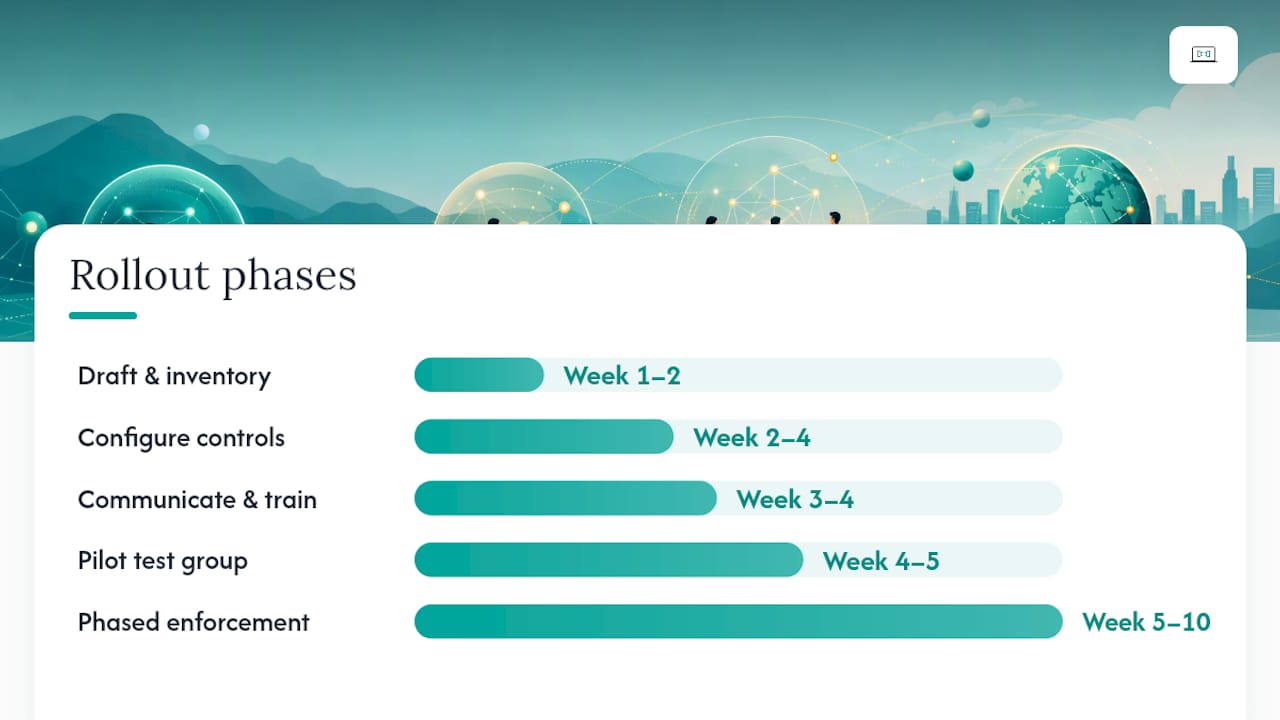
Implementation works best in phases. Trying to enforce everything on day one in a large organisation typically creates operational disruption and workarounds. For most SMEs, the full rollout takes six to twelve weeks.
-
Draft the policy (Week 1–2). IT/security drafts the document using the template. Legal and HR review. Business unit owners confirm operational feasibility. CISO signs off.
-
Inventory all remote access methods (Week 1–2, parallel). IT audits every active remote access path: VPN accounts, cloud console access, vendor accounts, RMM tools, SSH keys. Disable anything that cannot be attributed to a current, active user.
-
Configure technical controls (Week 2–4). Enable MFA on all remote access gateways. Configure idle timeouts and session duration limits. Deploy MDM to corporate devices if not already in place. Set up centralised log collection.
-
Communicate and train (Week 3–4). Send the policy to all staff and contractors. Run a short briefing (30 minutes is enough) covering what is changing, why, and what users need to do. Document attendance.
-
Pilot with a test group (Week 4–5). Roll out the full control set to a volunteer group of 10–20 users. Collect feedback on friction points. Adjust timeout values or workflow steps if needed.
-
Phased enforcement (Week 5–10). Roll out by department or access tier. Start with privileged users (admins, developers), then standard staff, then contractors and vendors.
-
Full enforcement and audit evidence collection (Week 10–12). All users are under the policy. Begin collecting audit evidence: MFA coverage reports, device compliance records, access review attestations, exception logs.
-
Post-rollout review (Week 12). Security team reviews the first month of logs. Identify any unapproved access methods still in use and remediate. Document lessons learned.
Stakeholder tasks at a glance:
- IT: technical configuration, account audit, log setup, pilot support.
- Security ops: monitoring rules, exception review, audit evidence collection.
- HR: policy communication, training records, offboarding process update.
- Procurement: vendor contract updates, access request process for new suppliers.
- Business owners: confirm access needs for their teams, attest to access reviews.
For distributed or international teams, the remote IT support setup guide covers the operational logistics of managing access across time zones.
The CISA Zero Trust Maturity Model provides a practical phased path for organisations ready to move beyond VPN-only access toward brokered, least-privilege app access. Start by replacing broad network VPN access for high-value assets with ZTNA, then expand. The phased approach keeps operations running while incrementally reducing risk.
How to test, audit, and review your remote access controls
Writing the policy is step one. Verifying it works is step two, and most organisations skip it.
Suggested test types
Configuration reviews check that technical settings match the policy: timeout values, MFA enforcement, approved protocol lists, and log forwarding. Run these quarterly or after any infrastructure change.
Remote access penetration tests attempt to access systems using methods the policy prohibits: unapproved tools, bypassed MFA, expired credentials. Commission these annually from an independent tester.
Vendor session reviews examine recorded vendor sessions for compliance with access scope and session duration limits. Run monthly for high-risk vendors.
Posture validation testing confirms that devices failing the posture check are actually denied access, not just flagged. Test with a deliberately non-compliant device each quarter.
Sample KPIs and thresholds
Audit checklist
- Policy acknowledgement records for all users and contractors.
- Access review results for the past 12 months.
- Session log availability and tamper-resistance confirmation.
- Exception records: named approver, compensating controls, expiry date.
- MFA enrolment reports.
- Device compliance reports from MDM.
- Penetration test results and remediation evidence.
When to trigger an out-of-cycle review: after any security incident involving remote access, after a significant infrastructure change (new VPN platform, cloud migration), or when new threat intelligence identifies active exploitation of a technology you use.
Common mistakes and red flags to avoid
Most remote access incidents are not sophisticated. They exploit gaps that a well-maintained policy would have closed.
Mistakes to avoid:
- Authentication without MFA: requiring only a password for VPN login is the single most common gap. Credential stuffing attacks make this trivially exploitable.
- BYOD with full network access: personal devices should never reach the same network segments as managed corporate devices. Segment them through a posture-checked gateway.
- Exceptions with no expiry: an exception granted "temporarily" in 2023 and never reviewed is a permanent gap. Every exception needs an automatic expiry date.
- Stale vendor accounts: a vendor who finished a project six months ago and still has active credentials is a liability. Audit vendor accounts monthly.
- Unmonitored VPN gateways: a VPN that logs nothing is useless for incident response. Confirm log forwarding to your SIEM is working, not just configured.
- No offboarding process: an ex-employee's VPN account left active for even 48 hours after departure is a significant risk. The offboarding checklist must include same-day remote access revocation.
Red flags to watch in logs and reviews:
- Authentication attempts from unexpected geographies or at unusual hours.
- A single account authenticating from two different countries within a short time window (impossible travel).
- Vendor sessions that exceed the approved duration or access scope.
- Repeated failed MFA attempts followed by a successful login (may indicate MFA fatigue attack).
- New devices appearing in session logs that are not in the MDM inventory.
Quick remediation steps:
For stale accounts: run a monthly automated report of accounts with no login in 30 days and disable them pending review. For unmonitored gateways: verify log forwarding in your SIEM weekly with a test event. For exceptions without expiry: add an expiry date field to your exception register and set a calendar reminder for each one.
TechTarget's remote access security risk guidance emphasises that documented processes and regular staff training are as important as technical controls. A technically perfect policy that staff do not understand or follow provides limited protection.
Australian-specific considerations for your remote access policy
Australian organisations face a specific regulatory environment that shapes how a remote access policy should be written and maintained.
Privacy Act 1988 and the Australian Privacy Principles (APPs): If your systems store or process personal information, APP 11 requires you to take reasonable steps to protect it from misuse, interference, loss, and unauthorised access. A documented remote access policy with MFA, logging, and access reviews is direct evidence of those reasonable steps. The Office of the Australian Information Commissioner (OAIC) can request evidence of these controls following a notifiable data breach.
ASD Essential Eight: The Australian Signals Directorate's Essential Eight Maturity Model includes multi-factor authentication and restricting administrative privileges as two of its eight controls. Your remote access policy should explicitly reference the Essential Eight and map your MFA and privileged access requirements to the relevant maturity level your organisation targets.
Cross-border work and data residency: Australian organisations with staff working offshore, or with vendors based overseas, need to consider where data travels during a remote session. If a staff member in Bali is accessing a system that holds personal information about Australian residents, that session may trigger cross-border disclosure obligations under APP 8. The policy should specify which systems can be accessed from which jurisdictions, and require VPN routing through Australian infrastructure where data residency is a concern.
Practical action points for Australian organisations:
- Have legal counsel confirm the policy meets current Privacy Act obligations, particularly if your organisation is subject to the mandatory data breach notification scheme.
- Align log retention periods with the OAIC's guidance on record keeping (generally a minimum of seven years for records that may be relevant to a complaint or investigation, though your specific industry may require longer).
- Reference the ASD's Information Security Manual (ISM) when setting technical controls, as it is the benchmark Australian government and many regulated industries use.
- For staff working internationally, review the remote work compliance guide for practical cross-border employment and data considerations.
What implementing remote access controls actually teaches you
The most consistent lesson from working with distributed clients is that the gap between a policy document and a working control is almost always an operational one, not a technical one. Organisations spend weeks selecting the right VPN or ZTNA platform and then discover that half their vendor accounts have no MFA because nobody updated the onboarding checklist.
The fix is rarely technical. It is getting HR, IT, and procurement to agree on a single onboarding workflow and then actually using it. One client, a mid-sized professional services firm with staff across three continents, had a technically sound VPN configuration but was granting vendor access through an informal email chain. Within a week of formalising the vendor access request process and adding session recording, they identified two vendor accounts that had been active for months after the engagement ended. No breach had occurred, but the exposure was real.
The policy is the starting point. The operational discipline around it is what actually reduces risk. If you want a second set of eyes on your current setup, or need help drafting the policy from scratch, reach out to Myitbutler for a no-obligation policy review.
Myitbutler can help you get this right
Drafting a remote access policy is straightforward when you have the template. Implementing it across a distributed team, coordinating vendor access governance, and keeping it current as your infrastructure changes is where most organisations need a hand.

Myitbutler provides remote IT support and managed security services for Australian businesses and international teams, with over 15 years of enterprise experience behind every engagement. The team holds CCNA, CompTIA Security+, and PRINCE2 certifications, and works across time zones via WhatsApp, email, and Zoom with no long-term contracts and transparent fixed pricing.
For remote access policy work specifically, Myitbutler can review your current controls against the ASD Essential Eight and ISO 27001, identify gaps, and help you implement the technical settings and operational processes the policy requires. There is no retainer required to get started.
Book a free initial chat to discuss your remote access setup, or download the policy template and bring your questions to the call.
Sources
- Csrc
- Cisa
- Common vulnerabilities associated with remote access | BitSight
- Remote Access Security Risks & Building Resilient Organizations
These references are for technical and compliance depth. The Myitbutler template is tailored specifically for Australian organisations and is the faster starting point for most teams.
FAQ
What is a remote access policy?
A remote access policy is a formal document that defines who may connect to an organisation's systems from outside the corporate network, which tools and authentication methods are approved, what device standards apply, and how sessions must be logged and monitored.
What does a remote access policy example look like?
A typical policy includes clauses covering purpose and scope, approved connection methods (VPN, ZTNA, RDP), MFA requirements, device posture standards, session timeout settings, logging and retention rules, vendor access conditions, and an exception handling process with automatic expiry dates.
What is an access control policy, and how does it differ?
An access control policy governs who can access which data and systems regardless of location. A remote access policy is narrower: it specifically governs the technical act of connecting from outside the network, including the authentication session, the device posture check, and the session controls that apply during the connection.
How often should a remote access policy be reviewed?
Review the policy at least annually. Trigger an out-of-cycle review after any security incident involving remote access, a significant infrastructure change, or when new threat intelligence identifies active exploitation of a technology your organisation uses.
What is the first control to enforce when implementing a remote access policy?
Enable MFA on every remote access gateway before anything else. Veeam's analysis confirms that the majority of successful remote access breaches exploit the absence of MFA, unpatched appliances, or stale accounts, making MFA the highest-return first step.