
TL;DR:
- Most business leaders wrongly believe a VPN alone secures remote access, but modern approaches demand a focus on identity, device health, and context. In 2025, compromised VPN credentials caused 73% of ransomware attacks, highlighting the need for stronger, multifaceted security measures like phishing-resistant MFA and Zero Trust architecture. Transitioning to application-specific access with ZTNA enhances security, reduces attack surfaces, and supports flexible remote teamwork effectively.
Most business leaders assume a VPN is all you need to secure remote access. That assumption is now genuinely dangerous. Remote access technology explained properly goes well beyond the old model of tunnelling traffic through a corporate network. The way distributed teams work in 2026 demands a sharper, more identity-focused approach to who gets in, from where, and on what device. This article breaks down the types, the real security risks, and the modern solutions that actually match how your people work today.
Table of Contents
- Key takeaways
- What is remote access and how does it work
- Security challenges in remote access
- Zero Trust Network Access (ZTNA) explained
- Choosing and managing remote access technology
- Benefits of modern remote access for distributed teams
- My perspective on where remote access is heading
- How Myitbutler can support your remote access strategy
- FAQ
Key takeaways
| Point | Details |
|---|---|
| VPN is not enough | Compromised VPN credentials caused 73% of ransomware intrusions in 2025, making VPN alone a serious liability. |
| Three core access types exist | Remote access falls into tunnelling (VPN), application portals, and direct app access (ZTNA), each with distinct trade-offs. |
| Identity is the new perimeter | Zero Trust verifies every connection based on identity, device health, and context rather than network location. |
| BYOD needs a two-path policy | Managed devices get broader access; unmanaged devices should be restricted to isolated, containerised environments. |
| Phishing-resistant MFA is the baseline | SMS and push-based MFA are vulnerable; FIDO2 hardware keys are now the standard for enterprise remote access. |
What is remote access and how does it work
Remote access is exactly what it sounds like. It lets authorised users connect to systems, applications, or data housed on a network they are not physically sitting on. Your finance manager in Brisbane accessing your London server, your developer in Manila pulling code from a private repository, your support team in South Africa logging into your helpdesk platform — all of that is remote access.
What differs is how that connection is made. According to NIST SP 800-46, remote access solutions fall into three primary categories.
| Type | How it works | Best for | Key limitation |
|---|---|---|---|
| VPN (tunnelling) | Encrypts all traffic and routes it through a corporate network gateway | Legacy systems, OT/ICS environments | Broad network access increases attack surface |
| Application portals | Browser-based access to specific apps via a web interface | BYOD users, light access scenarios | Limited functionality; not suited for complex workflows |
| ZTNA (direct app access) | Grants per-application access based on verified identity and device posture | Modern distributed teams | Requires upfront architecture planning |
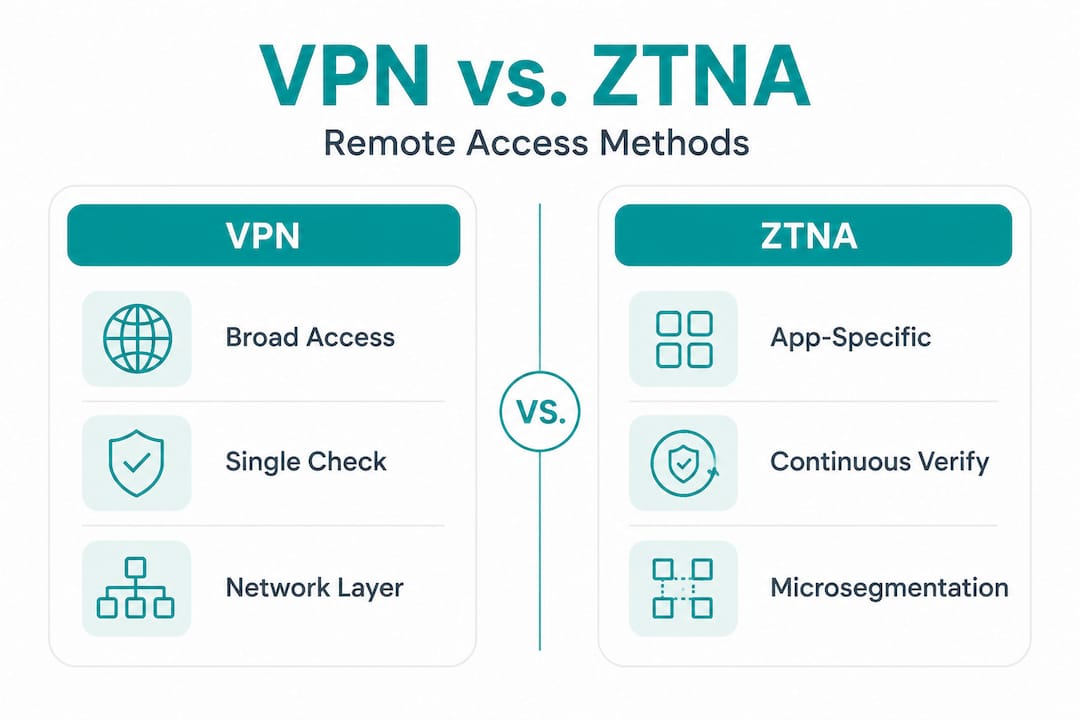
VPNs operate at the network layer. Once you are in, you typically have broad access to whatever is on that network. ZTNA, or Zero Trust Network Access, operates at the application layer. You get access to only the specific resource you need, and every single session is verified. That distinction matters enormously for security.
The underlying mechanics of remote access involve authentication (proving who you are), authorisation (confirming what you are allowed to do), and encryption (protecting the data in transit). Modern solutions layer in device posture checks, behavioural analysis, and conditional access policies that respond dynamically to risk signals. Understanding these layers is the foundation for making smart decisions about your business's remote access setup.

Security challenges in remote access
The threat picture for remote access has shifted dramatically. Most business remote work policies remain anchored to legacy VPN models, even as VPN appliances have become primary targets for attackers. In 2025, compromised VPN credentials accounted for 73% of ransomware intrusions where an entry vector was identified. That statistic should change how you think about your current setup.
VPN appliances have become so attractive to attackers precisely because they sit at the network edge with privileged access. A single compromised account can hand an attacker wide access to your internal systems. The problem is compounded by organisations treating VPN patching with less urgency than it deserves. These devices require the same rigorous patching and monitoring discipline you would apply to a domain controller.
Authentication is the other major weak point. Here is what the current picture looks like:
- SMS-based MFA is vulnerable to SIM-swapping and real-time phishing proxy attacks that capture one-time codes mid-session.
- Push notification MFA is susceptible to MFA fatigue attacks, where attackers send repeated approval prompts until a tired user accepts.
- Password-only access is effectively no protection given the scale of credential exposure from data breaches.
- Phishing-resistant MFA such as FIDO2/WebAuthn hardware keys is the current standard for enterprise environments because the authentication cannot be intercepted or replicated remotely.
Remote access security is not simply a network control. It is a system-wide responsibility that spans identity, device health, policy enforcement, and continuous monitoring. Treating it as a single product decision is how organisations get caught out.
Pro Tip: Audit your current MFA methods across all remote access points. If any of them rely on SMS or push approval alone, prioritise migrating those accounts to hardware security keys before your next policy review.
Zero Trust Network Access (ZTNA) explained
Zero Trust is not a product. It is an architectural model built on one principle: never trust, always verify. Every access request is treated as potentially hostile regardless of whether it originates from inside or outside your network. That is a fundamental departure from the traditional perimeter model where being on the corporate network meant being trusted.
For 2026, at least 70% of new remote access deployments are expected to use ZTNA rather than traditional VPNs. The shift is accelerating because the architecture genuinely solves the problems that VPNs create.
Here is how ZTNA works in practice for a distributed business:
- A user attempts to access a specific application, such as your ERP system or CRM platform.
- The ZTNA broker checks the user's identity against your identity provider (for example, Azure AD or Okta).
- It simultaneously evaluates the device's compliance status: is it managed? Is it patched? Does it have endpoint detection running?
- It applies contextual rules: is this a known location? What time is it? Does the behaviour match the user's normal pattern?
- Access is granted only to that specific application, not to the broader network. If the user needs a different application, the process repeats.
Microsegmentation sits at the heart of this model. Instead of one flat, trusted network, your resources are divided into small, isolated segments. Lateral movement by an attacker who compromises one account becomes extremely difficult because access is scoped so tightly.
One important caution: Zero Trust implementations frequently fail when treated as a product purchase rather than an architectural shift. Buying a ZTNA product and pointing it at your systems without mapping application dependencies, rationalising access policies, and integrating with your identity provider will not deliver the security improvement you expect. The transition requires deliberate design, particularly for organisations moving away from long-established VPN infrastructure.
For fully remote businesses without a corporate office, tailored Zero Trust models focused on identity and device posture are the practical path forward. There is no physical perimeter to defend, so identity becomes the perimeter.
Choosing and managing remote access technology
Selecting the right remote access technology for your business comes down to a few honest questions: What are your users actually accessing? How sensitive is that data? What mix of managed and personal devices does your workforce use?
Here is a structured approach to making that call:
- Map your access requirements. List every application and system users need to access remotely. Categorise them by sensitivity. This mapping drives every subsequent decision and is the starting point for transitioning to per-application ZTNA policies.
- Define your device policy. The best practice for BYOD is a two-path approach: fully managed devices with mobile device management (MDM) enrolled get broader application access, while unmanaged personal devices are restricted to containerised or browser-isolated environments that keep corporate data separate.
- Integrate with your identity provider. Your ZTNA or remote access solution should connect to your existing identity provider to inherit your user directory, group policies, and MFA requirements. Bolting on standalone authentication creates gaps.
- Enforce endpoint detection. Device posture checks should verify that endpoints have up-to-date endpoint detection and response (EDR) tools running before granting access. This is particularly relevant for global team security where devices span multiple operating environments.
- Plan for monitoring and patching. Remote access infrastructure needs ongoing attention. Establish a patching cadence for any appliances or agents, set up alerting for anomalous access patterns, and review access policies quarterly.
When evaluating vendors, focus on how well the solution integrates with your existing identity stack rather than feature lists. A solution that forces users through friction-heavy workflows will be worked around. Usability and security need to coexist.
Pro Tip: When assessing remote IT management tools for your business, prioritise those that offer native integration with your identity provider and include device compliance checking. These two features alone eliminate the most common attack vectors.
For travelling employees or distributed team members using mobile data, securing the connection endpoint matters too. Mobile security for travellers is an often overlooked part of the remote access picture, particularly for teams operating across international locations.
Benefits of modern remote access for distributed teams
Beyond security, the business case for upgrading your remote access approach is compelling. The remote access solutions market is projected to reach USD 40.6 billion by 2030, growing at 16.9% annually. That growth reflects genuine business demand, not speculation.
The practical benefits for distributed teams include:
- Consistent access regardless of location. Users in different time zones get the same reliable experience whether they are in Sydney, Singapore, or São Paulo.
- Reduced IT complexity. ZTNA and unified digital workplace platforms consolidate communication, application access, and data management into fewer tools, lowering support overhead.
- Stronger compliance posture. Policy-enforced, audited access satisfies requirements under frameworks like ISO 27001, SOC 2, and Australia's Privacy Act more cleanly than informal VPN-based setups.
- Workforce flexibility without risk trade-offs. Smart conditional access policies let you extend access to contractors, partners, or offshore team members without granting them broad network access.
- Faster incident response. When access is scoped and logged at the application level, identifying and containing a compromised account is far faster than chasing lateral movement across a flat network.
My perspective on where remote access is heading
I have worked with distributed businesses across multiple continents, and the single most common mistake I see is treating remote access as an infrastructure problem when it is actually an identity problem.
VPN is largely a legacy technology for standard business remote access. There are still valid uses — certain operational technology environments, lab access, specific compliance scenarios — but for the typical distributed office worker, keeping VPN as your primary remote access mechanism in 2026 means accepting unnecessary risk.
What I find most telling is that many organisations implement MFA and then stop, believing the problem is solved. Phishing-resistant authentication is the real baseline, and most businesses are not there yet. Hardware security keys are not complicated to deploy, and the protection they offer against credential theft is orders of magnitude stronger than push-based MFA.
The other pattern I see consistently: Zero Trust initiatives stall because someone bought a ZTNA product without doing the application dependency mapping first. You cannot enforce per-application access policies if you do not know what applications your users actually need. That mapping exercise, unglamorous as it sounds, is where the real work happens.
If you are refreshing your remote access policies this year, start with identity. Get your MFA right. Map your access needs. Then choose your technology. A trusted IT partner with practical experience in remote system administration across distributed environments will save you months of trial and error.
— Thomas
How Myitbutler can support your remote access strategy

If this article has raised questions about where your current remote access setup stands, that is a healthy sign. Myitbutler works with distributed businesses, international teams, and Australian organisations operating globally to design and manage remote access environments that are genuinely secure, not just theoretically compliant.
With over 15 years of enterprise experience, Myitbutler's team holds CCNA, CompTIA Security+, and PRINCE2 certifications, bringing structured, standards-based thinking to practical IT challenges. Whether you need a policy review, a ZTNA migration plan, or ongoing remote IT support, the team operates across time zones with transparent fixed pricing and no lock-in contracts.
You can book a consultation to discuss your specific environment and get a clear picture of what a modern, secure remote access setup looks like for your business.
FAQ
What is remote access technology?
Remote access technology lets authorised users connect to systems, applications, or data hosted on a network they are not physically present on. It spans VPNs, application portals, and modern Zero Trust Network Access solutions, each offering different levels of security and control.
How does ZTNA differ from a VPN?
A VPN grants broad network access once a user is authenticated, while ZTNA grants access to specific applications only after verifying identity, device health, and contextual signals. ZTNA significantly reduces the attack surface compared to traditional VPN.
What are the biggest remote access security risks in 2026?
Compromised VPN credentials and weak authentication methods are the leading risks. In 2025, VPN credential compromise drove 73% of ransomware intrusions with identified entry vectors. Phishing-resistant MFA and modern ZTNA architecture directly address these vulnerabilities.
Is a VPN still necessary for remote access?
For most standard business remote access, VPN is no longer the right tool. It remains valid for specific scenarios such as operational technology environments or certain regulated systems, but ZTNA provides stronger security and tighter access control for typical distributed workforce needs.
What authentication method should businesses use for remote access?
FIDO2/WebAuthn hardware security keys are the current enterprise standard for phishing-resistant authentication. SMS and push-based MFA are vulnerable to interception and fatigue attacks and should not be relied upon as sole authentication methods for sensitive remote access.