
TL;DR:
- Remote device management allows centralized control and security of devices without physical access. It involves enrolling, configuring, maintaining, troubleshooting, and remotely wiping devices through agent-based management. Proper implementation ensures security, efficiency, and scalability in managing distributed and diverse device fleets.
Remote device management (RDM) is defined as the centralised practice of monitoring, controlling, securing, and supporting devices without physical access. It covers desktops, laptops, mobile phones, tablets, and IoT endpoints across distributed fleets. Tools like Jamf, Microsoft Intune, and MDM agents make this possible by connecting each device to a central management console. For IT managers running distributed or global teams, understanding what is remote device management is the foundation for keeping devices secure and operations running without interruption.
What is remote device management and how does it work?
Remote device management works through an agent installed on each device. That agent connects back to a central management server, which IT administrators use to push policies, updates, and configurations without touching the device. The approach is called agent-based management, and it is the backbone of every major RDM platform.
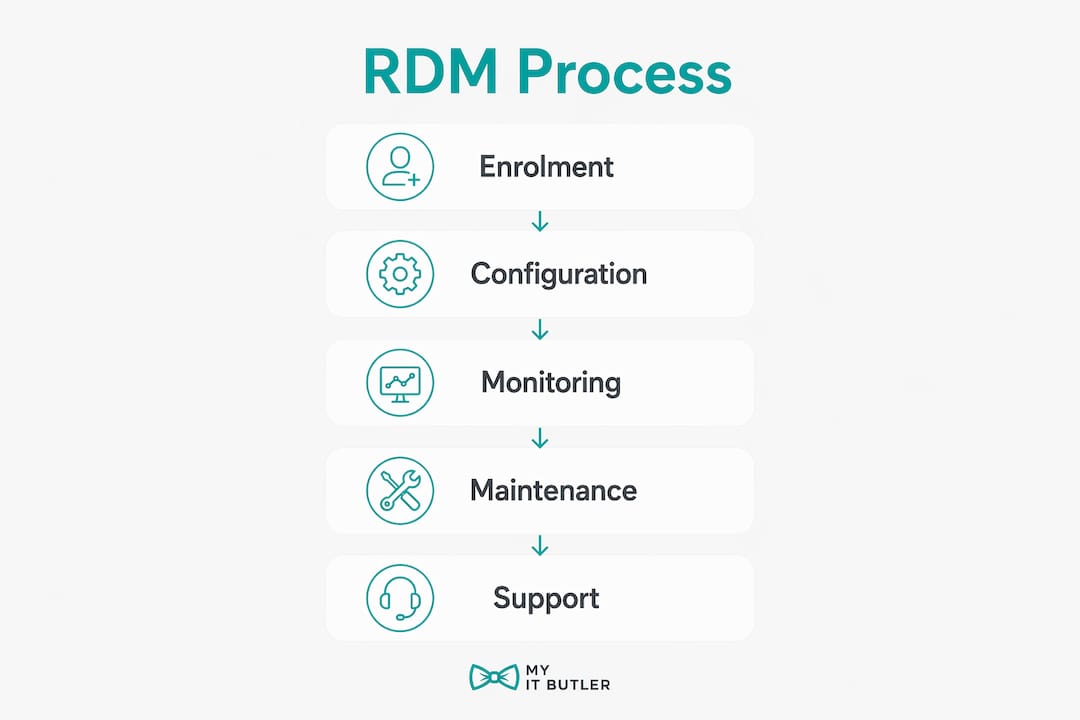
The lifecycle of a managed device follows five clear stages:
- Enrolment — the device registers with the management platform, either manually or through zero-touch provisioning tools like Apple Business Manager or Windows Autopilot.
- Configuration — the management console pushes settings, apps, and security policies to the device over the air using operating system APIs.
- Maintenance — patches, software updates, and compliance checks run automatically on a schedule or on demand.
- Troubleshooting — IT administrators support devices remotely without needing the user to bring the device in.
- Retirement — when a device is decommissioned or lost, the platform wipes it remotely to protect company data.
RDM covers deploying new endpoints, applying policy, pushing patches, troubleshooting, and retiring or wiping devices. That full lifecycle coverage is what separates RDM from simple remote access tools.
Mobile Device Management (MDM) is a core subset within RDM. MDM policy delivery involves pushing policies over the air from the MDM server console to the device agent using OS APIs. This means an IT administrator can enforce a password policy across 500 mobile phones in seconds, without calling a single user.
Pro Tip: Set up zero-touch enrolment from day one. Devices that enrol automatically on first boot save your team hours of manual setup per device, and they arrive policy-compliant before the user logs in for the first time.
What are the benefits of remote device management?
The benefits of remote device management go well beyond convenience. For distributed teams, RDM is the difference between a consistent security posture and a patchwork of unmanaged endpoints.
Key benefits include:
- Continuous security compliance. RDM tools validate devices against security standards and trigger enforcement or alerts when out of compliance. This means every device in your fleet is checked against baselines like OS version, encryption status, and password policy, automatically and continuously.
- Faster troubleshooting. IT teams resolve issues remotely without waiting for users to visit a physical office. For global teams across multiple time zones, this cuts downtime significantly.
- Operational scale. Policies are centrally defined and pushed wirelessly using agents and OS APIs, making device management scalable. A team of two IT administrators can manage hundreds of devices using the same effort that once required a full IT department.
- Policy consistency. Every device, regardless of location or device type, receives the same configuration. This removes the risk of a remote worker in Singapore running a different security policy to a colleague in Melbourne.
- Cost reduction. Zero-touch deployment and remote updates eliminate the need for on-site technicians for routine tasks. That saving compounds quickly across large or geographically spread fleets.
IT managers supporting remote teams face device sprawl as one of their top operational challenges. RDM directly addresses that by giving a single control point for every endpoint, regardless of where it sits.
How does RDM compare to remote desktop management and MDM?
These three terms are often used interchangeably, but they describe different things. Confusing them creates real security and operational gaps.
IT teams separate policy and compliance control (MDM/UEM) from interactive remote support (remote desktop). Each function has a distinct purpose, and combining them into one tool without understanding the difference leads to misconfigured environments.
| Feature | Remote device management | Remote desktop management | Mobile device management (MDM) |
|---|---|---|---|
| Primary function | Policy, compliance, lifecycle | Interactive remote control | Mobile policy enforcement |
| Device coverage | All endpoints including IoT | Primarily desktops and laptops | Mobile phones and tablets |
| User interaction needed | No | Yes, for screen sharing | No |
| Policy enforcement | Yes | No | Yes |
| Remote wipe capability | Yes | No | Yes |
| Typical tools | Jamf, Microsoft Intune | TeamViewer, AnyDesk | Jamf Pro, VMware Workspace ONE |
Remote device management is the umbrella term. MDM sits inside it, focused on mobile devices. Remote desktop management encompasses secure remote control, diagnostics, logs, updates, and user management. It is the tool you use when a user needs hands-on help with their screen, not the tool you use to enforce a firewall policy.
What is remote desktop management in practical terms? It is a live, interactive session between an IT administrator and a user's device. RDM, by contrast, operates silently in the background, enforcing policy whether or not anyone is logged in.
Pro Tip: Run your MDM and remote desktop tools from the same vendor platform where possible. Platforms like Microsoft Intune paired with Windows 365 reduce the number of agents on each device and simplify your audit trail.
How to implement remote device management in a distributed environment
Getting RDM right from the start saves months of remediation work later. The most common mistake is treating enrolment as an afterthought.
Without device-side agents and enrolment, policies cannot be applied reliably over the air. Every device must be enrolled before it is handed to a user. Skipping this step means that device sits outside your management boundary, invisible to your compliance reports and unprotected by your policies.
Practical steps for a sound implementation:
- Define your security baselines first. Skipping baseline definitions leads to enforcement inconsistencies and harder audit compliance. Document the minimum OS version, encryption requirement, screen lock policy, and approved app list before you enrol a single device.
- Segment your device fleet. Group devices by type, user role, or location. Apply different policy profiles to each group. A field sales laptop needs different restrictions to a finance team desktop.
- Integrate with identity management. Connect your RDM platform to your identity provider, such as Azure Active Directory or Okta. Secure remote sessions are often integrated with identity systems and multi-factor authentication to protect remote access. MFA on every remote session is non-negotiable for distributed teams.
- Automate compliance enforcement. Set your platform to automatically block or quarantine devices that fall out of compliance. Manual reviews create gaps. Automation closes them.
- Plan for IoT and non-standard devices. Printers, smart displays, and network-connected equipment need management too. Many organisations overlook these endpoints until a breach occurs through one of them.
Remote network security for global teams depends on consistent policy enforcement across every device type. RDM is the mechanism that makes that consistency possible at scale.
Pro Tip: Run a device audit before you select an RDM platform. Count every endpoint, including IoT and BYOD devices. Platforms are priced per device, and an accurate count prevents budget surprises after you sign a contract.
Key takeaways
Remote device management is the single most effective way for IT managers to maintain security and operational control across a distributed device fleet without physical access.
| Point | Details |
|---|---|
| RDM covers the full device lifecycle | Enrolment, configuration, maintenance, troubleshooting, and remote wipe are all managed centrally. |
| MDM is a subset of RDM | MDM handles mobile devices specifically; RDM is the broader term covering all endpoint types. |
| Remote desktop management is separate | It provides interactive screen control, not policy enforcement; the two tools serve different purposes. |
| Enrolment is the critical first step | Devices without agents enrolled cannot receive policies or be managed reliably over the air. |
| Security baselines must be defined first | Clear compliance criteria prevent enforcement gaps and simplify audit readiness across distributed fleets. |
The part most IT managers get wrong
After working with distributed teams across multiple time zones and device types, the pattern I see most often is this: organisations buy an RDM platform, enrol their laptops, and call it done. The mobile phones, the shared tablets in the warehouse, the IoT devices on the network — they stay unmanaged. That is not a minor gap. That is an open door.
The second mistake is conflating remote desktop access with device management. I have seen IT teams grant full remote desktop access to every device in the fleet and assume that counts as management. It does not. Remote desktop is a support tool. RDM is a governance tool. Mixing them up means you are reacting to problems rather than preventing them.
The shift I recommend to every IT manager starting or refining their RDM programme is this: treat policy enforcement and remote support as two separate disciplines with two separate toolsets. Define your baselines. Enrol everything. Then layer your remote desktop capability on top for the human support moments. That structure gives you both control and responsiveness, without one undermining the other.
The hybrid and remote workforce trend is not reversing. Remote teams face IT challenges that on-site IT infrastructure was never designed to handle. RDM is not optional for those environments. It is the foundation.
— Thomas
Myitbutler: remote device management support for distributed teams
Managing a distributed device fleet across time zones is demanding work, especially when your IT resources are stretched thin.

Myitbutler provides remote IT support for small to large businesses, international teams, digital nomads, and expatriates, all delivered to Australian enterprise standards. With over 15 years of experience and certifications including CCNA, CompTIA Security+, and PRINCE2, the team handles remote troubleshooting, device oversight, vendor liaison, and IT planning. Fixed pricing and no long-term contracts mean you get expert support without the overhead of a full-time hire. Book a consultation to discuss how Myitbutler can help your team manage devices securely from anywhere.
FAQ
What is remote device management in simple terms?
Remote device management is the practice of monitoring, securing, and controlling devices from a central location without physical access. It covers laptops, desktops, mobile phones, and IoT devices using agent software and a management console.
How does remote device management differ from remote desktop management?
Remote device management enforces policies and manages the full device lifecycle silently in the background. Remote desktop management provides live, interactive screen control for hands-on user support, and the two tools serve different purposes.
What is MDM and how does it fit within RDM?
Mobile Device Management (MDM) is a subset of remote device management focused specifically on mobile phones and tablets. It pushes policies over the air using OS APIs and is one component within the broader RDM framework.
Why is device enrolment so important in remote device management?
Without enrolment and an on-device agent, a management platform cannot apply policies or monitor the device reliably. Enrolment is the first step that brings a device inside your management boundary.
What are the main benefits of remote device management for distributed teams?
The main benefits are continuous security compliance, faster remote troubleshooting, policy consistency across all locations, and the ability to manage large device fleets without on-site technicians.