
TL;DR:
- Effective IT management for remote teams involves controlling identities, devices, communication tools, and workflows to enhance security and productivity. Prioritizing identity and patch management reduces breach risks, while structured documentation and ticketing recreate office visibility across time zones. Outsourcing expert remote IT support offers a cost-effective way for small businesses to implement these practices successfully.
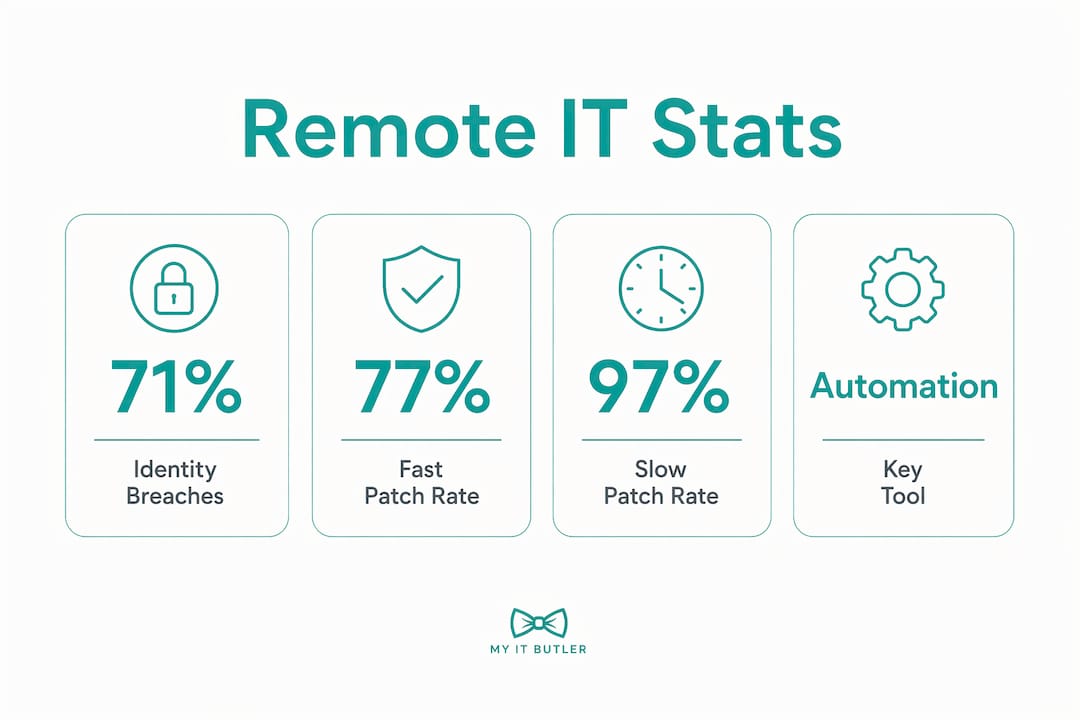
IT management for remote teams is defined as the structured control of identity, devices, communication tools, and workflows across distributed work environments. Without it, remote teams operate with no central visibility over who has access to what, which devices are patched, or how knowledge is shared. The consequences are measurable: 71% of organisations suffered an identity breach in the past year. Understanding why remote teams need IT management starts with recognising that the office building used to do a lot of invisible work, and distributed teams need technology to replace it.
Why remote teams need IT management: the core case
Managed IT, or what the industry formally calls IT service management (ITSM), covers the policies, tools, and processes that keep technology working reliably for a business. For remote teams, ITSM takes on extra weight because there is no physical perimeter to fall back on. Every employee is, in effect, their own branch office.

The NIST SP 800-207 Zero Trust Architecture standard makes this concrete. It defines that access decisions must be based on identity and device health, evaluated per session, not on network location. A VPN alone does not satisfy this. A remote worker connecting from a personal laptop in a café presents a fundamentally different risk profile than the same person on a managed device at a known location. Without IT management enforcing that distinction, your team cannot tell the difference.
Tools like ServiceNow and Jira give IT teams the ticketing and workflow visibility to track issues across time zones. Knowledge bases replace the informal "tap someone on the shoulder" culture that offices rely on. These are not optional extras for distributed teams. They are the operational backbone that keeps work moving when no one shares a building.
How does identity and device management prevent breaches?
Identity and device posture management is the practice of continuously verifying who is accessing your systems and whether their device meets your security standards before granting access. The Sophos 2026 survey of 5,000 leaders across 17 countries found that 71% experienced identity breaches, with human error and poor management of non-human identities as the leading causes. That figure means the majority of organisations are already losing this battle.
Non-human identities are a frequently overlooked risk. Service accounts, API keys, and automated scripts all carry permissions. When those permissions are not reviewed and revoked on a regular cycle, they accumulate into what security teams call "permission creep." A former contractor's API key left active for six months is an open door. Entitlement lifecycle enforcement prevents this by requiring that every identity, human or automated, is audited and deprovisioned when no longer needed.
For remote team leaders, the practical IT management functions that address this are:
- Multi-factor authentication (MFA): Requires a second verification step beyond a password, blocking most credential-stuffing attacks.
- Conditional access policies: Tools like Okta and Azure Active Directory can block logins from unmanaged or non-compliant devices automatically.
- Continuous access audits: Regular reviews of who has access to which systems, with stale permissions removed promptly.
- Secrets management: Platforms that rotate API keys and service account credentials on a schedule, removing the human error factor.
Pro Tip: Set a quarterly calendar reminder to audit all non-human identities in your environment. Service accounts and API keys are the most commonly forgotten attack surface in remote teams.
What happens when patch management falls behind?
Patch management is the process of applying software updates to fix known security vulnerabilities before attackers can exploit them. The Cloud Security Alliance 2026 survey found that only 9% of organisations remediate critical vulnerabilities within 24 hours. That gap between discovery and fix is where breaches happen.
The CSA data shows the stakes clearly:
| Patch Window | Breach Rate |
|---|---|
| Under 24 hours | 77% |
| 4–7 days | 97% |
| Self-managed (no policy) | Near 100% |
Even the fastest-patching organisations still report incidents at 77%. The organisations waiting four to seven days are essentially guaranteeing a breach. This is one of the clearest arguments for why the importance of IT management in remote work cannot be overstated.
Remote setups make patching harder for a specific reason. In an office, IT staff can push updates to machines on the corporate network overnight. With distributed teams, endpoints may be on home networks, personal devices, or travelling across time zones. Self-service patching fails because employees prioritise their work over system updates, and no one is watching to confirm compliance.
Proactive IT management solves this through automated patch deployment tools, endpoint monitoring platforms, and vulnerability scanning that flags unpatched systems before attackers find them. The goal is to remove the human decision from the patching process entirely.
Pro Tip: Use an endpoint management platform that reports patch compliance by device and user. If you cannot see which machines are unpatched right now, you are already behind.
How does IT management replace office visibility?
Remote work removes the ambient awareness that offices provide naturally. A manager walking past a desk can see a frustrated employee, notice a screen full of error messages, or overhear a conversation that signals a problem. Remote teams lose these signals entirely, and Risely's coaching research shows that problems in remote teams often surface verbally only three to four weeks after they first appear. By then, the damage is done.
IT management replaces this lost visibility through structured tools and deliberate processes. Ticketing systems like Jira and ServiceNow create a written record of every issue raised, its priority, and its resolution time. That data tells a manager far more than a weekly check-in call. If one team member is raising five tickets a week and another is raising none, something is wrong in both directions.
Async-first documentation is the cultural counterpart to these tools. The CTAIO async-first operating model treats written records as operational artefacts, not administrative overhead. Every decision, process, and troubleshooting step gets documented so that a team member in a different time zone can act without waiting for a synchronous meeting. Knowledge bases built on platforms like Confluence or Notion replace the institutional knowledge that used to live in people's heads.
Practical steps for remote team leaders to build this structure include:
- Require written summaries after every decision-making meeting, stored in a shared knowledge base.
- Use ticketing for all IT requests, not informal messages, so nothing falls through the cracks.
- Set async communication norms: define response time expectations by channel so team members are not expected to be always-on.
- Review ticket volume and resolution times weekly to spot coordination breakdowns early.
The role of IT in remote communication extends beyond tools. It is about creating the conditions where information flows reliably without requiring everyone to be online at the same time.
What are the real benefits of IT management for remote teams?
The benefits of IT management for remote teams are measurable across security, productivity, and team cohesion. Here are the four areas where structured IT management delivers the clearest returns:
-
Faster onboarding. Documented processes mean a new hire in Manila or Munich can be productive within days, not weeks. Without IT management, onboarding relies on whoever is available to answer questions, which is unreliable across time zones.
-
Fewer identity incidents. Centralised onboarding and entitlement controls prevent permission bloat from day one. When access is provisioned through a managed workflow, it is also deprovisioned correctly when someone leaves.
-
Greater employee trust. Proactive IT support, where issues are caught before they disrupt work, signals to remote employees that the organisation is invested in their success. Early issue detection reduces frustration and disengagement, which are harder to spot and address in distributed teams.
-
Clearer accountability. When every IT request goes through a ticketing system, ownership is explicit. There is no ambiguity about who is handling a problem or when it was resolved. This matters especially for [IT support across distributed teams](https://blog.myitbutler.com/blog/why remote teams face it challenges a managers guide) operating across multiple time zones.
What IT management tools work best for remote teams?
The right tools for remote IT management depend on team size and complexity, but the categories are consistent across most distributed organisations.
| Category | Tool Examples | Primary Function |
|---|---|---|
| Identity management | Okta, Azure Active Directory | Conditional access, MFA, user provisioning |
| Patch management | Microsoft Intune, NinjaRMM | Automated updates, endpoint compliance reporting |
| Ticketing and workflow | Jira, ServiceNow | Issue tracking, escalation, resolution visibility |
| Knowledge management | Confluence, Notion | Async documentation, onboarding guides |
| Endpoint monitoring | CrowdStrike Falcon, SentinelOne | Device health, threat detection |
For small to medium businesses, the question is often whether to hire in-house IT staff or outsource. A full-time IT hire in Australia costs upward of $80,000 per year before overheads. Remote IT support without a full-time hire is a practical alternative, particularly for teams that need expert-level management of identity, patching, and documentation without the fixed cost of permanent headcount.
Workflow automation tools can also reduce the manual burden of IT coordination by triggering access provisioning, patch notifications, and ticket routing automatically. This is particularly valuable for teams spread across multiple time zones where manual handoffs create delays.
Key takeaways
Structured IT management is the single most effective way remote teams can control identity risk, maintain patch compliance, and replace the coordination that offices provide naturally.
| Point | Details |
|---|---|
| Identity management is non-negotiable | 71% of organisations suffered identity breaches; MFA and access audits are the minimum baseline. |
| Patch fast or pay the price | Teams that miss the 24-hour patch window face a 97% breach rate; automated patching removes the human delay. |
| Documentation replaces office visibility | Async-first knowledge bases and ticketing systems recreate the coordination that physical offices provide. |
| Outsourcing is a viable option | Expert remote IT support delivers identity, patching, and documentation management without full-time hire costs. |
| Early detection prevents late damage | Problems in remote teams surface weeks after they begin; proactive IT monitoring closes that gap. |
The uncomfortable truth about remote IT management
I have worked with distributed teams across a range of industries, and the pattern I see most often is this: leaders invest in collaboration tools like Slack or Microsoft Teams, call it done, and assume IT is covered. It is not.
The tools are the easy part. The hard part is enforcing the processes that make those tools safe and useful. I have seen teams with Okta deployed but no one reviewing stale permissions. I have seen Confluence instances full of outdated documentation that no one trusts. The technology is present, but the management is absent.
The other thing I have noticed is that remote team leaders tend to underestimate how much the office was doing their IT management for them. The corporate network, the IT desk down the corridor, the automatic overnight updates on domain-joined machines. All of that disappears when your team goes distributed. You do not just need new tools. You need a deliberate operating model that replaces what the building used to provide.
My honest recommendation is to start with identity and patching before anything else. Get those two right, and you have addressed the majority of your breach risk. Then build your documentation culture, because that is what keeps productivity high when your team spans multiple time zones. Do not try to do everything at once. Pick the highest-risk gap and close it first.
— Thomas
How Myitbutler supports remote teams with expert IT management
Managing identity, patching, and documentation across a distributed team is a full-time responsibility. Myitbutler delivers remote IT management for small and medium businesses, with over 15 years of enterprise experience and certifications including CCNA, CompTIA Security+, and PRINCE2. The service covers on-demand troubleshooting, ongoing IT supervision, vendor liaison, and strategic planning, all at transparent fixed pricing with no long-term contracts.

Whether your team is spread across Australia, Southeast Asia, or Europe, Myitbutler provides Australian-standard IT support delivered globally. If you are ready to close the gaps in your remote IT setup, book a consultation and get a clear picture of where your team stands.
FAQ
What does IT management mean for remote teams?
IT management for remote teams covers the control of identity, devices, communication tools, and workflows across distributed environments. It replaces the informal oversight and infrastructure that physical offices provide automatically.
Why is identity management the biggest risk for distributed teams?
71% of organisations experienced identity breaches in the past year, driven by human error and unmanaged service accounts. Remote teams are more exposed because access happens outside the corporate network perimeter.
How does patch management differ for remote versus office teams?
Remote endpoints sit on home networks and personal devices, making centralised overnight patching impossible without dedicated tools. Only 9% of organisations patch critical vulnerabilities within 24 hours, and remote setups make that window even harder to meet without automation.
Can a small business afford proper IT management for a remote team?
Yes. Outsourced remote IT support from providers like Myitbutler delivers identity, patching, and documentation management at a fraction of the cost of a full-time hire. Fixed pricing and no long-term contracts make it accessible for small and medium businesses.
What tools should remote team leaders prioritise first?
Start with identity management platforms such as Okta or Azure Active Directory, then add an automated patch management tool like Microsoft Intune. These two categories address the highest-probability breach vectors before you layer in ticketing and documentation tools.