

TL;DR:
- Digital friction causes productivity loss and burnout in remote teams due to frequent IT obstacles. Addressing support gaps with proactive monitoring, automation, and strategic management reduces IT challenges and improves morale. Choosing an experienced, proactive IT partner ensures reliable, standards-compliant support for distributed organizations.
Remote work promised efficiency, but for many managers, it delivered something else entirely: a quiet, relentless drain on productivity known as digital friction. Digital friction refers to the small but frequent IT obstacles that slow workers down each day, from a VPN that won't connect to a video call that drops mid-sentence. Employees lose 1.3 workdays per month to these issues, driving frustration and burnout. Understanding why remote teams face IT challenges is the first step toward fixing them. This article covers the root causes and gives you real strategies to improve support across your distributed team.
Table of Contents
- Common IT challenges remote teams face
- Why remote IT support struggles to keep up
- How digital friction erodes productivity and morale
- Strategies to reduce IT challenges in remote teams
- Choosing the right IT partner for your remote team
- Rethinking remote IT challenges: beyond tech fixes
- How My IT Butler supports remote teams worldwide
- Frequently asked questions
Key Takeaways
| Point | Details |
|---|---|
| Digital friction costs time | Small IT issues cause remote employees to lose on average 1.3 workdays per month, impacting productivity. |
| IT support challenges persist | High turnover and reactive IT support limit the effectiveness of resolving remote team issues quickly. |
| Employee wellbeing suffers | Unresolved IT problems increase stress, loneliness, burnout, and turnover risk among remote workers. |
| Proactive strategies help | Using AI-driven tools, asynchronous communication, and focus time can reduce IT disruptions and improve output. |
| Choose the right partner | A specialised, proactive IT provider makes a significant difference in supporting remote teams successfully. |
Common IT challenges remote teams face
Having established how much productivity is quietly bleeding away, it's worth getting specific about what's actually causing it. Digital friction doesn't look dramatic. It looks like a team member waiting ten minutes for a shared document to load, or losing access to a critical system right before a client call.

Connectivity failures, software crashes, forced updates, and authentication issues are among the most frequent problems that cause inefficiencies for remote teams. Each one feels minor in isolation. Together, they form a pattern that erodes output across every time zone your team operates in.
Here are the most common IT issues in remote teams that managers report:
- Connectivity instability: Home internet setups vary wildly. A worker in Manila may be on shared bandwidth while a colleague in Berlin enjoys fibre. Neither has the consistency of a managed office network.
- Software and authentication failures: Multi-factor authentication adds security but creates bottlenecks when tokens expire or apps misbehave. Forced updates during work hours interrupt focus at the worst times.
- Hardware inconsistency: When employees use personal devices, you have no control over specs, configurations, or security posture. A single unpatched laptop can become a vulnerability point for your entire network.
- Cybersecurity exposure: Remote workers connecting through unsecured Wi-Fi or using shadow IT (unapproved apps) create risks that are difficult to detect and costly to remediate.
- Tool fragmentation: Teams often end up using five different apps for communication because no one agreed on a standard. This multiplies the surface area for IT issues to occur.
Getting IT support set up properly for global teams from the beginning is what separates teams that manage these problems from teams that are managed by them. The good news is there are technology solutions for remote collaboration that address many of these pain points when implemented consistently.
Why remote IT support struggles to keep up
Understanding the common issues helps explain why the support structures behind remote teams often can't keep pace. IT support for distributed workforces faces structural problems that go beyond just having enough staff.
Here's how the breakdown typically unfolds:
- Level 1 support has high turnover. High turnover of Level 1 IT staff creates a costly cycle of hiring and training, limiting consistent problem resolution. Institutional knowledge walks out the door constantly, and new staff can't contextualise the recurring problems your team experiences.
- Support is reactive, not preventative. Most IT teams are firefighting. They respond after productivity has already been lost, not before. By the time a ticket is raised and resolved, your team member may have lost two hours.
- Time zone complexity is underestimated. A support team in one country covering workers across eight time zones will inevitably leave gaps. A system failure at 2am AEST might not be addressed until the Sydney team starts work, which could mean your European team members are blocked for hours.
- IT environments are growing more complex. As teams add tools, cloud platforms, and devices, the number of potential failure points grows exponentially. Support capacity rarely scales at the same rate.
Reviewing the right IT support packages for your business size and structure can help close some of these gaps before they become expensive patterns.
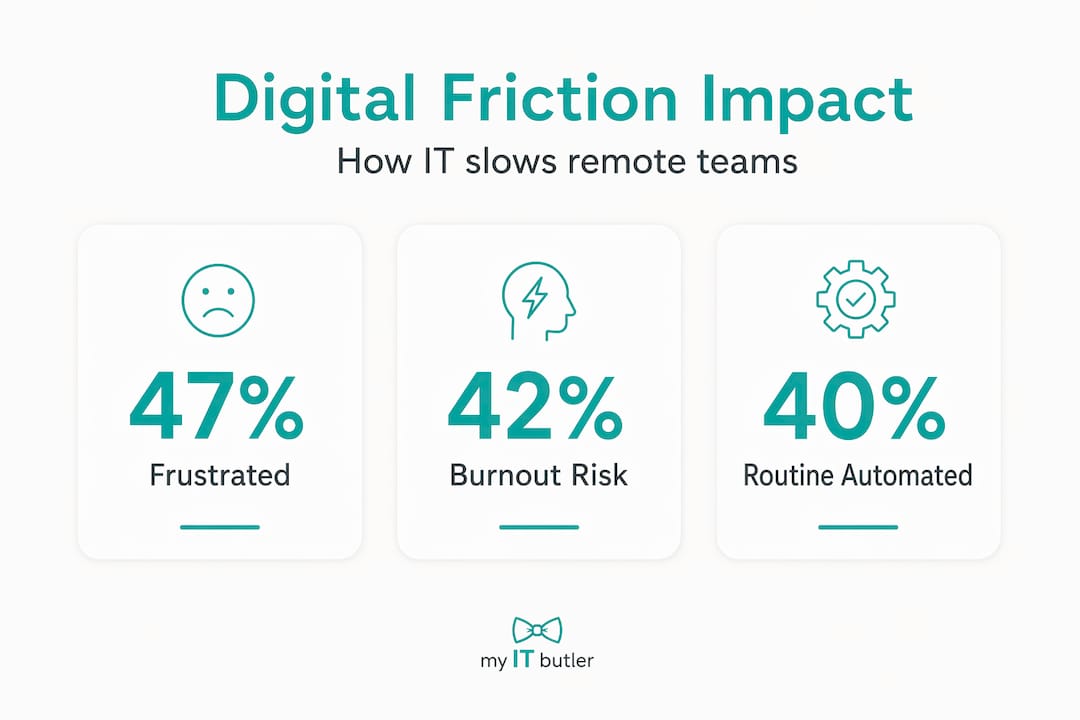
Pro Tip: Automation and AI-powered monitoring can handle up to 40% of routine IT tasks, such as password resets, patch management, and anomaly detection, freeing your support team to focus on the complex issues that actually require human expertise.
How digital friction erodes productivity and morale
With awareness of IT support struggles, it's vital to understand the profound impact these issues have on your team's wellbeing and output. This is where the numbers become personal.
Small frustrations accumulate. A slow login here, a dropped call there. Individually, they seem trivial. Collectively, they signal to your team that the organisation doesn't take their working environment seriously. That perception has consequences.
Digital friction causes 47% of employees to feel frustrated, lowers job satisfaction, contributes to 42% experiencing burnout, and has 28% considering leaving their role. Those are not minor risks. They are direct threats to team stability and your organisation's ability to retain skilled people.
The situation is compounded by the nature of remote work itself. Remote workers experience higher daily stress at 45% and loneliness at 27%, which intensifies the psychological impact of IT difficulties. When a worker already feels isolated, a frustrating tech failure isn't just an inconvenience. It's a signal that they're on their own.
The effects cascade:
- Reduced focus and deep work: Every IT interruption forces a context switch. Research shows it takes over 20 minutes to regain deep focus after a distraction.
- Increased stress and anxiety: Workers who can't trust their tools develop anticipatory stress, worrying about failures before they happen.
- Lower engagement and morale: Team members who feel unsupported by their digital environment disengage quietly. You won't always see it in performance metrics until it's too late.
- Higher turnover risk: The 28% considering quitting due to digital friction aren't announcing it. They're updating their CVs.
"Remote teams don't fail because people stop caring. They fail because the systems meant to support human connection and productivity are allowed to quietly degrade until the cost becomes impossible to ignore."
Investing in effective remote system administration directly addresses these hidden costs by shifting from reactive damage control to consistent, monitored reliability.
Strategies to reduce IT challenges in remote teams
Having seen why challenges arise and their impact, here are effective steps to regain control and improve your remote team's IT experience. This is not about buying more tools. It's about building a system.
- Implement proactive monitoring. Use remote monitoring and management platforms to detect issues before employees encounter them. Catching a failing hard drive or an expiring certificate before it causes an outage is worth far more than resolving it after the fact.
- Automate routine support tasks. AI-driven tools now handle password resets, onboarding provisioning, and patch scheduling without human input. Structured onboarding protocols and asynchronous communication improve remote worker productivity by over 70% and retention by 82%. Automation is a core part of making that structure work.
- Establish clear communication protocols. Decide which channels are for urgent IT issues, which are for non-urgent requests, and which are for general updates. Ambiguity wastes time and creates anxiety.
- Protect focus blocks. Designate periods in the day where non-urgent IT maintenance and updates are scheduled, and team members are not interrupted. Even 90 minutes of uninterrupted time per day makes a measurable difference.
- Create continuous feedback loops. Survey your team monthly about IT friction points. The problems they report will be more accurate than any ticket data because many small frustrations never get escalated.
| Reactive IT management | Proactive IT management |
|---|---|
| Responds after failures occur | Detects and prevents failures before impact |
| Higher ticket volume and resolution time | Fewer incidents, faster resolution |
| Employee productivity already lost | Productivity preserved through prevention |
| Support team in constant firefighting mode | Support team focused on improvement |
| Higher long-term cost | Lower total cost of ownership |
Choosing the right remote IT management tools is a critical decision in this process. And when you're ready to formalise your support structure, reviewing how other teams have approached remote IT support setup gives you a useful benchmark.
Pro Tip: Protect asynchronous updates ruthlessly. Not every IT issue needs a meeting. A short video update or written summary sent at the end of the day respects focus time while keeping everyone informed.
Choosing the right IT partner for your remote team
With strategies in mind, selecting the right IT partner is what turns good intentions into consistent outcomes. Not every IT provider understands the specific realities of distributed teams across multiple countries and time zones.
Here's what to look for when evaluating an IT partner for your remote team:
- Proactive rather than reactive approach: Ask directly how they monitor for issues before they impact users. If the answer involves waiting for tickets, keep looking.
- AI and automation capability: A modern IT partner should be using automation for routine tasks, not billing you for an engineer to reset passwords.
- 24/7 support coverage with genuine response times: Global teams don't fail on a 9-to-5 schedule. Understand what "24/7" actually means in practice, including response time commitments and escalation processes.
- Global reach with localised understanding: Your IT partner needs to understand the connectivity, regulatory, and infrastructure realities of the countries your team operates in, not just their home market.
- Clear communication channels: Support delivered through WhatsApp, email, and direct messaging is genuinely useful for remote teams. A ticketing portal that takes three steps to access is not.
- Australian standards applied globally: For organisations that value governance, security, and accountability, a partner operating to Australian enterprise standards brings structured, auditable support to your distributed environment.
When evaluating remote IT support services, ask for specifics: What certifications do their engineers hold? How do they handle vendor liaison? What does their escalation path look like? The answers reveal whether you're dealing with a generalist helpdesk or a genuine technology partner.
Pro Tip: Book a consultation before you need one. The worst time to choose an IT partner is during a crisis. Early engagement allows them to understand your environment, document your systems, and design support that fits your team's actual workflow.
Rethinking remote IT challenges: beyond tech fixes
Here is the opinion most IT articles won't give you: technology alone will not solve your remote IT problems. Not because the tools aren't good enough, but because many of the problems aren't actually technology problems.
Interruptions average every two minutes in modern knowledge work, creating a structural focus problem that technology solutions alone cannot fix. That statistic should stop you cold. Two minutes. Even if every IT tool in your organisation worked perfectly, the cultural expectation of constant availability would still fragment your team's focus beyond recovery.
The "15-minute myth" is the belief that a quick message, a brief check-in, or a short IT fix costs only 15 minutes. In practice, the cognitive recovery from a single interruption costs far more. Multiply that across a day, across a team, across a quarter, and you have a productivity crisis that no helpdesk ticket system will resolve.
The honest truth is that many remote IT challenges are symptoms of management philosophies built for a physical office, transplanted into a digital environment without adjustment. Rewarding constant availability, scheduling meetings that could be emails, and expecting synchronous responses across time zones all create conditions where IT problems hit harder than they should.
The organisations that genuinely resolve these challenges do three things differently. They shift to outcome-based management, where results matter more than hours online. They protect deep work time with the same discipline they apply to security policies. And they treat remote system administration strategies as one component of a broader commitment to how distributed work is actually designed, not just supported.
"You can deploy every monitoring tool available and still watch your team burn out if the organisation keeps treating remote work as office work done from home."
IT improvements and cultural change aren't competing priorities. They're complementary ones. The teams that understand this are the ones worth working for.
How My IT Butler supports remote teams worldwide
Managing a distributed team across borders is hard enough without IT problems compounding every challenge. My IT Butler was built specifically for this reality.

My IT Butler delivers proactive monitoring, AI-assisted support, and hands-on IT management to distributed teams and international organisations, applying Australian enterprise standards regardless of where your team is located. With certifications including CCNA, CompTIA Security+ and PRINCE2, and over 15 years of enterprise experience, the team understands what it takes to keep complex, global environments running reliably. Whether you need on-demand troubleshooting, ongoing IT supervision, or a trusted partner for vendor liaison and strategic planning, My IT Butler provides fixed, transparent pricing with no long-term contracts.
Book a consultation to discuss your team's specific environment, or log into the client support portal to get started. The right support, applied early, prevents the costly downtime that quietly undermines distributed teams every day. Visit My IT Butler to learn more.
Frequently asked questions
What is digital friction and why does it affect remote teams so much?
Digital friction refers to daily IT obstacles like software crashes and connectivity issues that slow work, and remote teams feel it acutely because they rely entirely on technology to collaborate. Employees lose 1.3 workdays per month to these issues, making it a significant driver of frustration and lost output.
Why is IT support often less effective for remote teams?
IT support for remote teams is frequently reactive, meaning problems are addressed after productivity has already been lost rather than before. High turnover of Level 1 staff compounds this by creating knowledge gaps that slow consistent resolution of recurring issues.
How can managers reduce IT-related stress and burnout in remote workers?
Managers should improve baseline IT reliability, protect focus time from interruptions, and establish asynchronous communication norms so that technology supports work rather than fragments it. Higher daily stress among remote workers means IT improvements have a disproportionately positive effect on wellbeing when implemented consistently.
What role does AI play in improving IT support for remote teams?
AI automates routine support tasks such as password resets, patch deployment, and anomaly detection, which reduces ticket volume and gives IT staff capacity to address complex problems. Automating routine support tasks frees IT staff for higher-value work and measurably improves employee satisfaction scores.
What should managers look for when choosing an IT partner for remote teams?
Prioritise a partner with proactive monitoring capabilities, AI-assisted support, genuine 24/7 coverage with defined response times, and demonstrated experience with distributed, international teams. Australian enterprise standards applied globally signal the kind of structured, accountable approach that complex remote environments actually require.