
TL;DR:
- A global IT helpdesk provides a centralized, 24/7 support function with standardized processes for distributed organizations. It manages incident intake, triage, troubleshooting, and escalation across regions, enhancing speed, visibility, and cost predictability. Effective governance, clear handoff protocols, and strong security compliance are essential for success.
A global IT helpdesk is a centralised, standardised support function that gives every user in a distributed organisation one consistent place to log IT issues, regardless of where they are or what time it is. For Australian businesses with staff in Singapore, London, or São Paulo, that means no more chasing regional contacts, no more dropped tickets at shift change, and no more waiting until Sydney wakes up to fix a critical login failure in Frankfurt.
Here is what that looks like in practice:
- One intake point for all IT requests, regardless of location or time zone
- Standardised processes so a ticket raised in Perth gets the same triage quality as one raised in New York
- 24/7 coverage through follow-the-sun staffing or on-call rosters
- Central reporting so IT managers can see trends, SLA compliance, and backlog across every region at once
The business problem it fixes is straightforward. Without a global desk, a staff member in Tokyo hitting a VPN failure at 9 AM local time might wait six hours for Sydney to open. With one, that ticket is live, triaged, and often resolved before the Sydney team has their first coffee.
Table of Contents
- What does a global IT helpdesk actually cover?
- How does a global IT helpdesk actually run day to day?
- What core features should you expect from a global IT helpdesk?
- Why does this matter for Australian organisations with distributed teams?
- What KPIs and SLA values should you require?
- What security and compliance questions apply to Australian organisations?
- How do you evaluate and select a global IT helpdesk provider?
- What does onboarding look like, and what drives the cost?
- What does an Australian-based global helpdesk look like in practice?
- Key takeaways
- The part most organisations get wrong
- Myitbutler can handle your global IT coordination
- Useful sources and further reading
- FAQ
What does a global IT helpdesk actually cover?
The terms "helpdesk," "service desk," and "ITSM" get used interchangeably, but they mean different things and the distinction matters when you are scoping a contract.
A helpdesk handles break-fix requests: password resets, software errors, connectivity issues. It is reactive by nature. A service desk is broader, covering incident management, service requests, change notifications, and communication back to the user. It follows a defined lifecycle and aligns to frameworks like ITIL (Information Technology Infrastructure Library). ITSM (IT Service Management) is the full discipline, encompassing change management, asset management, problem management, and more. A global helpdesk typically sits at the service desk level, with some ITSM functions depending on the provider's maturity.
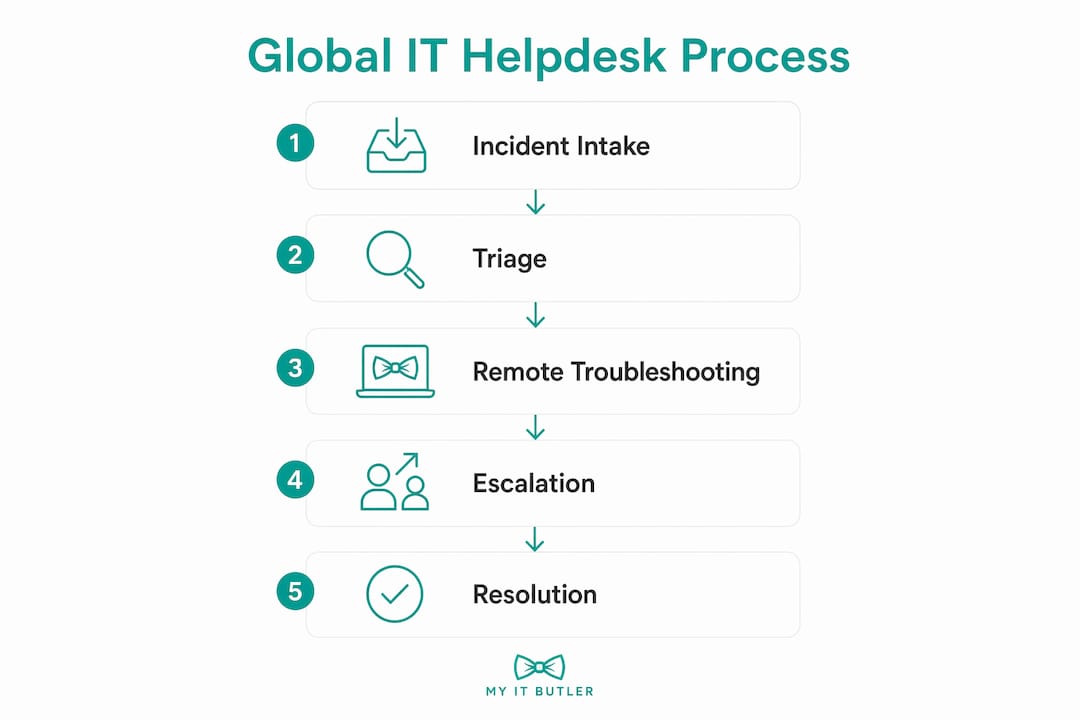
What a global IT service desk typically covers: incident intake, triage, remote troubleshooting, escalation to tier 2 or 3, knowledge base maintenance, and SLA tracking across all regions.
What it does not own: on-site hardware repairs, major infrastructure projects, or in-country regulatory compliance work. Those stay with specialist teams or local vendors.
How does a global IT helpdesk actually run day to day?
The operational backbone is the ticket lifecycle. A user submits a request through a portal, email, or chat. The system categorises and prioritises it automatically or via a first-line agent. The agent troubleshoots using documented runbooks. If the issue exceeds their authority or skill level, it escalates to tier 2 or tier 3. At shift change, open tickets hand off with full context notes. On resolution, the ticket closes and feeds back into the knowledge base.
The follow-the-sun model is what makes 24/7 coverage viable without burning out a single regional team. Sydney handles APAC hours, a European hub takes the handoff, then a US team covers the Americas overnight. The critical discipline is the handoff itself. Tickets must carry clear ownership, next steps, and enough context that the incoming team does not waste time re-diagnosing what the outgoing team already knows.

Pro Tip: Lock in your handoff template before go-live. Every open ticket at shift change should answer three questions: what has been tried, what the next action is, and who owns it. Teams that skip this step spend the first 20 minutes of every shift re-reading ticket history instead of resolving issues.
The core systems that make this work are an ITSM platform (such as Jira Service Management, ServiceNow, or Freshservice), a shared knowledge base, remote access tooling, and a unified communications channel. Automation tools increasingly handle the repetitive triage steps, routing tickets by keyword, user role, or system type before a human agent even looks at them.
Governance holds it together. Central SOPs define the process. Regional teams execute within those rules, with only pre-approved minor variations for language or local regulatory needs. A feedback loop, typically a monthly review of ticket data, closes the gap between what the SOP says and what agents actually do.
What core features should you expect from a global IT helpdesk?
Not every provider delivers the same depth. Here is what a mature global desk includes, and what separates genuine capability from a marketing claim:
- 24/7 coverage with documented shift structure, not just an on-call number that rings out
- ITIL-aligned SOPs and runbooks covering every common incident type, with version control and regular review cycles
- Centralised ticketing with global reporting, so you can pull SLA compliance, backlog, and CSAT data across all regions in one dashboard
- Multilingual support and language routing, directing users to agents who speak their language when the ticket complexity warrants it
- Remote access tooling (such as TeamViewer, AnyDesk, or built-in ITSM remote sessions) with session logging for audit purposes
- Single sign-on and directory integrations (Active Directory, Azure AD, Okta) so agents can action access requests without manual handoffs to separate teams
- Knowledge base with self-service portal, reducing ticket volume by letting users resolve common issues themselves
Global support in a contractual sense typically includes telephone, email, and remote conferencing support across jurisdictions. A strong provider goes further, adding asynchronous channels like WhatsApp or Teams for distributed teams who cannot always take a call.
Agent skills matter as much as tooling. Effective global helpdesk agents carry OS-level knowledge, networking basics, remote troubleshooting experience, and the cross-cultural communication skills to work with users across very different contexts.

Why does this matter for Australian organisations with distributed teams?
The business case comes down to four things: consistency, speed, visibility, and cost predictability.
Consistency is the one most organisations underestimate. When every office runs its own IT support, the quality of help varies by whoever happens to be available. A centralised global desk applies the same process to every ticket, so a staff member in Melbourne and one in Dubai get equivalent service.
Speed improves because centralised incident response replaces reactive local teams with a proactive function that has documented escalation paths and pre-built runbooks. Mean time to resolution drops when agents are not starting from scratch on every ticket.
Visibility is what IT managers actually need. Central reporting surfaces patterns that regional desks hide. If the same VPN error is hitting users in three countries, a global desk catches it as a problem to fix rather than three separate incidents to close.
Cost predictability comes from a fixed or tiered pricing model rather than the unpredictable cost of regional IT staff across multiple employment markets. For Australian businesses, that also removes the complexity of managing IT contractors under different labour laws in each country.
A practical example: an Australian professional services firm with offices in Singapore and the UK was managing IT support through a mix of local contractors and a Sydney-based IT manager. Tickets raised outside AEST business hours sat unresolved for hours. After moving to a global desk with follow-the-sun coverage, average response time outside business hours dropped from several hours to under 15 minutes, and the IT manager shifted from firefighting to planning. Remote teams facing similar challenges will recognise the pattern described in why remote teams face IT challenges.
What KPIs and SLA values should you require?
The Service Desk Institute's Global Best Practice Standard provides an industry reference model that complements ITIL and ISO/IEC 20000 for assessing service desk maturity. Use it as a benchmark when evaluating vendor claims.
| KPI | What it measures | Realistic target (24/7 global desk) |
|---|---|---|
| First response time (P1) | Time from ticket submission to first agent contact | Fast response times |
| First response time (P2/P3) | Standard and low-priority tickets | Prompt response times |
| First-call resolution (FCR) | Tickets resolved without escalation | High resolution rates |
| Mean time to resolution (MTTR) | Average time from open to close | Resolution times aligned with priority |
| SLA compliance rate | Tickets resolved within contracted time | High compliance with SLAs |
| Customer satisfaction (CSAT) | Post-ticket user rating | Positive user feedback |
| Backlog ratio | Open tickets older than SLA threshold | Low backlog levels |
Demand monthly reporting that includes all seven metrics broken down by region and priority tier. Quarterly reviews should include trend analysis: is FCR improving or declining? Is a particular region generating disproportionate volume? That data tells you whether the desk is maturing or drifting.
A ticketing platform review, such as a BoldDesk evaluation, can help you assess whether a provider's platform actually surfaces this data in a usable format before you sign a contract.
What security and compliance questions apply to Australian organisations?
Australian organisations are bound by the Privacy Act 1988 and the Australian Privacy Principles (APPs), which govern how personal information is collected, stored, and transferred. When a global helpdesk agent in another country accesses a user's device or account, that interaction may involve personal data crossing borders. The APPs require that overseas recipients provide comparable privacy protections, so your contract must address this explicitly.
Key controls to require from any provider:
- Role-based access control (RBAC) so agents access only what they need for the ticket in front of them
- Encryption in transit and at rest for all ticket data, session recordings, and knowledge base content
- Audit logs for every remote session, including agent ID, timestamp, and actions taken
- Multi-factor authentication (MFA) for all agent accounts, especially those with elevated privileges
- Data residency clauses specifying where ticket data is stored and processed
Alignment with ISO/IEC 27001 or the NIST Cybersecurity Framework is a strong signal of a provider's security maturity. Certifications like CompTIA Security+ and CCNA indicate individual agent competency in network security and access management. Ask providers to show their last penetration test summary and their incident response plan for a data breach involving Australian personal information.
How do you evaluate and select a global IT helpdesk provider?
Work through this checklist before shortlisting vendors:
- Coverage map: confirm the provider has staffed coverage in every time zone your users operate in, not just on-call arrangements.
- Language support: verify which languages agents are fluent in, not just "available." Ask for a sample ticket in your users' primary languages.
- Platform integrations: check that their ITSM platform connects to your existing directory, endpoint management, and communication tools.
- SOP ownership: ask who writes, reviews, and updates the SOPs. If the answer is vague, the process discipline will be too.
- Escalation paths: get the exact escalation matrix in writing, including who owns a P1 incident at 3 AM on a public holiday.
- Certifications: request evidence of ITIL alignment, relevant agent certifications (CompTIA, CCNA), and any ISO/IEC 27001 accreditation.
- Pilot or trial option: any credible provider will offer a time-limited pilot. Insist on one before committing to a full contract.
- Pricing model: understand whether pricing is per-user, per-ticket, or a flat monthly fee, and what happens when volume spikes.
- Contract terms: check minimum commitment periods, exit clauses, and data return provisions. A provider unwilling to specify data return on exit is a risk.
- References: ask for two or three clients in a similar industry or size, and actually call them.
Red flags: no published SLAs, SOPs described as "proprietary" without any detail, staffing claims that sound too broad ("we cover everything"), and pricing that changes significantly once you ask about your specific requirements.
For a structured approach to evaluating remote IT provider coverage, a dedicated checklist can save weeks of back-and-forth during procurement.
What does onboarding look like, and what drives the cost?
Onboarding a global helpdesk typically runs through five phases: discovery, SOP mapping, knowledge migration, pilot, and steady state. The timeline varies by organisation size.
- Small organisations (under 100 users): 2–4 weeks from contract to steady state
- Mid-size (100–500 users): 4–8 weeks, with a two-week parallel-run pilot
- Enterprise (500+ users, multiple regions): 8–16 weeks, including regional stakeholder sign-off and phased rollout
The primary cost drivers are coverage hours (24/7 costs more than business-hours-only), language requirements (specialist language agents carry a premium), custom integrations with existing platforms, security and compliance requirements (ISO/IEC 27001 audits, data residency controls), and support tier depth (tier 1 only versus full tier 1/2/3 coverage).
Helpdesk support for SMBs typically sits at the lower end of the cost range, with per-user monthly pricing being the most common model for organisations under 200 seats.
What does an Australian-based global helpdesk look like in practice?
Myitbutler is an Australian-operated provider with over 15 years of enterprise experience, offering remote troubleshooting, vendor liaison, documented SOPs, and follow-the-sun coordination for distributed teams. The service is built for organisations that need global reach without losing the compliance familiarity of an Australian-standard operation.
| Service function | What Myitbutler delivers |
|---|---|
| Remote troubleshooting | On-demand diagnosis and resolution across devices, OS, and connectivity issues |
| Vendor liaison | Coordination with third-party software and hardware vendors on the client's behalf |
| Documented SOPs | Written runbooks aligned to ITIL practices, reviewed and updated regularly |
| Follow-the-sun coordination | Multi-timezone coverage with structured handoff discipline |
| Certifications | CCNA, CompTIA Security+, PRINCE2 |
| Pricing model | Transparent fixed pricing, no long-term contracts |
| SLA reporting | Published SLAs with regular KPI reporting to clients |
| Compliance alignment | Australian Privacy Act awareness, data handling consistent with Australian standards |
Trust signals to look for in any provider, and what Myitbutler maps to: published SLAs (yes), named certifications (CCNA, CompTIA Security+, PRINCE2), transparent pricing with no lock-in, and a documented onboarding process. Client testimonials and case studies are worth requesting directly during the evaluation call.
When you book a consultation, bring your current ticket volume, the time zones your users operate in, your existing ITSM platform, and your top three unresolved pain points. That gives the provider enough to scope a realistic pilot rather than a generic proposal.
Key takeaways
A global IT helpdesk gives distributed organisations one consistent, 24/7 support function that replaces fragmented regional desks with standardised processes, central reporting, and measurable SLAs.
| Point | Details |
|---|---|
| Definition | A centralised, 24/7 support function with standard processes and global SLAs for distributed teams. |
| Follow-the-sun model | Requires strict handoff discipline so tickets progress across shifts rather than stalling. |
| KPIs to require | SLA compliance, backlog, and CSAT data across all regions in one dashboard |
| Security obligations | Australian Privacy Act compliance requires data residency clauses and role-based access controls in every contract. |
| Myitbutler | An Australian-based provider offering remote troubleshooting, documented SOPs, CCNA and CompTIA Security+ certified agents, and transparent fixed pricing with no lock-in. |
The part most organisations get wrong
Most IT managers evaluating a global helpdesk focus on coverage hours and price. Those matter, but the real failure mode is process drift, and it shows up six months after go-live, not on day one.
Here is what happens. The provider launches with solid SOPs. Regional agents start making small adjustments, reasonable ones at first, to account for language differences or a local system quirk. Nobody documents the change. Three months later, the Sydney team and the Dublin team are handling the same ticket type differently, CSAT scores diverge, and the IT manager cannot figure out why because the reporting looks fine at the aggregate level.
The fix is a governance model that treats SOPs as living documents with a central owner. Regional variations are allowed, but only when approved and documented. The Service Desk Institute's best practice guidance calls this "centralised process, local execution," and it is the most practical framing for organisations that need consistency without rigidity.
The other common pain point is the follow-the-sun handoff. Teams that treat the shift-change note as optional create a relay race where the baton gets dropped every eight hours. The discipline required is not complicated. It is just a short, structured note on every open ticket at shift end. The organisations that get this right treat it as a non-negotiable close-of-shift task, the same way a surgeon completes a checklist before leaving the operating theatre.
One more thing worth saying: more headcount does not fix inconsistency. Well-written SOPs are the real multiplier. A team of ten following a clear runbook will outperform a team of twenty improvising. Lock in your SOP framework before you scale, not after.
Myitbutler can handle your global IT coordination
If your organisation has staff across multiple time zones and your current IT support is a patchwork of regional contacts and after-hours phone numbers, there is a cleaner way to run it.

Myitbutler is an Australian-operated team with over 15 years of enterprise experience, built specifically for distributed businesses that need global reach with Australian-standard compliance. The service covers remote troubleshooting, vendor coordination, documented SOPs, and follow-the-sun support, all at a transparent fixed price with no long-term contract required. Certifications include CCNA, CompTIA Security+, and PRINCE2, so the team behind your tickets carries real credentials, not just a support queue.
For Australian IT managers, that means one point of contact, consistent processes across every region, and reporting you can actually use in a board update. Book a free consultation and bring your current pain points. The team will scope a pilot that fits your environment before you commit to anything.
Useful sources and further reading
These resources support procurement decisions, SOP design, and technical evaluation for global IT helpdesk projects:
- Global IT Service Desk: Boost Efficiency and Support — explains the centralised model and follow-the-sun approach; useful for scoping conversations with vendors
- Building Reliable IT Helpdesk SOPs — practical guide to SOP structure, escalation thresholds, and knowledge base practices; use this when reviewing a provider's process documentation
- Global Best Practice Standard for Service Desk, Service Desk Institute — the industry reference model for maturity assessment; benchmark vendor claims against this
- Helpdesk Operations Guide, GigaBPO — covers ticket lifecycle, roles, and SLA definitions; useful for procurement teams defining scope
- Global Support Definition, Law Insider — contractual definition of global support covering multi-channel and multi-jurisdiction expectations
- Myitbutler Remote IT Support — Australian-based global helpdesk services, certifications, and consultation options
- Myitbutler: How to Set Up Remote IT Support for Global Teams — operational guidance for cross-border support setup
- Myitbutler: How to Evaluate Remote IT Provider Global Coverage — procurement checklist for assessing vendor coverage and SLA claims
FAQ
What is global IT helpdesk support?
Global IT helpdesk support is a centralised, 24/7 service function that handles IT incidents and requests for users across multiple countries and time zones, using standardised processes and shared SLAs to deliver consistent support regardless of location.
What does a global service desk do?
A global service desk manages the full ticket lifecycle, from intake and triage through troubleshooting, escalation, and closure, across all regions, and provides central reporting so IT managers can track performance and spot trends organisation-wide.
What does "global support" mean in a contract?
In a contractual context, global support typically means technical assistance delivered via telephone, email, and remote conferencing across multiple jurisdictions, with defined SLAs that apply regardless of the user's location.
What skills do IT helpdesk agents need for global roles?
Effective global helpdesk agents need OS-level troubleshooting knowledge, networking basics, remote access tool proficiency, and strong cross-cultural communication skills. Certifications such as CompTIA Security+ and CCNA signal both technical competency and security awareness. Myitbutler's team holds these credentials alongside PRINCE2 for project and process discipline.
How long does it take to onboard a global IT helpdesk?
Onboarding typically takes 2–4 weeks for small organisations, 4–8 weeks for mid-size teams, and 8–16 weeks for enterprise deployments with multiple regions, depending on integration complexity and the number of SOPs that need to be documented or migrated.