
TL;DR:
- A small business IT helpdesk can operate efficiently using just a shared inbox, knowledge base, and simple automation tools. Starting with basic, cost-effective solutions reduces complexity and helps track support patterns before adding automation or advanced features. Focusing on clear ticket classification and metrics ensures the support system improves over time.
A well-run IT service desk is the difference between a team that works and a team that waits. For small businesses, the standard industry term is "IT service desk," though most owners simply call it the helpdesk. Getting it right does not require enterprise software or a dedicated IT department. A shared inbox, a knowledge base, and basic automation are enough to handle most support requests efficiently. This guide shows you exactly how to set up those tools, apply triage rules, avoid common mistakes, and keep costs under control.
What does it take to streamline an IT helpdesk for a small company?
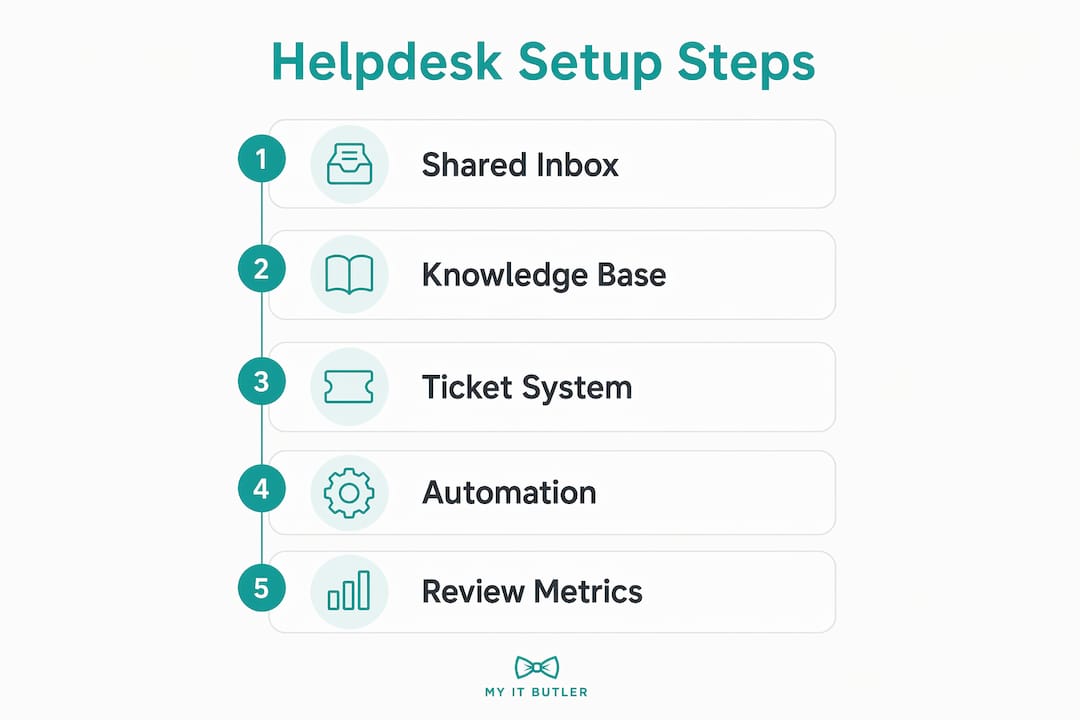
Efficient IT support for small business starts with three tools: a shared inbox, a knowledge base, and a lightweight ticketing system. Each one solves a specific problem. The shared inbox stops requests from disappearing into personal email accounts. The knowledge base lets staff answer their own questions without raising a ticket. The ticketing system tracks what is open, who owns it, and how long it has been waiting.

Cost is a genuine concern for lean teams. A shared inbox and knowledge base for a team of 3–5 people typically costs between $100 and $300 per month. That figure matters because a self-service resolution costs effectively nothing, while a human-handled ticket costs $5–$15 each time. Deflecting even 20 tickets per week to self-service pays for the platform inside a month.
The tools that work best for small teams include:
- Shared inbox platforms: Help Scout and Freshdesk both offer entry-level plans suited to small teams, with shared queues, collision detection, and basic reporting.
- Knowledge base software: Notion, Confluence, and Help Scout Docs all support screenshot-rich articles that staff can search without contacting IT.
- Lightweight ticketing: Freshdesk's free tier and Zoho Desk's entry plan handle basic ticket routing without the overhead of enterprise systems like ServiceNow.
- Automation triggers: Most shared inbox tools include simple rules, such as auto-assigning tickets tagged "password reset" to a specific agent or sending an acknowledgement reply within seconds.
Pro Tip: Do not pay for workforce management modules, SLA dashboards, or AI chatbot add-ons until your team is handling more than 50 tickets per week. Buying enterprise features early creates administrative work, not savings.
Simple, well-integrated helpdesk solutions outperform complex suites for small teams by reducing the cognitive load on agents who are often wearing multiple hats.
How do you implement automation and triage in a small business helpdesk?
Automation works best when it targets a narrow, well-understood problem. The fastest path to automated IT support starts with auditing what you already have. Follow these steps in order.
-
Audit your last 90 days of tickets. Export your inbox or ticket log and group requests by type. Password resets, software access requests, and printer issues typically make up the majority of volume in small offices.
-
Write 8–15 knowledge base articles targeting your top issues. Focus on quality over quantity. Documentation quality outweighs quantity every time. Each article should include screenshots, numbered steps, and a clear title that matches how staff actually phrase the problem.
-
Set triage rules before you touch automation. A triage rule is a simple filter: if a ticket contains the word "urgent" or comes from a specific email address, it jumps the queue. Most helpdesk platforms let you build these without writing code.
-
Apply automation only to low-risk, high-frequency requests. Password reset acknowledgements, ticket confirmation emails, and after-hours auto-replies are safe starting points. Do not automate anything that involves account access, billing, or sensitive data without human review.
-
Run a human-in-the-loop phase before going fully automated. AI-drafted replies should go to an agent for approval for 60–90 days. Only activate fully automated sending once agents are accepting more than 50% of the AI drafts without edits. This protects your reputation and catches errors before they reach staff or customers.
-
Set escalation paths for every automated workflow. Every automated response must have a fallback. If the self-service article does not resolve the issue, the ticket must route to a human automatically. Dead-end automation is the fastest way to frustrate your team.
Pro Tip: Start automation on one workflow only, such as password resets, and run it for four weeks before expanding. Narrow scope means faster fixes when something goes wrong.
AI-integrated helpdesks can handle 60–75% of conversations automatically when configured properly. That is a significant reduction in agent workload, but it only happens after the groundwork above is in place.
Can one platform handle both internal IT and external customer support?
Using a single helpdesk platform for both internal IT requests and external customer queries is a practical choice for small firms. Single platform usage reduces subscription costs and eliminates the context switching that happens when agents toggle between two separate systems.
The key requirement is access control. Internal IT tickets often contain sensitive information: server credentials, staff personal details, and security incident logs. External customer tickets must never share a queue or a view with that data. Most platforms, including Help Scout and Freshdesk, support separate inboxes with role-based permissions, which keeps the two streams cleanly separated.
| Feature | Internal IT helpdesk | External customer support |
|---|---|---|
| Ticket types | Password resets, hardware faults, software access | Product queries, billing issues, onboarding help |
| Access level | IT staff and managers only | Support agents and team leads |
| Knowledge base | Internal SOPs and troubleshooting guides | Public-facing FAQs and how-to articles |
| Automation priority | Routine IT requests | High-volume repetitive queries |
| Escalation path | Senior IT or external provider | Account manager or specialist team |
The main challenge is discipline around labelling and routing. Without clear naming conventions for ticket categories, internal and external requests can end up in the wrong queue. Solve this at setup by creating distinct inboxes with mandatory category tags, not after problems appear.
What mistakes should small companies avoid when setting up their helpdesk?
Most small teams fail by building complexity before they understand their own ticket patterns. Complex enterprise-style workflows introduced too early create administrative bottlenecks that slow resolution times rather than improving them. Spend the first 30 days classifying tickets and identifying recurring issues before building any automation at all.
The most common pitfalls are:
- Skipping the knowledge base. Automation cannot deflect tickets if there is nowhere to send staff for answers. Build the knowledge base first, then layer automation on top.
- Letting the knowledge base go stale. Articles that describe software versions or processes no longer in use actively mislead staff. Assign one person to review and update articles every quarter.
- Building escalation paths as an afterthought. Every triage rule needs a human fallback. If an automated response fails to resolve the issue, the ticket must reach a real person within a defined timeframe.
- Ignoring metrics. First response time and escalation rate are the two numbers that tell you whether your helpdesk is working. Track them from week one, even if you are only using a shared inbox.
- Over-automating too fast. Automation errors compound quickly. A misconfigured rule that sends the wrong reply to every password reset ticket can generate more work than it saves.
"The first 30 days of helpdesk setup should focus solely on ticket classification and frequency analysis. Identify your bottlenecks before you build anything." — Plain.com, 2026
Centralising ticket data before adding AI or automation reduces time waste and confusion. It is the single most effective step for early-stage IT support.
Which helpdesk tools suit small businesses best?
The right tool depends on your team size, ticket volume, and whether you need a combined internal and external support platform. The comparison below covers the options most relevant to small business IT management.
| Tool | Best for | Starting price (approx.) | Key strength |
|---|---|---|---|
| Help Scout | Teams wanting shared inbox plus knowledge base | ~$50/month | Clean interface, Docs feature built in |
| Freshdesk | Teams needing free tier to start | Free (limited) | Generous free plan, solid automation rules |
| Zoho Desk | Businesses already using Zoho suite | ~$14/agent/month | Deep integration with Zoho CRM and apps |
| Notion + email | Very small teams, minimal ticket volume | Free to ~$10/month | Flexible knowledge base, low overhead |
| ChatSpark | SaaS founders wanting AI-first support | Varies | AI automation focus, fast deployment |
No single tool wins for every situation. Help Scout suits teams that want a polished shared inbox with a built-in knowledge base. Freshdesk's free tier is the right starting point if budget is the primary constraint. Zoho Desk makes sense only if you already use other Zoho products.
Pro Tip: Use the free trial period of any platform to run a real week of tickets through it before committing. Synthetic testing tells you nothing. Real tickets reveal the gaps.
For remote IT management tools suited to small teams, the priority is always ease of setup and low administrative overhead, not feature count.
Key takeaways
A small company IT service desk works best when it starts simple, documents thoroughly, and adds automation only after understanding its own ticket patterns.
| Point | Details |
|---|---|
| Start with three tools | A shared inbox, knowledge base, and basic ticketing system cover most small business IT needs. |
| Cost self-service early | Self-service resolutions cost nothing versus $5–$15 per human-handled ticket. |
| Classify before automating | Spend 30 days on ticket classification before building any automation workflows. |
| Use human-in-the-loop AI | Have agents approve AI drafts for 60–90 days before activating fully automated replies. |
| Track two core metrics | First response time and escalation rate reveal whether your helpdesk is actually improving. |
What I have learned from watching small teams get this wrong
Running IT support for small businesses is not complicated. Getting it wrong, however, is surprisingly easy. The pattern I see most often is a business owner who reads about AI-powered helpdesks, signs up for an enterprise platform, spends three weeks configuring workflows, and ends up with a system that is harder to use than a shared Gmail inbox.
The businesses that get this right do the opposite. They start with a shared inbox, write ten good knowledge base articles about their most common problems, and only add automation once they can predict exactly which tickets will arrive each week. That discipline is rare, but it pays off quickly.
The hybrid AI and human model is genuinely useful for small teams, but only after the foundation is solid. A hybrid AI-human approach balances automation speed with the human judgement needed for sensitive or complex cases. The mistake is skipping straight to the AI layer without building the knowledge base and triage rules that make AI useful in the first place.
My honest advice: pick the simplest tool that handles your current ticket volume, not the one that will scale to 500 agents. You can always upgrade. Unwinding a complex setup that nobody understands is far more painful than starting over. For small businesses that want IT support options without the overhead of an internal IT team, outsourcing the helpdesk function to a specialist is often the most cost-effective path of all.
— Thomas
How Myitbutler supports small business IT helpdesks

Myitbutler provides remote IT support for small businesses that need a reliable helpdesk without the cost of an in-house IT team. With over 15 years of enterprise experience and certifications including CCNA, CompTIA Security+, and PRINCE2, the team delivers Australian-standard support to businesses globally. Services cover on-demand troubleshooting, ongoing IT supervision, vendor liaison, and help setting up the shared inboxes, knowledge bases, and triage systems described in this guide. Fixed pricing and no long-term contracts mean you pay for what you need. Book a consultation to discuss your helpdesk setup and find the right support package for your team.
FAQ
What is the cheapest way to set up a small business IT helpdesk?
Start with Freshdesk's free tier for ticketing and Notion for your knowledge base. Total cost can be near zero for teams under five people handling low ticket volumes.
How long does it take to set up basic helpdesk automation?
Automated support systems for lean teams can be launched within 48 hours once you have audited past tickets and written your core knowledge base articles.
Should a small company use the same helpdesk for IT and customer support?
Yes, if the platform supports role-based access controls. Keeping both streams in one system reduces costs and context switching, provided internal IT tickets are restricted to authorised staff only.
How many knowledge base articles does a small business actually need?
Between 8 and 15 high-quality, screenshot-rich articles targeting your most common requests outperform a large library of thin, text-only pages every time.
What metrics should I track for a small business IT helpdesk?
Track first response time and escalation rate from day one. These two numbers tell you whether tickets are being resolved quickly and whether your triage rules are working correctly.