

TL;DR:
- Remote system backup encrypts critical data and copies it offsite to prevent loss from disasters or ransomware. Regular testing and proper management of backup copies, including immutable storage, are essential for reliable recovery and business continuity. Combining local and remote backups with a focus on restore capability ensures effective protection for distributed organizations.
Remote system backup is defined as the automated, encrypted process of copying critical business data to a geographically separate location to protect against data loss, ransomware, and system failure. The industry standard governing this practice is the 3-2-1 backup rule: three copies of data, stored on two different media types, with one copy held offsite. For IT managers and decision-makers, understanding how remote backup works is no longer optional. Ransomware attacks, hardware failures, and accidental deletions can cripple operations within hours. A well-implemented remote backup strategy is the difference between a minor incident and a catastrophic outage.
What is remote system backup and how does it work?
Remote system backup is the practice of automatically sending copies of your data to storage infrastructure outside your primary site. The industry term most commonly used is "offsite backup" or "cloud backup," and both describe the same core mechanism: data leaves your environment, travels encrypted over the internet, and lands in a separate data centre where it stays protected and recoverable.
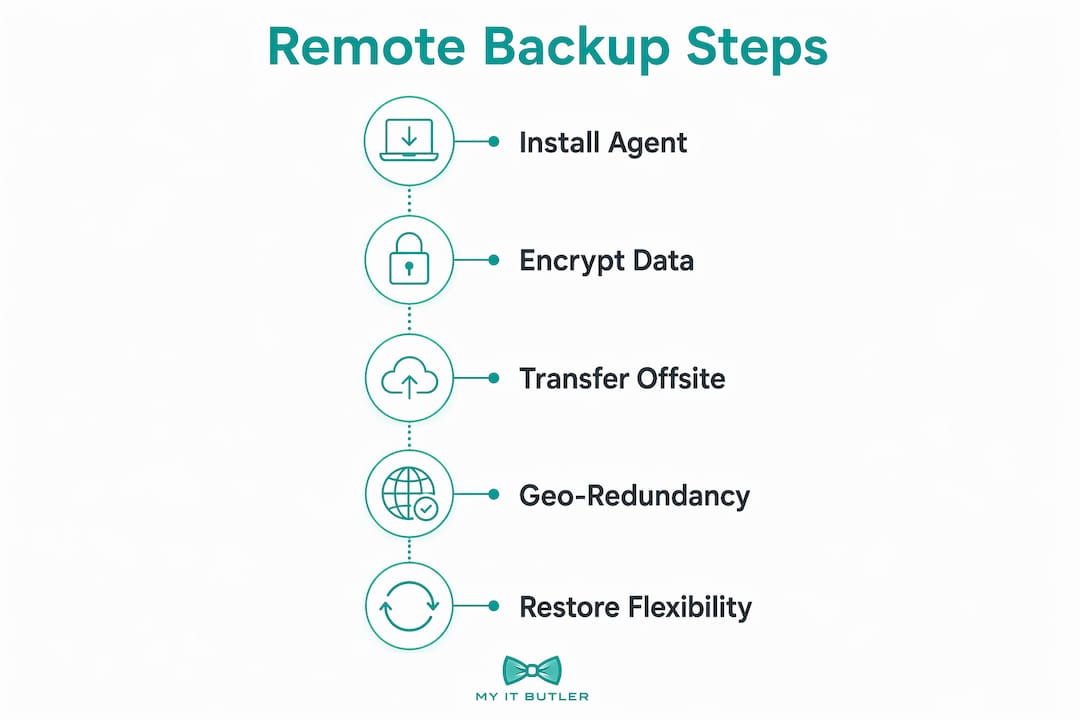
The process starts with a backup agent installed on each server, workstation, or virtual machine. This agent monitors the file system and collects data according to a defined schedule. On the first run, it performs a full backup. After that, most modern solutions use an incremental-forever strategy, sending only changed data blocks rather than the entire dataset each time. This approach saves significant bandwidth and storage.
Encryption protects data at every stage. AES-256 is the most widely used standard, applied both in transit and at rest. The data travels through a TLS-secured connection and is stored in an encrypted format that only authorised parties can read. For organisations that require zero-knowledge security, end-to-end encryption with user-held keys means even the backup provider cannot access your data.
Geo-redundancy adds another layer of protection. Enterprise-grade solutions store backup copies across multiple data centres in different geographic regions. If one facility goes offline due to a natural disaster or power failure, your data remains accessible from another location. Immutable storage takes this further by preventing backup data from being modified or deleted during its retention period, which is a direct defence against ransomware that targets backup repositories.
Restore flexibility is what separates a good backup solution from a great one. You should be able to recover a single deleted file, a specific folder, an entire server image, or a full system rebuild from the same backup set. Versioning and geo-redundancy together allow you to roll back to a point in time before a ransomware infection or accidental deletion occurred.
Pro Tip: Schedule backups during off-peak hours and configure bandwidth throttling so backup traffic does not compete with normal business operations. Even a well-designed backup can cause network slowdowns if it runs during business hours without limits.
What types of remote backup solutions are available?
Not all remote backup solutions work the same way. The right model depends on your organisation's size, budget, recovery speed requirements, and risk tolerance.
Backup-as-a-Service (BaaS)
BaaS offers subscription-based backup with near-unlimited scalability and removes the need for upfront hardware investment. You pay a recurring fee and the provider manages the infrastructure. This model suits rapidly growing organisations and those already operating in the cloud. The trade-off is less direct control over where data physically resides.
Hybrid backup
A hybrid backup strategy combines a local backup for fast restores with a remote copy for disaster resilience. This aligns directly with the 3-2-1 rule and is the most practical model for mid-sized organisations. Local backups deliver recovery speeds measured in minutes. Remote copies protect against site-level disasters like fire, flood, or theft.
Cloud-to-cloud backup
Cloud-to-cloud backup protects data held in SaaS platforms such as Microsoft 365 or Google Workspace. A critical point here: Microsoft 365 protects infrastructure uptime, not individual data recovery. If a user deletes files or ransomware propagates through a synced drive, Microsoft's built-in tools may not recover everything. A dedicated cloud-to-cloud backup fills that gap.
Air-gapped and offline backup
Air-gapped backups are physically or logically isolated from all networks. Ransomware cannot reach data that has no network path to it. This model is the gold standard for organisations in regulated industries or those with high-value intellectual property.
| Backup type | Best for | Key strength | Main consideration |
|---|---|---|---|
| BaaS | Cloud-first and growing organisations | Subscription pricing, no hardware | Less control over data location |
| Hybrid | Mid-sized organisations | Fast local restore plus offsite resilience | Requires managing two environments |
| Cloud-to-cloud | SaaS-heavy environments | Protects Microsoft 365, Google Workspace data | Separate cost and management layer |
| Air-gapped | High-security or regulated industries | Maximum ransomware protection | Slower restore, higher complexity |
What are the benefits and challenges of remote system backup?
The primary benefit of remote backup is business continuity. When a server fails or ransomware encrypts your file shares, a tested remote backup lets you restore operations within a defined Recovery Time Objective (RTO). IT managers increasingly treat remote backup as business continuity insurance, measured not by whether backups run, but by how quickly and confidently you can recover.
The benefits extend beyond disaster recovery:
- Ransomware protection: Immutable offsite copies cannot be encrypted by attackers who have compromised your primary systems.
- Human error recovery: Versioning lets you restore files deleted or overwritten by staff, often within minutes.
- Scalable storage: Cloud-based remote backup grows with your data without requiring new hardware purchases.
- Compliance support: Many regulatory frameworks require offsite data retention. Remote backup satisfies this requirement with audit trails and encryption documentation.
The challenges are equally real and worth planning for:
- Bandwidth constraints: Large initial backups and high-change environments can saturate internet connections without proper throttling.
- Restore testing complexity: Monitoring backup success and testing restores requires dedicated time and a documented process. Many organisations skip this until a crisis forces the issue.
- Security management: Backup credentials and encryption keys must be managed carefully. A compromised backup account is as damaging as a compromised production system.
- Misconceptions about cloud storage: Syncing files to a cloud drive is not a backup. Cloud sync replicates deletions and ransomware infections in real time. Proper remote backup requires logical separation from production systems to withstand these threats.
Pro Tip: Run a full restore test at least once per quarter. A backup you have never tested is a backup you cannot trust. Document the time taken and compare it against your RTO to confirm you can meet recovery commitments.
How do you choose and manage a remote backup solution?
Selecting a remote backup solution requires more than comparing storage prices. IT managers need to evaluate compliance requirements, security architecture, and operational fit before committing to a platform.
Start with data sovereignty. Regulations such as ISO 27001 and local data protection laws may require your backup data to remain within specific geographic boundaries. Confirm where your provider's data centres are located and whether they can contractually guarantee data residency.
Security features to look for include:
- Zero-knowledge encryption: The provider cannot read your data. You hold the encryption keys.
- Multi-factor authentication (MFA): Protects backup console access from credential theft.
- Immutable storage: Prevents backup data from being altered or deleted during retention.
- Role-based access controls: Limits who can modify backup schedules, delete recovery points, or change retention policies.
Service level agreements matter as much as features. A clear SLA defines the provider's uptime commitments, support response times, and recovery guarantees. For distributed organisations managing remote teams across time zones, 24/7 support access is not a luxury. It is a requirement.
Centralised management is the operational backbone of a mature backup programme. IT managers overseeing multiple sites or cloud environments need a single dashboard showing backup status, alerts, and restore activity across all systems. Without centralised visibility, gaps go undetected until a recovery event exposes them.
For organisations building out their broader IT posture, remote network security strategies and backup management work together. A backup solution that sits outside your security perimeter without proper access controls creates a new attack surface rather than reducing risk.
Backup scheduling should align with your business hours and data change rates. High-transaction environments may need hourly incremental backups. Lower-change environments may be well-served by nightly runs. Review your IT performance metrics regularly to confirm backup windows are not expanding beyond acceptable limits.
Key takeaways
Remote backup is only as valuable as your last successful restore test. Organisations that treat backup as a set-and-forget task consistently discover gaps at the worst possible moment.
| Point | Details |
|---|---|
| Follow the 3-2-1 rule | Keep three copies of data, on two media types, with one stored offsite. |
| Use immutable storage | Prevent ransomware from destroying backup copies by enabling immutable retention. |
| Test restores regularly | Run quarterly restore tests and measure recovery time against your RTO. |
| Choose the right model | Match BaaS, hybrid, or air-gapped backup to your organisation's size and risk profile. |
| Separate backup from sync | Cloud sync is not a backup. Logical separation from production systems is non-negotiable. |
Why I think most organisations get remote backup wrong
After working with distributed businesses across multiple continents, the pattern I see most often is this: organisations invest in backup technology and then assume the job is done. The backup agent runs, the dashboard shows green, and nobody looks at it again until something breaks.
The real measure of a backup programme is not whether data is being copied. It is whether you can recover within your RTO when it matters. Recovery confidence comes from tested restores, not from a green status light.
The second mistake I see constantly is treating cloud storage as backup. A business that syncs everything to a shared drive and calls it "backed up" has no protection against ransomware or mass deletion. The sync propagates the damage instantly. Logical separation is the only answer, and it requires a purpose-built backup solution, not a file-sharing platform.
My strong recommendation for any organisation managing remote or distributed teams is to combine a local backup for speed with a remote copy for resilience. This hybrid approach satisfies the 3-2-1 rule and gives you fast recovery for common failures while protecting against site-level disasters. Pair that with immutable storage and quarterly restore tests, and you have a programme worth trusting.
The cyberthreat environment in 2026 makes immutable backups non-negotiable. Ransomware groups now specifically target backup repositories before launching their main attack. If your backups can be deleted or encrypted, they offer no protection. Immutability closes that gap.
Partnering with a specialist who manages backup as part of a broader IT strategy is the most reliable path for organisations without dedicated backup engineers. The technology is mature. The failure point is almost always operational, not technical.
— Thomas
How Myitbutler supports your backup and IT continuity
Myitbutler provides remote IT support for small and medium businesses, distributed teams, and international organisations that need reliable, expert management without the overhead of an in-house IT department.

Backup and disaster recovery management sits at the centre of what Myitbutler does. The team holds certifications including CompTIA Security+ and CCNA, and operates to Australian standards for security and service delivery, regardless of where your business is located. From configuring backup schedules and monitoring restore health to advising on immutable storage and compliance requirements, Myitbutler handles the operational side so your team can focus on the business. Book a free consultation to discuss your current backup posture and what a managed approach would look like for your organisation.
FAQ
What is the 3-2-1 backup rule?
The 3-2-1 rule means keeping three copies of your data, stored on two different media types, with one copy held offsite. It is the industry standard for ensuring recoverability after disasters or ransomware attacks.
Is cloud storage the same as a remote backup?
No. Cloud storage services sync files in real time, which means deletions and ransomware infections replicate immediately. A proper remote backup maintains logical separation from production systems and retains independent recovery points.
How often should remote backups run?
Backup frequency depends on how much data your organisation can afford to lose. High-transaction environments benefit from hourly incremental backups. Most business environments are well-served by nightly incremental runs with a weekly full backup.
What is immutable backup storage?
Immutable storage prevents backup data from being modified or deleted during its retention period. This protects your recovery points from ransomware that specifically targets backup repositories before launching an attack on production systems.
How do I know if my remote backup is actually working?
Run a full restore test at least once per quarter and measure the time taken against your Recovery Time Objective. A backup that has never been tested cannot be trusted to perform during an actual recovery event.