
TL;DR:
- Small business data backup involves creating multiple copies across different media types and locations to ensure quick recovery from various disasters. The 3-2-1 backup rule—three copies on two media types with one offsite—minimizes failure risks, but modern threats like ransomware require adding immutable, offline backups and verified restores. Regular automated testing and a documented restore plan are critical to confirm backups' effectiveness and ensure quick recovery during incidents.
Small business data backup is the practice of creating multiple copies of critical business data, stored across different media types and locations, so you can recover quickly from hardware failure, theft, fire, or ransomware. The industry term for this discipline is data protection, and the 3-2-1 backup rule is the internationally endorsed baseline every small business should follow. Tools like Microsoft OneDrive, Veeam, and dedicated cloud backup platforms each play a role in a modern strategy, but no single tool is enough on its own. One of the most common and costly mistakes small businesses make is treating synced folders as a backup. Syncing mirrors changes and propagates corruption or ransomware instantly, whereas a proper backup preserves point-in-time versions you can actually restore from.
What is the 3-2-1 backup rule and why does it matter?
The 3-2-1 backup rule is the foundation of small business data backup explained in plain terms: keep three copies of your data, on two different types of storage media, with one copy stored offsite. This single principle removes every obvious single point of failure from your data protection plan.
Here is what each number means in practice:
- Three copies total. Your live working data counts as one. You need two additional backups, not one. Most small businesses stop at one backup and consider themselves protected.
- Two different media types. A copy on your laptop and a copy on an external hard drive plugged into the same desk is not two media types in any meaningful sense. The intent is to use genuinely different storage technologies, such as a local network-attached storage (NAS) device and a cloud backup service.
- One offsite copy. Offsite means physically or logically separated from your primary location. A cloud backup stored in a geographically separate data centre qualifies. A USB drive kept in the same building does not.
The 3-2-1 rule reduces risk from hardware failure, theft, natural disasters, and ransomware targeting local backups. That breadth of coverage is why government agencies and enterprise IT teams worldwide treat it as a minimum standard, not a gold standard.
Pro Tip: If you are unsure whether your current setup meets the 3-2-1 rule, draw a simple diagram of where each copy lives and what device or service holds it. If any two copies share the same physical location or the same storage account, you have a gap to fix.

A common misconception is that a cloud sync service like Dropbox or Google Drive counts as your offsite backup copy. It does not. These services are designed for access and collaboration, not point-in-time recovery. If a ransomware attack encrypts your files, the encrypted versions sync immediately to the cloud, overwriting your clean copies. Understanding this distinction is the first practical step in building a backup strategy that actually works when you need it most.
How does ransomware change your backup strategy?
Ransomware has fundamentally changed what "good enough" looks like for small business backup strategies. Ransomware attackers now routinely enumerate and target backup infrastructure before encrypting production data. They look for network-accessible backup repositories and destroy them first, so you have no recovery option. A standard 3-2-1 setup with all copies reachable over the network is no longer sufficient.
The modern answer is the 3-2-1-1-0 rule, which adds two critical requirements to the original framework:
- One immutable or offline copy. An immutable backup cannot be modified or deleted within its retention window, even by an administrator. Cloud storage platforms implement this via object lock features. Local backup tools like Veeam support Linux hardened repositories for the same purpose. An offline copy, such as a tape or a disconnected external drive, achieves a similar result by being physically unreachable.
- Zero errors, verified. Every backup job must be verified. An unverified backup is not a backup. It is an assumption.
Ransomware does not just encrypt your files. It hunts for your backups first. If your backup system is reachable from the same network as your workstations, it is already a target.
Immutability is the technical term for a backup that cannot be tampered with. Object lock in Amazon S3 or Azure Blob Storage, and hardened repositories in Veeam Backup and Replication, are the most widely used implementations. For small businesses without enterprise budgets, cloud providers like Backblaze B2 offer object lock at a fraction of the cost of enterprise storage.
Pro Tip: Configure your backup service account with the minimum permissions needed to write backups. A dedicated backup account that cannot browse the rest of your network limits how far an attacker can move if they compromise it. This is a critical security practice that most small businesses skip entirely.
Protecting your data from ransomware also connects directly to broader small business cybersecurity practices. Backups are your last line of defence, not your only one.
What are the different types of backups?
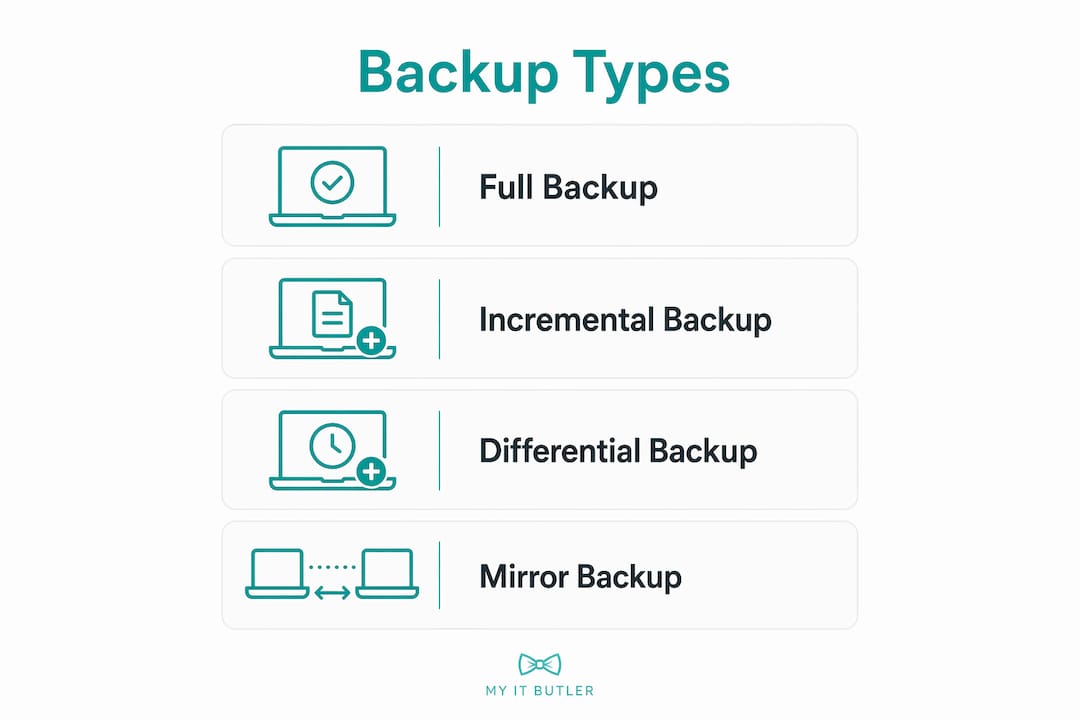
Choosing the right backup type affects how much storage you use, how long backups take, and how quickly you can restore. Practical backup designs balance full, incremental, and differential backups to optimise storage use while keeping recovery fast and reliable.
| Backup type | What it copies | Storage use | Restore speed |
|---|---|---|---|
| Full backup | All selected data, every time | High | Fastest: one file set to restore |
| Incremental backup | Only changes since the last backup of any kind | Lowest | Slower: requires full plus all incrementals |
| Differential backup | All changes since the last full backup | Medium | Faster than incremental: requires full plus one differential |
A full backup run weekly, combined with daily incremental backups, is the most common schedule for small businesses. This approach keeps daily backup windows short while limiting the number of files needed to complete a restore. A differential approach suits businesses that need faster restores and can afford slightly more storage.
For a practical example, consider a small accounting firm with 500 GB of client files. Running a full backup every Sunday night and incremental backups each weekday night means a Wednesday restore requires the Sunday full backup plus Monday and Tuesday incrementals. That is three restore files instead of one, but the daily backup jobs complete in minutes rather than hours.
Local vs cloud backups: which is better for small businesses?
The honest answer is that neither local nor cloud backup alone is sufficient. A hybrid backup strategy combining local fast restores with cloud offsite copies gives small businesses the best balance of speed, cost, and disaster resilience.
Local backups, using external hard drives or a NAS device, offer the fastest restore speeds for large data sets. Local backups provide quick restores that are necessary when you need to recover a full server or a large database quickly. The limitation is obvious: a fire, flood, or theft that destroys your office takes your local backup with it.
Cloud backup addresses that limitation directly. Key advantages include:
- Automatic offsite storage. Your data is physically separated from your premises without any manual effort.
- Scalability. Storage grows with your business without hardware purchases.
- Remote work support. Staff working from different locations can trigger and access backups without being on-site.
The trade-offs are real. Cloud backup requires adequate upload bandwidth, which can be a constraint for businesses with large data sets or slow internet connections. Initial seeding of a large cloud backup can take days or weeks. Restore speeds from cloud storage are slower than local restores for large volumes of data. Encryption in transit and at rest, vendor reliability, and data sovereignty (knowing where your data is physically stored) are all factors worth investigating before committing to a provider.
Services like Acronis Cyber Protect, Veeam, and Backblaze for Business each offer hybrid models that manage both local and cloud destinations from a single console, which reduces the management overhead for small teams.
How do you automate, test, and maintain backups reliably?
A backup that has never been tested is not a backup. Many backups are never successfully restored in real incidents because restore ability was never confirmed through realistic testing. This is the most common and most damaging gap in small business backup strategies.
Follow these steps to build a reliable, maintainable backup system:
- Automate every backup job. Automated backups reduce human error and deliver consistency that manual processes cannot match. Manual backups fail because people forget, assume someone else did it, or skip it during busy periods.
- Set your schedule based on data volatility. A business processing daily invoices needs at least daily backups. A business with mostly static files might accept weekly fulls. Your Recovery Point Objective (RPO) defines the maximum acceptable data loss in time. Your schedule must match it.
- Run monthly smoke tests. Restore a sample of individual files from your backup to confirm the data is readable and complete.
- Run quarterly full restore tests. Quarterly full restore tests and monthly smoke tests are the recommended minimum to confirm recoverability. Restore an entire system to a test environment and measure how long it takes.
- Document your Recovery Time Objective (RTO). RTO is the maximum time your business can tolerate being offline. Restore testing should measure actual restore time against your RTO and flag gaps before a real incident forces the issue.
- Set up alerts for backup job failures. A failed backup job that nobody notices is as dangerous as no backup at all. Most backup platforms, including Veeam and Acronis, send email or SMS alerts on failure.
Pro Tip: Simulate a ransomware scenario at least once a year by attempting a full restore from your immutable or offline copy only, without touching your primary or network-accessible backups. Documented restore drills under varied failure scenarios drastically improve actual recovery success when it counts.
Reducing IT downtime for your business depends heavily on knowing your RTO before a crisis, not discovering it during one.
Key takeaways
Effective small business data backup requires the 3-2-1 rule as a minimum, immutable copies for ransomware resilience, and verified restore testing to confirm the strategy actually works.
| Point | Details |
|---|---|
| Follow the 3-2-1 rule | Keep three copies of data on two media types, with one copy stored offsite at all times. |
| Add immutable backups | Use object lock or offline copies to protect against ransomware that targets accessible backups. |
| Never rely on sync services | Dropbox and OneDrive sync are not backups. They propagate corruption and ransomware instantly. |
| Automate and schedule | Automated backup jobs reduce human error and align with your Recovery Point Objective. |
| Test restores regularly | Run monthly file-level tests and quarterly full restores to confirm your backups actually work. |
The part most small businesses get wrong
After working with small businesses across multiple industries, the pattern I see most often is not a lack of backups. It is a lack of tested backups. Business owners set up a cloud sync or a weekly external drive copy, tick the box, and assume they are covered. Then a ransomware attack or a failed hard drive arrives, and the restore either fails or takes three times longer than the business can survive offline.
The 3-2-1 rule is the right starting point, but in 2026 it is not enough on its own. Ransomware has made immutable copies a genuine necessity, not a premium feature for enterprise budgets. Backblaze B2 with object lock costs a few dollars a month for most small businesses. There is no longer a cost argument against it.
What I find genuinely underestimated is the value of a written restore plan. Not a backup plan. A restore plan. Who does the restore? From which copy? In what order? How long should it take? If you cannot answer those questions before an incident, you will be answering them under pressure, with data loss accumulating by the hour.
My honest recommendation: treat your first full restore test as a fire drill. It will reveal gaps you did not know existed, and fixing them before a real incident is the entire point of the exercise. Review your backup strategy whenever your business changes significantly, whether that means new staff, new systems, or new locations.
— Thomas
How Myitbutler can help you protect your business data
Running a small business means your time is already stretched. Setting up a backup strategy that covers the 3-2-1 rule, immutable copies, automated scheduling, and regular restore testing is genuinely complex to get right without IT expertise.

Myitbutler provides remote IT support for small businesses globally, with over 15 years of enterprise experience and certifications including CompTIA Security+ and CCNA. The team can assess your current backup setup, design a hybrid strategy suited to your budget and data volumes, configure automation and alerts, and run restore tests to confirm your plan actually works. If you are ready to stop assuming your backups are fine and start knowing they are, book a consultation with Myitbutler today.
FAQ
What is the 3-2-1 backup rule?
The 3-2-1 backup rule means keeping three copies of your data on two different types of storage media, with one copy stored offsite. It removes single points of failure from hardware, theft, fire, and ransomware targeting local backups.
Is cloud sync the same as a cloud backup?
No. Cloud sync services like Dropbox and Google Drive mirror your files in real time, which means ransomware or accidental deletion propagates immediately to the cloud copy. A proper backup preserves point-in-time versions you can restore from a clean state.
How often should I test my backups?
Monthly smoke tests restoring individual files and quarterly full system restore tests are the recommended minimum. Testing confirms your backups are readable, complete, and recoverable within your acceptable downtime window.
What is an immutable backup?
An immutable backup is a copy that cannot be modified or deleted within a set retention period, even by an administrator. Cloud storage platforms implement this via object lock features, and it is the primary defence against ransomware that targets and destroys accessible backup copies.
What is the difference between RPO and RTO?
Recovery Point Objective (RPO) is the maximum amount of data loss your business can accept, measured in time. Recovery Time Objective (RTO) is the maximum time your business can tolerate being offline. Your backup schedule and restore plan must be designed to meet both targets before an incident occurs.