
TL;DR:
- IT's role in remote communication is to establish a reliable, governed infrastructure that enables seamless, secure collaboration across distributed teams. Proper design includes network architecture, authentication, training, and protocols, preventing tool sprawl and communication breakdowns. Effective governance and structured protocols ensure consistent tool usage, enhance engagement, and support reliable, scalable remote teamwork.
The role of IT in remote communication is to create a governed, reliable system of tools and infrastructure that enables distributed teams to collaborate clearly and consistently, regardless of location. Without deliberate IT design, remote teams default to tool sprawl, inconsistent practices, and communication breakdowns that erode productivity. Platforms like Microsoft Teams, Zoom, and Slack are only as effective as the infrastructure and governance behind them. The importance of IT in remote work goes well beyond choosing software. It covers network architecture, identity management, training programmes, and communication protocols that together determine whether a distributed team functions as a unit or fragments under the pressure of distance.
What is the role of IT in remote communication?
IT's role in remote communication is to provide the technical foundation, the governance framework, and the tools that make distributed collaboration possible at scale. This is not simply about installing video conferencing software. It covers every layer from network reliability and cloud access to authentication systems and user training.

The standard industry term for this discipline is unified communications management, which encompasses voice, video, messaging, and collaboration tools under a single governed architecture. For remote and international teams, this matters because a failure at any one layer, whether a dropped VPN connection or an expired single sign-on (SSO) token, can block access to every communication tool simultaneously.
Remote IT challenges for distributed teams are rarely about a lack of tools. They are almost always about the absence of a coherent system connecting those tools. A team in Sydney, a contractor in Berlin, and a client in Singapore all need the same reliable access, the same security controls, and the same clear guidance on how to communicate. IT is what makes that possible.
How does IT infrastructure power reliable remote communication?
The infrastructure behind remote communication is layered, and each layer carries its own failure risk. The layers include local network quality, internet service provider reliability, cloud platform availability, content delivery networks (CDNs), and identity and authentication systems.
Latency is more critical than raw bandwidth for interactive communication. A 500 Mbps connection with high latency produces worse video call quality than a 50 Mbps connection with low latency. This is particularly relevant for international teams where data must travel across multiple network hops between continents.
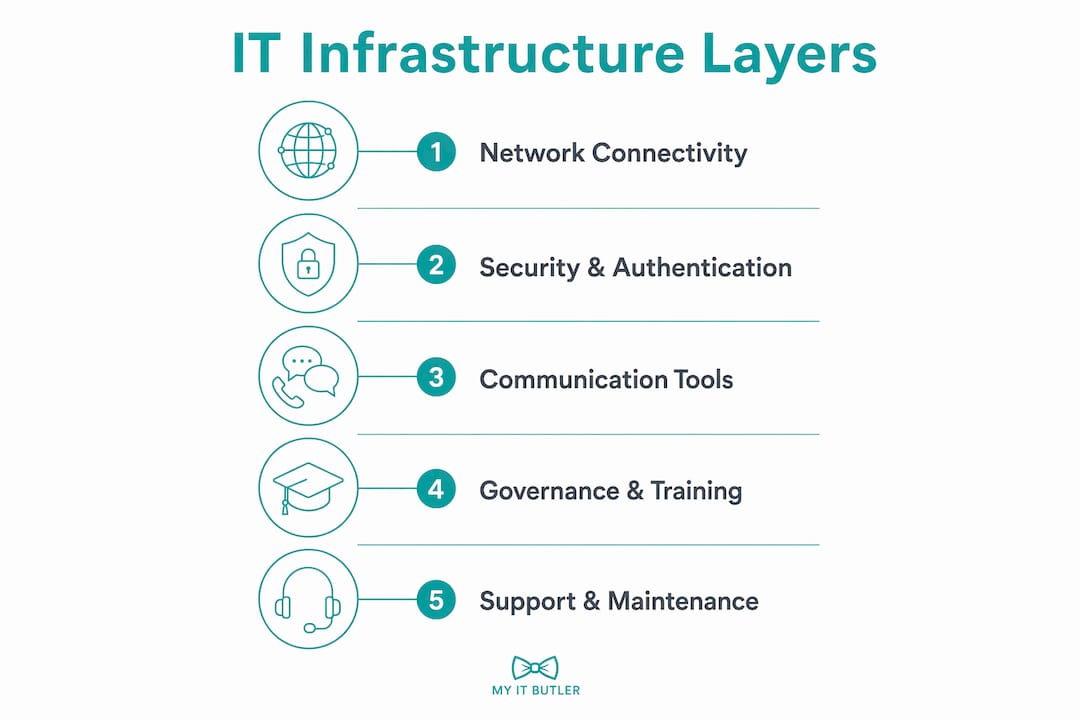
Authentication failures are a less obvious but equally serious risk. When an SSO system goes down, users lose access to every connected platform at once, including email, video conferencing, and project management tools. Resilient identity systems and distributed cloud servers are not optional extras. They are foundational to uninterrupted remote collaboration.
Key infrastructure considerations for remote and international teams include:
- Redundant connectivity: Fallback mobile data connections or international eSIMs protect against primary connection failures, especially for workers in regions with unreliable fixed-line internet.
- CDN-backed platforms: Communication tools that use globally distributed servers reduce latency for users in Asia-Pacific, Africa, and South America.
- Hardware optimisation: Noise-cancelling headsets, dedicated webcams, and wired ethernet connections materially improve call quality and reduce fatigue.
- Backup authentication: Offline multi-factor authentication (MFA) apps prevent lockouts when cloud-based identity providers experience outages.
Pro Tip: If your team spans more than two time zones, test your communication tools from each region before rolling them out. Latency and packet loss vary significantly by geography, and a platform that performs well in Melbourne may degrade noticeably in Lagos or São Paulo.
How should IT teams design communication protocols for distributed teams?
Treating remote communication as an engineered system, not a behavioural challenge, is the single most effective shift a distributed team can make. This means designing information channels, routing rules, and communication cadences with the same deliberateness applied to software architecture.
The core principle is asynchronous by default. Most information exchange in a remote team does not require an immediate response. Decisions, updates, and context should be documented in writing and shared through tools like Confluence, Notion, or a shared project channel. Synchronous meetings via Zoom or Microsoft Teams should be reserved for consensus-critical discussions where real-time dialogue genuinely changes the outcome.
A well-designed communication protocol for a distributed team typically includes four components:
- Decision records: Every significant decision is documented asynchronously with context, rationale, and outcome, so team members across time zones can review it without attending a meeting.
- Context broadcasts: Regular written updates (daily or weekly) replace status meetings and keep the whole team informed without requiring simultaneous availability.
- Escalation protocols: Clear rules define when an issue moves from a chat message to a video call to an urgent phone contact, preventing both under-communication and meeting overload.
- Presence coordination: Shared overlap maps showing each team member's working hours allow the team to identify the best windows for synchronous communication without forcing anyone into unreasonable hours.
Explicit presence coordination reduces meeting fatigue and protects deep work time, two of the most common complaints from remote workers on international teams.
| Communication mode | Best use case |
|---|---|
| Asynchronous text (Slack, email) | Status updates, decisions, documentation, non-urgent questions |
| Synchronous video (Zoom, Teams) | Consensus decisions, onboarding, team bonding, complex problem-solving |
| Asynchronous video (Loom) | Walkthroughs, demos, feedback where tone and visual context matter |
| Phone or instant message | Urgent escalations requiring immediate response |
Pro Tip: Map your team's communication channels to specific intents and publish the map in your team handbook. When everyone knows that Slack is for quick questions and Confluence is for decisions, tool sprawl and duplicate conversations drop significantly.
Does IT governance affect how well remote teams use communication tools?
The main cause of remote communication failure is insufficient governance and training, not a lack of tools. Teams that deploy Microsoft Teams, Slack, and Zoom without clear rules about which tool to use for which purpose inevitably end up with fragmented conversations, missed messages, and shadow IT.
Shadow IT, where employees use personal WhatsApp groups, personal Gmail accounts, or unapproved file-sharing services, is a direct consequence of unclear governance. It creates auditability gaps, exposes sensitive data to unmanaged platforms, and makes it impossible for IT teams to maintain visibility and control. Operational risk grows every time an employee bypasses an official tool because the approved option feels too complicated or unclear.
Effective IT governance for remote communication covers:
- Tool selection guidelines: A published list of approved tools with clear use cases prevents employees from defaulting to whatever they find convenient.
- Onboarding training: New team members should receive structured training on communication tools as part of their first week, not left to figure it out independently.
- Usage policies: Written rules covering data retention, meeting recording consent, and acceptable use of collaboration platforms reduce legal and security risk.
- Regular audits: Quarterly reviews of tool usage data identify which platforms are being used, which are being ignored, and where shadow IT is emerging.
Training on tool features within remote workflows improves adoption, reduces bypassing of official platforms, and gives IT teams the visibility they need to manage the environment. Technology deployment without behaviour change produces inconsistent results. Governance and training together are what make the technology investment worthwhile.
Pro Tip: Assign a communication champion in each team or department. This person is not an IT specialist but a peer who knows the tools well and can answer quick questions, reducing the burden on IT support and accelerating adoption.
How does IT-mediated communication affect remote team engagement?
Computer-mediated communication reduces engagement and positive emotional responses compared to face-to-face interaction. A 2026 review of 1,158 studies found that digital interactions consistently produce fewer emotional benefits than in-person meetings. This does not mean remote communication is ineffective. It means the channel choice matters more than most teams realise.
Video calls perform meaningfully better than text messaging for positive emotional connection in virtual interactions. For remote teams building trust across time zones, this is a practical finding with direct implications. Team bonding, one-on-one check-ins, and onboarding conversations should default to video, not chat.
Remote group learning and information processing are also less effective than in-person equivalents, which affects decision-making quality in distributed teams. Deliberate engagement design, such as structured discussion formats, rotating facilitators, and explicit invitations to contribute, partially compensates for this limitation.
Practical channel-to-intent mapping for remote teams:
- Video for bonding: Use Zoom or Teams for team socials, one-on-ones, and any conversation where emotional tone matters.
- Text for information: Use Slack or email for updates, documentation requests, and non-urgent questions where speed and searchability matter more than warmth.
- Asynchronous video for walkthroughs: Tools like Loom let you convey tone and visual context without requiring the recipient to be available at the same time.
- Phone for urgency: Reserve voice calls for time-sensitive escalations where a written message would create dangerous delays.
"The most effective remote teams do not try to replicate the office online. They design a communication system that plays to the strengths of each channel and compensates for the weaknesses."
Key takeaways
Effective remote communication depends on IT infrastructure, governance, and deliberate protocol design working together as a single system.
| Point | Details |
|---|---|
| Infrastructure is layered | Latency, authentication, and redundancy matter as much as the tools themselves. |
| Async by default | Design communication protocols with asynchronous as the standard and synchronous reserved for decisions only. |
| Governance prevents shadow IT | Clear tool selection rules and training stop employees from bypassing approved platforms. |
| Channel choice affects engagement | Video builds emotional connection; text handles information efficiently. Use each deliberately. |
| Training drives adoption | Rolling out tools without structured training produces inconsistent use and IT visibility gaps. |
What I have learned from building remote communication systems
After years of working with distributed teams across multiple continents, the pattern I see most often is this: organisations invest heavily in communication tools and almost nothing in communication design. They buy Microsoft 365 licences, deploy Teams, and then wonder why their team still sends critical decisions over WhatsApp.
The uncomfortable truth is that technology does not fix communication problems. Governance does. I have seen teams with basic tools and clear protocols outperform teams with enterprise-grade platforms and no rules. The engineering analogy from Adam Analytics resonates with me because it reframes the problem correctly. You would not build a software system without defining how data flows between components. Remote communication deserves the same rigour.
What actually works, in my experience, is starting with the question: "What decisions need to be made, and who needs to be involved?" From that answer, you build your protocol. You define which channel carries which type of information, you document it, and you train people on it. The IT oversight structure that supports this does not need to be complex. It needs to be consistent.
The other thing I would push back on is the assumption that more meetings solve communication gaps. They rarely do. A well-written asynchronous update, shared at the right time in the right channel, is worth three status calls. The teams I have seen thrive remotely are the ones that protect their synchronous time fiercely and invest in making their written communication clear and searchable.
— Thomas
How Myitbutler supports remote teams with IT communication solutions
Remote teams need more than good tools. They need the infrastructure, governance, and expert support to make those tools work reliably across time zones and geographies.

Myitbutler provides remote IT support for distributed businesses, international teams, digital nomads, and expatriates, backed by over 15 years of enterprise experience and certifications including CCNA, CompTIA Security+, and PRINCE2. From communication infrastructure audits to tool governance frameworks and on-demand troubleshooting, Myitbutler delivers Australian-standard IT management globally, with transparent fixed pricing and no lock-in contracts. If your team's communication setup needs a professional review, book a consultation to get started.
FAQ
What does IT actually do for remote communication?
IT provides the infrastructure, tools, governance, and training that enable distributed teams to communicate reliably. This includes network management, authentication systems, platform selection, and usage policies that keep communication consistent and secure.
Why do remote teams end up with too many communication tools?
Tool sprawl occurs when governance is unclear and employees default to whatever platform feels easiest. Without published tool selection guidelines and training, teams accumulate overlapping platforms that fragment conversations and reduce IT visibility.
Is video always better than text for remote teams?
Video outperforms text for emotional connection and team bonding, but text is more efficient for information sharing, documentation, and non-urgent updates. The best approach maps each channel to its intended use rather than defaulting to one format for everything.
How important is latency compared to internet speed for remote communication?
Latency matters more than raw bandwidth for interactive communication like video calls. High latency causes delays and audio issues even on fast connections, which is why international teams should test platform performance from each region before full deployment.
What is the biggest mistake remote teams make with communication technology?
The most common mistake is deploying tools without governance or training. Teams cannot learn on the fly, and without clear rules about which tool to use when, employees bypass official platforms and create security and auditability risks.