
TL;DR:
- Remote software deployment enables central management of software updates across distributed devices without physical access. Using agent-based methods over the internet is ideal for remote teams, ensuring security and compliance. Regular validation and monitoring are essential to maintain a secure and compliant software environment.
Remote software deployment is the process of installing, updating, and managing software on endpoint devices from a central location, without physical access to each machine. The industry term for this practice is remote endpoint software management, and it sits at the heart of how modern IT teams support distributed workforces. It relies on four core components: a software repository, deployment policies, defined target device groups, and real-time monitoring. For IT professionals and project managers running distributed teams across multiple sites or time zones, mastering this process is not optional. It is the difference between a controlled IT environment and one that drifts out of compliance the moment a staff member works from a new location.
What is software deployment remotely and how does it work?
Remote software deployment means pushing software packages from a central server or cloud platform to endpoint devices over a network. The process does not require anyone to physically touch the target machine. An IT administrator configures a deployment policy, selects the target device group, and the system handles the rest.

The deployment pipeline typically starts with a software repository. This is a central store holding the installation packages, version data, and configuration files. Modern tools support deploying via network or cloud shares, which means the package does not need to be downloaded locally to each endpoint first. That approach reduces bandwidth pressure and simplifies package management significantly.
Deployment policies define the rules: which devices receive which software, when the install runs, and what conditions must be met first. Target device groups let administrators segment endpoints by department, location, or operating system. Real-time monitoring then tracks success and failure rates across the fleet, giving IT teams visibility without needing to log into each machine individually.
One distinction worth understanding early: software deployment is technical code movement, while a software release is a business decision. Multiple deployments can happen before a feature is made available to end users. Keeping these concepts separate helps project managers set realistic timelines and avoid confusion between IT readiness and product readiness.
What are the primary methods for deploying software remotely?
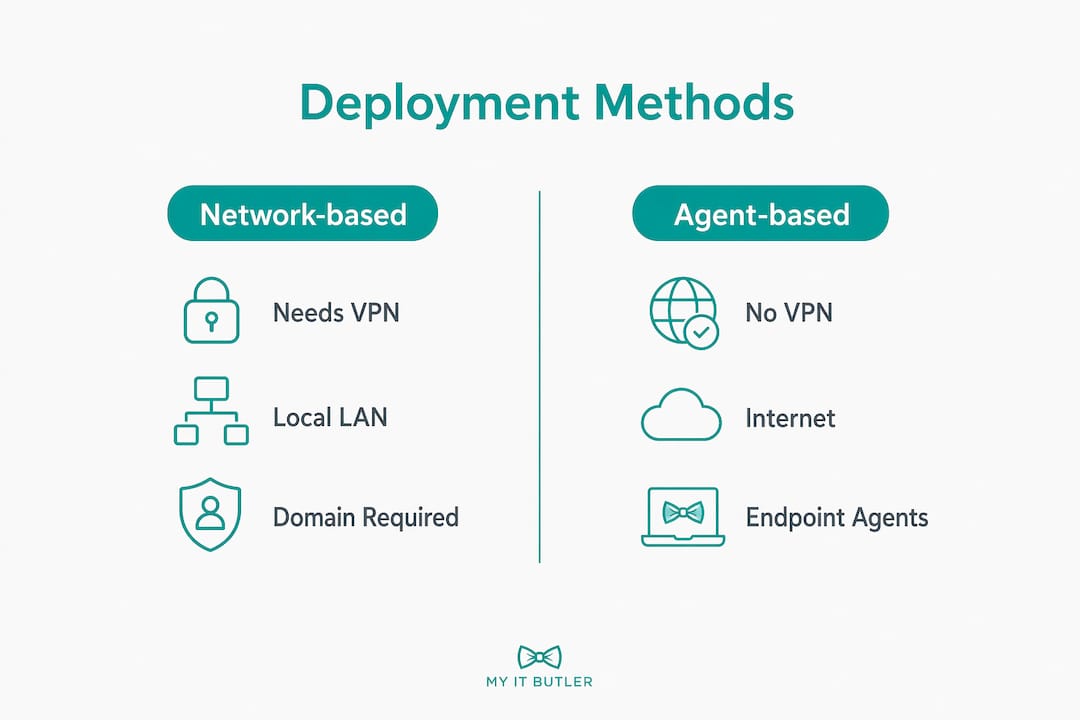
Two primary methods exist for remote software deployment: network-based deployment and agent-based deployment. Each suits different environments, and choosing the wrong one for your setup creates unnecessary complexity.
Network-based deployment
Network-based deployment works within a local area network or domain environment. Tools like Windows Group Policy push software to devices that are joined to the corporate domain. This method is reliable inside a controlled office network but falls apart the moment a device leaves that network. A staff member working from home or travelling abroad simply does not receive the update.
Agent-based deployment
Agent-based deployment installs a lightweight software agent on each endpoint. That agent communicates with the central management platform over the internet, regardless of where the device is physically located. Agent-based deployment avoids VPN dependency, enabling consistent deployment across diverse physical locations. This is the method that suits distributed and remote teams in 2026.
The practical difference is significant. Network-based deployment is adequate for organisations where all devices stay on-premises. Agent-based deployment is the right choice for any team with staff working across different cities, countries, or time zones.
Pro Tip: If your team has even a handful of remote workers, build your deployment infrastructure around agent-based methods from the start. Retrofitting later is time-consuming and disruptive.
The table below compares the two approaches across key criteria.
| Criteria | Network-based | Agent-based |
|---|---|---|
| Requires VPN or domain | Yes | No |
| Works for remote devices | Limited | Yes |
| Suited to distributed teams | No | Yes |
| Internet-only connectivity | Not supported | Supported |
| Management complexity | Lower for on-site | Lower for remote |
What are the core benefits of remote software deployment?
The primary benefit of remote software deployment is time. Manually installing software on individual machines across a distributed team is not a viable process at any meaningful scale. Centralised deployment pushes the same package to hundreds of endpoints in the time it would take one technician to walk to a second desk.
Consistency is the second major gain. Every device in the target group receives the identical software version, with the same configuration. That consistency directly supports compliance. Regulated industries, including finance and healthcare, require documented evidence that all endpoints run approved, patched software versions. Automated, policy-driven deployments provide that evidence without manual record-keeping.
Security improves substantially when manual installs are replaced with controlled, automated processes. Manual installs allow staff to introduce unauthorised software, miss critical patches, or install incorrect versions. Automation removes that variable entirely. Every install follows a defined policy, and every deviation is logged.
The advantages of remote deployment for growing teams are also practical:
- New staff devices are configured and ready without IT staff travelling to the user's location.
- Software updates reach all endpoints simultaneously, closing security vulnerabilities faster.
- Licence compliance becomes easier to track when all installs are centrally recorded.
- IT teams reclaim hours previously spent on repetitive manual tasks.
For project managers, the business case is straightforward. Remote deployment reduces the cost and time of onboarding, keeps the software environment consistent across the team, and gives IT administrators the visibility they need to maintain endpoint security for remote work without being physically present.
What best practices and pitfalls should IT teams know?
Getting remote software deployment right requires more than selecting a tool and pressing send. The most common failures come from skipping validation steps and misunderstanding how deployment agents execute commands.
Follow these practices to avoid the most costly mistakes:
-
Validate the environment before every deployment. Pre-installation checks must confirm available disk space, identify conflicting software versions, and validate registry keys before the install begins. Skipping this step causes failed deployments that are difficult to diagnose after the fact.
-
Set the correct execution context. This is the most overlooked technical detail in remote deployment. Wrong execution context causes silent failures that confuse IT administrators because the deployment appears to succeed but the software does not install correctly. The distinction between System User context and Logged-in User context determines which permissions the installer runs under. Get this wrong and the install either fails silently or installs in the wrong profile.
-
Build automated retry logic into every deployment policy. Remote devices go offline, reboot mid-install, or lose connectivity at inconvenient moments. Automated retries every 30 minutes, up to three attempts, handle these interruptions without requiring manual intervention from the IT team.
-
Manage uninstallations with the same rigour as installations. Removing legacy or unauthorised software is as important as deploying new packages. Centralised uninstall management maintains compliance and reclaims endpoint resources. Many IT teams invest heavily in deployment workflows but leave removal as an afterthought.
-
Never rely on manual, one-by-one installs for recurring tasks. Manual processes do not scale and do not produce consistent results. Any software that needs to reach more than two or three devices should be handled through a policy-driven deployment workflow.
Pro Tip: Test every deployment package in a staging group of two or three devices before pushing to the full fleet. A failed deployment across 200 endpoints during business hours is significantly more disruptive than catching the issue in a controlled test.
How does remote deployment fit into broader IT management?
Remote software deployment does not operate in isolation. It is one layer in a broader remote system administration framework that includes endpoint security, patch management, and compliance monitoring.
When deployment is integrated with endpoint management dashboards, IT administrators gain a single view of the entire device fleet. They can see which devices have received updates, which are pending, and which have failed. That visibility is the foundation of a defensible security posture for any distributed organisation.
Patch management is closely linked to deployment. Security patches are, in practice, a specific category of software deployment. Organisations that have mature remote deployment processes apply patches faster and more consistently than those relying on manual methods. Remote deployment integrates closely with endpoint security and patch management to support distributed workforce compliance.
The table below shows how remote deployment connects to adjacent IT management functions.
| IT function | How remote deployment supports it |
|---|---|
| Patch management | Automates security update delivery to all endpoints |
| Endpoint security | Prevents unauthorised software and enforces approved versions |
| Compliance monitoring | Provides audit trails of all installs and removals |
| Remote workforce support | Eliminates need for physical IT presence at user locations |
| Licence management | Centralises records of installed software across the fleet |
For remote teams facing IT challenges, the integration of deployment into a unified management platform is what separates reactive IT support from proactive IT management.
Key takeaways
Remote software deployment is the most direct way to maintain a consistent, secure, and compliant software environment across a distributed team without physical IT presence at every location.
| Point | Details |
|---|---|
| Core definition | Remote deployment installs and manages software centrally, without physical access to each device. |
| Agent-based is the standard | Agent-based deployment works over the internet without VPN, making it the right choice for distributed teams. |
| Validation prevents failures | Pre-deployment checks for disk space, conflicting versions, and registry keys stop most common failures. |
| Execution context matters | Using the wrong execution context causes silent install failures that are hard to diagnose. |
| Uninstall management is critical | Removing legacy software through the same centralised system maintains compliance and endpoint health. |
Remote deployment in 2026: what I have learned from the field
The teams that struggle most with remote software deployment are not the ones using the wrong tools. They are the ones treating deployment as a one-time event rather than an ongoing process. I have seen organisations invest in capable deployment platforms and then configure them once, never revisit the policies, and wonder why their endpoints drift out of compliance within six months.
The shift that changes everything is treating deployment automation as a security practice, not just an efficiency measure. When you automate deployment, you are not just saving time. You are removing the human error that lets unauthorised software onto devices, lets patches slip through, and lets one non-compliant endpoint become the entry point for a broader incident.
The other thing I would push back on is the assumption that agent-based deployment is complex to manage. The initial setup requires care, particularly around execution context and retry logic. But once those policies are correctly configured, the ongoing management burden drops sharply. The teams I have seen resist agent-based deployment because of setup complexity end up spending far more time managing the consequences of network-based limitations.
Continuous monitoring is not optional. Deployment success rates need to be reviewed regularly, not just when something breaks. A device that has silently failed three deployment attempts is a compliance and security risk sitting in your fleet right now.
— Thomas
How Myitbutler supports remote software deployment for distributed teams
Myitbutler delivers remote IT support built for organisations that cannot afford to have IT problems slow down distributed teams. With over 15 years of enterprise experience and certifications including CCNA, CompTIA Security+, and PRINCE2, Myitbutler manages remote software deployment, endpoint monitoring, and patch management for businesses operating across multiple time zones.

Whether your team is spread across Australian states or operating internationally, Myitbutler provides proactive IT management with transparent fixed pricing and no long-term contracts. From configuring deployment policies to managing endpoint compliance, the team handles the technical detail so your IT environment stays consistent and secure. Book a free consultation to discuss your remote deployment needs with an expert who understands distributed team environments.
FAQ
What is remote software deployment in simple terms?
Remote software deployment is the process of installing or updating software on devices from a central location, without needing to physically touch each machine. It uses deployment policies and a software repository to push packages to target devices over a network or the internet.
What is the difference between agent-based and network-based deployment?
Network-based deployment requires devices to be connected to a corporate domain or local network, while agent-based deployment works over the internet from any location. Agent-based is the standard approach for distributed and remote teams because it does not require a VPN.
Why do remote software deployments fail silently?
Silent failures most often occur when the deployment runs under the wrong execution context. The distinction between System User and Logged-in User context determines which permissions the installer uses, and an incorrect setting causes the install to appear successful while the software is never actually installed.
How does remote deployment support security and compliance?
Automated, policy-driven deployment prevents unauthorised software from reaching endpoints and ensures all devices run approved, patched versions. This creates an audit trail that supports compliance requirements in regulated industries.
How often should deployment policies be reviewed?
Deployment policies should be reviewed whenever a new software version is released, when device groups change, or at least quarterly. Regular review catches devices with repeated failed deployments before they become a compliance or security risk.