
TL;DR:
- Effective remote IT onboarding relies on automation, clear responsibility, and regular testing to ensure new hires receive ready-to-use devices and secure access from day one. Proper collaboration between HR and IT, including automated triggers and ownership mapping, prevents delays and configuration errors. Implementing these practices improves employee productivity, security, and overall onboarding experience.
The role of IT in remote onboarding is to give new employees ready-to-use technology and secure system access from their very first day. Without that foundation, new hires miss meetings, cannot access email, and lose confidence before they have even started. IT setup failures are a top cause of negative remote onboarding experiences, and most are preventable with proper planning. This guide explains the core IT components, the HR and IT collaboration model that prevents failures, and the practical steps HR managers and team leaders can take to build a reliable, automated onboarding workflow for distributed teams.
What is the role of IT in remote onboarding?
IT in remote onboarding covers three core functions: device provisioning, identity and access management, and communication support. These functions collectively determine whether a new hire can do their job on day one or spends the first week waiting for passwords and equipment. The industry now recognises three pillars as the 2026 standard: Zero-Touch Provisioning, automated IAM, and clear communication channels. Together, they eliminate manual setup steps, reduce human error, and lift security across distributed teams.

Zero-Touch Provisioning (ZTP) means a device ships directly to the new hire, pre-configured and ready to use out of the box. The employee powers it on, authenticates, and the device pulls down all required policies, apps, and settings automatically. Automated Identity and Access Management (IAM) pairs with ZTP by creating user accounts and assigning permissions the moment HR confirms a start date. Role-Based Access Control (RBAC) sits inside IAM and ensures each hire gets access to exactly what their role requires, nothing more.
Communication support is the third pillar and the one most often underestimated. New remote hires need a clear, tested path to reach IT help on day one. That means a known support channel, whether it is a ticketing system, a direct messaging platform, or a phone line, that is staffed and responsive from the moment the hire logs in.
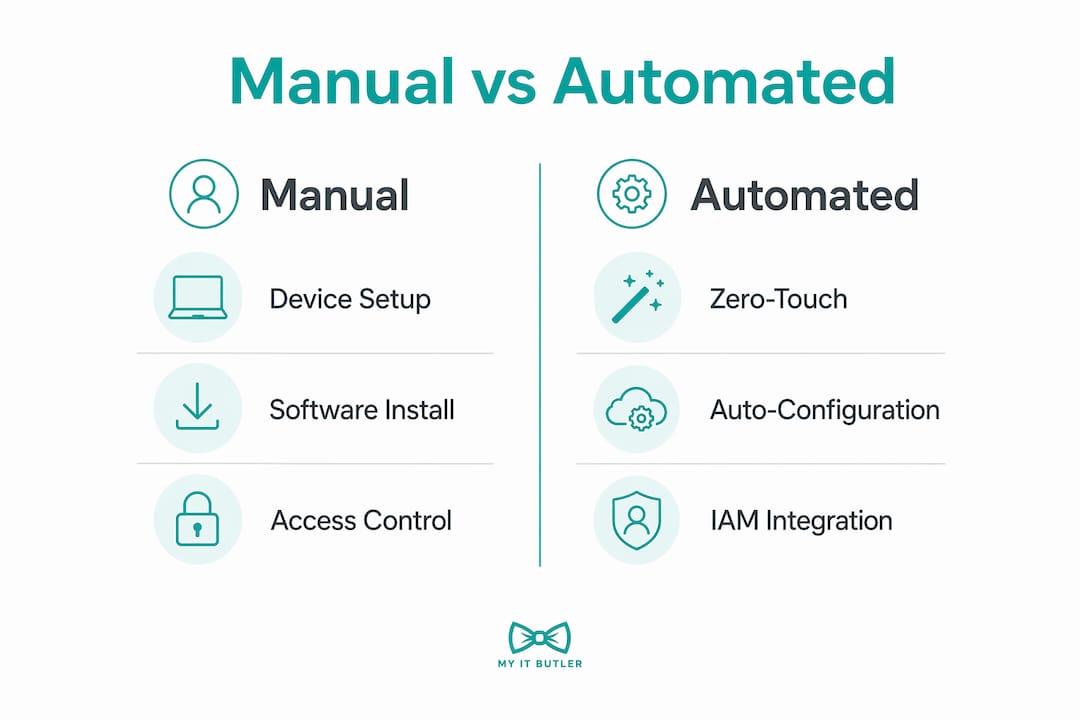
Manual vs automated IT onboarding: a direct comparison
| Process | Manual approach | Automated approach |
|---|---|---|
| Device setup | IT staff configure each device by hand | ZTP ships pre-configured devices directly to hire |
| Account creation | IT creates accounts after receiving an email from HR | HRIS trigger creates accounts automatically on hire confirmation |
| Access permissions | IT assigns permissions manually per request | RBAC assigns role-specific access at account creation |
| Security controls | MFA enabled case by case | MFA enforced by policy at first login |
| Support on day one | New hire contacts IT and waits | Support channel confirmed in pre-boarding email |
Pro Tip: Test your ZTP workflow with a spare device before every new hire cohort. A single missed configuration step can lock a hire out of their machine on day one.
How can HR and IT collaboration improve remote onboarding workflows?
The primary cause of remote onboarding failure is the silo between HR and IT. Silo mentality between HR and IT is the most frequently cited reason workflows break down, and the fix is integrated, automated communication between the two departments. When HR confirms a start date in the HRIS and that confirmation does not automatically trigger an IT provisioning task, delays are guaranteed.
A RACI matrix solves the accountability gap. Creating a RACI matrix for IT provisioning assigns clear ownership across every onboarding task, so no one can claim a step was someone else's responsibility. RACI stands for Responsible, Accountable, Consulted, and Informed. Applied to onboarding, it maps every task from device order to account creation to a named owner.
Automated triggers from the HRIS to the IT system remove the need for manual handoffs entirely. When a hire record is created in the HRIS, the system fires a provisioning request to IT automatically. That request includes the hire's role, start date, location, and required software. IT receives a structured task rather than an informal email, and the timeline starts immediately.
The best practices for HR and IT coordination are:
- Agree on a shared onboarding checklist before the first hire joins.
- Set up automated HRIS-to-IT triggers for account creation and device orders.
- Define a RACI matrix covering every provisioning task.
- Schedule a joint review of the onboarding workflow every quarter.
- Create a shared escalation path so both teams know who to contact when something breaks.
Pro Tip: Align HR and IT at least two weeks before a hire's start date. Late alignment is the single biggest predictor of a failed day one.
What practical steps create an IT-enabled remote onboarding workflow?
Building a reliable remote IT onboarding workflow follows a clear sequence. Each step depends on the one before it, so gaps in the sequence compound quickly.
Step-by-step workflow
- Confirm hire details in the HRIS. Role, location, start date, and required software must be recorded accurately. This record drives every downstream IT action.
- Trigger device procurement automatically. The HRIS confirmation fires a device order to your procurement system. Zero-Touch Deployment cuts device delivery to approximately five business days for global remote hires, compared to the weeks a manual process typically requires.
- Create accounts and assign access. Automated IAM creates the hire's accounts across all required platforms. RBAC assigns permissions based on role. Role-specific access provisioning should be automated to avoid security risks like manual password sharing.
- Configure security policies. Multi-Factor Authentication (MFA) is enforced at first login. Endpoint security policies are pushed to the device automatically. For a detailed look at endpoint protection for remote workers, the endpoint security for remote work guide covers the key controls.
- Send a pre-boarding IT pack. The hire receives login instructions, support contact details, and a short checklist before their start date. This prevents the frantic first-morning scramble.
- Run a Day One IT orientation session. A dedicated Day One IT orientation teaches secure access, password management, and how to raise support tickets. It humanises the IT experience and cuts early support volume significantly.
- Test and maintain the workflow quarterly. Run the full provisioning sequence on a test account after every major OS or security policy update. Broken scripts discovered in testing are far cheaper to fix than broken scripts discovered by a new hire.
Key tools that support this workflow include cloud-based MDM (Mobile Device Management) platforms for device policy enforcement, HRIS platforms with API integrations for automated triggers, and identity platforms that support SAML or OIDC for single sign-on. For a broader view of the IT tools for remote teams that support these workflows, that guide covers the current options in detail.
Pro Tip: Document every step of your provisioning workflow in a version-controlled repository. Treat it like software code. When something breaks, you need a change history to diagnose the cause quickly.
What common pitfalls should organisations avoid in IT remote onboarding?
Most remote onboarding failures trace back to a small set of repeatable mistakes. Knowing them in advance is the fastest way to avoid them.
- Manual password sharing. Sending passwords over email or chat is a security risk and a compliance failure. Automated IAM with enforced MFA removes this practice entirely.
- Unmanaged personal devices. Allowing new hires to use personal laptops because the company device has not arrived creates uncontrolled endpoints. ZTP with a confirmed delivery date prevents this.
- Untested provisioning scripts. OS updates and security policy changes can break configuration scripts silently. Treating onboarding IT scripts as version-controlled products and testing them quarterly prevents day one failures caused by a script that worked three months ago but does not work today.
- Asynchronous communication gaps. When a new hire in a different time zone cannot reach IT support for eight hours, their first day stalls completely. Support availability must match the hire's working hours, not the IT team's local hours.
- Unclear ownership. Without a RACI matrix, device orders and account creation fall into the gap between HR and IT. Both teams assume the other has acted. The hire arrives with nothing ready.
The human side of IT onboarding is just as important as the technical side. A new hire who cannot get help feels isolated and undervalued. Delayed or manual IT setup causes first-week lost productivity, missed meetings, and disengagement that is difficult to reverse. Responsive IT support on day one signals to the hire that the organisation is prepared and professional.
Pro Tip: Version-control your onboarding scripts in a tool like Git and tag each release. When a quarterly test fails, you can roll back to the last working version immediately rather than debugging from scratch.
How does effective IT onboarding impact remote employee productivity?
Timely IT readiness directly determines how quickly a new hire becomes productive. When a hire has working devices, correct access, and a known support path from day one, they attend their first meetings, complete their first tasks, and build confidence in the organisation. Studies link timely IT readiness to increased satisfaction and confidence among remote hires. The inverse is equally true: a hire who spends their first week chasing access requests forms a negative impression that is hard to shift.
Security readiness also matters for the hire's confidence. When MFA is enforced and access is role-specific from the start, the hire understands that the organisation takes data protection seriously. That signals a professional environment and reduces the risk of early security mistakes caused by confusion.
Automated IT onboarding workflows reduce manual errors, improve security compliance, and free HR and IT resources for higher-value work. Instead of spending hours configuring devices and creating accounts, IT teams can focus on architecture, security monitoring, and supporting the business. The compounding benefit across multiple hires is significant.
"The quality of a new hire's first-day IT experience sets the tone for their entire relationship with the organisation's technology. Get it right once, and you build a repeatable system that scales."
For a deeper look at how IT directly affects output, the role of IT in remote productivity guide covers the measurable connections between IT setup quality and employee performance.
Key takeaways
Effective IT onboarding requires Zero-Touch Provisioning, automated IAM, HR and IT alignment through a RACI matrix, and quarterly workflow testing to prevent day one failures.
| Point | Details |
|---|---|
| Zero-Touch Provisioning | Ships pre-configured devices directly to remote hires, cutting delivery to around five business days. |
| Automated IAM and RBAC | Creates accounts and assigns role-specific access automatically, eliminating manual password sharing. |
| HR and IT alignment | A RACI matrix and HRIS-to-IT automated triggers prevent task gaps and provisioning delays. |
| Day One IT orientation | A dedicated session on secure access and support channels reduces early confusion and support tickets. |
| Quarterly workflow testing | Version-controlled scripts tested after every OS update prevent silent failures on a new hire's first day. |
What I have learned from watching IT onboarding go wrong
After years of working with distributed teams across multiple time zones, the pattern I see most often is not a technology failure. It is a planning failure dressed up as a technology failure. The device did not arrive because nobody owned the order. The account was not created because IT was waiting on an email that HR thought they had already sent. The new hire sat idle for three days, and by the end of the first week, they were already questioning their decision to join.
The organisations that get this right treat IT onboarding as a product, not a checklist. They version-control their scripts. They run quarterly drills. They have a named owner for every provisioning step. They test the full workflow on a dummy account the week before every new hire cohort starts. That discipline is not complicated. It just requires someone to decide that onboarding quality is worth protecting.
The shift toward fully automated workflows is real and accelerating. HRIS platforms now offer native integrations with identity providers and MDM systems that would have required custom development a few years ago. The barrier to automation is lower than most HR managers realise. The bigger barrier is the internal conversation between HR and IT that has never happened, because both teams assumed the other had it covered.
My honest advice: book one meeting between your HR lead and your IT lead before your next hire starts. Map every step on a whiteboard. Assign an owner to each one. That single meeting will prevent more onboarding failures than any tool you could buy.
— Thomas
Myitbutler supports remote IT onboarding for distributed teams
Getting remote onboarding right requires more than good intentions. It requires IT expertise, tested workflows, and support that is available when your new hire needs it, not just during business hours in one time zone.

Myitbutler provides remote IT support for small businesses and distributed teams, backed by over 15 years of enterprise experience and certifications including CCNA, CompTIA Security+, and PRINCE2. From device provisioning coordination to identity management and Day One support, Myitbutler handles the IT side so your HR team can focus on the people side. Fixed pricing, no long-term contracts, and support delivered across time zones via WhatsApp, email, and direct messaging. Book a free chat to discuss your remote onboarding setup and find out where the gaps are before your next hire starts.
FAQ
What is the role of IT in remote onboarding?
IT in remote onboarding covers device provisioning, identity and access management, and communication support. These functions give new hires working technology and secure system access from their first day.
What is Zero-Touch Provisioning and why does it matter?
Zero-Touch Provisioning ships a pre-configured device directly to the new hire, who powers it on and receives all apps and policies automatically. It cuts device delivery to around five business days and removes the need for manual IT configuration.
How should HR and IT teams coordinate during remote onboarding?
HR and IT should use a RACI matrix to assign clear ownership of every provisioning task, and set up automated HRIS-to-IT triggers so account creation and device orders start the moment a hire is confirmed.
What security controls are standard in remote IT onboarding?
Multi-Factor Authentication enforced at first login and Role-Based Access Control for permissions are the two baseline security controls. Both reduce the risk of unauthorised access and eliminate manual password sharing.
How often should remote IT onboarding workflows be tested?
Onboarding scripts and provisioning workflows should be tested quarterly, and after every major OS or security policy update, to catch silent failures before they affect a real new hire.