
TL;DR:
- Setting up a business continuity plan involves documenting critical functions, assigning roles, and testing procedures regularly. The PPRR model—Prevention, Preparedness, Response, Recovery—is recommended to structure the plan effectively. External support like Myitbutler can help SMBs with IT gaps and testing to ensure resilience during crises.
To set up a business continuity plan for your SMB, document your critical functions, assign clear roles, define Recovery Time Objectives (RTO) and Recovery Point Objectives (RPO), then test the plan before you need it. Australian authorities including Business Queensland and the Australian Cyber Security Centre (ACSC) recommend the PPRR model (Prevention, Preparedness, Response, Recovery) as your organising framework.
Your next 72-hour to-do list:
- Identify your three most critical business functions and their owners
- Check whether you have a tested, offsite backup of your core data
- Confirm at least two people know how to access emergency credentials
- Download a BCP template from business.gov.au or Business Queensland
- Book a free discovery call at Myitbutler if you have no internal IT capacity
Table of Contents
- Who should build and own your continuity plan?
- How to run a business impact analysis for your SMB
- What are RTO and RPO, and how do you set them?
- How does the PPRR model structure your continuity plan?
- Technical recovery: what your IT checklist must cover
- Who to contact and what to say during a disruption
- How often should you test your continuity plan?
- Where to store your plan so you can find it in a crisis
- How do you keep the plan from going stale?
- What does it cost and how long does it take to build a BCP?
- Myitbutler helps Australian SMBs build and test their continuity plans
- Key takeaways
- Why most SMB continuity plans fail before the first incident
- Useful Australian resources and templates
- FAQ
Who should build and own your continuity plan?
A BCP built by one person is a single point of failure before the crisis even starts. FEMA continuity guidance is explicit: a named, cross-functional planning team is required, not optional.
For most Australian SMBs, that team looks like this:
- Business owner or senior leader — final decision authority and plan approval
- Recovery coordinator — owns the plan document, schedules exercises, tracks actions
- IT lead — responsible for backups, restore sequencing and access credentials
- HR representative — manages staff communications and welfare during disruption
- Finance contact — covers payroll continuity and insurance claims
- Facilities or vendor liaison — handles suppliers, premises and utilities
- Communications owner — drafts and sends all external messages
For lean SMBs, one person may cover two roles. What you cannot do is let one person cover all of them. Rotate exercise facilitation so knowledge spreads across the team.
Pro Tip: Bring in an external advisor like Myitbutler for the IT lead role if you have no dedicated internal IT staff. A gap there will show up fast during a real incident.
How to run a business impact analysis for your SMB
A Business Impact Analysis (BIA) maps which functions must keep running, how long they can be down, and what they depend on. Without it, you are guessing at priorities during a crisis.

Start by asking: if operations stopped tomorrow, what would cause irreversible harm within 48 hours? That answer drives everything else. Consider IT downtime costs when estimating financial impact per hour.
BIA table — example rows for a 10-person service business:
| Function | Owner | Max downtime | Key systems | Single points of failure | Workaround |
|---|---|---|---|---|---|
| Payment processing | Finance | 4 hours | Xero, bank portal | One staff member has login | Backup credentials stored offline |
| Customer communications | Comms owner | 8 hours | Email, CRM | Primary email server | SMS broadcast, personal mobile |
| Service delivery | Operations | 24 hours | Project tool, VPN | Single ISP | Mobile hotspot, secondary ISP |
| Internal reporting | Finance | 72 hours | Spreadsheets, cloud drive | Cloud account access | Local copies on two devices |
Focus your BIA on the most likely, high-impact incidents rather than every conceivable scenario. A practical BCP guide from CIO recommends this scoping approach to keep the plan usable.
What are RTO and RPO, and how do you set them?
Recovery Time Objective (RTO) is how quickly a function must be restored after a disruption. Recovery Point Objective (RPO) is how much data loss is acceptable, measured in time. Together, they are the single most important technical drivers in your plan.
Set them per function, not as a blanket figure for the whole business.
| Function | RTO | RPO | Technology match |
|---|---|---|---|
| Payment processing | 2 hours | 15 minutes | Continuous cloud replication |
| Customer email | 4 hours | 1 hour | Hourly cloud backup with failover |
| File storage | 24 hours | 4 hours | Daily snapshot, offsite copy |
| Internal reporting | 72 hours | 24 hours | Daily backup, local restore |
Your backup strategy must match these targets. A daily backup cannot meet a 15-minute RPO.
Pro Tip: Validate RTO and RPO by actually running a restore and timing it. Vendor claims about recovery speed are not the same as your actual recovery time (RTA) in a real incident.
How does the PPRR model structure your continuity plan?
The PPRR model, endorsed by Business Queensland and Australian state emergency management agencies, gives your plan a logical sequence: prevent what you can, prepare for what you cannot, respond when it hits, and recover systematically.
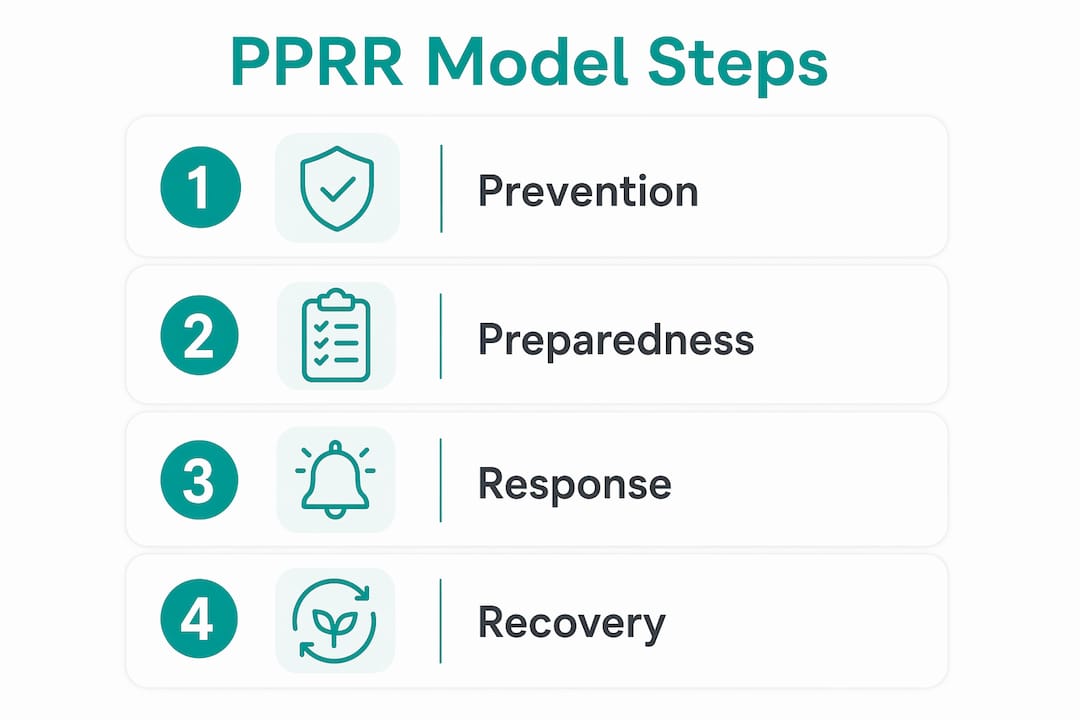
| Prevention | Preparedness | Response | Recovery |
|---|---|---|---|
| Patch and update all systems | Document the BCP and store offline copies | Activate the recovery coordinator | Restore systems in RTO/RPO order |
| Implement MFA on all accounts | Train staff on their roles | Notify staff via backup channel | Validate data integrity post-restore |
| Review vendor SLAs annually | Run tabletop exercises twice yearly | Engage backup suppliers | Conduct post-incident review |
| Install UPS and backup ISP | Keep emergency credentials current | Communicate with customers | Update the plan with lessons learned |
| Conduct annual risk assessment | Test backups monthly for critical systems | Escalate to ACSC if cyber incident | Confirm regulatory notifications sent |
Download free templates from business.gov.au and Business Queensland to populate each column with your specific actions.
Technical recovery: what your IT checklist must cover
Your disaster recovery plan (DRP) is a component of your BCP, not a separate document. It must be driven by the RTO and RPO targets you set above.
Backup checklist:
- Daily automated backups for all critical systems
- Offsite or air-gapped copy not stored in the same account as primary data
- Encryption at rest and in transit for all backup sets
- Monthly restore test for critical systems, quarterly for others
- Retention period documented (minimum 30 days for most SMBs)
For cloud accounting systems like Xero or QuickBooks Online, note that the platform's own backup may not cover all restore scenarios. Third-party tools that handle cloud restore processes fill that gap.
Recovery order (bring systems up in this sequence):
- Authentication and identity (Active Directory, SSO, MFA)
- Core communications (email, messaging)
- Payment and finance systems
- Customer-facing services
- Internal operations and reporting
Access and authentication:
- Store emergency admin credentials in an offline password manager or sealed physical envelope
- Maintain at least two admin accounts per critical system
- Document MFA fallback procedures (backup codes, secondary device)
- Test emergency access quarterly
Who to contact and what to say during a disruption
Speed and consistency matter more than perfect messaging. Prepare templates before you need them.
| Audience | Primary channel | Backup channel | Timing | Trigger |
|---|---|---|---|---|
| Staff | Team messaging app | Personal mobile SMS | Within 1 hour | Plan activation |
| Customers | Email broadcast | Social media post | Within 4 hours | Service impact confirmed |
| Key suppliers | Direct call | Within 2 hours | Supply chain affected | |
| Regulators (ACSC, OAIC) | Secure online portal | Registered email | Within 72 hours | Data breach suspected |
Australian SMBs must notify the Office of the Australian Information Commissioner (OAIC) of eligible data breaches under the Privacy Act 1988. Check your industry's specific reporting obligations, as financial services and health have shorter windows. Your IT compliance obligations page covers these triggers in detail.
How often should you test your continuity plan?
Testing is where most SMBs fall short. A plan that has never been exercised is a plan that will fail when it matters. Business Queensland guidance specifically recommends workplace simulations to confirm staff can locate and act on the plan under realistic pressure.
Three exercise types, in order of intensity:
- Tabletop exercise — the team talks through a scenario ("our primary ISP is down") without activating anything. Good for checking role clarity and decision authority.
- Structured walk-through — each team member follows their documented steps in sequence, confirming the steps are accurate and complete.
- Full simulation — a realistic scenario is run with actual system actions, timed restores and live communications. Reveals gaps that tabletops miss.
Suggested cadence for Australian SMBs:
- Tabletop: twice per year
- Walk-through: once per year
- Full simulation: once per year (or after a major IT change)
Record actual recovery time (RTA) for each critical function during every exercise and compare it against your stated RTO. CIO research suggests organisations test 2–4 times per year depending on complexity. Use the gap between RTA and RTO to update vendor SLAs and backup configurations.
Where to store your plan so you can find it in a crisis
Never store your only BCP copy inside the systems you expect to restore. If your primary cloud account is locked or your server is down, an inaccessible plan is no plan at all.
| Copy type | Location | Access control | Review frequency |
|---|---|---|---|
| Primary digital | Cloud storage (separate account) | Recovery coordinator + IT lead | After every update |
| Secondary digital | Encrypted USB or offline drive | Business owner | Quarterly check |
| Printed copy | Locked drawer, key location | All team leads | Annual reprint |
| Attachments included | BIA, contact lists, vendor SLAs, restore scripts, comms templates | Same as primary | With each plan update |
Good IT documentation practices apply here: version-control the document, date every revision, and confirm every critical staff member knows exactly where to find it.
How do you keep the plan from going stale?
A BCP reviewed once and filed away will be wrong within six months. Staff change, systems change, suppliers change.
Scheduled review triggers:
- Annual review, minimum, regardless of changes
- Any significant IT system change (new cloud platform, new ISP)
- New supplier or loss of a key vendor
- Staff turnover in a role named in the plan
- After any real incident, however minor
Post-incident review checklist:
- What triggered the incident and was it covered in the plan?
- How long did actual recovery take versus the stated RTO?
- Which steps were unclear or missing?
- Were all contact details current?
- What changes to the plan, backups or vendor SLAs are needed?
Record every review, exercise and change in a simple log. That log is your audit trail if a regulator or insurer asks for evidence of due diligence.
What does it cost and how long does it take to build a BCP?
| Week | Milestone | Typical effort |
|---|---|---|
| 1–2 | Assemble team, scope critical functions | 4–8 hours (owner + IT lead) |
| 3–4 | Complete BIA, set RTO/RPO targets | 6–10 hours |
| 5–6 | Document PPRR actions, comms templates, IT recovery steps | 8 hours |
| 7 | First tabletop exercise, identify gaps | 2–3 hours |
| 8 | Revise plan, store copies, brief all staff | 2–4 hours |
Cost drivers include staff time, external consultant hours (if you engage managed IT support), backup storage subscriptions, secondary ISP costs, and any software licences for monitoring or testing. For most SMBs, the biggest cost is staff time in weeks 3–6.
Hire managed remote IT support when: your internal team cannot validate RTO/RPO targets through real restore tests, you have no tested offsite backup, critical IT knowledge sits with one person, or your team spans multiple time zones. The benefits of managed IT services are clearest when internal capacity is thin.
Myitbutler helps Australian SMBs build and test their continuity plans
When your internal IT capacity cannot meet the RTO and RPO targets your business actually needs, Myitbutler provides the gap-fill without a long-term contract.

Myitbutler's team, certified to CCNA, CompTIA Security+, and PRINCE2 standards, supports Australian SMBs with BIA facilitation, RTO/RPO validation, backup and restore testing, tabletop exercise facilitation, and 24/7 remote recovery support. The engagement is straightforward: a quick IT audit, a fixed-price proposal, structured onboarding, and scheduled test cycles. No retainer lock-in, transparent pricing, and support delivered across time zones via WhatsApp, email, and Zoom.
If your backups have never been tested, your emergency credentials are in one person's head, or your team is distributed across regions, book a free discovery call and get a clear picture of where your plan stands. For a deeper audit and BIA facilitation, the IT support consultation page is the right starting point.
Key takeaways
A tested, documented BCP built on the PPRR model, with defined RTO and RPO targets for every critical function, is the minimum standard for Australian SMB resilience.
| Point | Details |
|---|---|
| Start with a BIA | Map critical functions, maximum downtime, and dependencies before writing any procedures. |
| Set RTO and RPO per function | Payment systems need tighter targets than internal reporting; match backup technology to each target. |
| Use PPRR as your structure | Business Queensland and Australian emergency guidance endorse PPRR as the practical organising framework. |
| Test at least twice a year | Record actual recovery time (RTA) against your RTO after every exercise and update the plan accordingly. |
| Myitbutler fills the IT gap | When internal capacity cannot validate backups or meet RTO targets, Myitbutler provides remote IT support with no long-term contract. |
Why most SMB continuity plans fail before the first incident
The conventional wisdom says "write the plan and you're covered." That is the wrong frame entirely. A BCP is not a document; it is a set of practised behaviours. The plan itself is almost secondary to whether your team has ever actually run through it under pressure.
The gap most SMBs miss is the distance between what the plan says and what staff can actually do at 2 AM when the payment system is down and the IT lead is on leave. That gap only closes through repeated, realistic exercises. A tabletop once a year is better than nothing, but a timed restore test on a Tuesday afternoon, with the IT lead deliberately out of the room, tells you far more.
The other underestimated failure point is documentation access. Storing the BCP in the same cloud account you are trying to restore is a surprisingly common mistake. An offline copy, a printed copy in a known location, and at least two people who know where both are: that is the minimum. Everything else in the plan depends on being able to read it.
Useful Australian resources and templates
- Business Queensland BCP guidance — PPRR framework, templates, and testing guidance for Queensland SMBs; most content applies nationally
- business.gov.au — Australian Government SME guidance including emergency planning checklists and regulatory links
- Australian Cyber Security Centre (ACSC) — cyber incident response guidance, reporting obligations, and the Essential Eight controls relevant to continuity planning
- FEMA Continuity Guidance Circular — US federal guidance on team composition and governance; useful as a cross-reference for team structure
- UNDRR SME BCP templates — basic, intermediate and advanced BCP templates aligned to ISO 22301:2019
- Myitbutler — guided BCP implementation and remote IT support for Australian SMBs, including backup testing and tabletop facilitation
Download templates, keep an offline copy, and schedule your first tabletop exercise within 30 days of completing your BIA.
FAQ
What is the PPRR model and why should Australian SMBs use it?
PPRR stands for Prevention, Preparedness, Response, and Recovery. Business Queensland and Australian state emergency management agencies endorse it as the practical framework for structuring a business continuity plan.
How long does it take to build a basic SMB continuity plan?
A basic BCP for a small team typically takes 6–8 weeks, covering team assembly, BIA, PPRR documentation, a first tabletop exercise, and staff briefing.
What is the difference between RTO and RPO?
RTO is how quickly a function must be restored after a disruption; RPO is how much data loss is acceptable, measured in time. Both must be set per function and validated through real restore tests.
How often should an SMB test its continuity plan?
At minimum, run a tabletop exercise twice per year and a full simulation once per year. Record actual recovery times and compare them against your stated RTOs after every exercise.
When should an SMB hire managed IT support for continuity planning?
Engage managed IT support when your team cannot validate backups through real restores, critical IT knowledge sits with one person, or your RTO targets require technical expertise your staff do not have. Myitbutler offers fixed-price remote support with no long-term contract.