
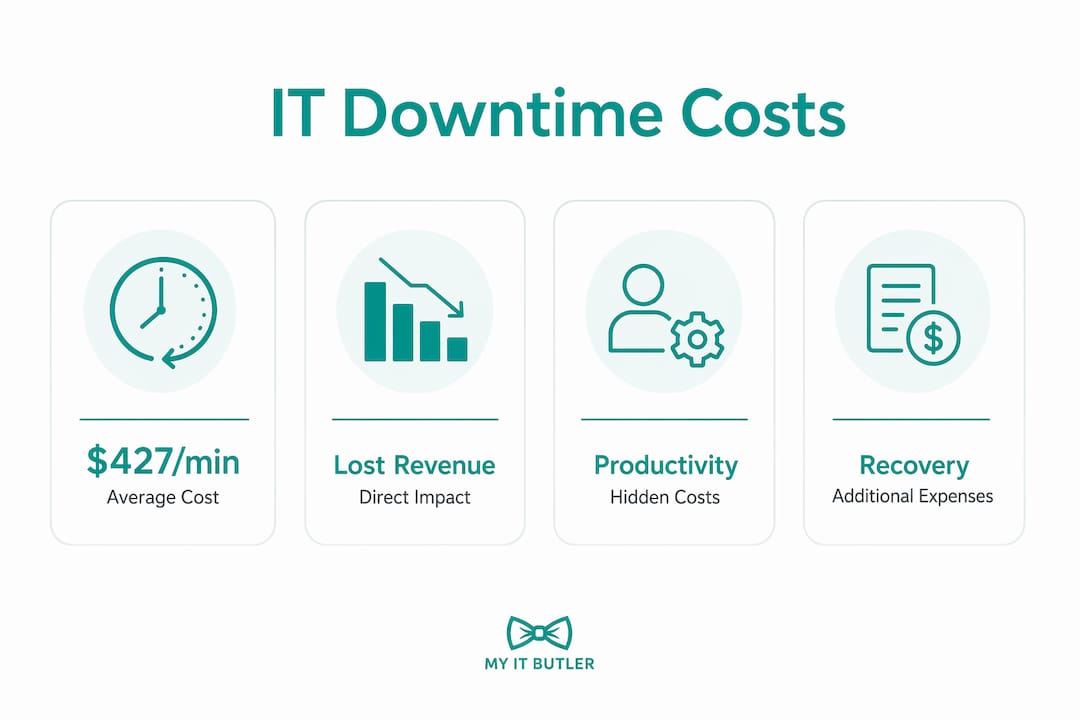
IT downtime costs Australian small and medium-sized businesses an average of $427 per minute, or more than $25,000 per hour, before you factor in reputation damage, compliance exposure, or client penalties. That figure alone should change how you think about your IT budget. Most business owners only count the obvious losses when a system goes down. The real bill is almost always much higher.
Here is what the costs actually look like:
- Lost revenue: Every minute your systems are offline, sales stop, bookings stall, and invoices go unsent.
- Idle staff wages: Your team gets paid whether they can work or not. A 20-person team sitting idle for two hours is thousands of dollars gone before IT even picks up the phone.
- Emergency repair costs: Break-fix IT support carries premium rates, often $150–$300 per hour for after-hours calls.
- Reputational damage: Clients who experience your systems being unavailable do not always complain. Sometimes they just leave.
- Compliance fines: Regulated businesses face additional exposure when outages trigger undocumented incidents or missed filing windows.
The core problem is that businesses systematically underestimate what downtime costs because they only count the obvious line items. Understanding the full picture is the first step toward doing something about it.

What does IT downtime actually cost your business?
Direct costs are the ones you can put on a spreadsheet. Lost revenue from missed sales, emergency IT labour, hardware replacement at above-market pricing because you need the part now, and data recovery expenses if ransomware or a failed drive is involved. IBM's Cost of a Data Breach Report 2024 indicates ransomware recovery can cost small businesses millions when all factors are included.

The hidden costs of downtime often exceed direct repair costs several times over, particularly in regulated sectors. Customer churn is one of the hardest to quantify. A client who experiences unreliable service rarely sends a formal complaint. They quietly start looking at alternatives, and you only notice months later when the revenue gap shows up.
Other hidden costs include:
- Overtime pay: Staff catching up on backlogged work after systems come back online.
- SLA penalties: If your contracts guarantee uptime or response times, an outage can trigger financial penalties that never appear in standard downtime estimates.
- Compliance fines: For businesses operating under frameworks like HIPAA, FINRA, or Australia's Privacy Act, an undocumented outage is a liability. A two-hour outage that costs a retail business $10,000 could cost a medical practice $50,000 or more once compliance risk is factored in.
- Productivity drag: Employees do not simply snap back to full focus the moment systems return. Frustrated staff spend time on workarounds, IT calls, and catching up, often for hours after the outage ends.
Pro Tip: Track every outage, including the small ones. A portal that loads slowly for 20 minutes three times a week adds up faster than a single dramatic crash.
How to calculate your specific IT downtime cost
The formula is straightforward. Downtime cost equals lost revenue plus lost productivity plus recovery costs plus intangible costs, multiplied by the duration of the outage. Applying it to your own numbers takes about five minutes.
| Business size | Hourly wage cost | Lost revenue (est.) | Recovery cost | Total (2-hour outage) |
|---|---|---|---|---|
| — | $300 | — | — | — |
| — | — | — | — | — |
| 20 staff | — | — | — | — |
| — | — | — | — | — |
These figures are conservative. They exclude SLA penalties, compliance costs, and customer churn, which can dwarf the numbers above for businesses in regulated industries.
To apply this to your situation, multiply your average hourly revenue by the outage duration, add the fully loaded hourly cost of every affected staff member, then add your estimated recovery and repair expenses. If you operate under any regulatory framework, add a compliance risk buffer on top. The resulting number is your real downtime exposure, and for most SMBs, it is a genuine shock.
Pro Tip: Run this calculation before your next outage, not during it. Knowing your number in advance makes the case for proactive IT investment far easier to justify internally.
What causes IT downtime for SMBs?
Hardware failure is the single most preventable cause of small business downtime. Servers, workstations, switches, and firewalls do not usually fail without warning. They degrade slowly, show signs that go unnoticed, and then fail at the worst possible moment.
The other major causes:
- Ransomware and cyberattacks: Ransomware-related downtime for SMBs averages 21 days, according to IBM's Cost of a Data Breach Report 2024. At even a conservative cost estimate, that is a multi-million dollar event before a single dollar in ransom is paid.
- Software crashes and failed updates: Incompatible applications or patches applied without testing can take core systems offline within minutes.
- Power outages and internet disruptions: Particularly relevant for Australian businesses in regional areas or those without redundant connectivity.
- Human error: Accidental file deletion, misconfigured systems, or poorly documented processes can cause outages that take days to resolve.
- Shadow IT: Undocumented applications that staff use unofficially create hidden complexity. When the person who set up a critical system three years ago leaves the company, that knowledge leaves with them. Mid-crisis discovery that no one knows the admin credentials or where the backup lives is one of the most common causes of extended downtime.
Neglecting proactive maintenance sits behind most of these causes. Hardware that is monitored regularly shows warning signs before it fails. Software that is patched consistently closes the vulnerabilities ransomware exploits. The failure is rarely sudden. It is usually the predictable result of deferred attention.
How to reduce IT downtime risks before they cost you
The research on this is clear. Companies using proactive IT management experience 85% less downtime than those relying on reactive break-fix support, according to Aberdeen Group. That gap exists because problems get caught before they become outages.
Practical steps that make a real difference:
- Implement continuous monitoring: Routine monitoring detects degrading hardware or unpatched software before failures occur. You cannot fix what you cannot see.
- Test your backups regularly: A backup that has never been tested is a backup you cannot trust. Your Recovery Time Objective (RTO), which is the maximum time your business can afford to be offline, should be documented and tested against a real simulated failure.
- Document everything: Without documentation, recovery from outages can extend from hours to multiple days. Every critical system should have a record of its configuration, credentials, and dependencies.
- Consolidate Shadow IT: Audit what applications your staff actually use and bring them under managed oversight. Undocumented systems dramatically increase recovery complexity.
- Train your team: Human error causes a significant share of outages. Regular training on phishing awareness, file management, and change procedures reduces that risk.
- Use managed IT services: Access to 24/7 monitoring and expert support means problems get addressed before they escalate. The benefits of managed IT services for SMBs extend well beyond cost savings on individual incidents.
Pro Tip: Micro-outages, such as slow portals, syncing delays, and brief application crashes, often go unreported because staff find workarounds rather than logging tickets. Use unified observability tools that centralise monitoring across your environment so these small incidents surface before they compound into something much larger.
Common misconceptions about IT downtime that hurt SMBs
The most damaging belief is that IT is just a cost centre rather than a business continuity asset. Businesses that treat IT spending as something to minimise tend to underinvest in maintenance, which is precisely what makes outages expensive when they arrive.
A close second is the belief that no recent major outage means no urgent need for attention. Absence of a crisis is not evidence of a healthy system. It often just means the degradation has not yet crossed the threshold into failure.
Shadow IT deserves particular attention here. Many SMB owners are unaware of how many undocumented tools their staff rely on daily. When an outage hits, the recovery complexity multiplies because no one has a complete picture of the environment. Bringing these systems under documented management is not just a security measure. It is a direct reduction in your potential recovery time and cost.
Micro-outages are another underestimated risk. Small, frequent incidents like a business portal taking longer than usual to load or a file not syncing from the cloud often go unreported. Their individual cost looks trivial. Compounded across a team over months, they can rival the cost of a single major outage.
The businesses that manage downtime costs most effectively are the ones that measure them. Once you know your per-hour exposure, the investment in proactive IT management becomes straightforward arithmetic rather than a leap of faith.
How downtime affects your team's productivity and morale
When systems go down, work stops. Employees cannot access tools, files, or communication platforms, and the immediate productivity loss is obvious. What is less obvious is what happens in the hours after systems come back online.
Staff who have spent time on frustrated workarounds, IT calls, and manual processes do not immediately return to full focus. Research consistently shows that context switching and interruption carry a recovery cost well beyond the outage window itself. A two-hour outage rarely costs just two hours of productivity per person.
Repeated outages compound the morale problem. Staff who regularly experience unreliable systems start to lose confidence in the business's ability to support their work. That erodes engagement, and in tight labour markets, it contributes to turnover. Replacing a skilled employee costs far more than fixing the IT problem that frustrated them into leaving.
For remote and distributed teams, the impact is sharper still. When your team relies entirely on digital tools to collaborate, even a brief outage can derail a full day's coordination across multiple time zones.
Building a business continuity plan that actually works
A business continuity plan (BCP) is a documented set of procedures that keeps your business operating during and after an IT failure. Most SMBs either do not have one or have one that has never been tested.
The core elements of an effective BCP:
- Risk assessment: Identify which systems are critical and what the financial impact of losing each one would be for different durations.
- Recovery Time Objectives: Define the maximum acceptable downtime for each critical system. This number drives every other decision in the plan.
- Tested backup procedures: Backups that are not tested regularly are not reliable. Schedule quarterly recovery tests and document the results.
- Communication protocols: Who contacts clients during an outage? Who authorises emergency spending? These decisions should not be made under pressure.
- Vendor contacts and escalation paths: Know exactly who to call and in what order when something fails.
The role of IT in business continuity goes beyond keeping systems running. A well-structured plan reduces the financial impact of outages that do occur, because recovery is faster when the steps are already documented and practised. Without that preparation, recovery from outages can extend from hours to multiple days, multiplying the financial impact significantly.
Insurance options for IT downtime losses
Cyber insurance and business interruption insurance are the two most relevant products for Australian SMBs facing IT downtime risk.
Cyber insurance covers losses from cyberattacks, including ransomware recovery costs, data breach notification expenses, and legal liability. Policies vary widely in what they cover, and many have exclusions for incidents caused by unpatched systems or poor security hygiene. Insurers increasingly require evidence of basic controls, such as multi-factor authentication and regular backups, before issuing a policy.
Business interruption insurance covers lost revenue and ongoing expenses when your business cannot operate due to a covered event. Standard policies often exclude IT failures unless specifically extended to cover them. Check your policy wording carefully, as "system failure" and "cyber event" are frequently treated as separate categories.
A few practical points for Australian SMBs:
- Get quotes from brokers who specialise in technology or SMB risk, as general business insurers often underestimate cyber exposure.
- Document your downtime costs using the formula covered earlier. Insurers and brokers need this figure to size your coverage correctly.
- Review exclusions annually. As your systems and risk profile change, your policy should too.
Insurance does not prevent downtime. It reduces the financial impact after the fact. Proactive IT management reduces the likelihood of needing to make a claim in the first place.
Key takeaways
IT downtime costs Australian SMBs far more than most owners realise, with direct and hidden losses combining to make even a short outage a serious financial event.
| Point | Details |
|---|---|
| Cost per minute | IT downtime costs SMBs approximately $427 per minute, or more than $25,000 per hour, according to Datto's research. |
| Hidden costs dominate | Customer churn, compliance fines, and productivity drag often exceed direct repair costs. |
| Ransomware risk is severe | Ransomware-related downtime averages 21 days, making it the most expensive single cause. |
| Proactive management works | Companies using proactive IT monitoring experience 85% less downtime than break-fix users. |
| Calculate your exposure | Use the downtime cost formula to know your real per-hour risk before an outage occurs. |
FAQ
What are the main costs associated with IT downtime?
IT downtime costs fall into two categories: direct costs such as lost revenue, emergency IT labour, and hardware replacement, and hidden costs including idle staff wages, customer churn, SLA penalties, and compliance fines. Hidden costs frequently exceed direct repair expenses, particularly in regulated industries.
What are the hidden costs of downtime?
Hidden costs include productivity loss from idle staff, customer churn from damaged trust, overtime pay for catch-up work, SLA penalties from breached contracts, and regulatory fines for undocumented outages in industries governed by frameworks like Australia's Privacy Act or HIPAA.
How much does IT downtime cost per minute for small businesses?
Research from Datto estimates the average IT downtime cost for small businesses at approximately $427 per minute, or more than $25,000 per hour, before factoring in recovery costs, reputation damage, or compliance exposure.
How much does a major IT outage cost an SMB overall?
The total depends on duration, industry, and recovery complexity. Downtime costs are substantial when revenue loss, productivity loss, emergency recovery, and hidden factors are included. Ransomware events are far more severe, with IBM's 2024 data indicating recovery can cost small businesses millions.
How can an SMB reduce IT downtime costs?
The most effective approach is proactive IT management, which includes continuous monitoring, tested backups, documented recovery procedures, and regular staff training. Managed IT services give SMBs access to 24/7 support and expert oversight without the cost of a full in-house IT team. Aberdeen Group research shows proactive monitoring delivers 85% less downtime compared to reactive break-fix support.
Myitbutler provides remote IT support and managed services for Australian SMBs and global distributed teams, backed by over 15 years of enterprise experience and certifications including CCNA, CompTIA Security+, and PRINCE2. If you want to know your real downtime exposure and what it would take to reduce it, book a free consultation with the Myitbutler team.
