
TL;DR:
- An affordable SMB IT support plan aligns your technology needs with a predictable cost model, utilizing structured frameworks like NIST CSF 2.0 and CIS Controls v8 to prioritize cybersecurity based on actual risk. Choosing the appropriate pricing model—such as fixed monthly fees or per-user subscriptions—prevents unforeseen expenses and supports scalable growth. Separating ongoing support, project work, and break/fix in clear contracts helps maintain budget control and avoids costly overruns.
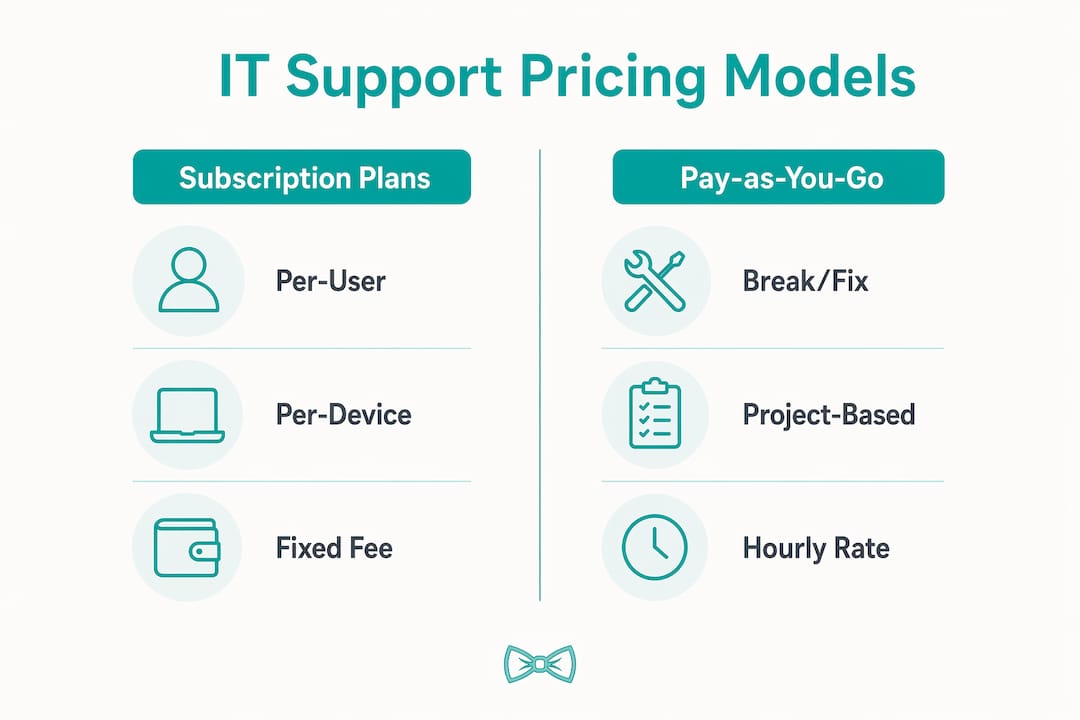
An affordable IT support plan for an SMB is a structured, budget-conscious arrangement that matches your technology needs to a defined set of services and a predictable cost model. The most common frameworks include break/fix hourly billing, per-user subscriptions, per-device fees, and all-inclusive fixed monthly fees. Choosing the right model is the single biggest lever you have over your IT spending. This guide walks you through pricing structures, needs assessment, cybersecurity integration using NIST CSF 2.0 and CIS Controls v8, and contract management so you can build a plan that scales with your business without blowing your budget.
What pricing models help you build an affordable IT support plan for an SMB?
The four main pricing models for small business IT support each carry different cost profiles and risk levels. Understanding them before you sign anything saves you from expensive surprises.

Break/fix is the simplest model. You call a technician when something breaks and pay an hourly rate of $125 to $250. This sounds cheap until you factor in a server outage on a Friday afternoon. Unpredictable costs are the core weakness of break/fix, and for growing businesses it becomes unmanageable quickly.
Per-user and per-device pricing are the most common subscription models. Per-user support runs $75 to $150 per month for basic plans and up to $200 to $300 for advanced coverage. Per-device fees sit between $25 and $100 for standard endpoints and $150 to $200 for complex infrastructure. These models scale naturally as your team grows.
Fixed monthly fees bundle everything into one predictable number, typically $1,200 to $3,500 per month for a small business. This is the model that delivers the most budgeting certainty. Managed IT services average $99 to $500 per user per month and include proactive monitoring, patching, and help desk access. That proactive element is what separates managed services from reactive support.
| Pricing model | Best for | Monthly cost range | Key risk |
|---|---|---|---|
| Break/fix hourly | Very small teams, low IT dependency | Unpredictable | Downtime costs |
| Per-user subscription | Growing teams, remote workers | $75 to $300 per user | Scope creep |
| Per-device fee | Device-heavy operations | $25 to $200 per device | Licence tracking |
| Fixed monthly fee | Businesses wanting certainty | $1,200 to $3,500 | Overbuying services |
For a practical comparison of IT support package structures, it helps to map each model against your actual device count and headcount before committing.
Pro Tip: Separate your ongoing support contract from one-off projects like migrations or hardware rollouts. Mixing them into a single agreement is the fastest way to lose track of what you are actually paying for each month.
How do you assess your SMB's IT support needs before building a plan?
A needs assessment is the foundation of any cost-effective IT support arrangement. Without it, you are either overbuying services you do not use or underbuying and leaving your business exposed.
Start by documenting every device and system your business relies on. This includes laptops, desktops, servers, network equipment, cloud platforms like Microsoft 365 or Google Workspace, and any industry-specific software. A simple spreadsheet works. The goal is a clear picture of what needs to be supported, not a perfect asset register.
Next, evaluate which systems are genuinely critical. A retail business that cannot process payments has a different uptime requirement than a consultancy that can work offline for an hour. Rank your systems by business impact so your support plan prioritises accordingly. This step also informs your IT risk assessment and helps you avoid paying for 24/7 monitoring on non-critical systems.
Consider your team's technical skill level honestly. A team of five with one tech-savvy person needs different support than a team of twenty with no internal IT capability. The gap between what your team can handle and what they cannot is exactly what your support plan should fill.
Finally, check your industry's compliance requirements. Healthcare, finance, and legal businesses in Australia face specific obligations around data handling and security. These requirements shape which services are non-negotiable versus optional.
Pro Tip: Schedule an annual IT review every financial year. Technology changes, your team grows, and compliance rules shift. A plan that was right in 2024 may be costing you money or leaving gaps in 2026.
The checklist below covers the core assessment areas:
- Total device count and types
- Cloud platforms and software licences in use
- Critical systems and their acceptable downtime
- Team size and internal IT capability
- Industry compliance and data handling obligations
- Current pain points (recurring outages, slow response times, security incidents)
How do you integrate affordable cybersecurity into your IT support plan?
Cybersecurity is not a separate budget line. It belongs inside your IT support plan from day one, and the good news is that proven frameworks make it affordable by telling you exactly what to prioritise first.
The NIST Cybersecurity Framework 2.0 is the most practical starting point for small businesses. It reframes security as risk management rather than a checklist of tools to buy. The framework's six functions (Govern, Identify, Protect, Detect, Respond, Recover) give you a structured way to assess where your business sits and what to address next, without overcommitting budget upfront.
Pairing NIST CSF 2.0 with CIS Critical Security Controls v8 creates a staged, cost-controlled roadmap. The CIS Controls are divided into three implementation groups. IG1 covers the basics every business should have regardless of size. IG2 adds controls for businesses with more complex environments. IG3 addresses the most sophisticated threats. Starting at IG1 and progressing only when your business genuinely needs it keeps cybersecurity spending proportional to actual risk.
For businesses that need documented evidence of their security posture, ISO/IEC 27001 provides a scalable framework. A small business does not need a full enterprise implementation. A concise risk register, a risk treatment plan, and a Statement of Applicability are enough to demonstrate due diligence and satisfy most client or regulatory requirements. This approach keeps documentation costs low while maintaining auditability.
The practical steps for incorporating cybersecurity into your support budget are:
- Complete a gap analysis against CIS IG1 controls (typically 18 foundational controls)
- Identify which gaps your current IT support provider can address within your existing plan
- Add targeted security tools only where gaps exist, such as endpoint detection or multi-factor authentication
- Schedule quarterly reviews to track progress against your NIST CSF maturity targets
- Document everything in a simple risk register so you can demonstrate compliance without expensive consultants
Affordability in cybersecurity comes from sequencing. Businesses that buy tools before assessing risk routinely overspend on the wrong protections. Frameworks like NIST CSF 2.0 and CIS Controls v8 exist precisely to prevent this.
For practical guidance on securing customer data within a small business context, the steps above translate directly into your support plan's security component.
How should you structure your IT support contract to keep costs manageable?
A well-structured contract is what keeps an affordable IT support plan affordable over time. Without clear boundaries, costs drift and disputes arise.
The most important structural decision is separating three distinct categories of work. Ongoing managed support covers day-to-day help desk requests, monitoring, and maintenance. Break/fix covers unexpected failures outside normal scope. One-time projects cover migrations, new system deployments, and onboarding. Mixing these categories into a single agreement is the primary cause of cost overruns for SMBs.
When reviewing a contract, check for these features:
- Defined response times for different issue severities (critical, high, standard)
- Coverage hours that match your business operating hours
- Scalable user and device counts so you are not locked into a fixed number
- Clear exclusions that list what is not covered
- A process for raising and pricing one-off project work separately
Fixed monthly fees give you the budgeting certainty that switching from reactive support to a managed model provides. The predictability alone reduces financial stress for small business owners who cannot absorb a $3,000 emergency repair bill in a single month.
Bundling services is another cost lever. Providers who offer combined help desk, monitoring, and security patching in one plan almost always cost less than sourcing each service separately. Ask any prospective provider to show you a bundled versus unbundled price comparison before you decide.
Pro Tip: Request a trial consultation before signing any managed services agreement. A provider who cannot clearly explain what is and is not included in their plan during a free consultation will not be clearer once you are a paying client.
The steps for negotiating a contract that stays affordable as you grow:
- Define your current user and device count as the baseline
- Confirm the per-unit cost for adding users or devices mid-contract
- Agree on a review clause (every 12 months is standard)
- Get project work priced separately in writing before any work begins
- Confirm exit terms so you are not locked in if the service does not meet expectations
What are the common mistakes when building an SMB IT support plan?
The most expensive mistake is underestimating total cost. Annual reviews and bundling services consistently lower support costs, yet most SMBs sign a contract and forget about it until something goes wrong. Unused licences, redundant tools, and services that no longer match your business size all accumulate silently.
The second most common mistake is choosing the cheapest hourly rate available. Break/fix support feels affordable until a critical system fails and you are paying emergency rates while your business sits idle. The cost of downtime almost always exceeds the savings from a lower hourly rate.
Other pitfalls to watch for:
- No documentation of IT assets, making it impossible to scope support accurately
- Ignoring cybersecurity until after an incident, which costs far more than prevention
- Failing to separate project costs from ongoing support in contracts
- Not reviewing plans when the business grows, changes industry, or adopts new technology
- Overbuying security tools before completing a basic risk assessment
The clearest sign your current plan is not working is a pattern of unexpected invoices. If you cannot predict your IT spend within 10% each month, your contract structure needs fixing before your budget does.
Key takeaways
An affordable IT support plan works because it matches a defined pricing model to your actual needs, separates ongoing support from project work, and uses frameworks like NIST CSF 2.0 to sequence cybersecurity spending by risk rather than assumption.
| Point | Details |
|---|---|
| Choose the right pricing model | Fixed monthly fees deliver budgeting certainty; break/fix suits only very small, low-risk operations. |
| Assess needs before buying | Document devices, critical systems, and compliance obligations before approaching any provider. |
| Use cybersecurity frameworks | NIST CSF 2.0 and CIS Controls v8 IG1 keep security spending proportional to actual risk. |
| Separate contract categories | Split ongoing support, break/fix, and project work in writing to prevent cost overruns. |
| Review annually | Unused licences and outdated plans are silent budget drains; a yearly audit fixes both. |
Why I think most SMBs get this backwards
Most small business owners I speak with approach IT support the same way they approach insurance. They look for the cheapest option, hope nothing goes wrong, and deal with the fallout when it does. After 15 years working with businesses across Australia and internationally, I can tell you that approach costs more in the long run, not less.
The businesses that get the most value from their IT spend are not the ones with the biggest budgets. They are the ones who did a proper needs assessment, chose a model that matched their actual usage, and treated their IT provider as a planning partner rather than a repair service. A 12-person professional services firm in Melbourne once told me their monthly IT costs dropped by nearly a third after they switched from ad-hoc break/fix to a per-user managed plan. Not because the per-user rate was lower, but because they stopped paying emergency rates for problems that proactive monitoring would have caught.
The cybersecurity piece is where I see the most wasted money. Businesses either ignore it entirely or buy a stack of tools they do not understand and cannot manage. NIST CSF 2.0 and CIS Controls exist to solve exactly this problem. Start with IG1, get the basics right, and build from there. That approach is both more affordable and more effective than buying an enterprise security suite for a 10-person team.
If you are building or reviewing your plan right now, the single most useful thing you can do is separate your ongoing support costs from your project costs in writing. Everything else flows from that clarity.
— Thomas
How Myitbutler can help you build your IT support plan
Myitbutler delivers remote IT support for Australian SMBs with transparent fixed pricing and no long-term contracts. Whether you need a per-user managed plan, on-demand troubleshooting, or a full IT strategy review, the team brings over 15 years of enterprise experience to businesses of every size.

Every engagement starts with a clear conversation about what your business actually needs, not a generic package. Myitbutler's certifications in CCNA, CompTIA Security+, and PRINCE2 mean your plan is built on Australian-standard methodology, delivered wherever your team operates. If you are ready to stop guessing at your IT costs, book a consultation and get a plan that fits your budget and your business.
FAQ
What does an affordable IT support plan for an SMB typically cost?
Monthly costs range from $75 to $300 per user for subscription-based plans, or $1,200 to $3,500 per month for all-inclusive fixed fee arrangements. Break/fix hourly rates run $125 to $250 but offer no cost predictability.
What is the difference between break/fix and managed IT services?
Break/fix means you pay per incident at an hourly rate, with no ongoing monitoring or proactive maintenance. Managed IT services provide continuous monitoring, patching, and help desk access for a fixed monthly fee, which reduces downtime and makes budgeting predictable.
How do I include cybersecurity in my IT support plan without overspending?
Start with the NIST CSF 2.0 framework and CIS Controls v8 IG1, which covers the 18 foundational security controls every business needs. Address gaps in your current setup before purchasing additional tools, and build security maturity in stages aligned to your actual risk level.
How often should I review my IT support plan?
An annual review is the minimum. Check for unused licences, services that no longer match your team size, and any new compliance requirements in your industry. Regular audits consistently identify cost savings without reducing service quality.
What should I look for in an IT support contract?
Confirm that ongoing support, break/fix incidents, and one-time projects are priced and defined separately. Check response time commitments, coverage hours, scalability terms for adding users or devices, and exit conditions before signing anything.