
A remote support SLA must guarantee measurable response times, a resolution plan deadline, a defined restoration target, and a named escalation path. If any of these four is missing or vague, the agreement isn't protecting you. Standards like RTO and RPO matter for compliance-bound systems, and providers such as Myitbutler build these commitments into fixed-price contracts rather than open-ended "best efforts" language.
TL;DR:
- Response times should be tied to specific, measurable response, resolution, and restoration targets with clear tiering by issue severity.
- Support scope must explicitly include system types, user access, and remote access methods, while exclusions like hardware repairs or third-party outages demand detailed listing.
- Enforceable SLAs require named escalation contacts, automatic service credits, and operational monitoring with regular reporting to ensure accountability.
- Beware vague language like "best efforts" and unsupported claims of 24x7 support without defined response metrics for critical outages.
- Improve existing SLAs by reviewing incident data, demanding clear response plans, and establishing ongoing review processes with proactive monitoring tools.
Table of Contents
- What a remote support SLA actually covers
- What are the key metrics in a remote support SLA?
- Clauses that actually make an SLA enforceable
- Red flags that signal a weak remote-support SLA
- How to negotiate or improve an existing remote support SLA
- A publisher's view on how this works in practice
- Tailoring an SLA to your organisation's size and industry
- Aligning SLA metrics with what the business actually needs
- When an SLA alone won't prevent outages
- How Myitbutler helps you put these clauses into practice
- Sources
- FAQ
What a remote support SLA actually covers
Before you argue about response times, you need to know what "remote support" means in your contract. Most disputes happen not because a provider missed a deadline, but because nobody agreed on what was in scope to begin with.
A proper remote support SLA should spell out three things clearly: which systems are supported, which users can raise tickets, and which remote-access methods are permitted. That last point matters more than most business owners realise. A provider connecting through an unsecured remote desktop session is taking on different risk (and different diagnostic limits) than one working through an encrypted VPN with multi-factor authentication.
Exclusions deserve just as much attention as inclusions. Common carve-outs include:
- Physical hardware replacement or on-site repairs
- Outages caused by third-party cloud providers (Microsoft 365, AWS, Google Workspace)
- Unsupported legacy software the vendor no longer patches
- Issues arising from unauthorised changes made by the client's own staff
If your SLA doesn't list these explicitly, you'll find out about them during an incident, which is the worst possible time. Access requirements also affect how fast a technician can actually respond. If your team hasn't set up VPN credentials in advance, or if password resets require a callback to a director who's asleep in a different timezone, your "one hour response" promise means very little in practice.
What are the key metrics in a remote support SLA?
Three terms get used interchangeably and shouldn't be: response time, resolution plan, and restoration target. Atlassian's breakdown of SLA fundamentals treats these as distinct, measurable commitments, and that distinction is where most weak SLAs fall apart.
Response time is simply how long before a human acknowledges the ticket. Resolution plan is the provider telling you what they'll do and who's doing it. Restoration target is when the service is meaningfully usable again, which isn't always the same moment the underlying bug gets fixed.
A workable tiered structure typically includes multiple priority levels, each with distinct response and restoration targets appropriate to the severity of the issue, ensuring critical problems get faster attention than minor requests.
A well-negotiated SLA specifies exact numbers per tier, not a single blanket promise covering every ticket type. On uptime, vendor agreements commonly cite high availability percentages, but the actual meaning depends on how excluded downtime and maintenance windows are defined. BeyondTrust's cloud SLA is a useful example of how scheduled maintenance windows and force majeure events get carved out of the calculation before the percentage is applied.
Clauses that actually make an SLA enforceable
A tiered response chart looks good on paper. What makes it enforceable is the fine print sitting underneath it.
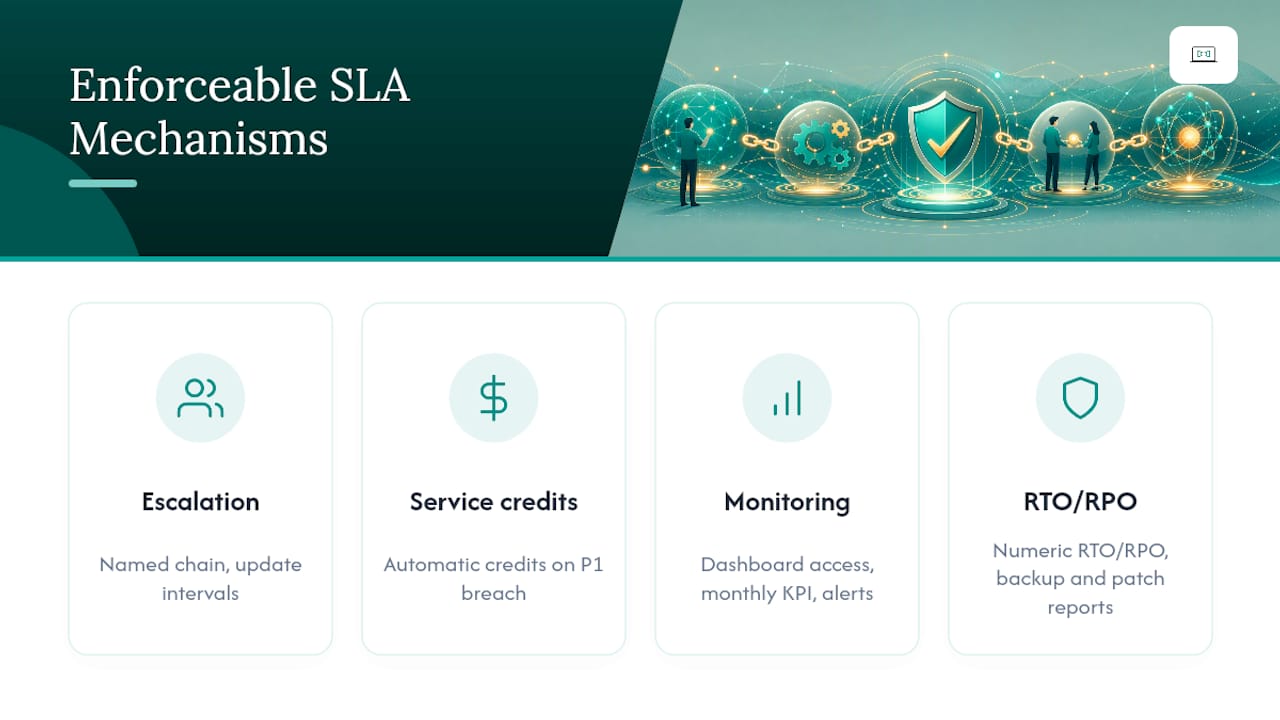
Start with escalation. Your SLA should name who gets contacted if a P1 ticket blows past its target, not just "the support team." A named escalation chain, first-line technician, then team lead, then account manager, with defined update intervals at each breach point, turns a vague promise into something you can actually hold someone to.
Service credits are the next lever. Jones IT's guide to managed services contracts makes the point plainly: automatic credit triggers protect you far better than clauses that leave compensation "at the provider's discretion." If a P1 ticket breaches its restoration target, the credit should apply without you having to argue for it.
Monitoring and reporting close the loop, with tools like dock and warehouse software for UK sites providing operational dashboards and supply-chain IT metrics. Ask for dashboard access, a monthly KPI report, and automated alerts when a ticket is at risk of breaching. Zendesk's research on SLA workflows found that folding SLA rules directly into ticketing automation helps agents actually hit targets instead of discovering a breach after the fact.
For compliance-bound systems, insist on numeric RTO and RPO figures plus backup verification reports, patch cadence should be spelled out too, not left as "regularly."
Pro Tip: Ask your provider for a sample breach report before you sign. If they can't produce one, they probably aren't tracking the metric they just promised you.
Red flags that signal a weak remote-support SLA
Some warning signs show up the moment you read the contract, before a single ticket is ever raised.
- Language like "best efforts" or "commercially reasonable" instead of actual numbers
- No named escalation contact, just "our support team will be notified"
- Credit clauses that use words like "may" or "at our discretion" with no trigger condition
- A "24x7 support" claim with no written response matrix behind it
That last one is worth dwelling on. A breakdown of tiered SLA structures for remote database support makes the point that the headline "24x7" is meaningless without specific first-response numbers attached to each severity level. Anyone can offer round-the-clock availability. Far fewer will commit, in writing, to what happens in the first 30 minutes of a critical outage at 3am your time.
How to negotiate or improve an existing remote support SLA
Improving a weak SLA doesn't require starting from scratch; it requires a structured conversation backed by data.
- Pull your incident logs. Look at your last six months of tickets and see how long things actually took to resolve. Use that history, not guesswork, to set realistic tier targets.
- Demand a resolution plan clause. Insist the provider names who handles each severity tier and what their first action will be, not just an acknowledgement.
- Negotiate monitoring and automatic credits. Push for dashboard visibility and credit triggers that apply without a dispute process attached.
- Set a review cadence. Agree to monthly dashboard check-ins and a quarterly contract review, with a clear exit or remediation clause if targets are repeatedly missed.
Pro Tip: Bring your own incident data to the negotiation. Providers rarely lower their proposed targets, but they'll often agree to tighter numbers when you show them the historical average is already faster.
A publisher's view on how this works in practice
Some providers recommend SLA structures starting with multiple priority tiers, each with named escalation contacts and regular reporting cadence. Transparent, fixed pricing can help reduce disputes related to scope creep by clearly defining terms.
Clear scope, paired with named contacts at each escalation level, tends to resolve incidents faster simply because nobody wastes the first twenty minutes figuring out who's responsible. Coordination across time zones often uses tools like WhatsApp, Zoom, and email to avoid escalation delays due to account managers being unavailable.
None of this replaces testing the arrangement before you need it. A contract is only as good as the drill you ran to prove it works.
Tailoring an SLA to your organisation's size and industry
A five-person startup and a 200-seat distributed company need very different SLA structures, even if the underlying principles (response, resolution, restoration, escalation) stay the same.
Small businesses and startups usually do better with fewer tiers, often just two or three, since a single critical outage can affect the whole team at once. What matters most here is speed of response and a fixed monthly cost, since unpredictable hourly billing during an incident can blow out a small budget fast.
Mid-sized distributed teams need SLAs that account for time zones explicitly. If your support desk operates 9 to 5 in one region but your staff span three continents, your SLA needs to state, in writing, what coverage looks like outside those hours, not just imply it. This is where cross-timezone coverage models become genuinely important rather than a nice-to-have.
Larger organisations and regulated industries (finance, healthcare, property management) usually need the full structure: numeric RTO/RPO, backup verification, quarterly compliance reviews, and multi-level SLAs that separate corporate-wide targets from client-specific ones. ManageEngine's overview of SLA models describes this layered approach, corporate, customer, and service-level SLAs stacked together, as standard practice once an organisation reaches a certain scale.
Property owners running short-term rentals or villas sit somewhere in between. They need fast response for guest-facing tech failures but rarely need the compliance overhead a bank would require.
Aligning SLA metrics with what the business actually needs
A technically perfect SLA can still fail the business if nobody checked whether the metrics match what users actually experience day to day.
Response time targets should reflect real operational stakes, not arbitrary round numbers. If a fifteen-minute response commitment exists for a system that isn't used until 9am, that speed is wasted. Conversely, if your customer-facing booking system goes down on a Saturday, a next-business-day target is useless regardless of what the contract says.
The fix is mapping each supported system to its actual business impact before setting tier assignments. Ask which systems, if down for an hour, would visibly affect revenue or customer experience, and put those in your highest tier. Everything else can sit lower without weakening your protection where it counts.

End-user expectations matter just as much as the numbers on paper. If staff don't know how to raise a ticket correctly, or don't know a P1 designation exists, your fast response time never gets triggered when it matters. Track a metric your IT performance metrics guide would flag early, ticket volume by priority tier, to see whether staff are using the system as intended or defaulting every request to "urgent." Reviewing that pattern quarterly, alongside the SLA itself, keeps the metrics honest and the contract useful rather than decorative.
When an SLA alone won't prevent outages
An SLA sets expectations. It doesn't run the drill that proves those expectations hold up under pressure. Pair every SLA clause with periodic testing, an onboarding check, and a named engagement manager who owns the relationship, not just the paperwork.
— Thomas
How Myitbutler helps you put these clauses into practice
Some remote IT support arrangements are structured around named priority tiers, defined escalation contacts, and monthly reporting, with fixed, transparent pricing and no long-term lock-in.

For distributed teams, expats, and business owners juggling support across time zones, that structure matters more than a glossy sales pitch. You can access remote troubleshooting, ongoing supervision, and vendor liaison services coordinated through communication tools like WhatsApp, Zoom, and email to help manage escalations across time zones.
If your current support arrangement doesn't spell out response times, resolution plans, or who to call when something breaks, it's worth a second look. You can review Myitbutler's managed IT services guide for a sense of how the reporting and scope structure works, or book a free consultation to talk through your current SLA and where it falls short.
FAQ
What does "support SLA" mean?
A support SLA is a contractual agreement defining how quickly a provider will respond to and resolve issues, along with the availability and performance standards they commit to.
What does a 4 hour SLA mean?
It typically means the provider commits to responding to (acknowledging) a ticket within four hours, though the resolution or restoration target is usually a separate, longer figure specified elsewhere in the tier.
What does SLA mean in a help desk context?
In a help desk, an SLA sets the rules for how fast tickets get acknowledged and resolved based on priority, and it's the benchmark used to measure whether the support team is performing.
What are the three types of SLAs?
The three common models are customer-based (tailored to one client), service-based (the same target applied across all customers for a specific service), and multi-level SLAs that combine corporate, customer, and service-specific tiers.
How does Myitbutler structure its SLA commitments?
Myitbutler builds remote support around named priority tiers, defined escalation contacts, and regular reporting, delivered under fixed pricing without long-term contracts.