
Cross-timezone IT support is a provider service that keeps troubleshooting, escalations and technical supervision running across multiple regions, with a formal handoff process instead of a rotating cast of strangers. Done properly, it delivers three concrete outcomes: shorter downtime because someone competent is always reachable, consistent escalation paths so a P1 issue never sits idle overnight, and predictable handoffs where the next technician already knows what has been tried. Platforms like Microsoft Intune for device management and Jira Service Management for ticket routing sit underneath most credible setups, and providers such as My IT Butler build their entire model around this coordination.
- Shorter downtime through round-the-clock reachability, not just longer office hours
- Consistent escalation rules so severity doesn't get diluted at shift change
- Predictable handoffs backed by documented notes, not tribal memory
Key Takeaways
Reliable cross-timezone IT support depends on formal handoff discipline, the right ITSM and RMM tooling, and published SLAs, not just having someone awake somewhere.
| Point | Details |
|---|---|
| Availability isn't follow-the-sun | True continuity needs single-owner handoffs with a structured evidence packet, not just a warm body on shift. |
| Automate before you staff up | SSPR, MFA and VPN automation often remove the need for a third region entirely. |
| Insist on real SLA numbers | Get acknowledgement times, resolution tiers and P1/P2 shift-boundary rules in writing. |
| Match the model to ticket volume | A two-site model often beats three-region follow-the-sun when demand clusters in a narrow window. |
| My IT Butler fits distributed teams | Offers on-demand troubleshooting, documented runbooks, vendor liaison and client portal access with fixed pricing and no lock-in contracts. |
Table of Contents
- What is cross-timezone IT support and how does it work?
- Core components that make multi-timezone support reliable
- How do handoffs prevent dropped tickets overnight?
- How do you evaluate and contract a provider?
- What's a realistic rollout timeline?
- Why an Australian-standard partner makes this easier
- Get reliable coverage without the overnight guesswork
- Sources
- FAQ
What is cross-timezone IT support and how does it work?
Cross-timezone IT support means a provider coordinates troubleshooting, monitoring and escalation across regions so your business gets coverage beyond a single office's business hours. It's not about scheduling team meetings across time zones. It's a support model, and there are three common versions of it.
Simple availability is the loosest version: someone is awake somewhere to pick up tickets, but there's no formal ownership of an issue as it crosses shifts. Formal follow-the-sun support hands a single ticket to a single owner who passes it, with full context, to the next region as their day ends. Tiered regional coverage splits the difference, with overlapping windows and different escalation depth depending on the region and time of day.
Smaller teams with light, predictable ticket volume usually do fine with simple availability or a two-region overlap model. Larger or more complex operations, especially ones running critical infrastructure, need the discipline of true follow-the-sun.
- Ownership: availability models share tickets loosely; follow-the-sun assigns one clear owner per handoff
- Governance: tiered coverage needs a documented escalation matrix; availability models often don't have one
- Cost: full follow-the-sun (three-plus regions) costs more to run well than a two-site model
Core components that make multi-timezone support reliable
Reliable coverage isn't a roster. It's a stack of tools, automation and rules that stop the whole thing collapsing the moment a region goes to sleep.
ITSM platforms anchor everything. Jira Service Management, Zendesk and Freshservice all let you route tickets by region, track service level agreements (SLAs) across shifts and automate repetitive workflows. A dedicated ITSM platform is what keeps ticket history visible when ownership crosses a border, rather than vanishing into someone's inbox.
RMM and endpoint management tools, like Microsoft Intune and Jamf, let engineers push patches, reset configurations and fix devices without being in the same building, or even the same continent. This is what turns "remote support" from a euphemism into a genuine remediation capability. Combined with proactive monitoring, this approach catches problems before they become outages rather than reacting after the fact, which is the whole point of a managed RMM setup.
Identity and self-service tools matter more than most businesses realise. Self-service password reset (SSPR), MFA enrolment workflows and basic chatbot triage handle the bulk of repetitive after-hours requests automatically, which is exactly what keeps overnight queues from ballooning out of control.
On staffing, three patterns dominate: regional teams with minimal overlap for cost efficiency, single-owner daily baton-passing for genuine follow-the-sun continuity, and a lighter two-site model for businesses whose ticket volume clusters in a narrow daily window.
Ask any provider to quote real SLA numbers, not vague promises. Look for a first-response acknowledgement window (commonly 15 to 60 minutes for priority tickets), a defined resolution tier for each severity level, and explicit rules for how P1 and P2 incidents get handled if they land right at a shift boundary.
- ITSM platforms: Jira Service Management, Zendesk, Freshservice
- RMM/endpoint tools: Microsoft Intune, Jamf
- Self-service: SSPR, MFA automation, basic chatbot triage
- SLA anchors: acknowledgement time, resolution tier, P1/P2 shift-boundary rules
Pro Tip: Before adding headcount to cover more hours, check how much of your overnight ticket volume is password resets, VPN access requests or account lockouts. Automating those away often removes the need for a third region entirely.
How do handoffs prevent dropped tickets overnight?
The single biggest failure point in cross-timezone support is the handoff. An incoming technician who has to reconstruct what happened overnight wastes the first hour on guesswork instead of fixing anything.

A proper evidence packet solves this. At minimum it needs: current status of the issue, every action already tried (and its result), items that have been ruled out, the next action with a named owner, and links to any relevant runbook. Without this, follow-the-sun support quietly degrades into fragmented, repeated troubleshooting where each shift starts from scratch.
A workable handoff note looks like this: Status: user still can't authenticate. Tried: password reset, cache clear, checked MFA sync. Ruled out: account lockout, network outage. Next: escalate to identity team, owner is Priya. Runbook: linked in ticket #4021.
For overlap windows, a short "golden hour" sync works well for complex, live incidents. It's unnecessary noise for routine tickets that already have a clear next step written down.
- Keep runbooks inside the ticket itself, not in a separate wiki nobody checks
- Tag the next owner explicitly by name, never "whoever picks it up"
- Write comments a competent stranger could follow without asking questions
Good ticketing discipline is what makes this repeatable rather than a one-off habit that slips under pressure.
How do you evaluate and contract a provider?
Start by asking every shortlisted provider to fill out a coverage matrix, not a sales deck. You want hard fields: regions covered, coverage hours per region, SLA acknowledgement and response times, escalation tiers available per shift, tooling included, and realistic onboarding time.
In discovery calls, push on specifics: What ticketing platform do you use, and do I get direct access? Who owns runbooks, and where do they live? How do you handle regional holidays and rosters? Can you show me a real example of a follow-the-sun handoff, not just describe one?
Red flags show up fast once you ask these questions. No published SLAs is the biggest one. So is a single person covering an entire overnight window with no backup, an incompatible ticketing platform that can't share history across regions, and no evidence-packet habit at handoff. Tool and process mismatches between regions are one of the most common reasons follow-the-sun rollouts quietly fail even when the staffing looks fine on paper.
| Coverage matrix field | What to check |
|---|---|
| Regions and hours | Confirm actual coverage windows, not just around-the-clock marketing claims |
| SLA response times | Get acknowledgement and resolution targets in writing per severity |
| Escalation tiers per shift | Ask which shifts have full escalation capability versus light triage only |
| Tooling included | Confirm ITSM, RMM and self-service tools are part of the package |
| Onboarding timeline | Get a realistic date for when full coverage actually starts |
Pricing usually falls into hourly rates, flat monthly subscription tiers, per-seat pricing, or a blended "pod" model covering a fixed group of users. Hourly suits occasional, unpredictable needs. Subscription and pod pricing suit businesses that want a fixed monthly cost and don't want surprise invoices eating into the budget.
What's a realistic rollout timeline?
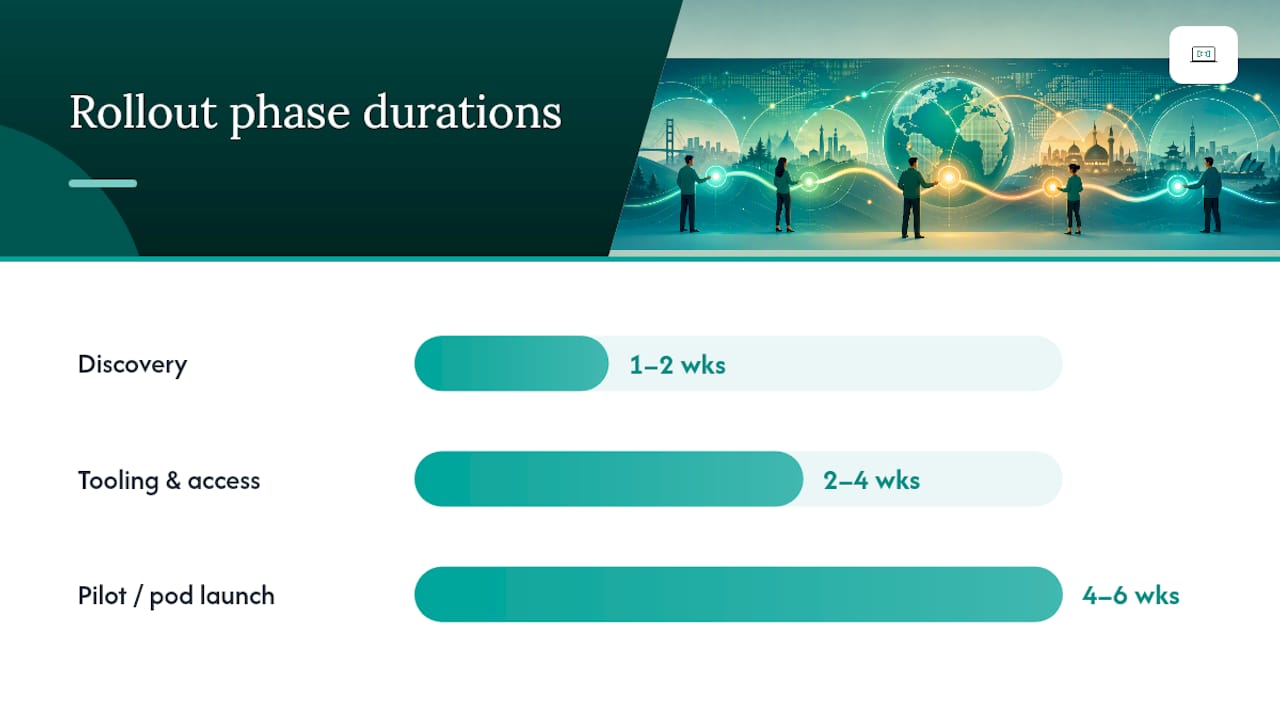
Getting from a signed contract to genuinely reliable coverage usually takes four phases:
- Discovery (week 1 to 2): map current tooling, ticket volume patterns and existing pain points.
- Tooling and access (week 2 to 4): deploy RMM agents, connect ITSM platforms, set up SSPR and identity tools.
- Pilot or pod launch (week 4 to 6): run a limited rollout with one or two regions live, testing handoffs under real conditions.
- Steady state (from week 6 onward): full coverage live with regular SLA reporting.
Before going live, run at least one severity-1 incident simulation timed right at a shift boundary, and cross-check regional holiday calendars against your roster so nobody's covering alone during a public holiday nobody flagged.
Quick wins that cut overnight volume fast: enable SSPR immediately, automate MFA and VPN provisioning, and build priority macros for the ten most common ticket types before go-live.
Why an Australian-standard partner makes this easier
Most businesses don't need to build this stack themselves. My IT Butler runs on-demand troubleshooting, ongoing IT supervision, vendor liaison and documented runbooks as a single service, built specifically for organisations that don't have the internal bandwidth to design a follow-the-sun operation from scratch.
This fits distributed SMEs juggling staff across continents, expat teams who need someone reachable outside their home office's hours, and property owners who need remote security oversight for villas or short-term rentals without a local IT department.
The trust signals matter here: published SLAs, certifications including CCNA, CompTIA Security+ and PRINCE2, and client portal access so you can see exactly what's been done and by whom, rather than taking someone's word for it.
- On-demand troubleshooting with documented runbooks for every recurring issue
- Ongoing supervision so problems get caught before they become outages
- Vendor liaison, so you're not the one on hold with three different suppliers
- Client portal access for full visibility into what's happening on your account
Booking a first conversation costs nothing. Start at My IT Butler to see how coverage would map to your regions.
What actually goes wrong
Most cross-timezone support failures I've seen trace back to one thing: teams assume "someone's awake" is the same as follow-the-sun ownership. It isn't. The gap between those two shows up exactly when it hurts most, at 2am during an outage nobody documented properly.
Two fixes work immediately. First, force every handoff through a structured note, no exceptions, even for "quick" tickets. Second, automate the boring high-volume stuff (password resets, VPN access) before you even think about adding a third region.
Get reliable coverage without the overnight guesswork
My IT Butler is the alternative to cobbling together ad-hoc overnight cover yourself: fixed pricing, no long-term contracts, and coordination across time zones handled through WhatsApp, Zoom and email so you're never stuck waiting on a ticket portal for an answer.

A first chat costs nothing and takes fifteen minutes. Tell the team your current setup, your regions, and where the gaps show up, and you'll get a straight answer on whether a two-site model or full follow-the-sun coverage fits your ticket volume. Certifications including CCNA, CompTIA Security+ and PRINCE2 back the technical work, and client portal access means you can see exactly what's being done on your account at any hour.
Book a free chat to get a coverage matrix built around your actual business, or read the managed IT services guide first if you want to compare service tiers before talking to anyone.
Sources
- Serving Multi‑Time‑Zone Clients — How national MSPs structure follow‑the‑sun support
- How to handle IT support across three time zones
FAQ
What is cross-timezone IT support?
It's a provider service that coordinates troubleshooting, monitoring and escalation for a business across multiple regions, using formal handoffs rather than isolated shifts.
What's the difference between availability and follow-the-sun support?
Availability just means someone is awake to answer tickets; follow-the-sun assigns single ownership of each issue with a documented handoff as it moves between regions.
What tools do providers typically use?
Most rely on ITSM platforms like Jira Service Management, Zendesk or Freshservice for ticketing, and RMM tools like Microsoft Intune or Jamf for remote device management.
How long does it take to set up reliable coverage?
A realistic timeline runs four to six weeks from discovery through pilot launch, with steady-state coverage typically live by week six.
Does My IT Butler offer cross-timezone coverage?
Yes. My IT Butler provides on-demand troubleshooting, ongoing supervision, vendor liaison and documented runbooks with fixed pricing for distributed teams and expats.