
TL;DR:
- An IT support ticket system is a software platform that tracks, assigns, and manages all IT issues from start to resolution. It improves support efficiency, enforces SLAs, and enables proactive management by converting requests into trackable records. Proper process discipline and regular review are crucial for maximizing its value in IT operations.
An IT support ticket system is a centralised software platform that captures, categorises, assigns, and tracks every IT issue or service request from the moment it is raised through to resolution. The industry standard term is a help desk ticketing system, and it sits at the heart of any well-run IT service management (ITSM) operation. Without one, support requests arrive through email, phone calls, chat messages, and corridor conversations, and they get lost. With one, every request becomes a trackable digital record with a full history, an assigned owner, and a clear status. For IT managers and team leaders, this is the difference between reactive firefighting and a support operation that actually scales.
What is an IT support ticket system and how does it differ from basic help desk software?
A ticketing system and help desk software are closely related but not identical. Help desk software is the broader category. It typically includes ticketing, a customer-facing portal, reporting dashboards, and sometimes asset management. A ticketing system is the core engine inside that software. It converts incoming requests into unique, numbered tickets that the team can manage, prioritise, and close.
The inputs can come from anywhere. A user sends an email, submits a web form, opens a chat, or an automated monitoring alert fires. The system converts these inputs into a single, consistent ticket format regardless of the channel. That consistency is what replaces fragmented communication. Instead of chasing someone through Slack to find out if a printer issue was resolved, you check the ticket.
ITSM is the strategic framework that governs how IT services are planned, delivered, and improved. A ticketing system is the tactical tool that executes within that framework. Confusing the two leads to underinvestment in process design and over-reliance on software to fix what are actually workflow problems.
How does a ticket system work from submission to resolution?
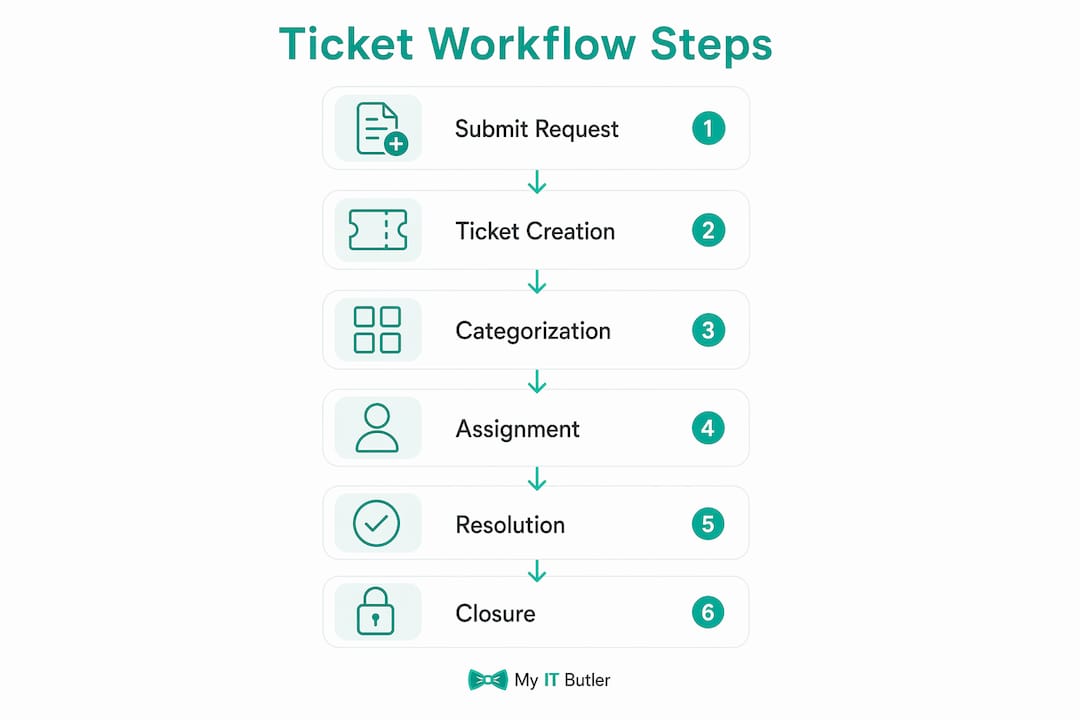
The IT support ticket process follows a consistent sequence of stages. Each stage adds structure and accountability to what would otherwise be an informal and unreliable exchange.
- Ticket submission. A user reports an issue via email, a self-service portal, live chat, or an automated system alert. The channel does not matter. The system captures it.
- Automatic ticket creation. The system generates a unique ticket record with a reference number, timestamp, and the user's details. No manual data entry is required at this point.
- Categorisation and prioritisation. The ticket is tagged by type (hardware fault, software error, access request) and assigned a priority level. Priority is usually based on impact and urgency, which are defined in the organisation's Service Level Agreements (SLAs).
- Triage and routing. The ticket is assigned to the right agent or team. This can be automatic, based on category rules, or manual, based on a team leader's judgement.
- Investigation and resolution. The assigned agent works on the issue, logs notes inside the ticket, and communicates with the user through the system. All updates are visible to the team.
- Closure and knowledge base update. Once resolved, the ticket is closed and the resolution is documented. That documentation feeds the knowledge base, reducing the time needed to resolve the same issue next time.
- KPI tracking. Managers monitor metrics including average response time, average resolution time, and backlog volume to spot bottlenecks and measure team performance.
The standard ticketing workflow gives managers a live view of every open request, who owns it, and how long it has been waiting. That visibility alone changes how a team operates.
Pro Tip: Set up automated acknowledgement emails the moment a ticket is created. Users who receive immediate confirmation are far less likely to send follow-up emails or call the helpdesk, which reduces duplicate tickets and keeps your queue clean.

What are the main benefits of using an IT support ticket system?
The benefits of support ticket systems go well beyond keeping a tidy inbox. They change the operational capacity of an IT team.
- First-contact resolution improves significantly. A structured system gives agents the full context of an issue before they respond. Implementing a ticketing system can increase first-contact resolution by 37% and improve overall support efficiency by 50%. Those numbers reflect what happens when agents stop wasting time gathering basic information and start solving problems immediately.
- SLA compliance becomes measurable. Without a ticketing system, SLAs are aspirational. With one, every ticket carries a deadline, and the system flags breaches before they happen. Accountability is built into the process.
- Duplicate effort is eliminated. Two agents working the same issue is a common problem in email-based support. A ticketing system makes every open request visible to the whole team, so duplication stops.
- Support scales without adding headcount. As request volume grows, the system absorbs the administrative load. Routing, categorisation, and status updates happen automatically. The team focuses on resolution, not administration.
- Reporting becomes genuinely useful. Managers can pull reports on ticket volume by category, resolution times by agent, and recurring issue types. That data drives decisions about training, infrastructure investment, and staffing.
- Knowledge management compounds over time. Organisations that treat closed tickets as knowledge base entries automate responses to common queries and reduce repetitive workload. The system gets more valuable the longer it runs.
For remote teams and distributed organisations, these benefits are amplified. When your IT team and your users are in different time zones, a well-run IT helpdesk is the only way to maintain consistent service quality across the board.
How does a ticketing system fit within ITSM and broader IT operations?
ITSM is a strategic framework. A ticketing system is a tactical tool. Confusing these two leads to a common and costly mistake: organisations buy ticketing software expecting it to fix their IT service delivery, then wonder why nothing improves.
The ticketing system executes within the ITSM framework. ITSM defines the policies, the SLAs, the change management process, and the service catalogue. The ticketing system records and tracks activity against those policies. Without the framework, the system is just a list of complaints.
When integrated properly, a ticketing system supports several ITSM disciplines:
- Incident management. Every unplanned disruption is captured, prioritised, and resolved through the ticket workflow.
- Change management. Change requests are raised as tickets, reviewed, approved, and tracked through the same system.
- Asset management. Tickets linked to specific assets (a laptop, a server, a software licence) build a history of issues against that asset, informing replacement and maintenance decisions.
- Problem management. Recurring tickets pointing to the same root cause trigger a problem record, which drives a permanent fix rather than repeated workarounds.
The strategic value of a ticketing system comes from treating it as a data source, not just a queue manager. Ticket data reveals which systems fail most often, which users need more training, and where infrastructure investment will have the greatest impact. Teams that use ticket data strategically transition from reactive support to proactive IT management.
What are best practices when implementing an IT support ticket system?
Getting the software running is the easy part. Getting the team to use it correctly, and getting value from it, requires deliberate process design.
- Define your SLAs before you go live. Without SLAs defined upfront, the system tracks activity but not performance. SLAs give every ticket a target, and the system measures whether you hit it.
- Build a single source of truth. Every support communication must enter the system. Informal chats and emails that bypass the ticketing system create invisible workload and destroy the accuracy of your reporting. This is a cultural rule as much as a technical one.
- Avoid over-automation early on. Automation is powerful, but misconfigured routing rules send tickets to the wrong team and erode trust in the system. Start with simple rules and add complexity once the team understands the workflow.
- Address cultural resistance directly. The greatest obstacle to adoption is employees viewing the system as administrative overhead. Show the team their own metrics. When agents see their resolution times improving and their backlog shrinking, resistance fades.
- Mine closed tickets regularly. Closed ticket data identifies recurring infrastructure issues and training gaps. Schedule a monthly review of closed tickets by category. The patterns you find will shift your IT operation from reactive to genuinely proactive.
- Build the knowledge base from day one. Every resolved ticket should include a brief resolution note. Over time, these notes become the foundation of a self-service knowledge base that reduces ticket volume without reducing service quality.
Pro Tip: Assign one team member as the "ticket quality owner" for the first three months after go-live. Their job is to check that tickets are categorised correctly, resolution notes are complete, and SLA targets are being set. This single role prevents the bad habits that are very hard to fix later.
Remote and distributed teams face additional challenges when rolling out ticketing systems. The IT challenges facing remote teams are well documented, and a poorly implemented ticketing system can make them worse rather than better.
Key takeaways
An IT support ticket system delivers measurable value only when it is backed by defined SLAs, consistent process discipline, and regular review of closed ticket data.
| Point | Details |
|---|---|
| Core definition | A ticketing system centralises IT requests into trackable records with full history and assigned ownership. |
| Workflow stages | Every ticket moves through submission, categorisation, triage, resolution, and closure with documented notes. |
| Measurable benefits | Structured systems can improve first-contact resolution by 37% and support efficiency by 50%. |
| ITSM relationship | Ticketing systems are tactical tools that execute within a broader ITSM strategic framework. |
| Implementation priority | Define SLAs and enforce a single source of truth before configuring automation or advanced routing. |
The part most IT managers get wrong
After working with IT teams across multiple industries, I have seen the same mistake repeated consistently. Organisations spend weeks evaluating ticketing software, comparing feature lists, and debating pricing tiers. Then they go live with the winning platform and wonder why the team still resolves issues through email and Slack.
The software was never the problem. The process was.
A ticketing system does not create discipline. It records it. If your team does not have a shared understanding of what a ticket is, when to raise one, and what a good resolution note looks like, the system will faithfully document your chaos in a more organised format.
The teams I have seen get the most from their ticketing systems share one habit: they treat closed ticket analysis as a standing agenda item, not an occasional exercise. Every month, they look at the top ten ticket categories, the average resolution time by category, and the tickets that breached SLA. That review drives training decisions, infrastructure changes, and process improvements. The ticketing system becomes the central nervous system of their IT operation, not just a queue.
Automation bloat is the other trap. I have watched teams build elaborate routing rules and auto-responses that work perfectly for the first two weeks, then start misfiring as the business changes. The rule of thumb I follow: automate what is genuinely repetitive and low-risk, and keep a human in the loop for anything that requires judgement. Start simple. Add automation only when you can clearly see it is needed.
The uncomfortable truth is that selecting the right ticketing software matters far less than most IT managers think. What matters is the process you wrap around it.
— Thomas
How Myitbutler supports your IT ticketing needs
Running a ticketing system well requires more than software. It requires someone who understands the full picture: your SLAs, your team's workflow, your infrastructure, and the gaps in between.

Myitbutler provides remote IT support and managed services built for distributed businesses, international teams, and organisations that need Australian-standard IT delivered globally. With over 15 years of enterprise experience and certifications including CCNA, CompTIA Security+, and PRINCE2, the team helps organisations set up, integrate, and get genuine value from their IT support processes. Whether you are starting from scratch or fixing a system that is not delivering, book a free consultation to talk through your options with no obligation.
FAQ
What is an IT support ticket system in simple terms?
An IT support ticket system is software that converts every IT issue or request into a numbered record that can be tracked, assigned, and resolved. It replaces informal communication channels with a single, transparent workflow.
How does a ticket system work for end users?
Users submit a request via email, a web form, or a chat channel, and the system automatically creates a ticket with a reference number. The user receives updates through the system until the issue is resolved and the ticket is closed.
What is the difference between a ticketing system and ITSM?
ITSM is the strategic framework that governs IT service delivery, including policies, SLAs, and service catalogues. A ticketing system is the tactical tool that records and tracks activity within that framework.
What are the main benefits of support ticket systems for IT teams?
The core benefits include enforced SLA compliance, elimination of duplicate effort, improved first-contact resolution, and the ability to scale support without adding headcount. Closed ticket data also builds a knowledge base that reduces future ticket volume.
How do you use a ticket system effectively?
Define your SLAs before go-live, require all communications to enter the system, avoid over-automating routing rules early on, and review closed ticket data monthly to identify recurring issues and training gaps.