
An IT coordinator organises your vendors, enforces service agreements, and keeps distributed teams running by managing the processes that prevent downtime, not by fixing every laptop personally. Small businesses and remote teams benefit most, since they rarely need a full-time technician on staff. For most distributed setups, the right move is a business-minded coordinator or a managed remote partner who can cover multiple time zones without a long-term contract.
TL;DR:
- Businesses with more than two vendors or remote staff significantly benefit from a dedicated coordinator to manage vendor relations and documentation effectively.
- Top candidates should demonstrate comfort with ticketing systems, asset tracking, and basic cloud and network knowledge, along with strong communication skills.
- The first 30 days should deliver a complete asset inventory, SLA review, and a written 30/60/90 plan, providing measurable progress early on.
- Managed remote IT support often offers a flexible, cost-effective alternative to in-house hires, especially for distributed teams across multiple time zones.
- Certifications like CCNA, Security+, and PRINCE2 indicate structured thinking but require relevant experience for success in the role.
Table of Contents
- What does an IT coordinator actually do?
- Who should you actually hire?
- How do you test whether a candidate can actually coordinate?
- What will it cost, and which model fits your team?
- What should you ask in the interview?
- What should the first 90 days look like?
- The hiring mistake almost every distributed team makes
- Why Myitbutler is built for exactly this hiring gap
- Sources
- FAQ
What does an IT coordinator actually do?
An IT coordinator's job is administrative and operational, not hands-on repair work. They sit between your business and the technical world, translating vendor jargon into decisions you can actually make.
Their core duties usually include:
- Vendor liaison — chasing quotes, renewals, and support tickets with your internet provider, software vendors, and hardware suppliers
- SLA oversight — checking that vendors deliver what they promised within agreed timeframes
- Ticket governance — making sure support requests get logged, prioritised, and closed instead of forgotten in an inbox
- Asset inventory — knowing exactly what hardware, licences, and subscriptions your business owns and pays for
- Documentation — keeping written records so knowledge doesn't disappear when someone leaves
- Continuity planning — preparing for outages, breaches, or staff turnover before they happen
This is different from a technician, who fixes the printer or reinstalls Windows, and different again from an IT manager, who typically owns budgets, staffing, and long-term technology strategy at larger organisations. Job description data from Jobdescription confirms the coordinator role sits closer to project and vendor management than to bench repair work. If your business has more than two vendors, remote staff, or recurring IT headaches, a coordinator is worth the investment.
Who should you actually hire?
The right profile depends on your size, budget, and how spread out your team is.
- Freelancer or contractor — good for occasional coordination needs; low commitment, but availability can be inconsistent
- Junior in-house hire — works if you have simple, predictable systems and time to train someone up
- Part-time senior coordinator — suits growing SMEs that need experienced judgement without a full salary
- Co-managed or managed service — best for distributed teams, expats, and businesses without fixed premises
A digital nomad running a two-person consultancy needs something very different from a 40-person distributed company juggling five SaaS vendors and three time zones. The nomad usually does better with a managed remote partner billed on demand. The larger distributed team often needs a part-time senior coordinator working alongside a managed service for routine maintenance, an arrangement VC3 describes as letting internal staff focus on strategy while specialists handle the repetitive work.
Certifications matter here as a baseline signal. Look for CCNA for networking fundamentals, CompTIA Security+ for security awareness, or PRINCE2 for project governance. None of these replace real coordination experience, but they show a candidate has invested in structured thinking rather than picking things up ad hoc.
How do you test whether a candidate can actually coordinate?
Skip the resume theatre and test for three things: technical fluency, communication discipline, and whether they think in outcomes rather than tasks.
Hard skills worth verifying:
- Comfort with a ticketing system (Zendesk, Freshdesk, or similar) and how they'd structure escalation
- Basic change management, meaning how they document and roll back a failed update
- Asset tracking methods, ideally with a real example of a spreadsheet or tool they've used
- Working familiarity with cloud platforms and networking basics, even if they're not the specialist doing the deep technical work
Soft skills to prioritise: Emotional intelligence and asynchronous communication ability are decisive for remote hiring, according to DistantJob's hiring research, often more predictive of success than technical depth alone. A coordinator who can de-escalate a frustrated vendor over email, without a phone call, at 11pm their time, is worth more than one who only performs well face to face.
Ask directly about KPIs. VC3's hiring guidance recommends asking candidates what metrics they'd track, because the answer reveals whether they think like an operator or just a fixer. Push for specifics on:
- Mean time to acknowledge (MTTA) — how fast tickets get a first response
- SLA adherence — whether vendors are actually hitting the terms you're paying for
- Documentation completion rate — whether processes get written down or live only in someone's head
Pro Tip: Ask the candidate to walk you through a documentation sample or a rough 30/60/90 plan on the spot. A real artefact tells you more in five minutes than a polished answer to a hypothetical ever will.
What will it cost, and which model fits your team?
Pricing shapes vary a lot depending on how much coverage you actually need.
- Hourly freelancers suit occasional, unpredictable issues but offer no guaranteed coverage window
- Employed staff give full-time attention but come with salary, leave, and superannuation overheads even during quiet weeks
- Retained part-time coordinators offer predictable monthly cost with defined hours, a middle ground many growing SMEs land on
- Managed services bundle coordination, monitoring, and vendor liaison into a fixed monthly fee, often with no long-term contract
Budgeting guidance is straightforward: hourly rates suit low-frequency needs, fixed monthly retainers suit predictable ongoing work, and project fees suit one-off migrations or rollouts. For distributed teams, coverage windows matter more than the price tag. A coordinator based in one time zone leaves gaps when your Manila support team hits an issue at 2am Sydney time, so ask any candidate or provider exactly how escalation works outside their normal hours.
What should you ask in the interview?
Structure the conversation in three stages, as recommended in hiring guides for technical and remote roles: technical, behavioural, and culture fit. This stops strong talkers from coasting past weak fundamentals.
- Technical stage — ask them to walk through a real incident they resolved, focusing on how they diagnosed the vendor's fault versus an internal one
- Behavioural stage — ask how they've negotiated a vendor down on price or turnaround time, and listen for specifics, not general claims
- Culture and fit stage — ask what KPIs they'd report to you in the first month, then check if the answer matches what your business actually needs
A strong answer to the incident question includes a timeline, who they contacted, and what changed afterwards. A weak answer stays vague about outcomes. DistantJob's research on remote hiring backs a three-part structure like this precisely because it surfaces real experience rather than rehearsed answers.
Red flags include candidates who can't name a single vendor they've negotiated with, who describe documentation as "not really my thing," or who answer every technical question with "it depends" and nothing further. Score each stage separately rather than forming one overall impression, it keeps you honest when a charming interview covers for thin substance.
What should the first 90 days look like?
The first month should produce concrete deliverables, not just familiarisation.
- Complete asset inventory — every device, licence, and subscription accounted for
- Critical SLA review — flagging which vendors are underperforming against what you're paying for
- Vendor action list — a prioritised list of renewals, complaints, or renegotiations needed
- A written 30/60/90 roadmap — what gets fixed first, what gets monitored, what gets planned for later
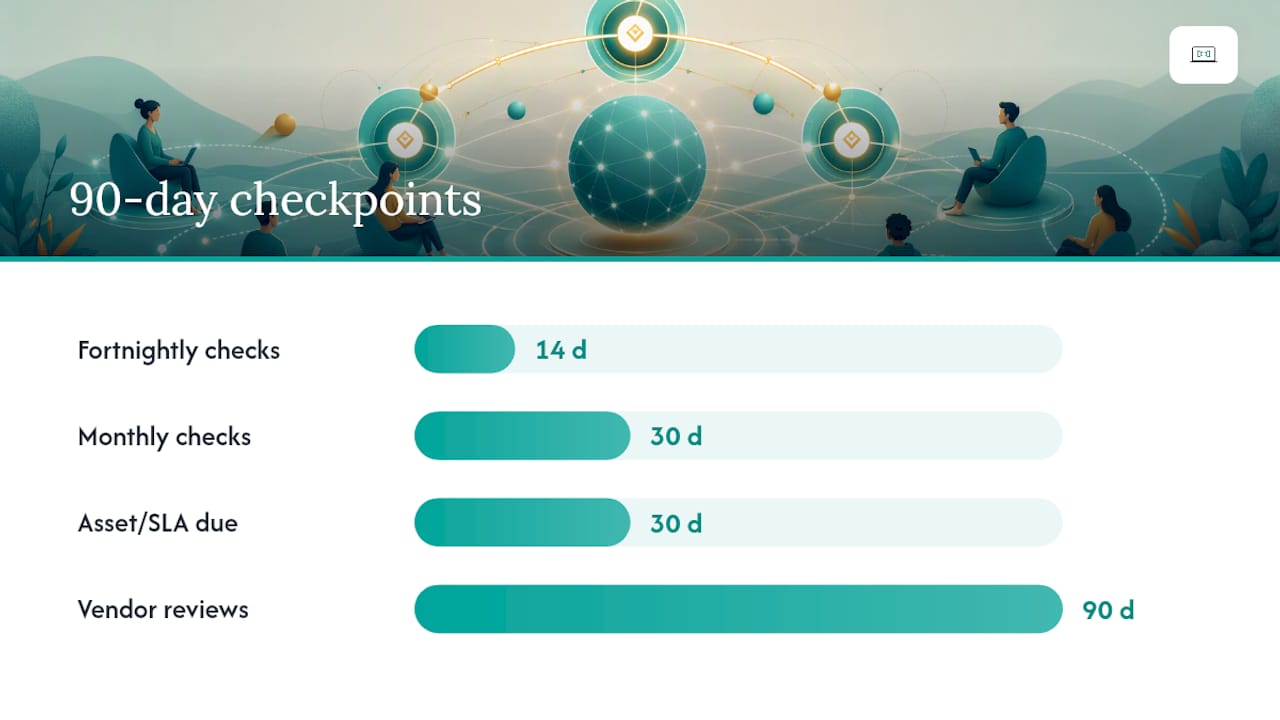
This kind of early milestone structure is common practice in remote-support and hiring literature, and it works because it gives you something measurable within weeks rather than a vague promise of "settling in." Suggest a fortnightly check-in for the first quarter, then move to monthly once things stabilise. Vendor reviews should happen quarterly at minimum, more often if you're mid-renegotiation with anyone.
Pro Tip: Ask for the asset inventory and SLA review in writing by day 30. If a coordinator can't produce either, that's your first warning sign about how they'll handle month six.
The hiring mistake almost every distributed team makes
Most small teams hire a technician when they actually need a coordinator. They post a job ad for someone who can "fix computers and manage our IT," get a candidate who's brilliant at troubleshooting and hopeless at vendor negotiation, then wonder six months later why nothing is documented and every renewal catches them off guard.
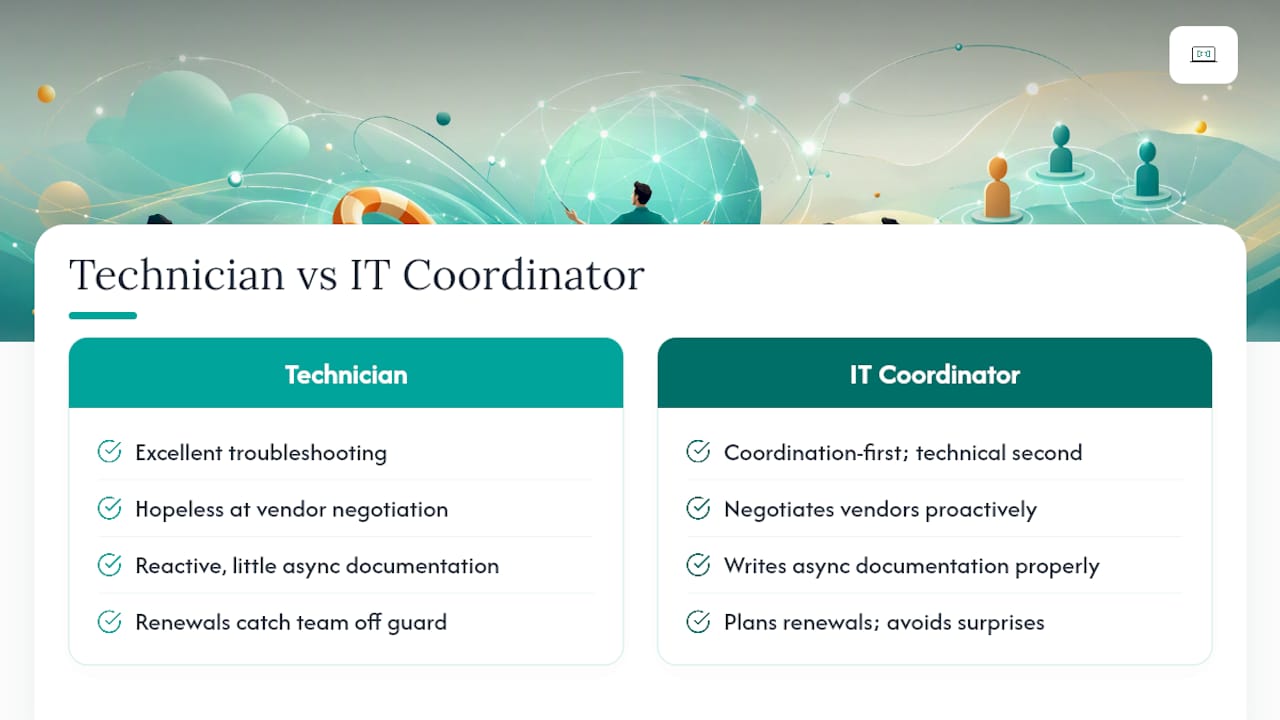
The businesses that get this right hire for coordination instincts first and technical depth second. That's the whole philosophy behind why small businesses need an IT strategy rather than a pile of reactive fixes. Async documentation matters more than most owners expect, too. A coordinator who writes things down properly saves a distributed team from the 2am ticket becoming a three day standoff across time zones.
Certifications like CCNA, CompTIA Security+, and PRINCE2 aren't decoration. They're a reasonable proxy for whether someone thinks in structured processes rather than improvised fixes, which is exactly what a distributed team needs from this role.
— Thomas
Why Myitbutler is built for exactly this hiring gap
Remote IT support providers offer an alternative to hiring blind for distributed teams who need coordination without the overhead of a full-time technical hire. Instead of gambling on a job ad, you can access on-demand remote troubleshooting, ongoing IT supervision, vendor liaison, and strategic planning from experienced teams.

Coordination commonly happens across WhatsApp, Zoom, and email, designed for teams spread across time zones rather than a single office. Pricing is often fixed and transparent, usually without long-term contracts locking you in if your needs change. Services can adhere to Australian standards and be delivered remotely to international organisations, SMEs, expats, and digital nomads alike.
If you're weighing up whether to hire in house or bring in a coordinated partner, start with a conversation rather than a job posting. Book a free chat with Myitbutler to talk through your setup, or visit the main site to see how the coordination model works before you commit to anything.
Sources
For deeper detail on role scope and hiring criteria, the JobDescription.org coordinator profile and VC3's IT manager hiring guide are worth a read. Myitbutler's own guide on types of IT support packages breaks down engagement models in more detail, and remote team IT challenges covers the async coordination side further.
- Jobdescription
- How to Hire an IT Specialist: Skills, Salary & Hiring Guide (2026) | DistantJob
- IT Manager Job Description Updated for 2026 | Indeed
FAQ
What is the difference between an IT coordinator and an IT manager?
An IT coordinator handles day-to-day vendor liaison, documentation, and ticket governance, while an IT manager typically owns budgets, staffing, and long-term strategy at larger organisations, per Indeed's role breakdown.
Do I need a coordinator if I only have five staff?
If you rely on more than two vendors or have any remote staff, a part-time coordinator or managed service like Myitbutler usually pays for itself in avoided downtime and missed renewals.
What certifications should I look for in a candidate?
CCNA, CompTIA Security+, and PRINCE2 are strong baseline signals of structured technical and project thinking, though real vendor-negotiation experience matters just as much.
Can a managed service replace an in-house coordinator entirely?
For many small and distributed teams, yes. A co-managed or fully managed approach, such as Myitbutler's remote coordination model, covers vendor liaison and supervision without the overhead of a full-time salary.
How long should onboarding take before I see results?
Expect a complete asset inventory and SLA review within 30 days, with a full 30/60/90 roadmap in place to guide the next two months of work.