
TL;DR:
- Small businesses often neglect proactive IT budgeting, leading to costly emergencies and overlooked expenses. Implementing adaptive, quarterly reviews and focusing on essential categories like security and infrastructure enhances cost control and resilience in 2026. Leveraging strategic planning, cloud optimization, and managed support ensures predictable spending and better protection against escalating cyber threats.
Most small businesses only think about their IT budget after something breaks. A server fails, a subscription auto-renews at double the price, or a cyberattack wipes out a week of productivity. The cost of that reactive approach is enormous, and in 2026, with cloud costs rising, security threats multiplying, and software subscriptions stacking up quietly in the background, it is more expensive than ever. This guide will show you exactly how to create an IT budget for your small business in 2026, covering the right categories, adaptive planning techniques, cost optimisation strategies, and the security spending you cannot afford to skip.
Table of Contents
- Key takeaways
- The core categories of a small business IT budget
- Adaptive budgeting: moving beyond the annual plan
- Practical strategies to optimise IT spending in 2026
- Budgeting for IT security in 2026
- How to build and manage your IT budget step by step
- My perspective on IT budgeting for 2026
- How Myitbutler can help you plan smarter
- FAQ
Key takeaways
| Point | Details |
|---|---|
| Know your budget categories | A healthy small business IT budget splits across personnel, software, infrastructure, security, and contingency reserves. |
| Go adaptive, not static | Rolling monthly forecasts beat annual budgets by letting you respond quickly when costs or priorities shift. |
| Prioritise security spending | With breach costs averaging over $3m, skimping on cybersecurity is a false economy for any small business. |
| Review and reallocate quarterly | Quarterly reviews with reallocation authority keep spending aligned with where your business actually is heading. |
| Watch for hidden costs | Reactive IT and deferred technical debt quietly inflate your real spend well beyond what your budget spreadsheet shows. |
The core categories of a small business IT budget
Before you can create an IT budget for your small business in 2026, you need to understand what you are actually budgeting for. Most small businesses underestimate the number of categories involved, and that is where surprise costs enter.
A well-structured small business IT budget typically breaks down like this:
| Category | Typical allocation range | What it covers |
|---|---|---|
| Personnel | 28–55% | Internal IT staff, contractors, managed service fees |
| Software and SaaS licences | 26–30% | Subscriptions, productivity tools, specialised applications |
| Infrastructure | 20–24% | Hardware, cloud hosting, networking equipment |
| Security | 5–14% | Endpoint protection, firewalls, compliance tools |
| Contingency reserve | 5–10% | Emergency repairs, unexpected upgrades, new opportunities |
According to 2026 IT budget planning guidance, experts recommend keeping a 5 to 8 per cent contingency reserve specifically to avoid reactive emergency spending that blows out your numbers mid-year.
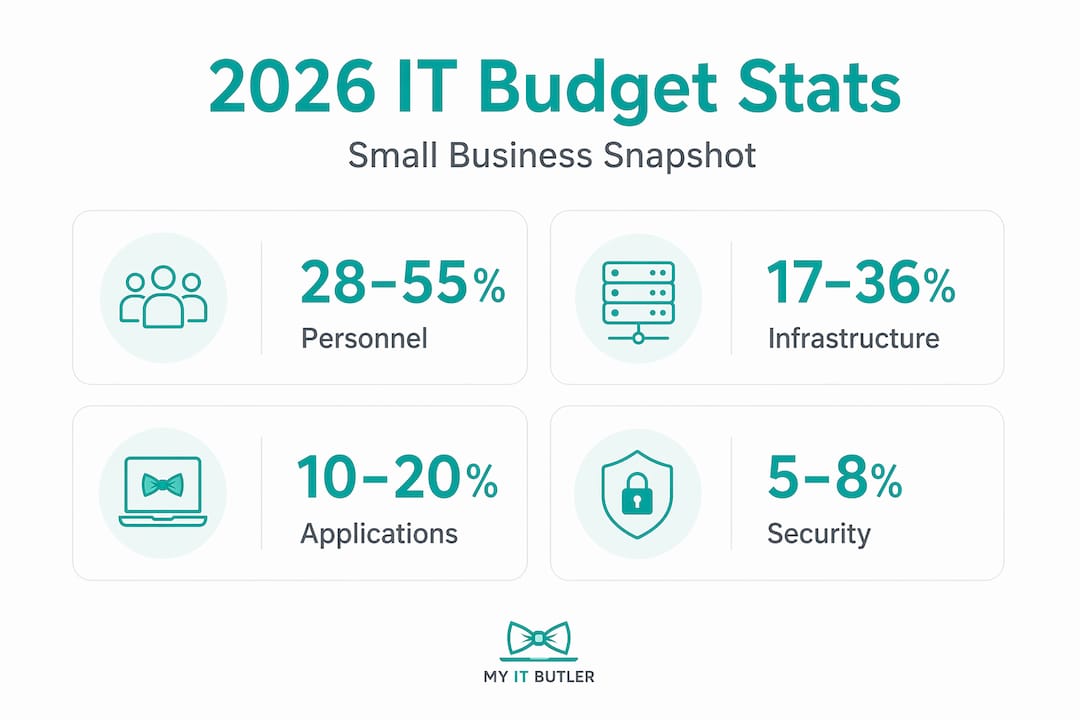
A few things are worth noting about these ranges. Personnel is often the largest line item, but for small businesses using managed IT services rather than hiring full-time staff, that cost becomes more predictable and often lower. Software costs are growing fast as more tools shift to subscription models, which means a single overlooked auto-renewal can throw your whole quarter off. Infrastructure spending is increasingly cloud-based, which brings flexibility but also waste if not monitored closely.
Pro Tip: Before you set a single budget figure, pull together 12 months of actual IT invoices, card statements, and subscriptions. You will almost certainly find tools you forgot you were paying for.
The security allocation is worth particular attention. Five per cent sounds small, but for a business spending $80,000 per year on IT, that is $4,000 dedicated specifically to keeping your systems and customer data safe. Given the stakes, many businesses should sit closer to the 14 per cent end of that range. Understanding the IT support packages available to you can help you decide how to structure this spend.
Adaptive budgeting: moving beyond the annual plan
The biggest mistake in small business IT budget planning is treating it like a one-time annual exercise. You fill in a spreadsheet in October, get sign-off in November, and then spend the next 12 months hoping reality matches the plan. It almost never does.
Successful businesses shift to adaptive models with rolling monthly forecasts led by department heads. This collaborative approach means that when a vendor raises prices, a new compliance requirement appears, or a growth opportunity demands faster hardware, you can respond without a budget crisis.
Here is how to build an adaptive IT budgeting process:
- Set a baseline. Start with your actual IT costs from the past year, including the hidden ones like emergency callouts and productivity lost to downtime.
- Build three scenarios. Create a base-case plan, a constrained plan for tighter revenue months, and a growth plan if demand accelerates. Scenario-based planning helps leadership understand the real risk of underfunding before a crisis hits.
- Schedule monthly check-ins. Assign someone accountable for reviewing actual spend against forecast each month. This does not need to be an IT person. It just needs to be consistent.
- Protect the contingency reserve. Do not raid it for planned spending. It exists specifically for surprises.
- Adjust quarterly. Formal quarterly reviews with authority to reallocate funds are what turn a budget from a document into a management tool.
Pro Tip: Adaptive budgeting is not about cutting costs blindly. It is about operational flexibility that lets your business keep functioning well even when the economic environment shifts unexpectedly.
The organisations that handle IT surprises best are not the ones with the biggest budgets. They are the ones that review, adapt, and reallocate regularly. Even a 30-minute monthly budget review with a clear variance report puts you ahead of most small businesses.
Practical strategies to optimise IT spending in 2026
Knowing your categories and adopting a flexible approach gets you halfway there. The other half is actively looking for ways to spend smarter without cutting corners on things that matter.
Cloud cost management
Cloud waste averages 30% across businesses of all sizes. That means for every $10,000 you spend on cloud services, roughly $3,000 delivers no real value. The fix is not complicated. Do a quarterly review of your cloud usage. Rightsize any servers or storage that are over-provisioned. Look at reserved instances for workloads you run consistently, and spot or pre-emptible pricing for flexible jobs. These steps alone can reduce your cloud bill by 20 to 30 per cent.
SaaS licence rationalisation
Most small businesses are paying for overlapping tools. You might have three video conferencing licences across two different platforms, or a project management tool nobody logs into anymore. An annual SaaS audit, where you list every subscription, confirm who uses it and how often, and cancel duplicates, can save thousands without removing anything people actually rely on. A clear view of your small business tech expenses makes this process much faster.
Staff augmentation over permanent hires
Staff augmentation converts fixed personnel costs into variable expenses, letting you scale IT capacity up or down based on actual need. For a small business that needs more IT support during a system migration but less during quieter periods, this approach saves money and removes the overhead of recruitment, HR administration, and office space.

Addressing technical debt
Technical debt refers to older systems, patched code, or deferred upgrades that accumulate over time. Left unaddressed, deferred technical debt causes slower systems, higher defect rates, and security vulnerabilities. Allocating 10 to 15 per cent of your development or IT maintenance capacity to addressing this debt pays off within six to twelve months through fewer incidents and faster operations.
Budgeting for IT security in 2026
Security budgeting is where many small businesses make their costliest mistake. They treat it as optional until it is not.
Small businesses face average breach costs exceeding $3 million. That figure covers not just the technical recovery, but legal exposure, lost business, reputational damage, and staff time. Against that backdrop, spending a few thousand dollars per year on layered security controls is not a cost. It is insurance.
Your security budget for 2026 should cover:
- Multifactor authentication (MFA): Adds a second verification step to logins, blocking the vast majority of credential-based attacks. Low cost, high impact.
- Endpoint protection: Security software on every device, including laptops used by remote staff or employees working from home.
- Patch management: Automated or scheduled updates to operating systems and software to close known vulnerabilities before attackers exploit them.
- Backup and recovery: Regular, tested backups stored separately from your main systems. This is your primary defence against ransomware.
- Identity and access management: Controls over who can access what, reducing the risk of insider threats and limiting damage if an account is compromised.
"Budgeting for layered security controls such as multifactor authentication, endpoint security, patch automation, and backup verification blocks most automated attacks and reduces costly incident risks."
The most cost-effective approach for small businesses is bundling managed security with your IT support. Choosing managed IT providers with a security-first mindset simplifies budgeting by consolidating services, reducing tool sprawl, and increasing cost predictability. You also get consistent monitoring without needing an in-house security team. For deeper reading on what that looks like in practice, the guide on securing customer data is worth your time.
Do not forget compliance. Audits, staff training on phishing awareness, and privacy policy maintenance are often overlooked in security budgets. They are not glamorous, but regulators and customers expect them.
How to build and manage your IT budget step by step
With the categories and strategies clear, here is the practical process for putting your 2026 IT budget together and keeping it on track throughout the year.
- Audit last year's actual spend. Pull every IT-related invoice, subscription, and callout cost. Include the hidden costs of reactive IT such as lost productivity and emergency repair bills. Many businesses only switch to flat-fee managed IT services once they realise these reactive costs have been quietly doubling their real IT spend.
- Map spend to categories. Assign every cost to one of the five budget categories. This immediately shows you where money is going and where gaps exist.
- Set forecasts aligned with business goals. If you are planning a new office, a website rebuild, or a significant staff increase, those need corresponding IT budget lines. IT spend disconnected from business objectives is the most common cause of funding gaps.
- Involve your team leads. The person running your operations, sales, or finance function knows what tools their team needs. Including them in the process produces better numbers and removes the "IT just spends our money" frustration that leads to budget conflicts.
- Build in quarterly reviews. Annual-only budgets risk becoming obsolete within months. Quarterly reviews with documented variance against forecast and authority to reallocate keep your spending purposeful.
Common budgeting mistakes to avoid:
| Mistake | Why it hurts |
|---|---|
| Budgeting only initial build costs | 15 to 20% annual maintenance adds up fast and creates funding gaps if ignored |
| Ignoring technical debt | Deferred fixes compound into larger, more expensive problems over time |
| Annual-only planning | Quarterly reviews are what turn a budget from a document into a decision tool |
| Underestimating software growth | SaaS subscriptions grow by default; without audits, costs creep beyond forecast |
For businesses without a dedicated IT manager, tools like simple spreadsheet templates or lightweight IT management platforms make tracking variance straightforward. The goal is visibility, not complexity.
My perspective on IT budgeting for 2026
I have worked with small businesses across a range of industries, and the pattern I see repeatedly is this: organisations that suffer the most avoidable IT emergencies are not the ones with the smallest budgets. They are the ones with the most rigid ones.
A business that set its IT budget in October and refuses to revisit it in March, despite a new compliance requirement or a vendor price hike, is setting itself up for a crisis. I have seen a single unplanned hardware failure wipe out an entire quarter's contingency reserve because there was no formal review process to catch the warning signs early.
What actually works, in my experience, is the combination of rolling forecasts and a managed IT partner with transparent, flat-fee pricing. When you know exactly what your IT support costs each month, and you have a partner who proactively flags issues rather than waiting to be called, your budget becomes far more predictable. Many small businesses I have spoken with over-invest in running existing systems and under-invest in the security and improvements that protect and grow the business. That imbalance is worth fixing before it costs you more to correct it later.
The businesses I see thriving in 2026 are the ones treating their IT budget as a living document, not a filed report. If your current approach is "set it and forget it," this is the year to change that.
— Thomas
How Myitbutler can help you plan smarter
If pulling together an IT budget feels overwhelming or you are not sure whether your current spending is working as hard as it should, Myitbutler is built for exactly this situation.

Myitbutler provides remote IT support for small businesses across Australia and internationally, with flat-fee managed services that replace unpredictable break-fix costs with clear, fixed monthly pricing. That alone makes 2026 IT budget planning significantly easier. Beyond support, Myitbutler offers proactive security management, vendor coordination, and strategic planning from a team with over 15 years of enterprise experience and certifications including CCNA, CompTIA Security+, and PRINCE2. Whether you are starting your budget from scratch or reviewing what you already have, book a consultation to get a clear picture of what your IT should cost and what it should be delivering. Existing clients can manage requests directly through the client support portal.
FAQ
What percentage of revenue should a small business spend on IT?
Most small businesses spend between 4 and 6 per cent of revenue on IT, though businesses in highly regulated industries or those scaling quickly often spend more. The right figure depends on your growth goals, risk profile, and how much of your operations depend on technology.
How often should I review my small business IT budget?
Quarterly reviews are the minimum recommended frequency. Annual-only planning risks leaving your budget misaligned with reality for months, which leads to either overspending or cutting things that matter.
What hidden IT costs should I watch for in 2026?
The most common hidden costs are reactive callout fees, productivity loss during outages, auto-renewing SaaS subscriptions you no longer use, and the compounding cost of deferred technical debt. Auditing your actual spend against your budget each quarter surfaces most of these.
Is managed IT support worth it for a small business?
For most small businesses, yes. Flat-fee managed IT services replace unpredictable reactive costs with a consistent monthly expense, making budgeting far more accurate and reducing the risk of expensive emergencies going undetected.
How much should a small business budget for cybersecurity?
Security should represent at least 5 per cent of your total IT budget, with higher-risk businesses allocating up to 14 per cent. Given that breach costs can exceed $3 million, even a modest dedicated security budget delivers strong return on investment through incident prevention alone.