
TL;DR:
- Small business downtime can cost between $127 and $427 per minute, potentially leading to thousands of dollars in losses during outages. Implementing IT inventory, standardisation, monitoring, regular testing, and reliable support significantly reduces the risk and duration of system failures. Focus on disciplined maintenance and clear response plans to ensure continuous operations without the need for in-house IT staff.
Your small business loses money the moment your systems go down. Downtime can cost a small business anywhere from $127 to $427 per minute, meaning a three-hour outage could wipe out between $22,500 and $77,000. If you've been trying to reduce IT downtime in your small business and felt overwhelmed by where to start, you're not alone. This article gives you a practical roadmap: from auditing your IT environment and applying proven downtime reduction strategies, to measuring whether your efforts are actually working.
Table of Contents
- Key takeaways
- Prepare your IT environment to prevent downtime
- Step-by-step strategies to minimise IT downtime
- Common challenges when reducing downtime
- Measuring your downtime reduction success
- My honest take on IT downtime in small business
- How Myitbutler can help you stay online
- FAQ
Key takeaways
| Point | Details |
|---|---|
| Downtime costs are real and immediate | Even a short outage can cost thousands of dollars, making prevention far cheaper than recovery. |
| Standardisation prevents most outages | Defining and enforcing a baseline for your IT environment cuts random outages at the source. |
| Monitoring and patching are non-negotiable | Watching key system metrics and applying updates on schedule catches problems before they escalate. |
| Recovery plans need regular testing | Backups only matter if restores actually work; test them quarterly to confirm. |
| Metrics drive continuous improvement | Tracking MTTR and incident patterns reveals where to focus your next round of improvements. |
Prepare your IT environment to prevent downtime
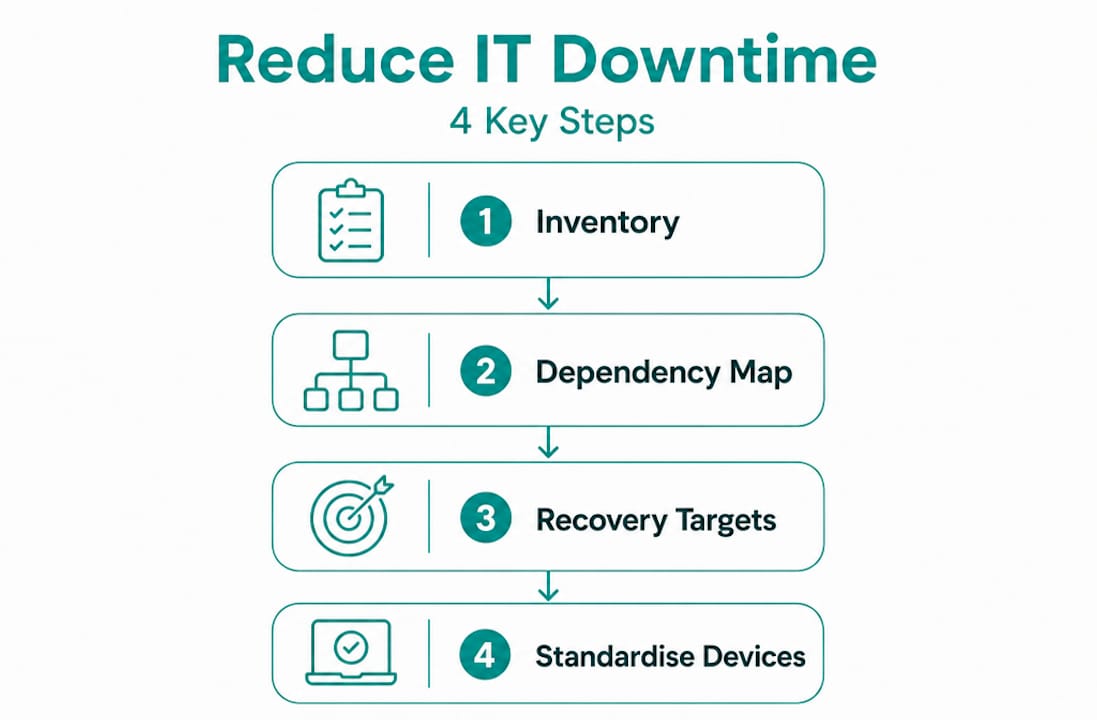
Before you can reduce IT downtime in your small business, you need a clear picture of what you're working with. Most small businesses are surprised to discover just how many devices, software licences, and online services are quietly running in the background. A proper IT inventory is your starting point.
Start with a full IT inventory
List every device, piece of software, and cloud service your business depends on. Include routers, printers, servers, laptops, phones, and any software-as-a-service tools your team uses daily. Once you can see the full picture, you can rank each item by criticality. Which systems, if they fail, would stop your business cold? Those go to the top of your protection list.
From this inventory, build a simple dependency map. A dependency map shows which systems rely on others to function. For example, your accounting software might depend on your internet connection, which depends on your router, which depends on your ISP. If any link in that chain breaks, the whole thing fails. Knowing these relationships lets you direct your protection efforts where they matter most.
Set your recovery targets
Two terms worth knowing here are RTO (Recovery Time Objective) and RPO (Recovery Point Objective). Your RTO and RPO define how long you can afford to be down and how much data you can afford to lose. If your RTO is two hours, your systems and support processes need to be capable of restoring services within that window. If your RPO is four hours, your backups need to run at least every four hours.
Setting these targets early shapes every other decision you make: how often to back up, which systems need redundancy, and what level of IT support you need on standby.
Standardise your endpoints
Endpoint standardisation means every device in your business runs the same approved operating system version, security settings, and software configuration. This sounds like extra work, but it pays off quickly. When every machine is configured the same way, troubleshooting becomes faster, patches apply consistently, and random outages caused by configuration drift become rare.

Pro Tip: Create a one-page device build standard and make it the baseline for every new machine or staff onboarding. It takes an hour to write and saves days of troubleshooting later.
Step-by-step strategies to minimise IT downtime
Once your environment is documented and standardised, you're ready to apply specific small business IT management practices that keep systems running reliably.
-
Set up proactive monitoring. Install a monitoring tool that watches disk space, CPU usage, backup job status, firewall health, and login anomalies. Monitoring key metrics like these catches warning signs before they become full outages. You want an alert on your phone before your staff notice a problem, not after.
-
Schedule and automate patching. Unpatched systems are one of the most common causes of both security incidents and system failures. Set a fixed patching window each week, outside business hours, and automate where possible. Patch operating systems, firmware, and third-party applications on the same schedule.
-
Move critical workloads to the cloud. Cloud platforms typically offer uptime guarantees as high as 99.99%, with built-in redundancy and maintenance handled by the provider. Moving email, file storage, and business applications to reputable cloud services removes your local hardware from the equation for those workloads. Pair this with a solid small business hosting guide to choose platforms that match your reliability needs.
-
Back up correctly and test restores. Run automated daily backups to at least two locations: one offsite or cloud-based, one local. Quarterly restore testing confirms your backups are actually usable. Many businesses discover their restores are broken only during an actual crisis. Don't be that business.
-
Build redundancy into critical systems. For services your business cannot survive without, add a failover option. This might mean a secondary internet connection from a different provider, a backup power supply for key equipment, or a spare device pre-configured and ready to swap in.
-
Train staff and create response playbooks. Staff training and clear response plans significantly speed up recovery and reduce repeat incidents. A response playbook is simply a short document that tells staff exactly what to do when a specific system fails. Who do they call? What do they check first? What should they never do?
-
Engage reliable remote IT support. Having a trusted IT support service on call means issues are handled by someone who knows your environment, not a random technician starting from scratch. For small businesses without in-house IT staff, this is often the single biggest improvement they can make to their uptime.
Pro Tip: Pair your monitoring alerts directly to your IT support provider's communication channel so issues are visible to both your team and your support partner in real time.
Common challenges when reducing downtime
Even with good preparation, you'll hit obstacles. Knowing what to expect helps you respond faster and avoid the most damaging mistakes.
The biggest culprits in IT outages are worth examining directly:
-
Human error. Human error causes the majority of IT outages, usually through inadequate training or missing documentation. A staff member accidentally deleting a shared folder, misconfiguring a setting, or ignoring an update prompt can bring systems down. Regular short training sessions and written procedures reduce this risk significantly.
-
Network and hardware failure. Routers, switches, and ageing servers fail without warning. Hardware that is past its recommended lifespan is a liability. Keep a refresh schedule for critical equipment and consider a secondary internet connection for mission-critical operations. Resources like guides on reliable network setup can help you build infrastructure that holds up under pressure.
-
Security incidents. Ransomware and phishing attacks can take your whole business offline in minutes. Good cybersecurity practices are as much a downtime reduction strategy as they are a data protection measure. A correctly configured business firewall and endpoint security software are not optional extras at this point.
-
Broken backup restores. Having a backup is not the same as being able to recover from one. Many businesses learn this the hard way. Commit to testing restores quarterly and documenting the results.
-
Outdated disaster recovery plans. A plan written two years ago may not reflect your current systems, staff, or suppliers. Tabletop exercises involving your team can uncover gaps in authority, contact lists, and recovery steps. Run one at least annually and update your plan immediately after any significant system change.
Measuring your downtime reduction success
Doing the work is only half the job. Knowing whether it's actually working requires you to track a small set of meaningful numbers.
| Metric | What it measures | Target |
|---|---|---|
| Total downtime hours | Cumulative unplanned outage time per month | Trending down quarter on quarter |
| MTTR (Mean Time to Repair) | Average time to restore service after an incident | Under 2 hours for non-critical, under 30 minutes for critical |
| Backup restore success rate | Percentage of restore tests that complete successfully | 100% |
| Patch compliance rate | Percentage of devices patched within your scheduled window | Above 95% |
| Incident frequency | Number of unplanned outages per month | Trending down |
Tracking metrics like MTTR and backup restore rates ties your improvement efforts to real business outcomes. Without numbers, you're guessing. With numbers, you can see clearly which strategies are working and where to focus next.
Schedule a monthly 30-minute incident review with whoever manages your IT, whether that's an internal person or an external provider. Look at what broke, why it broke, how long it took to fix, and what would prevent it happening again. This simple habit, done consistently, compounds into dramatically fewer outages over time. Random outages become rare once you establish standard baselines and regular operational rhythms.
Also consider annual or biannual remote IT management tool reviews to make sure the technology supporting your uptime is still the right fit as your business grows.
My honest take on IT downtime in small business
I've worked with enough small businesses over the years to know that most of them are one bad outage away from a serious wake-up call. The frustrating part is that most IT downtime is predictable and avoidable with the right groundwork in place.
What I've found is that businesses often reach for new tools when what they actually need is discipline around the tools they already have. A company that consistently patches on schedule, tests its restores, and has a documented response playbook will almost always outperform one running sophisticated monitoring software on a chaotic, unstandarised environment.
I've also seen the other common mistake: treating downtime prevention purely as a technical problem. It's not. The human and communication side of recovery, knowing who calls whom, who has authority to make decisions, and who communicates with customers during an outage, often determines whether a one-hour incident becomes a six-hour one.
My practical advice is this. Start with a proper inventory and baseline. Pick two or three of the strategies in this article and implement them properly before adding anything else. Measure your results honestly. And if you don't have reliable IT support behind you, fix that first. Everything else flows more easily when you have a trusted partner watching your back.
— Thomas
How Myitbutler can help you stay online
Running a small business without reliable IT support is a risk that compounds over time. Myitbutler provides remote IT support for small businesses worldwide, built on over 15 years of enterprise experience and delivered to Australian standards.

From proactive monitoring and patch management to backup oversight and vendor coordination, Myitbutler handles the IT work that keeps your business running. Whether you need ongoing supervision or just a clear assessment of where your downtime risks sit, the team can help. The hosting support behind your uptime matters too, and Myitbutler coordinates across your entire IT environment, not just individual components. Book a no-obligation consultation and get a clear picture of your downtime risks and what to do about them.
FAQ
What does IT downtime cost a small business?
Small business downtime costs between $127 and $427 per minute. A three-hour outage can result in losses between $22,500 and $77,000, depending on the business.
What causes most IT downtime in small businesses?
Human error is the leading cause, followed by unpatched software, hardware failure, and security incidents. Most outages are preventable with consistent maintenance habits and clear response procedures.
How often should I test my backups?
Test your backup restores at least quarterly. A successful backup job does not guarantee a working restore, and quarterly testing confirms your recovery process actually works when you need it.
What is the fastest way to reduce IT downtime?
Standardising your device configurations and setting up proactive monitoring will produce the fastest results. These two steps alone eliminate most of the random outages that small businesses experience regularly.
Do I need in-house IT staff to prevent outages?
No. A reliable remote IT support provider with knowledge of your environment can handle monitoring, patching, and incident response effectively. Many small businesses find this more cost-effective than hiring full-time IT staff.