
Paid WhatsApp IT support is a genuinely practical choice for most distributed businesses, remote teams, expats, and digital nomads. If your staff are spread across time zones, rely on mobile devices, or need fast triage without logging into a separate portal, a WhatsApp-first support channel fits the way you already work.
It's a strong fit when you have:
- Distributed or remote staff who need rapid, asynchronous triage across time zones
- Teams where WhatsApp is already the default communication tool
- Property owners or short-term rental managers needing emergency IT and security alerts
It's less ideal as your sole channel when your organisation requires complex on-site hardware repairs or operates in a heavily regulated sector where a dedicated ticketing system is a compliance requirement from day one.
Ready to see if it fits your setup? Book a consultation or log into the Client Support Portal to get started.
Key takeaways
WhatsApp IT support is a secure, practical channel for distributed teams when it runs on a verified Business API sender with PSA integration and documented SLAs.
| Point | Details |
|---|---|
| Strong fit for distributed teams | WhatsApp support suits remote staff, expats, digital nomads, and property managers needing fast, asynchronous triage. |
| Security requires real controls | Use the Business API, enforce MFA, require VPN for remote sessions, and document data handling against the Australian Privacy Principles. |
| Response times improve materially | Chat-first intake dropped first-response to 13.5 minutes in one MSP case study, far faster than email workflows. |
| Vet providers on five criteria | Verified sender, PSA integration, certified technicians, transparent SLAs, and no long-term lock-in contracts. |
| Myitbutler is a certified option | CCNA, CompTIA Security+, and PRINCE2 certified, with fixed pricing, no lock-in, and a WhatsApp-first delivery model. |
Table of Contents
- What does 'WhatsApp IT support' actually mean?
- Who actually benefits from WhatsApp IT support?
- How does a WhatsApp support session actually work?
- Is WhatsApp secure enough for business IT support?
- How do you choose a WhatsApp IT support provider?
- What does WhatsApp IT support typically cost?
- Onboarding checklist: getting WhatsApp IT support running safely
- A provider's honest take on WhatsApp support
- Myitbutler's WhatsApp-first IT support: what you get
- Sources
- FAQ
What does 'WhatsApp IT support' actually mean?
This guide is not about getting help from Meta when your WhatsApp account is locked. That is a different problem entirely, and Meta handles it through its own consumer support channels.
Here, WhatsApp IT support means paid, business-to-client IT support and managed services delivered via WhatsApp messaging, typically using the WhatsApp Business API. A certified technician receives your request through a verified business number, triages it, and either resolves it via chat or escalates to a remote access session.
What's included in a proper WhatsApp support channel:
- Remote troubleshooting via chat and screen-share links
- Vendor liaison and escalation coordination
- Scheduled maintenance notices via approved message templates
- Emergency alerts and incident updates sent to staff or property managers
- Ticket creation inside a PSA (professional services automation) system, synced from the WhatsApp thread
What's not included:
- WhatsApp account recovery or Meta platform issues
- On-site hardware repairs (unless separately contracted)
- Consumer IT advice with no service agreement in place
The Australian Privacy Principles apply to any business handling personal data through a messaging channel, so a reputable provider like Myitbutler operates with documented data handling policies, not just a personal phone number.
Who actually benefits from WhatsApp IT support?
Six scenarios where this channel earns its keep:
- Distributed SME teams — a staff member in Perth can't connect to the company VPN at 7 AM. A WhatsApp message gets a technician on it before the Sydney office opens.
- Remote-first startups — onboarding a new hire across three countries via a single verified WhatsApp number, with ticket tracking in the background.
- Travelling expats and digital nomads — a consultant in Bali needs a secure remote-access link sorted before a client call. WhatsApp works on local SIMs without a corporate VPN pre-configured. For more on support models for mobile professionals, see this guide for travelling professionals.
- Property owners and short-term rental managers — a villa manager in Lombok gets an automated security alert via WhatsApp when a camera goes offline, then coordinates a fix remotely.
- Multi-time-zone customer support teams — a team lead in London receives a WhatsApp status update on a critical outage being handled by an Australian technician at 2 AM local time.
- On-call incident teams — approved WhatsApp templates push structured incident alerts to on-call staff faster than email, with higher read rates in markets where WhatsApp is the dominant messenger.
WhatsApp operates across 180+ countries, and in many of those markets it delivers higher read rates than SMS or email for business notifications. For globally distributed teams, that reach matters.
How does a WhatsApp support session actually work?
The typical flow: message → triage → remote access or escalation → resolution and audit trail.
A well-run WhatsApp support session looks like this:
- Verified intake — the client messages a verified WhatsApp Business number (not a technician's personal mobile).
- Identity match — the system checks the sender against the client register before a ticket opens.
- PSA ticket creation — the message thread syncs to a PSA tool, creating a timestamped, auditable record.
- Triage — a technician assesses severity and either resolves via chat or escalates.
- Remote session — if needed, a secure remote-access link (via tools like TeamViewer or AnyDesk) is sent through the chat.
- Resolution and close — the technician confirms resolution, logs the outcome, and the ticket closes in the PSA.
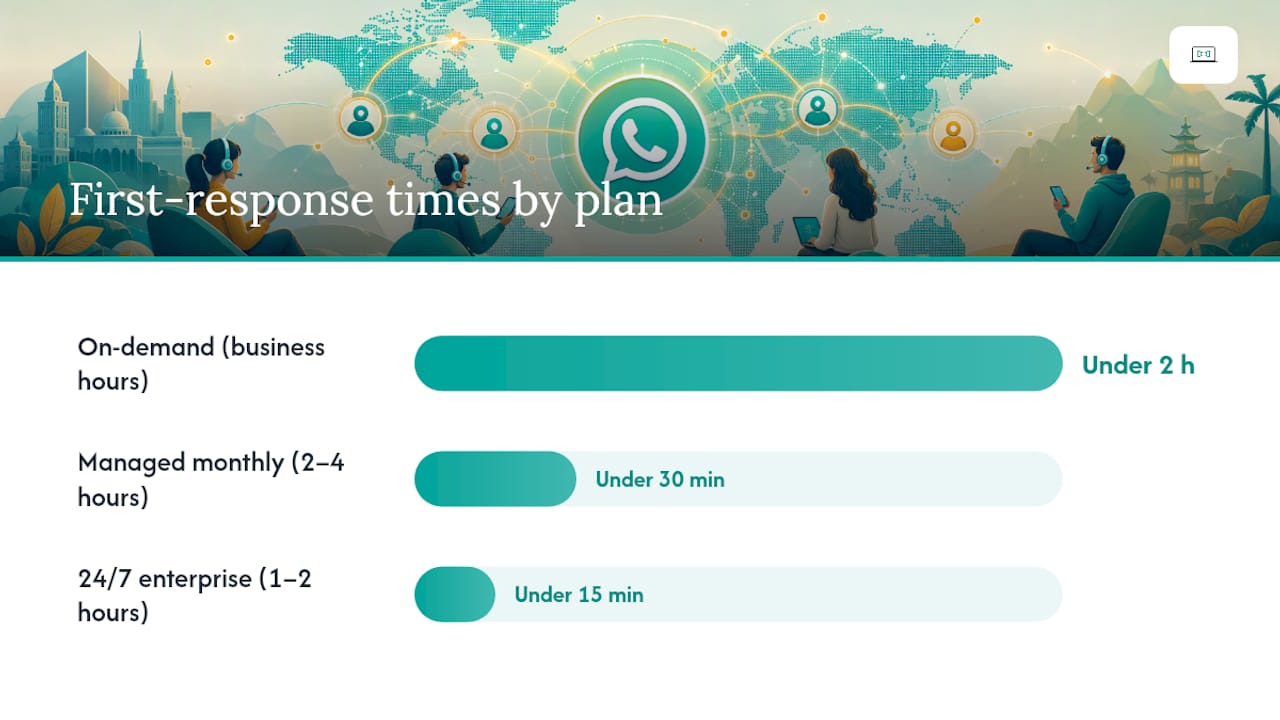
Sample intake message template: Sample status update template: Typical SLA ranges by plan type:
| Plan type | First response | Resolution target |
|---|---|---|
| On-demand (business hours) | Under 2 hours | Same business day |
| Managed monthly | Under 30 minutes | 2–4 hours |
| 24/7 enterprise | Under 15 minutes | 1–2 hours |
Chat-first MSP case studies show materially faster response times than email workflows. One reported a first-response average of 13.5 minutes after switching to chat-first intake, with PSA integration handling triage and routing at volume. Modern remote support also pairs chat intake with remote device management and self-service portals to keep senior technicians focused on complex problems.

Is WhatsApp secure enough for business IT support?
Yes, with the right controls in place. WhatsApp uses end-to-end encryption by default, but encryption alone is not a compliance posture.
Security checklist before going live:
- Use the WhatsApp Business API, not a consumer app or personal number
- Enforce authorised device policies (only approved devices can access the business account)
- Use approved message templates for outbound notifications
- Capture full audit logs via PSA integration
- Define data retention and secure storage policies in writing
- Require VPN for any remote access session initiated through the chat
- Enforce multi-factor authentication (MFA) for all privileged technician actions
- Document your data handling practices against the Australian Privacy Principles
Australian enterprise mobility guidance from the Australian Cyber Security Centre recommends VPNs for cellular and wireless communications and encrypted messaging for all remote and mobile endpoints. Pairing WhatsApp with a VPN requirement and MFA aligns with that guidance.
Pro Tip: Replace all personal technician numbers with a single verified WhatsApp Business API sender from day one. This gives you a full audit trail, removes the risk of a technician leaving and taking client conversations with them, and keeps your data handling compliant.
How do you choose a WhatsApp IT support provider?
Prioritise identity verification, PSA integration, encryption controls, and transparent SLAs. Marketing polish is a distant second.
Selection checklist:
- Verified WhatsApp Business API sender (not a personal number)
- PSA integration with full audit logging
- Certified technicians: look for CCNA, CompTIA Security+ as minimum benchmarks
- Documented SLAs with response and resolution commitments in writing
- Multi-time-zone coverage if your team spans regions
- Transparent, fixed pricing with no long-term lock-in
- Clear data handling policy referencing the Australian Privacy Principles
- Escalation path to senior engineers for complex incidents
Ten questions to ask any provider:
- Do you use a verified WhatsApp Business API number or a personal mobile?
- How do you create and track tickets from WhatsApp conversations?
- What PSA tool do you integrate with?
- What are your documented first-response and resolution SLAs?
- How do you handle after-hours or weekend incidents?
- Which certifications do your technicians hold?
- How long does onboarding take, and what do we need to prepare?
- Where is client data stored, and what is your retention policy?
- How do you escalate issues that can't be resolved remotely?
- What does your pricing structure look like, and are there lock-in contracts?
For a deeper look at helpdesk processes, the IT helpdesk guide for small companies covers SLA structures and triage workflows in plain language.
What does WhatsApp IT support typically cost?
Three common models, each with a different risk profile:
- On-demand hourly — pay per incident, no commitment. Suits businesses with low, unpredictable IT needs. Rates vary by provider and technician seniority.
- Monthly managed subscription — a fixed monthly fee covering a defined scope: response SLAs, proactive monitoring, and a set number of support hours. Predictable cost, better SLAs.
- Enterprise bundle — a custom contract with 24/7 on-call, dedicated technicians, multi-site coverage, and guaranteed response windows. Priced on scope.
The trade-off is straightforward: hourly is cheaper when issues are rare; a managed subscription pays for itself once you're logging more than a few hours of IT time per month. Myitbutler offers all three models with transparent fixed pricing and no long-term contracts. Book a consultation for a tailored quote based on your team size and time-zone spread.
Onboarding checklist: getting WhatsApp IT support running safely
Onboarding typically takes a few days to two weeks, depending on PSA integration complexity and how many users you're migrating from personal-number workflows.
- Verify your business sender — register and verify a WhatsApp Business API number through an approved Business Solution Provider.
- Migrate personal numbers — move any existing client conversations to the verified business number and notify clients of the change.
- Register approved templates — submit intake, status update, and escalation message templates for WhatsApp approval before go-live.
- Map user identities — link client phone numbers to your CRM or PSA so tickets open automatically on first contact.
- Set SLAs and escalation paths — document response targets and the escalation chain before the first ticket arrives.
- Test remote access tools — confirm that remote-session links (TeamViewer, AnyDesk, or equivalent) send and open correctly through WhatsApp on both iOS and Android.
- Run a pilot — start with a small user group for two to four weeks, measure response and resolution times, then scale.
Pro Tip: For the first month, have a senior technician own the WhatsApp queue personally and run a daily rotation with one backup. Measure first-response time from day one. The data you collect in that first month is what justifies broader rollout to the rest of the business.
Myitbutler's managed IT services guide covers the full onboarding process and what to expect at each stage.
A provider's honest take on WhatsApp support
WhatsApp IT support works best when it's treated as a professional service channel, not a convenience shortcut. The businesses that get the most from it are the ones that set up a verified sender, integrate with a PSA from day one, and measure response times from the first week. The ones that struggle are those who hand out a technician's personal number and call it a WhatsApp support channel.
The certification stack matters too. CCNA, CompTIA Security+, and PRINCE2 are not just badges. They reflect how a technician thinks about network security, escalation, and project risk. With 15+ years of enterprise IT experience behind Myitbutler's delivery model, the difference shows up in how incidents are triaged and how quickly they close.
If you're on the fence, the lowest-risk starting point is a single consultation to map your current support gaps against what a WhatsApp-first model can realistically cover. That conversation takes 30 minutes and gives you a clear picture before you commit to anything.
Myitbutler's WhatsApp-first IT support: what you get
Myitbutler delivers remote IT support via a verified WhatsApp Business channel, backed by PSA integration and a full audit trail. No personal numbers, no guesswork on SLAs.

Services available to WhatsApp-first clients:
- On-demand troubleshooting (hourly, no lock-in)
- Managed monthly subscriptions with documented SLAs
- Property and villa security assessments via VillaShield
- Multi-time-zone support for distributed and international teams
Trust signals: CCNA, CompTIA Security+, PRINCE2 certified. 15+ years enterprise IT experience. Transparent fixed pricing, no long-term contracts. Client Support Portal with full ticket visibility.
Start a free chat or book a paid consultation to scope your WhatsApp support setup.
Sources
FAQ
What is WhatsApp IT support, and how is it different from Meta support?
WhatsApp IT support is a paid, business-to-client service where a certified technician triages and resolves your IT issues via WhatsApp messaging. It has nothing to do with Meta's consumer support for WhatsApp account issues.
Is WhatsApp secure enough for business IT support in Australia?
Yes, when you use the WhatsApp Business API with a verified sender, PSA audit logging, VPN for remote sessions, and MFA for technician access. This aligns with Australian Cyber Security Centre enterprise mobility guidance.
How fast can I expect a response from WhatsApp IT support?
Response times depend on your plan. Managed monthly plans typically target under 30 minutes; 24/7 enterprise plans under 15 minutes. One MSP case study reported a first-response average of 13.5 minutes after switching to chat-first intake.
Does Myitbutler offer WhatsApp IT support with no lock-in contract?
Yes. Myitbutler offers on-demand hourly support, managed monthly subscriptions, and enterprise bundles, all with transparent fixed pricing and no long-term contracts.
What do I need to set up before going live with WhatsApp IT support?
You need a verified WhatsApp Business API number, approved message templates, PSA integration, mapped user identities, and documented SLAs. Onboarding typically takes a few days to two weeks depending on your setup complexity.