
TL;DR:
- IT automates remote invoicing processes, reducing manual work and errors across distributed teams. It integrates billing with accounting systems and ensures real-time data synchronization and compliance. Automation speeds workflows but still requires human oversight for complex exceptions and disputes.
The role of IT in remote invoicing is to automate and synchronise billing processes across distributed teams, making them faster, more accurate, and far easier to manage. Remote invoicing, known formally as electronic invoicing or e-invoicing, refers to the digital creation, delivery, and processing of invoices without manual paper handling. Teams adopting invoice automation reduce manual processing time by approximately 94%, cutting weekly labour from 8 hours down to 30 minutes. That single figure explains why the IT impact on remote billing has moved from a nice-to-have to a core business function for freelancers and distributed businesses alike.
What is the role of IT in remote invoicing?
IT automates the repetitive work in invoicing and connects every part of the billing process in real time. Without IT, a remote team relies on email chains, manual data entry, and spreadsheets that quickly fall out of sync across time zones. With the right technology in online invoicing, every invoice is created, sent, tracked, and reconciled inside a single connected system.

The shift is significant. Approximately 72% of revenue cycle leaders have migrated or plan to migrate their billing functions to AI-driven tools within two years. That adoption rate signals a broad industry consensus: manual remote billing is no longer viable at scale. IT does not just speed things up. It removes entire categories of error from the process.
How does IT automation enhance accuracy and reduce manual workload?
AI-powered invoice processing uses three core technologies: optical character recognition (OCR), machine learning, and natural language processing. OCR reads invoice data from PDFs and scanned documents. Machine learning matches line items against purchase orders and flags discrepancies. Natural language processing interprets unstructured text fields that older systems cannot parse. Together, these tools handle the bulk of routine invoice processing without human input.
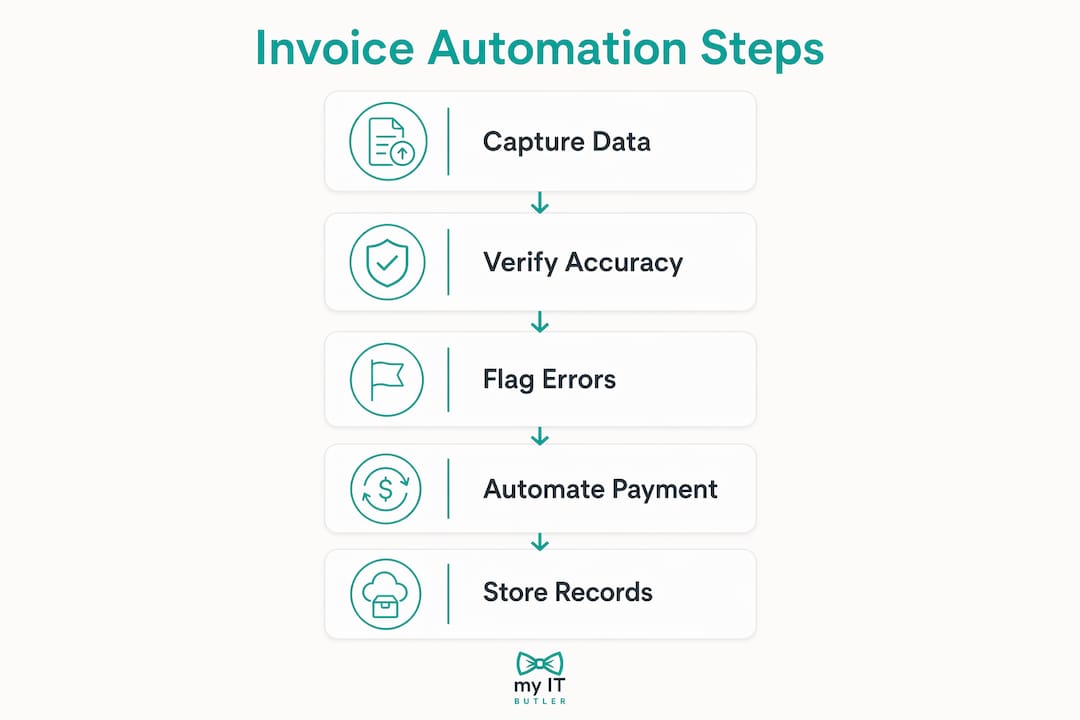
The results are measurable. AI-driven billing systems have documented denial rate reductions of 85% to 90%, alongside administrative cost savings of 25% to 40%. Those savings come directly from removing manual review steps that previously required dedicated staff hours. For a freelancer or small business owner, that translates to less time chasing payments and more time doing billable work.
Automation does not eliminate human roles. Agentic AI systems process invoice workflows autonomously and escalate exceptions only when human judgement is needed. This shifts your team's focus from data entry to exception management, which requires sharper skills and better judgement, not fewer staff.
- Routine invoice generation and delivery: fully automatable
- Payment reminder scheduling: automatable with rule-based triggers
- Tax calculation and currency conversion: automatable with jurisdiction-specific rules
- Disputed invoices and complex billing appeals: require human review
- Vendor relationship management: requires human communication
Pro Tip: Set your automation rules to flag any invoice that deviates from a standard template before it is sent. Catching format errors at creation costs nothing. Correcting them after a client disputes the invoice costs time and trust.
What IT infrastructure does effective remote invoicing require?
Effective remote invoicing depends on three connected layers: cloud-based billing software, integration with existing accounting or ERP systems, and compliance with jurisdictional e-invoicing mandates.
Integration with existing ERP systems is critical for both compliance and workflow efficiency. Without it, invoice data lives in two separate systems that must be manually reconciled, which reintroduces the errors automation was meant to eliminate. A connected ERP pulls purchase order data, customer records, and payment terms directly into each invoice, removing the need for manual lookups.
Cloud billing software enables real-time data synchronisation and role-based access across remote teams. That means a finance manager in Sydney and a contractor in London see the same invoice status at the same moment. Role-based access controls who can approve, edit, or view invoices, which reduces both errors and fraud risk.
Compliance is a growing technical requirement. Many jurisdictions now mandate specific e-invoicing formats and transmission standards. Keeping your IT infrastructure aligned with these mandates requires continuous updates and planning, not a one-time setup.
| Feature category | What to look for |
|---|---|
| ERP and accounting integration | Native connectors to your existing accounting platform |
| Cloud access and sync | Real-time updates accessible from any device or location |
| Compliance and tax rules | Automatic updates for jurisdiction-specific e-invoicing mandates |
| Role-based access controls | Granular permissions for approvers, editors, and viewers |
| Audit trail and reporting | Timestamped logs of every invoice action for internal review |
What are the challenges of relying solely on IT for remote invoicing?
Technology alone cannot replicate the nuanced human judgement needed for complex billing appeals and exceptions. An AI system can flag a discrepancy, but it cannot negotiate a resolution with a client, interpret a contractual ambiguity, or decide when to waive a late fee to preserve a relationship. Those decisions require context that no algorithm currently holds.
Remote billing teams also face a structural communication problem. Formalising remote billing communication can create information overload and knowledge silos if not managed deliberately. When everyone works asynchronously, critical context about a client account can sit in one person's inbox and never reach the team member who needs it.
The staffing picture is also more complex than it first appears. Automation replaces routine tasks but increases demand for specialised billing staff who can manage complex claims and exceptions. Businesses that cut headcount aggressively after deploying automation often find themselves understaffed for the high-value work that remains.
- Assign a named owner to every exception queue, not just a shared inbox
- Schedule weekly billing reviews even when automation is running well
- Document client-specific billing rules in a shared knowledge base, not in individual email threads
- Rotate exception review duties to prevent single points of failure in your team
Pro Tip: Build a short onboarding document for every new billing team member that covers your top five most common invoice exceptions and how you resolve them. This replaces the informal knowledge transfer that happens naturally in an office but disappears in a remote setting.
How can businesses and freelancers implement IT solutions for remote invoicing?
A phased approach works better than a full system overhaul. Start by mapping your current invoicing workflow and identifying where the most time is lost or errors occur most often. That audit gives you a clear target for your first automation deployment.
Step-by-step implementation
- Audit your current process. Document every step from invoice creation to payment receipt. Note where manual work happens and where errors typically appear.
- Select software with native integrations. Choose a cloud billing platform that connects directly to your accounting or ERP system. Avoid tools that require manual data exports.
- Configure automation rules. Set up recurring invoice schedules, payment reminders, and tax calculation rules before going live. Test each rule with real invoice data.
- Set role-based access controls. Define who can create, approve, and view invoices. Limit editing rights to reduce accidental changes.
- Deploy a real-time dashboard. Synchronised dashboards prevent invoice loss in disconnected teams and speed up payment cycles. Make the dashboard the single source of truth for your billing team.
- Schedule human review cycles. Automate the routine work, but set a fixed weekly or fortnightly review where a team member checks the exception queue and audits a sample of processed invoices.
Managing remote employees effectively also means giving your billing team the right IT tools, not just the right processes. The two go together.
Best practices for remote invoicing success
- Use a single cloud platform for all invoice creation, delivery, and tracking
- Automate recurring invoices and payment reminders from day one
- Keep your compliance settings updated whenever tax rules or e-invoicing mandates change in your operating jurisdictions
- Conduct internal audits monthly, not just when something goes wrong
- Understand the IT risks that small businesses overlook, particularly around data access and invoice fraud
- Train every team member on the exception management process, not just the finance lead
Key takeaways
IT-driven automation is the most direct way to reduce invoicing errors and reclaim staff time in a remote billing environment, but it only delivers full value when paired with structured human oversight.
| Point | Details |
|---|---|
| Automation cuts processing time | Teams using invoice automation reduce manual work from 8 hours to 30 minutes per week. |
| ERP integration is non-negotiable | Connecting billing software to your ERP removes manual reconciliation and compliance gaps. |
| Human oversight remains critical | Complex exceptions, disputes, and client decisions still require skilled human judgement. |
| Cloud platforms enable real-time visibility | Role-based dashboards keep distributed teams aligned on invoice status across time zones. |
| Phased implementation reduces risk | Auditing your current process before deploying automation prevents costly configuration errors. |
The part most businesses get wrong about remote invoicing IT
When I talk to small business owners and freelancers about their invoicing setup, the conversation almost always starts with the same question: which software should I use? That is the wrong starting point.
The software matters far less than the process it sits inside. I have seen teams deploy well-regarded cloud billing platforms and still end up with late payments, duplicate invoices, and frustrated clients. The reason is almost always the same: they automated a broken process instead of fixing it first. Automation does not fix bad workflows. It accelerates them.
The shift I have watched happen across distributed businesses is a move from manual processing to what I would call strategic exception management. Your IT infrastructure handles the predictable 90% of invoices without anyone touching them. Your team focuses entirely on the 10% that need a real decision. That is a fundamentally different job description for a billing team, and most businesses are not prepared for it.
The other thing I would push back on is the idea that once you have set up your invoicing IT, you are done. Jurisdictional e-invoicing mandates are changing fast. Tax rules update. Your client base grows and changes. The IT infrastructure that works today needs active management, not passive monitoring. That is where having a trusted IT partner makes a real difference, particularly for remote teams operating across multiple countries.
— Thomas
How Myitbutler supports your remote invoicing IT setup
Remote invoicing IT is not just about picking the right software. It requires a connected infrastructure that stays compliant, stays secure, and keeps your distributed team working without interruption.

Myitbutler provides remote IT support for small businesses and distributed teams, with over 15 years of enterprise experience and certifications including CCNA, CompTIA Security+, and PRINCE2. The team helps businesses configure cloud billing integrations, manage ERP connections, and maintain compliance with e-invoicing mandates across jurisdictions. Fixed pricing and no long-term contracts mean you get expert support without the overhead of a full-time IT hire. If your remote invoicing setup needs a proper IT foundation, book a free consultation and get a clear plan from a team that works to Australian standards, delivered globally.
FAQ
What does IT actually do in remote invoicing?
IT automates invoice creation, delivery, tracking, and reconciliation across distributed teams. It connects billing software to accounting systems so data stays accurate without manual entry.
How much time can automation save on invoicing?
Teams adopting invoice automation reduce manual processing time by approximately 94%, from around 8 hours to 30 minutes per week.
Do I still need staff if I automate my invoicing?
Automation handles routine tasks, but complex exceptions, disputes, and client decisions still require skilled human oversight. Demand for specialised billing staff typically increases after automation is deployed.
What is the biggest IT risk in remote invoicing?
Disconnected systems are the most common risk. When billing software does not integrate with your ERP or accounting platform, data must be reconciled manually, which reintroduces errors and compliance gaps.
How does Myitbutler help with remote invoicing IT?
Myitbutler provides remote IT support and managed services for distributed businesses, helping configure cloud billing integrations, ERP connections, and compliance settings to Australian enterprise standards.