
TL;DR:
- Remote IT support involves trained technicians remotely diagnosing, fixing, and maintaining systems through secure, internet-enabled tools. It offers faster issue resolution, proactive monitoring, enhanced security, and supports distributed teams effectively while reducing costs. Proper setup, disciplined processes, and advanced platforms, including AI capabilities, are essential for maximizing its benefits and ensuring reliable support.
Remote IT support is exactly what businesses and distributed teams often get wrong before they try it. Many assume it means waiting on hold for a generic helpdesk or having someone awkwardly guide you through steps over the phone. What it actually means is a trained technician taking direct, real-time control of your systems from anywhere in the world, diagnosing faults, applying fixes, and keeping your technology running without stepping foot in your office. If your team is spread across time zones, cities, or continents, understanding what is remote IT support could be the most practical decision you make this year.
Table of Contents
- Key takeaways
- What is remote IT support, really?
- Benefits of remote IT support for businesses
- Tools and platforms used in remote IT support
- How remote IT monitoring reduces downtime
- How to apply remote IT support effectively
- My honest take on remote IT support
- How Myitbutler supports your remote team
- FAQ
Key takeaways
| Point | Details |
|---|---|
| Remote IT support defined | A technician resolves your IT issues from a distance using internet-enabled tools, not phone calls. |
| Proactive monitoring matters | Remote monitoring catches system faults before they become outages, reducing downtime significantly. |
| Tool quality determines outcomes | Enterprise-grade platforms offer session recording, unattended access, and security features free tools do not. |
| RMM frees your IT staff | Automated patch management and alerts let your team focus on strategic work instead of routine fixes. |
| Choosing the right provider counts | Australian-standard providers with certified expertise deliver consistent, secure outcomes for global teams. |
What is remote IT support, really?
At its core, remote IT support means a technician provides technical assistance from a different physical location using internet-connected tools. This is not a phone call where someone reads instructions to you. It is a trained professional who can see your screen, access your files, run diagnostics, install software, and fix configuration problems in real time, while you watch or carry on working.
The distinction matters because remote IT support is far more capable than most people realise. It goes well beyond basic screen sharing. A properly equipped remote technician has access to tools that allow them to:
- Take full remote control of a desktop or server
- Transfer files between devices securely
- Monitor system health data including CPU, memory, and network traffic
- Restart devices and reconnect without user assistance
- Apply software patches and security updates
- Access machines that are unattended or even powered down using hardware-level management
Hardware-based management works at the OS and firmware level, which means IT can manage powered-off or malfunctioning endpoints. That is a level of control most business owners do not realise exists until they need it.
Remote IT support also sits within a broader category called managed remote IT service, which bundles ongoing supervision, vendor management, and strategic planning alongside the day-to-day help. This is what separates a one-off fix from a genuine IT partnership.
The common tools used in professional remote support include platforms with encrypted tunnels, multi-factor authentication, session logging, and audit trails. These are the non-negotiables for any business taking security seriously.
Benefits of remote IT support for businesses
The advantages of remote IT help go beyond convenience. For businesses running distributed teams, the benefits directly affect productivity, security, and your bottom line.
Speed is the most immediate gain. When a staff member in Singapore has a critical application fail at 9am their time, a provider operating across time zones can have a technician connected and diagnosing the problem within minutes. No waiting for someone to drive across town.
Cost reduction follows naturally. Removing the need for onsite visits eliminates travel time charges and delays. Many issues that would take half a day to resolve through a traditional call-out can be fixed remotely in under an hour.
The other core benefits worth knowing about:
- Proactive detection. Remote monitoring tools watch your systems continuously and flag anomalies before they become failures. This is what separates reactive IT from genuinely managed support.
- Better security outcomes. Real-time alerts and automated patch management mean vulnerabilities get closed quickly, rather than sitting open while you wait for a scheduled visit.
- Flexibility for hybrid and distributed teams. Staff working from home, a serviced office, or a café on another continent all get the same quality of support.
- Improved technician efficiency. Automating routine tasks frees IT staff for compliance, architecture, and zero-trust policy work instead of repetitive tickets.
Pro Tip: When evaluating a remote IT support provider, ask specifically what percentage of issues they resolve without escalating to an onsite visit. A well-equipped provider should be resolving more than 85% of support requests remotely.
The security angle deserves more attention than most businesses give it. Only 21% of SMBs have disaster recovery plans that actually match their remote IT setups. That gap is exactly where a proactive managed service makes the difference.
Tools and platforms used in remote IT support
Not all remote tech support tools are created equal. Understanding what separates a professional platform from a consumer-grade tool helps you ask the right questions when choosing a provider or solution.
At the simpler end, tools like Chrome Remote Desktop offer free, basic access. However, Chrome Remote Desktop lacks file transfer, session recording, and the robust session management businesses actually need. It works for a home user helping a relative, but it is not designed for professional IT environments.
Professional platforms designed for business remote IT support solutions include features that matter at scale:
- Unattended access. A technician can connect to a device without requiring the user to be present, which is critical for out-of-hours maintenance.
- Session recording. Every support session is logged and recorded for auditing, compliance, and quality review.
- Multi-monitor support. Technicians can navigate between multiple screens on the user's device, which is standard in office environments.
- Privilege elevation. The technician can request elevated permissions during a session without switching accounts.
- Encrypted connections. All data in transit is protected, not just the session itself.
AI-powered features in remote IT platforms now accelerate troubleshooting and reduce technician workload, with over 750,000 businesses globally using AI-enabled remote session tools. This includes in-session recommendations, automated session summaries, and predictive fault detection.
Here is a comparison of typical tool types to illustrate the difference:
| Feature | Free tools | Professional platforms | Enterprise/AI-enabled |
|---|---|---|---|
| Unattended access | No | Yes | Yes |
| Session recording | No | Yes | Yes, with AI summaries |
| File transfer | Limited | Yes | Yes |
| Multi-monitor support | No | Yes | Yes |
| Audit logs | No | Yes | Yes, with compliance exports |
| AI-assisted troubleshooting | No | No | Yes |
| Privilege elevation | No | Yes | Yes |
For businesses evaluating options, the right remote IT tools will depend on team size, compliance requirements, and how much unattended access your environment demands.
How remote IT monitoring reduces downtime
What is remote IT monitoring? It is the continuous collection of real-time health data from your devices, servers, and networks. Think of it as a health check that runs 24 hours a day, seven days a week, without anyone needing to manually look.
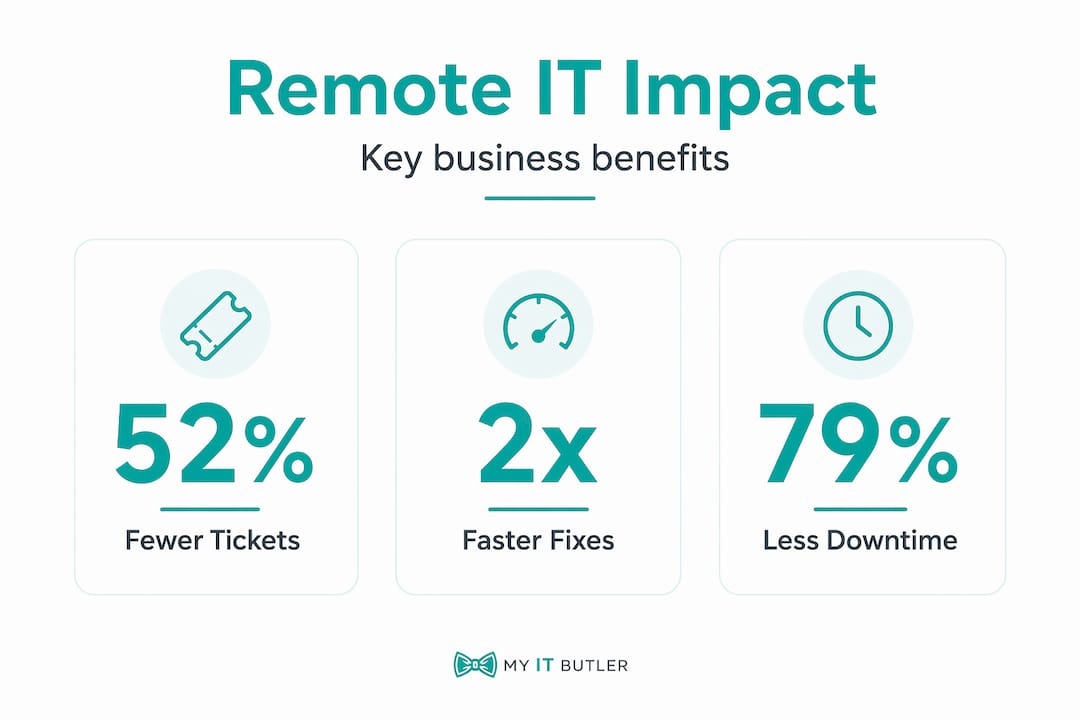
Remote monitoring and management (RMM) goes beyond traditional monitoring by adding automation. RMM automates patching and delivers real-time alerts, which means your IT team fixes issues before users ever notice a problem. This shifts IT from a reactive function into something genuinely preventative.
The practical effect is significant. Advanced IT teams measure what are known as "friction minutes," which is the total time users spend experiencing IT-related disruptions. Telemetry agents can detect sustained application hang times and trigger automated workflows to clear caches or reset tokens without any user involvement. The user never knew there was a problem.
| Metric | Without RMM | With RMM |
|---|---|---|
| Level 1 support tickets | High volume, manual resolution | 52% reduction via automated response |
| IT staff time on strategic work | Limited | 38% more time available |
| Patch management | Scheduled, often delayed | Automated, continuous |
| Fault detection | After user reports | Before user notices |
Remote system administration combined with RMM creates a layered defence that keeps infrastructure stable and secure without requiring constant manual attention.
Pro Tip: Ask your provider whether their RMM platform supports automated remediation workflows, not just alerts. Alerts without automated responses still require a human to act. True RMM fixes common faults before a ticket is ever logged.
How to apply remote IT support effectively
Understanding what remote IT troubleshooting involves is one thing. Setting it up to actually work for your team is another. Here is how businesses get the most from it:
- Audit your current environment first. Before selecting a provider or platform, document your devices, operating systems, software, and user locations. This tells you what access levels and tool capabilities you genuinely need.
- Select tools matched to your scale. A five-person team has different needs from a 200-person distributed workforce. Match the platform features to your actual requirements, not the most impressive feature list.
- Prepare your users. Staff should understand what remote access means, what a technician can see, and how to initiate a support request. Clear communication reduces resistance and speeds up resolution times.
- Define your security protocols. Set rules around who can grant remote access, which sessions must be recorded, and how credentials are managed during remote sessions.
- Choose a provider with verified credentials. For businesses operating across borders or requiring compliance with data protection standards, certifications like CCNA, CompTIA Security+, and PRINCE2 are not optional extras. They signal disciplined, accountable practice.
- Review performance regularly. Track ticket volumes, resolution times, and system uptime monthly. Good remote IT support should be measurably improving these numbers over time.
For teams distributed globally, the guide on setting up remote IT support from abroad is a practical starting point for understanding the coordination requirements.
The best remote IT support outcomes come when technicians can observe issues in the exact context, seeing real desktop behaviour, application state, and network conditions rather than relying on vague user descriptions.
My honest take on remote IT support
I have spent more than 15 years working in IT environments ranging from small startups to complex international organisations. The single biggest mistake I see businesses make with remote IT support is treating it as a cheaper version of onsite help. It is not. Done well, it is genuinely superior for most business scenarios.
What I have learned from watching teams implement remote support is that the technology is rarely the limiting factor. The process discipline is. Providers who rely on guesswork, who close tickets without root cause analysis, who send alerts without automated remediation, they create the impression that remote support is unreliable. It is not the model that fails. It is the lack of rigour.
I am also increasingly interested in where AI is taking this space. In-session AI recommendations and automated session summaries are already changing how technicians work. Within the next few years, a significant portion of what is today classified as Level 1 and Level 2 support will be handled automatically before a human ever looks at it.
My advice to any business evaluating remote IT support is to ask harder questions than price. Ask how faults are detected. Ask what gets automated. Ask what happens at 2am when something breaks and your Australian-based provider is in the right time zone to respond. Those answers tell you far more than any service brochure.
— Thomas
How Myitbutler supports your remote team
If you are ready to move beyond reactive IT and into genuinely managed support, Myitbutler is built for exactly this. With over 15 years of enterprise experience and certifications in CCNA, CompTIA Security+, and PRINCE2, Myitbutler delivers Australian-standard remote IT support to businesses and distributed teams worldwide.

From on-demand remote troubleshooting to proactive monitoring, vendor liaison, and strategic IT planning, every service comes with transparent fixed pricing and no lock-in contracts. Whether your team is in Melbourne, Manila, or Madrid, you get the same quality of support. Book a free IT consultation to find out how Myitbutler can reduce downtime, tighten your security, and give your team the IT support they deserve.
FAQ
What is remote IT support?
Remote IT support is technical assistance delivered over the internet, where a technician accesses and fixes your devices, systems, or software from a different location without visiting in person.
How does remote IT support work?
A technician connects to your device using specialised remote access software, which lets them see your screen, run diagnostics, transfer files, and apply fixes in real time. The connection is encrypted for security.
What is remote IT monitoring?
Remote IT monitoring is the continuous collection of real-time data from your devices, servers, and networks to detect faults, performance issues, or security threats before they cause disruption.
What is managed remote IT service?
A managed remote IT service provides ongoing IT supervision, maintenance, monitoring, and support under a fixed service agreement. It goes beyond one-off fixes to cover proactive management of your entire IT environment.
Is remote IT support secure?
Yes, when delivered by a professional provider. Enterprise-grade remote support platforms use encrypted connections, multi-factor authentication, session recording, and audit logs to protect your data throughout every session.