
TL;DR:
- A firewall is an intelligent traffic gateway that inspects, controls, and filters network connections based on security rules. Small businesses need firewalls to prevent unauthorized access, monitor traffic, and defend against malware, especially with remote and cloud-based operations. Ongoing management, policy enforcement, and regular updates are essential to keep firewalls effective and protect against evolving cyber threats.
Most people picture a firewall as a simple digital wall standing between their business and hackers. That picture is wrong, or at least incomplete. A firewall is far more than a barrier. It is an intelligent traffic gateway that inspects every connection attempting to enter or leave your network, then decides what to allow based on rules you define. If you run a small business with remote staff, cloud tools, or offices across different countries, getting this right is not optional. This guide covers the small business firewall explained plainly, so you can act on it whether you have a dedicated IT manager or not.
Table of Contents
- What is a firewall and why does your small business need one?
- Types of firewalls and how they fit into modern small business security
- Developing and managing an effective firewall policy for your small business
- Practical firewall deployment and monitoring tips for small businesses with distributed teams
- Why simply installing a firewall isn't enough: what most small businesses overlook
- Affordable remote IT support and firewall management with My IT Butler™
- Frequently asked questions
Key Takeaways
| Point | Details |
|---|---|
| Firewall basics | Firewalls control network traffic based on rules to protect your small business from unauthorised access and cyber threats. |
| Types of firewalls | Traditional, next-generation, and cloud firewalls like Azure Firewall offer different protections suited to SMBs' on-premise and remote needs. |
| Policy importance | Developing, testing, and maintaining an ongoing firewall policy is essential to avoid security risks from outdated or excessive rules. |
| Deployment strategies | Use edge, internal segmentation, and cloud firewalls combined with monitoring to secure networks with remote or distributed teams. |
| Expert support benefits | Partnering with remote IT experts helps small businesses manage firewalls effectively and keep up with evolving security needs. |
What is a firewall and why does your small business need one?
At its core, a firewall monitors and controls network traffic based on a set of security rules, acting as a gatekeeper sitting between your trusted internal network and the untrusted internet beyond it. Think of it as a customs officer at a border checkpoint. Every packet of data attempting to cross gets inspected. Some are waved through. Others are turned back.
For small businesses, this matters more than most owners realise. A single unguarded port, one misconfigured service left exposed, can hand an attacker a way into your systems. When you factor in remote employees logging in from cafes in Bali or Lisbon, or cloud tools processing customer data, that exposure multiplies quickly.
What a firewall actually does for your business includes:
- Traffic filtering: Examines each data packet and permits or denies it based on IP address, port, and protocol
- Connection monitoring: Tracks the state of active connections to detect unusual patterns
- Activity logging: Records connection attempts, providing evidence for security investigations
- Blocking unauthorised access: Prevents outsiders from reaching internal systems they have no business touching
- Malware and ransomware defence: Cuts off the communication channels malicious programs rely on to operate
When you are setting up your small office network, the firewall is one of the first decisions you make, not an afterthought. It defines the boundary between what is yours and what is not.

Types of firewalls and how they fit into modern small business security
Not all firewalls are equal, and choosing the wrong type can leave real gaps in your protection. The firewall landscape has evolved significantly, so here is what you are actually choosing between when you explore the best firewalls for small businesses.
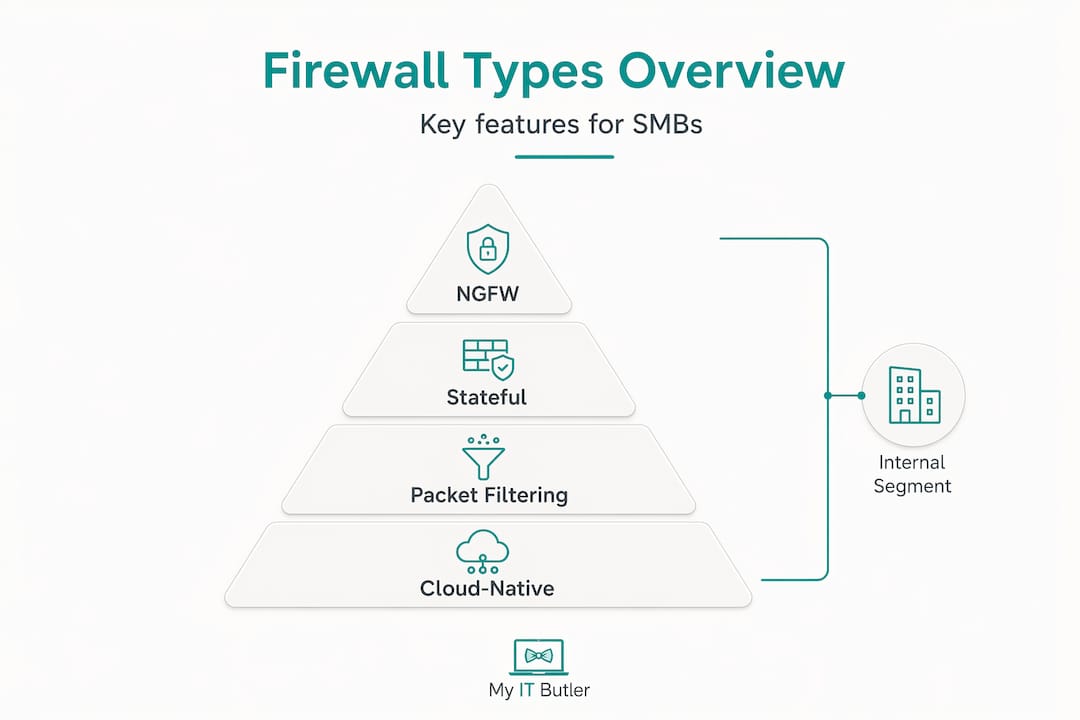
Traditional (packet-filtering) firewalls work at the network layer. They check source and destination IP addresses, ports, and protocols. Fast and lightweight, yes. But they cannot tell the difference between legitimate web traffic and malware riding over port 80. For a business with more than a handful of employees, this is usually not enough on its own.
Stateful firewalls step up by tracking the state of each connection. They understand that a packet arriving at your network is part of an established session, not a random probe. This gives far better protection without massive overhead.
Next-generation firewalls (NGFWs) are where the real power lies for modern SMBs. They add application control (blocking specific apps like BitTorrent regardless of port), user identity awareness, and intrusion prevention. An NGFW knows who is on your network, not just what IP address they are using.
Cloud-native firewalls address the reality that your data no longer lives entirely on-premises. Azure Firewall Basic is purpose-built for SMBs, offering fully stateful, cloud-native protection well suited to distributed teams and cloud workloads, with throughput around 250 Mbps and built-in high availability.
Internal segmentation firewalls are often overlooked. Rather than sitting at the perimeter, they live inside your network, creating barriers between departments or systems. If one area is compromised, the attacker cannot simply walk sideways into everything else.
| Firewall type | Best suited for | Key strength | Limitation |
|---|---|---|---|
| Packet filtering | Basic filtering needs | Speed, low cost | No application awareness |
| Stateful | Most SMBs | Tracks connection state | Limited deep inspection |
| Next-generation (NGFW) | SMBs with varied apps and users | App control, user identity, IPS | Higher cost, needs management |
| Cloud-native (e.g. Azure) | Remote and cloud-heavy teams | Scalable, consistent policy | Requires cloud infrastructure |
| Internal segmentation | Businesses with sensitive data zones | Contains lateral movement | Adds network complexity |
Firewalls in modern defence enforce access control, network segmentation, and traffic monitoring across on-premises, cloud, and remote access environments. For teams spread across time zones, this consistent enforcement is what keeps things manageable.
Pro Tip: If your business uses Microsoft Azure or Microsoft 365, Azure Firewall integrates natively and gives you centralised policy management without buying separate hardware. Pair it with good remote IT management tools and you have a strong foundation.
For businesses supporting staff internationally, explore how remote IT support for global teams fits alongside your firewall strategy, especially when VPN policies and access rules need coordinating across regions.
Developing and managing an effective firewall policy for your small business
Installing a firewall without a documented policy is like hiring a security guard and never telling them who is allowed in the building. The firewall will do something. It just may not be doing what you need.
NIST guidelines on firewall policy make clear that firewalls perform best when backed by a solid, ongoing policy covering rule selection, configuration, testing, deployment, and active management. That word "ongoing" is where most small businesses fall short.
Here is how to build a policy that actually holds up:
- Start with default deny. Every rule that is not explicitly allowed is blocked. This is the single most effective posture for small business IT security. Open only what you genuinely need.
- Document every rule. Write down why each rule exists, who approved it, and when it was created. If you cannot explain why a port is open, it should probably be closed.
- Apply the principle of least privilege. Staff should only have network access to what their role requires. A sales team member does not need access to your server management interface.
- Test before you deploy. Simulate the effects of new rules in a staging environment or during off-peak hours. A misconfigured rule can lock your own team out of critical systems.
- Monitor logs regularly. Firewall logs are a goldmine of intelligence. Repeated failed connection attempts from the same IP? That is worth investigating.
- Prune rules quarterly. Rule accumulation is a major SMB risk. Former employees, discontinued services, and legacy exceptions leave open doors nobody remembers granting. Schedule quarterly reviews and remove what no longer applies.
- Keep firmware and software updated. Unpatched firewalls have known vulnerabilities. Attackers scan for them actively.
Pro Tip: Assign ownership of the firewall policy to a specific person or service, not "the IT team" generally. Shared responsibility tends to mean nobody takes responsibility. If you outsource IT, confirm in writing that managing firewall policies is explicitly part of the scope.
Practical firewall deployment and monitoring tips for small businesses with distributed teams
Knowing the right type of firewall and having a solid policy still leaves one question: where exactly do you put it, and how do you keep it working when your team is scattered across multiple countries?
Firewalls remain a critical control point even as users, applications, and data spread across on-premises networks, cloud platforms, and remote access paths. The perimeter is no longer a single line. It is everywhere your data travels.
Practical deployment for SMBs with distributed teams looks like this:
- Edge firewall at every network entry point: Block unsolicited inbound traffic and filter outbound connections to prevent data exfiltration. This applies both to physical offices and cloud virtual networks.
- Internal segmentation between sensitive zones: Separate your payment systems from your general staff network. Separate your development environment from production. Contain the blast radius if something goes wrong.
- Cloud firewall near cloud workloads: Azure Firewall's cloud-native design with built-in high availability gives SMBs policy consistency across dispersed cloud resources without managing physical hardware in each location.
- Monitoring and alerting: Configure your firewall to send alerts for specific events, such as repeated failed logins or connections to known malicious IP addresses. Do not rely on reviewing logs manually after the fact.
- Zero trust framing: Treat every connection as potentially untrusted until verified. Combine firewall rules with multi-factor authentication and device compliance checks, especially for remote staff.
A firewall without active monitoring is a smoke detector with the battery removed. It looks the part, but it will not save you when it matters.
For teams operating internationally, remote system administration that includes proactive firewall monitoring is far more practical than flying someone to each location. The right support partner can manage your firewall policies, respond to alerts, and keep your rules current without any of your team needing to be in the same room.
Why simply installing a firewall isn't enough: what most small businesses overlook
Here is an uncomfortable truth that most firewall guides avoid saying plainly: the majority of small business firewall failures are not caused by the technology. They are caused by neglect after installation.
We see this pattern repeatedly. A firewall is purchased, configured, and switched on. Everyone feels protected. Then twelve months pass, staff change, new cloud tools get added, and nobody updates the rules to match. Stale exceptions accumulate. Old user accounts retain access paths. And the firewall, which was well configured on day one, has quietly drifted into a liability.
NIST's own guidance is explicit: the real value of a firewall comes not from installing it, but from developing and enforcing a policy with genuine ongoing management. That is a process, not a product.
The specific risk that catches most SMBs off guard is rule drift. Rules get added for a contractor, a one-off project, or a vendor integration. The project ends but the rule stays. Rule set accumulation quietly expands your attack surface in ways that are almost invisible until something goes wrong.
The businesses that handle this well typically share one characteristic: they have someone accountable for firewall policy maintenance on an ongoing basis. For a small business that cannot justify a full-time security engineer, that means partnering with a specialist. Not a generalist IT contact who will answer the phone when things break, but someone with genuine network security experience who treats your firewall as a living document.
That is where affordable remote IT management changes the equation for international and distributed SMBs. You get enterprise-grade firewall discipline at a fraction of the cost of in-house staff, without sacrificing quality.
Affordable remote IT support and firewall management with My IT Butler™
Running a small business with remote or international staff already stretches your time and resources. Managing firewall policies, monitoring network security logs, and keeping firmware updated on top of everything else is a significant ask without the right support.

My IT Butler offers remote IT support built specifically for small businesses and distributed teams, delivered to Australian standards with over 15 years of enterprise experience. We handle firewall policy management, ongoing network security monitoring, vendor coordination, and proactive IT supervision so your team stays protected without pulling you away from running your business. Our certifications, including CCNA and CompTIA Security+, mean firewall strategy is not guesswork for us.
Ready to get your firewall and IT security properly managed? Book a consultation and we will build a support plan tailored to your business size, locations, and risk profile. If you manage remote properties as well, ask about our VillaShield security programme for remote property protection.
Frequently asked questions
What exactly does a firewall do for my small business?
A firewall controls network traffic at your network boundary, blocking or allowing connections based on defined security rules to protect your data and devices from unauthorised access and cyber threats.
What type of firewall is best for a small business with remote or distributed teams?
Cloud-native options like Azure Firewall Basic suit SMBs with remote teams well, providing scalable, consistent protection across dispersed and cloud environments without requiring physical hardware at each location.
How often should I review and update my firewall rules?
Monthly log reviews combined with a thorough quarterly rule audit are considered best practice to remove stale or risky exceptions and keep your firewall effective against current threats.
Can a firewall protect my business from ransomware?
Yes. Firewalls help block the command-and-control communications that ransomware needs to function, cutting off one of its primary operational lifelines before it can encrypt your files.
Should I combine firewall protection with other security measures?
Absolutely. No single control stops all threats, and firewalls are most effective when layered with endpoint protection, identity controls, email security, and active monitoring for a genuine defence-in-depth approach.