
TL;DR:
- Choosing the right firewall is essential for small business cybersecurity, requiring assessment of network size, bandwidth, remote access needs, and compliance. Active maintenance, including regular updates, rule reviews, and performance checks, is crucial to ensure ongoing protection and avoid security lapses. Vendors like Fortinet, Cisco Meraki, and Sophos offer solutions tailored to different business needs, but selecting and managing a firewall should be a strategic, continuous process.
A firewall is the primary barrier between your business network and the internet, controlling which traffic enters and exits based on defined security rules. Choosing the right firewall for your small business is not a one-size-fits-all decision. Cyberattacks surged by 69% compared to previous levels, making a dedicated firewall no longer optional for any business handling customer data or processing payments. Brands like Fortinet, Cisco Meraki, and Sophos each offer solutions targeting small business needs, but the right choice depends on your network size, budget, compliance obligations, and whether you have in-house IT expertise to manage it.
How to choose the right firewall for your small business: key criteria first
Before you compare product specs or price tags, you need to understand your own network. The most common mistake small business owners make is selecting a firewall based on marketing materials rather than actual requirements.
Start by asking four foundational questions:
- How many users and devices connect to your network? A business with 10 staff and 20 devices has very different needs from one with 50 staff across multiple sites.
- What is your peak internet bandwidth? Firewall throughput must be sized at 1.5 to 3 times your peak bandwidth when security features are fully enabled. This means a 100 Mbps connection requires a firewall rated for at least 150 to 300 Mbps under real-world conditions.
- Do you need remote access or VPN support? Businesses with remote staff or multiple locations need firewalls with built-in VPN capabilities and enough processing power to handle encrypted tunnels without slowing down productivity.
- What compliance obligations apply to your business? Industries handling payment card data, health records, or personal data of EU residents must meet PCI, HIPAA, or GDPR requirements, which directly influence which firewall features you need.
Budget planning is equally critical. Hardware costs range from $300 to $1,500, with annual security subscription bundles adding $400 to $600 per year on top. That subscription cost matters more than most buyers realise. Subscription costs for UTM bundles can represent 40 to 60 percent of total firewall ownership costs over three years, meaning the hardware price is often the smaller part of the equation.
Pro Tip: When building your firewall budget, calculate a three-year total cost of ownership that includes hardware, annual subscriptions, and any professional support fees. This prevents sticker shock after year one.
What types of firewalls are available for small businesses?
The firewall market splits into several distinct categories, each with genuine trade-offs for small business scenarios.
Entry-level vs next-generation firewalls
A traditional or entry-level firewall filters traffic based on IP addresses and ports. A Next-Generation Firewall (NGFW) goes further, inspecting the actual content of traffic, identifying applications, blocking malware, and filtering web categories. For any business storing customer data or operating in a regulated industry, an NGFW is the practical minimum in 2026.
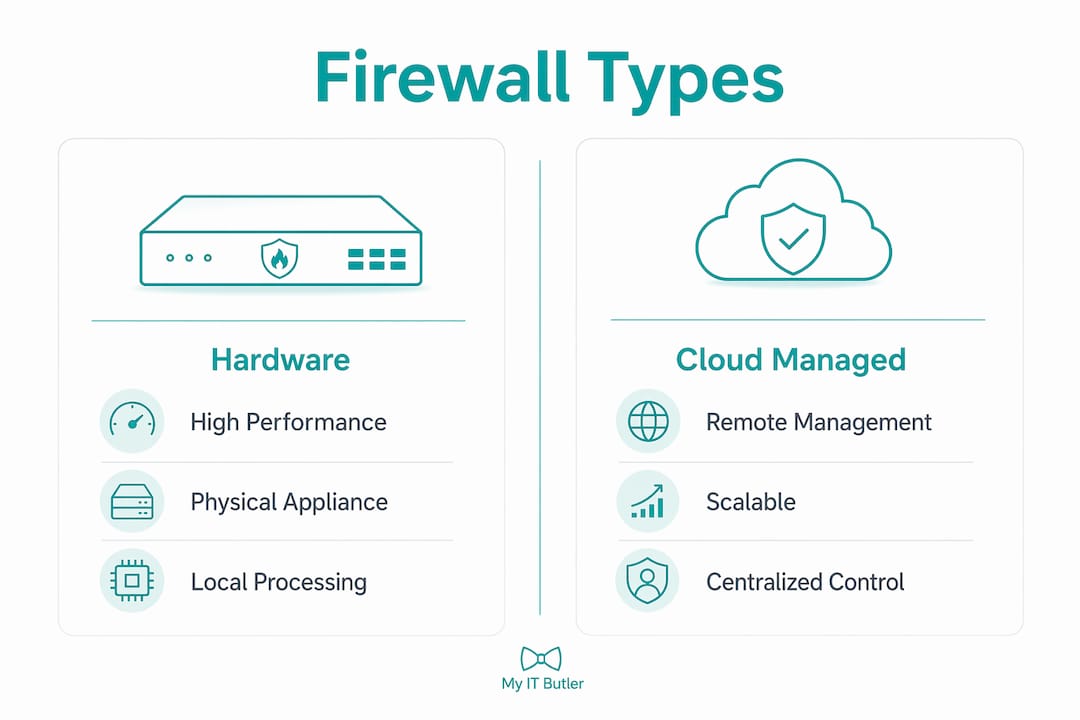
Hardware appliances vs cloud-managed firewalls
Hardware appliances like the Fortinet FortiGate 40F and 60F sit physically on your network and offer high performance at a fixed cost. The Cisco Meraki MX series takes a cloud-managed approach, where configuration and monitoring happen through a web dashboard rather than a local interface. This makes Meraki particularly well-suited to small businesses without dedicated IT staff, since updates and policy changes can be made remotely without touching the device. Sophos XGS and WatchGuard appliances sit between these extremes, offering strong NGFW features with reasonably accessible management interfaces.
| Firewall type | Best for | Key advantage | Key limitation |
|---|---|---|---|
| Fortinet FortiGate 40F/60F | Performance-focused SMBs | High throughput, strong security fabric | Steeper learning curve |
| Cisco Meraki MX | Businesses without IT staff | Cloud-managed, easy dashboard | Higher subscription cost |
| Sophos XGS | Balanced security and usability | Strong threat protection, good reporting | Requires some IT familiarity |
| WatchGuard | Multi-site small businesses | Flexible licensing, solid VPN | Interface less intuitive |
| SonicWall | Budget-conscious SMBs | Affordable entry point | Limited scalability |
Open-source options: pfSense and OPNsense
Open-source platforms like pfSense and OPNsense offer zero licensing fees and maximum flexibility, but they require specialised expertise to configure and maintain securely. For a small business without a dedicated IT person, the hidden cost of misconfiguration or missed updates can far exceed the savings on licensing. These platforms suit technically capable teams or businesses working with a managed IT provider who can handle the configuration on their behalf.
How to evaluate and select the right firewall: a step-by-step process
Once you understand your requirements, the selection process becomes structured rather than overwhelming. Follow these steps to avoid the most common pitfalls.
-
Define your security goals clearly. Write down what you need to protect, who needs access, and what threats concern you most. This document becomes your evaluation checklist and prevents you from being swayed by features you will never use.
-
Calculate your sizing requirements. Take your current peak internet speed and multiply it by at least 1.5. Then check whether the firewall's rated throughput applies to basic packet filtering or to full threat inspection. Real-world throughput drops 40 to 70 percent when security features like SSL inspection and intrusion prevention are fully enabled. A firewall rated at 1 Gbps on the box may deliver only 300 to 600 Mbps under real conditions.
-
Plan your full budget. Include hardware, annual subscriptions, and support costs. Use the IT budget guide to model three-year costs before committing to a vendor.
-
Assess management complexity. Ease of configuration and reporting directly affect whether a firewall actually gets managed properly in an SMB environment. A technically superior product that nobody on your team can confidently operate is a liability, not an asset. Look for a single-pane dashboard that shows traffic, threats, and policy status in one view.
-
Choose a vendor ecosystem deliberately. Multivendor sprawl increases complexity and creates interoperability gaps. If you already use Fortinet switches or Sophos endpoint protection, extending that same vendor's firewall creates a unified security fabric where components share threat intelligence automatically.
-
Run a Proof of Concept before buying. Most vendors offer trial licences or evaluation units. Test the firewall under your actual traffic conditions, with all security features enabled. This is the only reliable way to confirm real-world performance before committing budget.
Pro Tip: Always define your requirements before approaching vendors. Businesses that start with vendor demos rather than their own requirements list consistently end up with over-specified or poorly matched solutions.
Common pitfalls to avoid include undersizing the appliance for future growth, ignoring the performance impact of encrypted traffic inspection, and purchasing based on headline throughput figures rather than real-world tested performance.
How do you manage and maintain a firewall long-term?
Selecting the right firewall is only half the work. A firewall that is not actively maintained degrades in effectiveness over time, sometimes without any visible warning signs.
The most critical ongoing task is keeping firmware and threat signatures current. Vendors like Fortinet and Sophos release signature updates multiple times per day to address new malware and exploits. A firewall running outdated signatures is significantly less effective than its specifications suggest. If subscription licences lapse, hidden costs of neglected renewals can reduce your firewall to basic routing with no active threat protection. This is one of the most common and preventable security failures in small businesses.
Beyond updates, firewall rules need regular review. Rules accumulate over time as staff join, leave, and change roles. Unused rules create unnecessary attack surface. A quarterly review of active rules, combined with checking firewall logs for anomalies, keeps your configuration tight and your network visibility accurate.
Centralised dashboards matter here. Cloud-managed firewalls like Cisco Meraki provide real-time visibility across all connected sites from a single browser tab, which is particularly valuable for businesses with remote teams or distributed offices. For businesses without dedicated IT staff, partnering with a managed service provider for remote firewall monitoring removes the burden of day-to-day management while keeping protection current.
Pro Tip: Schedule a firewall health review every six months. Check firmware versions, review active rules, confirm subscription status, and test that VPN connections are functioning correctly. This takes less than two hours and prevents the majority of avoidable security incidents.
Finally, plan for growth. A firewall that fits your business today may struggle in two years if you add staff, open a new location, or shift more workloads to cloud services. Revisit your sizing calculations annually and factor firewall upgrades into your three-year IT planning cycle.
Key takeaways
The right firewall for a small business balances verified real-world throughput, manageable operational overhead, and a total cost of ownership that accounts for subscriptions, support, and future growth.
| Point | Details |
|---|---|
| Size for real-world performance | Plan for 1.5 to 3 times peak bandwidth; throughput drops 40 to 70 percent with full security features enabled. |
| Budget for total cost of ownership | Subscriptions represent 40 to 60 percent of three-year costs; hardware price alone is misleading. |
| Match complexity to your team | Choose a firewall your team can actually manage; a single-pane dashboard reduces errors and missed updates. |
| Stick to one vendor ecosystem | Single-vendor security fabrics reduce complexity and improve threat intelligence sharing across devices. |
| Maintain actively or outsource | Lapsed subscriptions and unreviewed rules are the most common causes of preventable firewall failures. |
What I have learned from firewall decisions in the field
Over 15 years of working with distributed businesses and remote teams, the firewall decisions I have seen go wrong share one pattern: the business chose based on what looked good on paper rather than what matched their actual environment.
The spec sheet for a Fortinet FortiGate 60F is impressive. But if the person responsible for managing it has never configured an NGFW policy, that device will sit with default settings and open rules for months. I have seen this more times than I care to count. The "best" firewall is not the one with the highest threat prevention score in a lab test. It is the one that gets configured correctly, updated consistently, and reviewed regularly by whoever is responsible for it.
Cloud-managed options like Cisco Meraki MX genuinely change the equation for small teams. The subscription cost is higher, but the operational overhead is dramatically lower. For a 15-person business without a dedicated IT manager, that trade-off is almost always worth it.
The other lesson I keep returning to is the danger of treating firewall selection as a one-time event. Your network in 2026 will not look the same as your network in 2028. Staff numbers change, cloud adoption grows, and threat actors get more sophisticated. Build a review cycle into your IT planning from day one, and treat your firewall as a living part of your security posture rather than a box you tick and forget.
— Thomas
How Myitbutler helps you select and manage the right firewall
Choosing a firewall without expert guidance means relying on vendor marketing rather than independent assessment. Myitbutler works with Australian small businesses to assess their actual network requirements, recommend firewall solutions that fit their budget and team capability, and handle ongoing management so protection never lapses.

Whether you are selecting your first business firewall or replacing an ageing appliance, the team at Myitbutler brings CCNA and CompTIA Security+ certified expertise to every engagement. From initial scoping through to deployment and monthly monitoring, you get a trusted IT partner rather than a one-off vendor transaction. Book a consultation to get a clear, unbiased recommendation for your specific situation, with transparent fixed pricing and no lock-in contracts.
FAQ
What is the best firewall for a small business in 2026?
The Fortinet FortiGate 40F and Cisco Meraki MX are consistently rated among the top firewalls for SMBs, with the best choice depending on whether your priority is raw performance or ease of cloud management. Sophos XGS is also a strong option for businesses needing balanced threat protection with accessible reporting.
How much does a small business firewall cost?
Hardware appliances typically cost between $300 and $1,500, with annual security subscription bundles adding $400 to $600 per year. Over three years, subscription costs often represent 40 to 60 percent of total ownership costs, so budget accordingly from the start.
Do small businesses really need a next-generation firewall?
Any business storing customer data, processing payments, or operating under GDPR, PCI, or HIPAA requirements needs an NGFW with application inspection and intrusion prevention. A basic port-filtering firewall does not provide adequate protection against modern threats.
What is the difference between a hardware firewall and a cloud-managed firewall?
A hardware firewall processes traffic locally on a physical appliance, while a cloud-managed firewall like Cisco Meraki MX uses a web-based dashboard for configuration and monitoring. Cloud-managed options suit small teams without dedicated IT staff because updates and policy changes can be made remotely without on-site access.
How often should a small business update its firewall?
Firmware updates should be applied as soon as vendors release them, typically monthly or when critical patches are issued. Threat signatures update automatically with an active subscription, which is why allowing subscriptions to lapse immediately reduces protection to basic traffic filtering.