
Six controls stop most distributed-team breaches before they start: multi-factor authentication everywhere, a complete asset inventory, automated patching, endpoint detection and response (EDR) on every device, full disk encryption, and mobile device management (MDM) enforcing conditional access. If your team is spread across time zones and home networks, these aren't optional extras — they're the baseline the NIST Cybersecurity Framework 2.0 recommends even small organisations build around.
Do this in the next 72 hours:
- Turn on MFA for every account with admin or email access
- Pull a live list of every device touching company data (laptops, phones, tablets)
- Check which endpoints are missing critical patches, prioritising anything on CISA's Known Exploited Vulnerabilities list
- Confirm BitLocker or FileVault is switched on for every laptop
For the medium term, you're choosing between managed EDR/MDR, an MDM platform, zero trust network access (ZTNA), and a SIEM for log correlation. Remote endpoints without in-office network protection are exposed to home Wi-Fi, personal devices, and unmanaged apps — Harvard's remote-work security guidance puts device encryption and automatic updates near the top of its list for good reason. The single next step that reduces exposure fastest: enforce MFA organisation-wide today, because credential theft remains the entry point for the majority of remote-endpoint compromises.
Key Takeaways
Distributed team endpoint security works when MFA, automated patching, EDR, encryption, and MDM are enforced together in a deliberate sequence, not bolted on piecemeal.
| Point | Details |
|---|---|
| Sequence matters more than tool choice | Build inventory first, then patching, then EDR, then SIEM integration, in that order. |
| MFA is the fastest win | Enforcing MFA organisation-wide today closes the most common credential-theft entry point. |
| MDM and EDR are different layers | Pair Intune, Jamf, or Workspace ONE with a genuine EDR tool like Defender or CrowdStrike rather than relying on MDM alone. |
| Remove standing admin rights early | It's a low-effort change that sharply limits damage from a compromised credential. |
| Managed support fills the monitoring gap | Myitbutler coordinates EDR, MDM, and vendor liaison for distributed teams without an in-house SOC. |
Table of Contents
- Distributed team endpoint security best practices that actually hold up
- What should you monitor once controls are in place?
- Which endpoint protection platform suits a distributed team?
- How do you choose the right approach for your team?
- What does a 90-day rollout actually look like?
- Managed IT support that actually understands distributed teams
- Sources
- FAQ
Distributed team endpoint security best practices that actually hold up
Most "best practices" lists read like a compliance checklist nobody actually implements. Here's what to build, in the order that matters for a team scattered across home offices, co-working spaces, and airport lounges.
1. Get a real asset inventory first. You can't protect what you can't see. Before buying any tool, list every laptop, phone, and tablet touching company data, plus who owns it and what OS it runs. Verify by cross-checking your MDM enrolment count against payroll headcount. Distributed teams routinely lose a notable portion of devices to this "shadow endpoint" gap.

2. Enforce MDM before anything else. Microsoft Intune, Jamf, or VMware Workspace ONE should gate access before a device gets a single corporate resource. Windows and Android lean on Intune's compliance policies; Apple shops get tighter control through Jamf's supervised mode. Verify by testing that a non-compliant device is actually blocked, not just flagged.
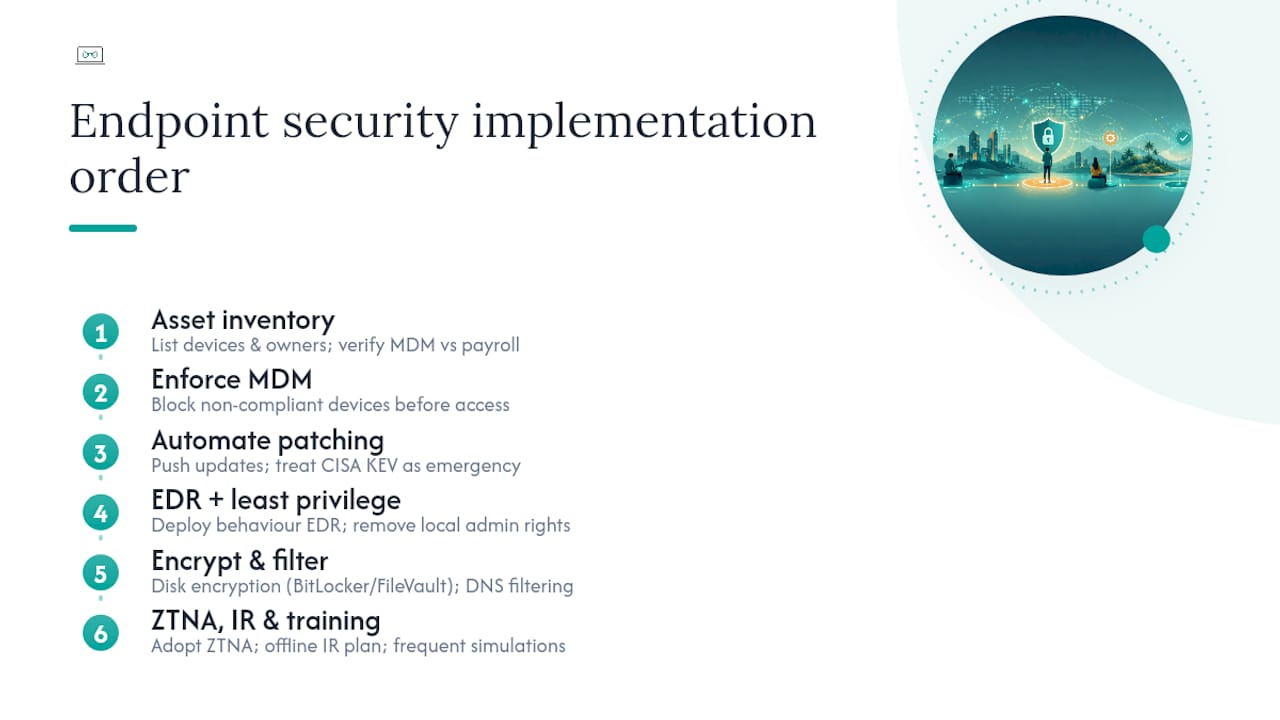
3. Automate patching, don't ask for it. Manual patch reminders fail the moment someone's on leave. Wire Intune (or your MDM of choice) to push updates automatically, and treat anything on the CISA KEV list as an emergency patch, not a next-cycle item.
4. Run EDR with real telemetry, not just antivirus. SentinelOne, CrowdStrike Falcon, Sophos Intercept X, and Microsoft Defender for Endpoint all detect behaviour, not just known signatures. Microsoft's Zero Trust endpoint guidance recommends pairing Defender with Sentinel so alerts get correlated centrally instead of sitting in isolated dashboards.

5. Kill standing local admin rights. This is the cheapest, highest-impact move on this whole list. Removing local admin access limits what an attacker can do even after they've compromised a laptop. Most IT teams put it off because it's mildly annoying for staff. Do it anyway.
6. Encrypt disks and data in transit. BitLocker on Windows, FileVault on macOS, and enforced device encryption on mobile through your MDM policy. Verify quarterly, because a re-imaged laptop can silently drop back to unencrypted.
7. Filter DNS and manage the browser. A managed browser policy plus DNS filtering stops a huge share of phishing and malicious downloads before they hit the endpoint at all.
8. Move remote access to ZTNA, not blanket VPN. ZTNA checks device posture (patched, encrypted, EDR-active) before granting access to any single app. A flat VPN just hands someone the whole network once they're in.
9. Build an incident response plan that works offline. If a laptop goes dark in a hotel room in another country, can you remotely isolate it or wipe it without the user's help? If not, that's a gap.
10. Train people, repeatedly, not once. Annual phishing training doesn't stick. Short, frequent simulations tied to real threats your team has actually seen work better.
Pro Tip: Map each control to a NIST CSF or CIS Controls category before you present it to leadership. Executives fund frameworks they recognise, not ad hoc tool lists.
What should you monitor once controls are in place?
Deploying tools is the easy part. Knowing whether they're actually working is where most distributed-team security programs quietly fail.
Track these signals continuously:
- Agent health (is the EDR agent actually running, not just installed?)
- Patch level against your defined SLA
- EDR alerts, weighted by confidence
- Disk encryption status across the fleet
- Identity provider authentication anomalies (impossible travel, repeated MFA failures)
- DNS filtering and browser isolation events
- App-level data loss signals from cloud platforms
None of these signals means much alone. A sound endpoint strategy correlates data from EDR, MDM, your identity provider, and email/cloud logs together, because an isolated EDR alert looks very different next to a simultaneous login anomaly from an unfamiliar country. That correlation is what a SIEM is for.
A practical integration pattern: Intune enforces device compliance, Defender for Endpoint feeds telemetry, and Sentinel (or another SIEM) correlates that against identity logs to flag posture drift automatically. MDM plus EDR plus SIEM works the same way regardless of vendor, as long as the pieces actually talk to each other.
On alerting, resist the urge to flag everything. Set baselines first, then alert only on genuine deviations, and reserve automated containment (isolating a device, killing a process) for high-confidence indicators only. Noisy alerts train your team to ignore them.
Pro Tip: Track agent coverage percentage and "endpoints not reporting in 7 days" as your two headline metrics. A device that's gone quiet is often more dangerous than one throwing alerts.
Which endpoint protection platform suits a distributed team?
There's no single right answer here. It depends on your existing platform investment, your team's OS mix, and whether you have in-house security staff to run detections around the clock.
Microsoft Intune, Jamf, and Workspace ONE aren't EDR platforms. They're device management layers that decide whether a device is even allowed to connect, which is why most distributed teams pair one of them with a genuine EDR tool like Defender, CrowdStrike, or SentinelOne rather than treating MDM alone as "security."
The entrants were shortlisted on OS coverage, how easily they deploy to devices that never touch a corporate office network, and whether they feed a SIEM for correlated alerting, detailed further in the methodology note below.
Pro Tip: If you don't have someone watching EDR alerts at 2am your time, a managed detection and response (MDR) layer or a managed partner matters more than which EDR brand you pick.
How do you choose the right approach for your team?
Before signing anything, put these questions to any vendor or managed provider:
- What's the agent's footprint on CPU and battery, especially for staff on ageing laptops?
- Can it remotely isolate or wipe a device that's offline when the alert fires?
- How long is telemetry retained, and can it export to our SIEM?
- Does patch automation cover third-party apps, not just the OS?
- Does it gate access based on device posture (patched, encrypted) before granting app access?
- What's the SLA for support, and does it cover our time zones?
Red flags worth walking away from: incomplete agent coverage across your actual OS mix, no integration with your identity provider or MDM, and no automated containment for confirmed threats.
For a pilot, run it against a genuine cross-section of devices, not just the newest laptops. Measure:
- Deployment success rate across your real device mix
- Telemetry quality (does it actually catch test scenarios?)
- False positive rate over two to four weeks
- Mean time to isolate a compromised device
A typical rollout: two to four weeks for a pilot on 10 to 20 percent of devices, six to eight weeks for phased deployment, then ongoing tuning. Budget for a person (internal or managed) who actually owns this, not a shared responsibility nobody follows up on.
What does a 90-day rollout actually look like?
- Days 0 to 30: Complete asset inventory, patch every critical CVE, enforce MFA everywhere. Acceptance criteria: 100 percent MFA coverage, zero unpatched KEV items.
- Days 31 to 60: Enrol devices in MDM, pilot EDR on 20 to 30 percent of the fleet, start enforcing device compliance policies. Target: 80 percent agent coverage.
- Days 61 to 90: Roll EDR out fully, wire telemetry into your SIEM, run a tabletop incident response exercise.
Stagger enrolment by time zone so support tickets don't all land at once, and set a clear fallback for BYOD devices that can't meet the encryption bar. Report agent coverage and patch compliance percentages to leadership monthly, not just at rollout's end.
Pro Tip: Run the tabletop exercise on a Friday afternoon. It reveals exactly how your on-call process handles a real incident when half the team has already logged off for the weekend.
How were these recommendations put together?
Products were shortlisted on OS coverage across a distributed fleet, ease of remote deployment (no physical touch required), telemetry depth, SIEM compatibility, and remote remediation capability. Vendor documentation from Microsoft, NIST, and CISA guidance were the primary references, alongside practitioner sources on sequencing and control prioritisation.
Distributed teams rarely fail because they picked the wrong EDR brand. They fail because nobody owns the sequencing: inventory first, then patching, then EDR, then integration. Skip the order and every tool underperforms.
Thomas holds CCNA, CompTIA Security+, and PRINCE2 certifications and has spent over 15 years coordinating enterprise IT for distributed organisations at My IT Butler. This isn't a vendor-paid ranking. Where a managed partner fits better than a self-run stack, that's said plainly.
When does a managed partner make sense over doing it yourself?
Running EDR, MDM, and SIEM correlation properly takes a team watching it around the clock. Most distributed businesses under 200 people don't have that bench.
- Under 20 staff with no dedicated security hire: managed makes sense
- Regulatory obligations (health data, financial records): managed or hybrid, given audit demands
- 24/7 monitoring need without in-house SOC: managed
- Established in-house IT team with security depth: self-managed is viable
If you're unsure which bucket you're in, an assessment through My IT Butler settles it in one conversation.
Managed IT support that actually understands distributed teams
Myitbutler is the alternative to hiring an in-house SOC for teams too small to justify one but too exposed to skip proper endpoint controls. Rather than juggling five vendor logins and hoping your EDR alerts get read overnight, Myitbutler coordinates the tools, liaises directly with vendors, and handles escalations across time zones, all under fixed, transparent pricing with no lock-in contracts.

That's the practical gap for most expats, digital nomads, and small distributed teams: you don't need another dashboard, you need someone who actually watches it and knows who to call when something breaks at 3am your time. Myitbutler's remote support runs on Australian standards, backed by CCNA, Security+, and PRINCE2 certifications, and covers everything from ad-hoc troubleshooting to ongoing managed liaison with your EDR and MDM vendors.
If your team is self-managed and holding up fine, keep going. If you're patching the gaps in your evenings and weekends, a free consultation will tell you within thirty minutes whether managed support actually saves you money and risk. Book the chat and bring your current tool list.
Sources
- Take a tour: NIST Cybersecurity Framework 2.0 — NIST
- CISA cybersecurity advisories (AA25-163A) — CISA
- Zero Trust for endpoints — Microsoft Learn
- Abnormal
- Building an effective endpoint security strategy in 2026 — Tanium blog
FAQ
What is the single most important endpoint control for distributed teams?
Multi-factor authentication, enforced organisation-wide, closes the most common entry point attackers use against remote credentials.
Do I need both MDM and EDR?
Yes. MDM (Intune, Jamf, Workspace ONE) gates device compliance and access, while EDR (Defender, CrowdStrike, SentinelOne) detects and responds to active threats. They're complementary layers, not substitutes.
How long does a distributed team endpoint security rollout take?
A pilot typically runs two to four weeks, phased deployment another six to eight weeks, with full integration and tuning continuing after that.
Is a managed EDR/MDR service worth it for a small distributed team?
For teams without a dedicated security hire watching alerts around the clock, a managed partner like Myitbutler often closes the monitoring gap more reliably than a self-run stack.
What should I check first if my team works entirely remotely?
Start with a complete device inventory and MFA enforcement, since you can't secure devices you don't know about, and credential theft remains the most common way into remote endpoints.