

TL;DR:
- Effective IT strategies automate administrative tasks, enhance client communication, and enable freelancers to scale their businesses.
- Using integrated platforms and local AI models creates a secure, efficient, and enterprise-ready operation capable of attracting high-value clients.
Information technology is the operating system of a modern freelance business. The role of IT in freelance business covers every function that keeps you competitive: automating admin, managing client communication, protecting data, and proving your value to enterprise clients. Established freelancers using automated tech earn hourly rates of $50–$150, with annual incomes reaching $150,000. That gap between average and top earners is not talent. It is technology. Tools like Plutio, Ezly, and AI-driven assistants are now standard kit for freelancers who want to work less and bill more.
What is the role of IT in freelance business?
IT in a freelance context means the systems, software, and digital practices that run your business behind the scenes. The industry term for this is managed technology stack, and it covers everything from project management and invoicing to cybersecurity and client reporting. For a solopreneur, your tech stack is your operations team, your accounts department, and your communications manager rolled into one.
The impact is direct and measurable. Freelancers who build a deliberate IT strategy spend less time on low-value admin and more time on billable work. They also present a more professional face to clients, which matters when you are competing for contracts against agencies with full back-office support. Getting your IT strategy right is not a luxury. It is the foundation of a scalable freelance business.
How does IT enhance productivity and workflow management for freelancers?
Productivity is where the importance of IT for freelancers shows up most clearly. The right tools remove the friction between finishing work and getting paid, between receiving a brief and starting the job.

The admin tax on your time
Every freelancer pays an admin tax. Chasing invoices, scheduling calls, updating project trackers, and switching between five different apps all cost time that could be billed. Consolidating tools into one platform saves freelancers 2–5 hours weekly by eliminating manual handoffs between disconnected software. Over a year, that is more than 100 hours returned to billable work.
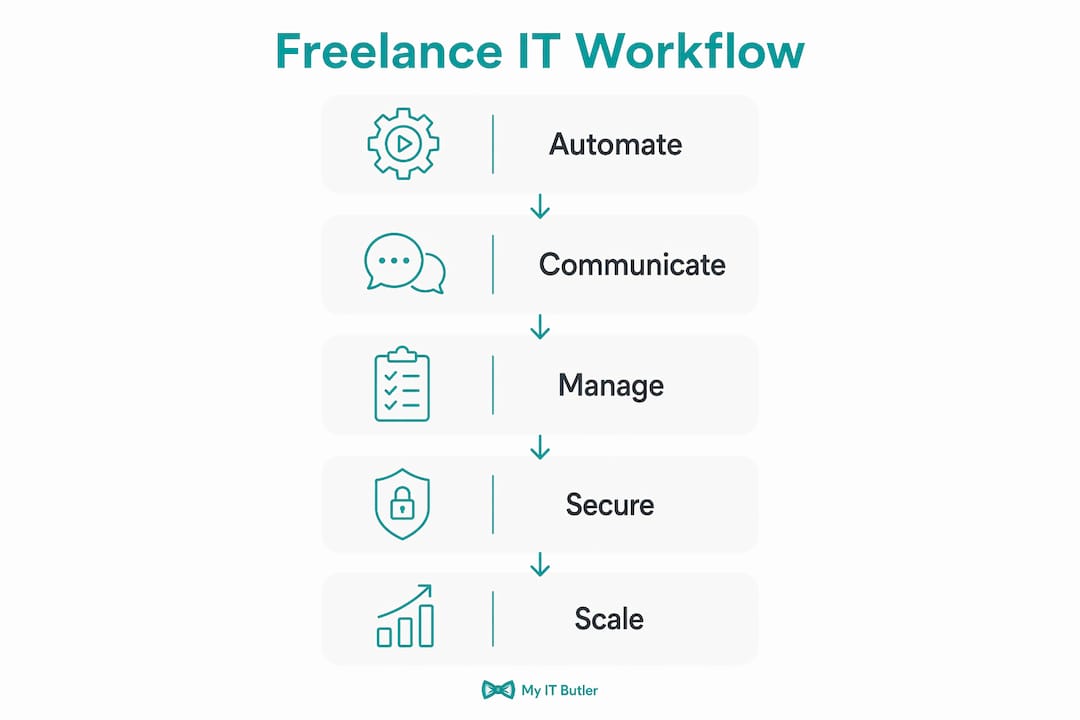
Platforms like Plutio combine project management, invoicing, client portals, and time tracking in a single interface. That matters because every time you switch context between apps, you lose momentum. Automation tools that connect your workflows, such as Zapier or Docker-based pipelines, reduce manual data entry and the errors that come with it.
What to prioritise first
Not every freelancer needs the same tools. The right sequence matters more than the right tools.
- Online presence and portfolio: A professional website or profile on platforms like LinkedIn or Behance establishes credibility before any sales conversation.
- Automated billing: Tools like FreshBooks, Wave, or the invoicing module inside Plutio remove the awkward "have you paid yet?" follow-up.
- Project tracking: A simple Kanban board in Trello or Notion keeps client work visible and deadlines clear.
- Communication hub: A single inbox or client portal prevents messages from falling through the cracks across email, Slack, and WhatsApp.
- Time tracking: Toggl or Harvest gives you data to justify your rates and spot where your time actually goes.
Pro Tip: Start with browser-first tools before committing to desktop software or complex integrations. Browser-based platforms require no installation, work across devices, and are easier to trial before you invest time in setup. Free-tier foundations with essential billing and presence tools keep overhead low while you find what actually fits your workflow.
What IT tools improve communication and client relationship management?
Fast, clear communication is one of the most underrated competitive advantages a freelancer can build. Clients do not always hire the most skilled person. They hire the person who responds quickly, communicates clearly, and makes them feel looked after.
AI communication assistants
AI tools like Ezly are changing how top freelancers manage client volume. Freelancers using AI communication assistants manage up to 8 client threads simultaneously with reply times under 15 seconds, earning $5,000–$15,000 per month. That is not because they work faster. It is because the AI drafts responses in their voice, flags urgent messages, and keeps tone consistent across every client relationship.
The key advantage of tools like Ezly is that they preserve your personal style while removing the cognitive load of composing every reply from scratch. Clients feel they are getting your full attention. You are actually managing four times the client load you could handle manually.
CRM and client lifecycle management
A customer relationship management (CRM) system tracks where every client sits in your pipeline. For freelancers, this means knowing when a contract is up for renewal, when to send a check-in message, and which clients are most likely to refer new work.
- Map your client stages: Prospect, proposal sent, active project, invoiced, completed, and follow-up. Every client sits in one of these stages at all times.
- Set automated reminders: Tools like HubSpot CRM (free tier) or the CRM features inside HoneyBook trigger follow-up tasks so nothing slips.
- Track communication history: A full log of every email, call note, and deliverable means you never start a client conversation cold.
- Use reporting for transparency: Sharing a simple weekly status report with clients, generated automatically from your project tool, builds trust and reduces check-in calls.
- Integrate with invoicing: When your CRM connects to your billing tool, contract renewals trigger invoice drafts automatically.
The impact of technology on freelance client management is that it shifts you from reactive to proactive. You are not waiting for clients to chase you. You are already one step ahead.
Plutio vs HoneyBook vs Bonsai: which platform suits freelancers?
Choosing the right all-in-one platform is one of the highest-leverage decisions a freelancer makes. The wrong choice means paying for features you do not use. The right choice replaces five subscriptions with one.
Freelancers typically spend $100–$200 per month on 5–6 subscriptions. Consolidating into a single platform cuts that to around $49 per month. That saving alone pays for the platform several times over.
| Platform | Monthly cost | Best for | Key features | Limitation |
|---|---|---|---|---|
| Plutio | From $19 | Generalist freelancers | Projects, invoicing, proposals, time tracking, client portal | Steeper learning curve |
| HoneyBook | From $19 | Creative professionals | Contracts, scheduling, payments, client communication | Less flexible for technical work |
| Bonsai | From $25 | Consultants and developers | Contracts, invoicing, time tracking, tax tools | Limited project management depth |
Standalone tools like Trello, FreshBooks, and Calendly each do one thing well. The problem is that they do not talk to each other. Every manual transfer between them is a potential error and a guaranteed time cost. Integrated platforms eliminate that friction entirely.
How can freelancers use advanced IT strategies to win enterprise clients?
The ceiling for freelance income rises sharply when you position yourself as enterprise-ready. Enterprise clients do not just want deliverables. They want a partner who fits into their existing IT environment without creating risk or complexity.
Becoming a systems architect
Successful freelancers act as systems architects, delivering documented, integrated setups that clients can plug into directly. This means providing uptime records, security compliance documentation, and workflow automation evidence rather than just a portfolio of past work. Enterprise clients prefer freelancers who can demonstrate measurable performance. That preference translates directly into higher retainers and longer contracts.
Practically, this means:
- Document your processes: Write up how you onboard clients, manage revisions, and deliver work. A documented process signals professionalism and reduces client risk.
- Demonstrate security compliance: Use tools like Bitwarden for password management and show clients you follow data handling best practices. Affordable cybersecurity tools are accessible even for solo operators.
- Provide uptime and availability metrics: If you use a client portal or shared workspace, show clients it is reliable and accessible.
- Build measurable ROI reporting: Analytics dashboards in tools like Google Looker Studio let you show clients the direct impact of your work in numbers.
Local AI models and data privacy
Advanced freelancers are moving beyond public AI APIs for sensitive client work. Running local AI models on consumer-grade hardware keeps confidential code and client data entirely off third-party servers. This matters for clients in legal, financial, and healthcare sectors where data sovereignty is a contractual requirement.
Tools like Ollama let you run models such as Llama 3 locally on a standard laptop. The processing stays on your machine. The client's data never leaves your controlled environment. That capability alone can open doors to contracts that other freelancers cannot bid on.
Pro Tip: A hybrid AI approach works best for most freelancers. Use public APIs like OpenAI for non-sensitive tasks such as drafting marketing copy, and local AI models for anything involving client data, proprietary code, or confidential documents. This balances speed with genuine data protection.
Automation tools that connect your applications, whether through back-office workflow automation or platforms like Zapier, reduce the manual upkeep that kills productivity at scale. When your project tool automatically updates your CRM, which triggers your invoicing system, you have built a business that runs with far less daily intervention.
Key takeaways
A deliberate IT strategy is the single biggest differentiator between freelancers who plateau and those who scale to enterprise-level retainers.
| Point | Details |
|---|---|
| Start with foundational tools | Prioritise billing automation and online presence before adding complex integrations. |
| Consolidate your subscriptions | Switching to an all-in-one platform like Plutio cuts monthly software costs from $200 to around $49. |
| Use AI for communication | Tools like Ezly let you manage up to 8 client threads with sub-15-second reply times. |
| Position as enterprise-ready | Document your processes, demonstrate security compliance, and provide measurable ROI to win high-value retainers. |
| Protect client data locally | Run local AI models for sensitive work to meet data privacy requirements and access restricted contract opportunities. |
Why I think most freelancers get their IT strategy backwards
Most freelancers I speak with build their tech stack the wrong way around. They start with the flashy tools, the AI writing assistants and the project dashboards, and skip the boring fundamentals like automated billing and a proper client portal. Then they wonder why they are still chasing invoices at 11pm.
The uncomfortable truth is that the workflow automation tools that actually move the needle are rarely the ones being talked about on LinkedIn. They are the unglamorous connective tissue: the Zapier zap that creates a project folder when a contract is signed, the invoice that sends itself three days before a project wraps up, the CRM reminder that tells you to check in with a client you have not heard from in six weeks.
I have also seen freelancers fall into tool fatigue. They sign up for eight platforms in a month, spend two weeks configuring them, and end up more overwhelmed than before. The advice I give every time is to master one tool completely before adding another. Complexity is not sophistication. A simple stack you actually use beats an elaborate one you avoid.
The freelancers earning at the top end are not necessarily the most technically skilled. They are the ones who have built systems that make them look and operate like a small agency. They respond fast, deliver consistently, and give clients confidence through transparency. That is an IT problem as much as it is a talent problem. And it is one you can solve methodically, one tool at a time.
— Thomas
How Myitbutler supports freelancers with tailored IT solutions
Running a freelance business means wearing every hat, including IT manager. When your tools break, your security lapses, or you need a proper IT strategy to pitch enterprise clients, you need expert support without the cost of an in-house team.

Myitbutler provides remote IT support built for independent professionals, digital nomads, and distributed teams. With over 15 years of enterprise experience and certifications including CCNA and CompTIA Security+, Myitbutler delivers proactive IT management, vendor liaison, and strategic planning at transparent fixed pricing with no lock-in contracts. Whether you need on-demand troubleshooting or a full IT audit before pitching a major client, you can book a consultation and get a plan built around your actual business needs.
FAQ
What does IT actually do for a freelance business?
IT automates admin tasks, manages client communication, protects your data, and gives you the tools to operate professionally at scale. The right tech stack lets a solo operator compete with agencies on responsiveness and reliability.
How much should a freelancer spend on IT tools?
Most freelancers spend $100–$200 per month across multiple subscriptions. Consolidating into an all-in-one platform like Plutio or Bonsai reduces that to around $49 per month without losing core functionality.
Which IT tools are best for freelancer communication?
AI communication assistants like Ezly reduce response times and manage multiple client threads simultaneously. Combined with a CRM tool like HubSpot, they keep client relationships organised and proactive.
How do IT strategies help freelancers win enterprise contracts?
Enterprise clients require documented processes, security compliance, and measurable performance data. Freelancers who provide uptime records, data privacy practices, and ROI reporting position themselves as low-risk, high-value partners rather than individual contractors.
Is cybersecurity worth investing in as a freelancer?
Yes. Data breaches and privacy failures can end client relationships and expose you to legal liability. Basic tools like Bitwarden for password management and local AI models for sensitive data processing are affordable and protect both you and your clients.