

TL;DR:
- Myitbutler offers Australian-standard managed IT services tailored for distributed teams and digital nomads. It provides fixed pricing, no lock-in contracts, and multi-timezone support, making it ideal for remote-first operations. Comparing options, providers should meet Essential Eight standards and have clear SLAs to ensure security and reliability.
For Australian distributed teams, expats, and digital nomads, Myitbutler is the strongest alternative to Remotech.IT, backed by over 15 years of enterprise experience, Australian-standard certifications (CCNA, CompTIA Security+, PRINCE2), transparent fixed pricing, and no lock-in contracts. Otto IT is a second named option worth considering for larger Australian SMEs needing a local presence. Beyond those two, the shortlist thins quickly once you apply the criteria that actually matter: Essential Eight alignment, multi-timezone support, and documented SLAs.
Book a free consult with Myitbutler to discuss your requirements before committing to any provider.
Table of Contents
- How do Myitbutler and Otto IT compare as Remotech.IT alternatives?
- How do you pick the right Remotech.IT alternative?
- What should an Australian-standard remote MSP actually provide?
- What Australian businesses say about switching managed IT providers
- What contract terms should you expect from a managed IT provider?
- Key takeaways
- The reality of supporting distributed teams across time zones
- Myitbutler: the practical alternative for distributed teams
- Useful sources and further reading
- FAQ
How do Myitbutler and Otto IT compare as Remotech.IT alternatives?
The table below maps the dimensions that matter most when switching managed IT providers.
| Dimension | Myitbutler | Otto IT |
|---|---|---|
| Best for | Distributed teams, expats, digital nomads, SMEs | Mid-market Australian businesses, local offices |
| Service model | Managed + ad-hoc remote support | Managed services, onsite and remote |
| Pricing model | Transparent fixed pricing, no long-term contracts | Subscription-based; pricing not publicly listed |
| SLAs & response times | Documented; critical response targets available on request | Documented; varies by tier |
| Security & certifications | CCNA, CompTIA Security+, PRINCE2; Essential Eight aligned | ISO-aligned; security services offered |
| Australian coverage & data residency | Australian company; global delivery; data residency discussed at onboarding | Australian offices; local data handling |
| Multi-timezone support | WhatsApp, Zoom, email; explicit multi-timezone coordination | Business-hours focus; after-hours by arrangement |
| Onboarding effort | Low; remote-first, rapid setup | Moderate; discovery and site assessment typical |
Myitbutler pros: Fixed pricing with no surprises, purpose-built for remote and distributed teams, accessible via WhatsApp for after-hours queries, and certifications that signal genuine security depth.
Myitbutler cons: No onsite visits (remote-only delivery model).
Otto IT pros: Local Australian offices, onsite capability, suits businesses that occasionally need a technician on the floor.
Otto IT cons: Pricing not publicly listed, less explicit focus on expat or digital nomad use cases, and multi-timezone coordination is not a stated strength.
For teams spread across time zones with no fixed office, Myitbutler's remote-first model is the practical fit. Otto IT suits a Melbourne or Sydney-based team that wants the option of someone walking through the door. See how remote troubleshooting services compare for a deeper feature breakdown.
How do you pick the right Remotech.IT alternative?
A glossy website tells you nothing. These criteria separate substantive providers from marketing claims, drawn from Australian MSP buyer guidance for 2026.
Must-have checklist:
- Essential Eight alignment: can they map your current maturity against all eight controls?
- Documented SLAs with specific response targets (critical issues under 30 minutes is a reasonable benchmark).
- Clear onboarding scope: discovery, migration, configuration, knowledge transfer, and a defined go-live date.
- Australian data residency capability or a written statement of where your data lives.
- Vendor management: will they liaise with your ISP, cloud provider, and software vendors on your behalf?
- Reporting cadence: monthly summary at minimum, with patch compliance and incident data included.
Questions to ask on a shortlisting call:
- What is your documented response time for a critical outage at 11 PM on a Friday?
- How often do you test backups, and can you show me the last test report?
- Do you have an incident response runbook, and will I receive a copy?
- How do you handle offboarding if we decide to leave?
Red flags to walk away from:
- Vague security claims with no reference to Essential Eight or a recognised framework.
- No written SLA, or SLA language that is all "best efforts."
- Billing surprises: setup fees, per-ticket charges, or exit penalties buried in the fine print.
- No clear offboarding process. A provider who makes leaving difficult is telling you something important.
Pro Tip: Build a simple three-column comparison doc: list your three-year IT roadmap items in column one, each shortlisted vendor's stated capability in column two, and any gaps or unknowns in column three. Run it past each vendor on the call. The ones who engage with the gaps honestly are worth a second conversation.
What should an Australian-standard remote MSP actually provide?
Choosing a managed IT provider is about extending your security and IT capability, not just outsourcing helpdesk tickets. Here is what a quality provider delivers:
Core services:
- Remote troubleshooting and helpdesk (business hours at minimum, 24/7 for critical systems).
- Proactive monitoring and patch management across endpoints and servers.
- Backup and disaster recovery, with tested restore procedures.
- Vendor liaison: your MSP should talk to your ISP, Microsoft, and any SaaS vendors so you do not have to.
- vCIO or strategic planning: quarterly reviews, technology roadmap input, and budget forecasting.
Security expectations:
- Alignment to the Australian Cyber Security Centre's Essential Eight controls.
- Multi-factor authentication enforced across all managed accounts.
- Patch compliance reporting delivered monthly.
- A partnership with a dedicated cybersecurity provider for incident response beyond the MSP's own scope.
Distributed team support:
- Multi-timezone communications via WhatsApp, Zoom, or email, with documented after-hours escalation paths.
- Lightweight device management for laptops in multiple countries.
- Secure remote access channels (VPN or zero-trust alternatives).
- Documented onboarding and offboarding procedures for staff joining or leaving across different jurisdictions.
Statistic callout: According to Valont's 2026 SME guide, quality managed IT providers offer three pricing tiers (basic, standard, premium), with the standard tier typically covering security monitoring and advisory services alongside core helpdesk.
What Australian businesses say about switching managed IT providers
Published client feedback for Australian managed IT providers consistently highlights three themes: response speed, communication clarity, and the absence of billing surprises.
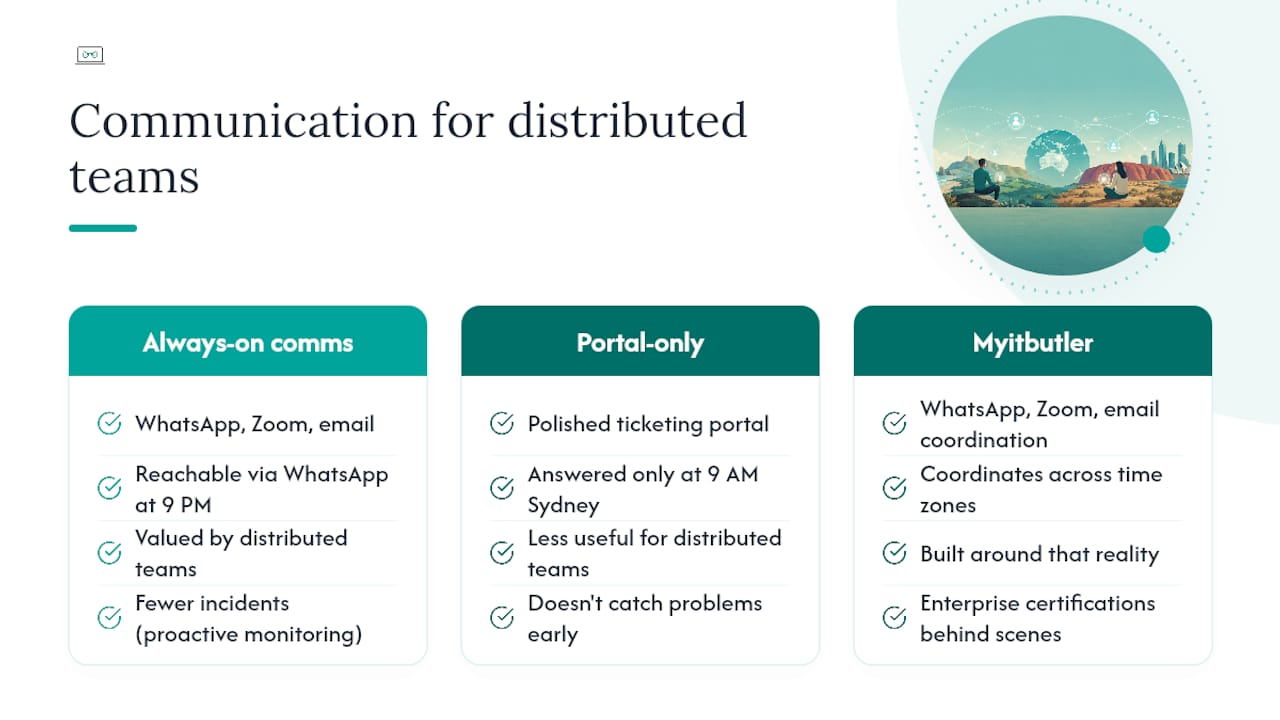
Businesses that have moved from ad-hoc or break-fix arrangements to a managed subscription typically report that the biggest gain is not faster fixes but fewer incidents overall, because proactive monitoring catches problems before users notice them. For distributed teams, the communication channel matters as much as the technical capability. A provider reachable via WhatsApp at 9 PM in a different time zone is worth more than one with a polished ticketing portal that nobody answers until 9 AM Sydney time.
Myitbutler's model is built around exactly that reality: WhatsApp, Zoom, and email coordination across time zones, with enterprise certifications behind the scenes. For a practical guide to managed IT services and what clients can expect at each stage, the Myitbutler services guide covers the detail.
What contract terms should you expect from a managed IT provider?
Contract flexibility is one of the clearest signals of a provider's confidence in their own service.
What good looks like:
- Month-to-month or rolling quarterly agreements with no exit penalties.
- Fixed pricing locked for the contract term, with any changes requiring written notice.
- A clear offboarding clause: the provider hands back all credentials, documentation, and access within a defined period (typically 5–10 business days).
- Service credits for SLA breaches, not just apologies.
What to avoid:
- Annual or multi-year lock-ins with early termination fees.
- Contracts that give the provider ownership of your documentation or configuration files.
- Renewal clauses that auto-escalate pricing without notice.
Myitbutler operates with no long-term contracts, which means you are not locked in if your needs change. That structure suits startups scaling quickly, expats whose business footprint shifts, and distributed teams that add or remove users frequently.
Key takeaways
For Australian distributed teams evaluating managed IT providers, Myitbutler is the lead recommendation: Australian-standard certifications, fixed pricing, no lock-in contracts, and explicit multi-timezone support built for remote-first teams.
| Point | Details |
|---|---|
| Lead recommendation | Myitbutler meets all core criteria: certifications, fixed pricing, no lock-in, multi-timezone support. |
| Essential Eight alignment | Require any shortlisted provider to map your maturity against all eight ACSC controls before signing. |
| Contract flexibility | Insist on month-to-month or rolling quarterly terms with a clear offboarding clause and no exit penalties. |
| Onboarding timeline | Allow 4–6 weeks from discovery to SLA go-live; plan a 48-hour monitoring overlap during cutover. |
| Next step | Book a free consult with Myitbutler to discuss your requirements and get a fixed-price proposal. |
The reality of supporting distributed teams across time zones
Supporting a distributed team is not the same as supporting an office. The problems arrive at odd hours, in odd time zones, and often through a WhatsApp message rather than a formal ticket. What matters is whether someone actually picks it up.
The providers worth trusting are the ones who have built their communication model around that reality, not retrofitted it. Certifications like CCNA and CompTIA Security+ signal technical depth. No long-term contracts signal confidence. But the real test is whether your provider answers at 11 PM when a team member in Lisbon cannot access the CRM before a morning pitch.
Australian standards matter here not because of geography but because of rigour. The Essential Eight framework, documented SLAs, and tested backup procedures are habits, not features. A provider who has built those habits into their daily operations will handle your distributed team's chaos better than one who lists them on a services page.
Myitbutler: the practical alternative for distributed teams
If you have been running on Remotech.IT or evaluating similar services, the gap Myitbutler fills is specific: Australian-standard managed IT delivered entirely remotely, with fixed pricing you can budget against, certifications that hold up under scrutiny, and communication channels that work across time zones without a ticketing system getting in the way.

No long-term contracts means you can start with a scoped engagement and scale as your team grows. The free consult is a 30-minute call, no obligation, where you can walk through your current setup and get a straight answer on what a managed engagement would look like and what it would cost.
Book your free consult or view the full service overview to see how Myitbutler supports distributed teams, expats, and digital nomads operating to Australian standards.
Useful sources and further reading
- Choosing the Right MSP in Australia: A Technical Buyer’s Checklist for 2026
- How to Choose a Managed IT Provider for Your Small Business [2026] | Valont
- Remote IT Support for Small Business | My IT Butler™ Australia
- Managed IT Services for Small Businesses: A Practical Guide
- Remote IT Support for Small Business - Australia & Global
- Remote IT support without a full-time hire: 2026 guide
- Top remote troubleshooting services compared for Australian IT teams
FAQ
What is the best Remotech.IT alternative for Australian distributed teams?
Myitbutler is the strongest like-for-like alternative: Australian-standard certifications, fixed pricing, no lock-in contracts, and multi-timezone support via WhatsApp, Zoom, and email.
Does Myitbutler offer month-to-month contracts?
Yes. Myitbutler operates with no long-term contracts, so you can start with a scoped engagement and adjust as your team's needs change.
How long does onboarding with a new managed IT provider take?
Typically 4–6 weeks from initial discovery to SLA go-live, covering infrastructure audit, tooling deployment, configuration, and knowledge transfer.
What security standard should I require from any managed IT provider?
Require alignment to the Australian Cyber Security Centre's Essential Eight framework, with a maturity mapping document and monthly patch compliance reporting as a minimum.
How do I start comparing Remotech.IT alternatives?
Book a free consult with Myitbutler to walk through your current setup, then use the checklist in this article to run the same questions across any other providers you shortlist.