
For most small and mid-market businesses, per-user or tiered pricing is the practical default. If your team is mostly desk-based with one or two devices each, per-user pricing keeps budgeting simple. Tiered packaging (Good / Better / Best) suits buyers who want to self-select a service level without negotiating a custom contract. Per-device pricing makes more sense when your environment is asset-heavy or device counts run low relative to headcount. Value-based or outcome-based pricing fits organisations where downtime has a measurable dollar cost and you want the MSP accountable to uptime or security targets.
Quick-reference by business type:
- Small business (under 25 staff): Per-user or entry-tier pricing; about 63% of MSPs use some form of per-user billing, so quotes are easy to compare.
- Mid-market (25–200 staff): Tiered or hybrid (per-user for staff, per-device for servers and network gear).
- Infrastructure-heavy firms: Per-device or hybrid; server and appliance counts drive support effort more than headcount.
- Compliance-regulated organisations: Value/outcome-based or premium tiered; you need written SLAs tied to uptime, MTTR and security posture.
Key takeaways
| Point | Details |
|---|---|
| Default model for most buyers | Per-user or tiered pricing works for the majority of small and mid-market teams. |
| Per-device crossover point | Per-device becomes cheaper than per-user when users average fewer than three devices each. |
| Hidden fee risk | After-hours labour, project work and hardware mark-ups can add 30–50% to monthly totals. |
| Minimum viable price signal | Quotes below $80/user/month almost always omit EDR, backup or patch management. |
| Myitbutler option | Fixed-price, no-contract managed IT with written inclusions; book a free chat to get a scoped quote. |
Table of Contents
- What is a managed IT pricing model and why does it matter?
- How does per-user pricing work in Australia?
- How does per-device pricing work, and when is it cheaper?
- How does tiered pricing (Good / Better / Best) work?
- What other billing models should you know about?
- What actually drives MSP costs higher than the headline?
- How do you compare MSP quotes in Australia?
- Australian benchmarks and worked examples
- How Myitbutler approaches pricing and transparency
- Myitbutler: fixed-price managed IT with no lock-in
- Sources
- FAQ
What is a managed IT pricing model and why does it matter?
A managed IT pricing model is the formula an MSP uses to measure, bundle and transfer risk in a support contract. The headline monthly figure tells you almost nothing on its own. What matters is what triggers a charge, what is included, and who bears the cost when something goes wrong outside scope.
Common managed services billing models include:
- Per-user — one flat fee per employee, regardless of how many devices they use
- Per-device — a separate fee for each managed asset (workstation, server, firewall)
- Tiered (Good / Better / Best) — bundled service levels at fixed price bands
- Flat-rate / all-you-can-eat — unlimited support for a fixed monthly fee
- Monitoring-only — remote visibility with hourly billing for incidents
- À la carte — pick individual services; predictability suffers
- Value/outcome-based — fees tied to measurable outcomes (uptime, MTTR, security score)
- Hybrid — combinations of the above, most commonly per-user plus per-device for servers
The model shapes predictability, incentives and scope. A per-user contract incentivises the MSP to keep users productive. A monitoring-only deal incentivises them to bill more hours when things break. Knowing which model you are buying is the first step to reading a quote accurately.
How does per-user pricing work in Australia?
Per-user pricing charges one monthly fee per employee seat and typically covers all devices that person uses — laptop, desktop, mobile. It is the most common IT service pricing structure for a reason: it mirrors how most businesses budget (by headcount) and makes forecasting straightforward.
What per-user pricing usually includes and excludes
| Category | Typically included | Typically excluded |
|---|---|---|
| Helpdesk support | ✓ Remote helpdesk, business hours | After-hours and weekend calls |
| Monitoring | ✓ Endpoint monitoring and alerting | Server and network appliance monitoring |
| Security | ✓ Antivirus / EDR for endpoints | SIEM, SOC, compliance reporting |
| Backup | Sometimes included at entry level | Cloud backup, DR testing, restore SLAs |
| On-site visits | Rarely included | On-site labour billed separately |
| Project work | ✗ | Migrations, deployments, new-site setups |
| Servers | ✗ | Servers billed per-device or as add-ons |
Australian per-user cost ranges
| Business size | Typical monthly range (AUD per user) | Notes |
|---|---|---|
| Small (under 25 users) | $100–$175 | Entry to mid-tier; basic helpdesk + EDR |
| Mid-market (25–200 users) | $125–$225 | Broader security stack, faster SLAs |
| Enterprise (200+ users) | $200–$300+ | 24/7 cover, compliance, dedicated resources |
Market benchmarks put small-business stacks at $100–$175/user/month and mid-market at $125–$225/user/month. Anything quoted below $80/user almost certainly omits security essentials — EDR, patch management, or backup.
Pros of per-user pricing:
- Predictable monthly cost; scales cleanly with hiring and offboarding
- Easy to compare quotes across MSPs on a like-for-like basis
- Covers multi-device users without per-device counting
Cons:
- Servers, firewalls and network gear are almost always excluded
- Light users (one device, low ticket volume) subsidise heavy users
- Scope creep risk if inclusions are not written down clearly
Best fit: Professional services firms, remote-first teams, businesses where most staff use two devices or fewer and server infrastructure is modest.
How does per-device pricing work, and when is it cheaper?
Per-device pricing bills a separate monthly fee for each managed asset. The rate varies by device type because support effort genuinely differs between a workstation and a server.

Typical Australian per-device rates
| Device type | Typical monthly range (AUD) |
|---|---|
| Workstation / laptop | $50–$120 |
| Server (physical or virtual) | $150–$400+ |
| Firewall / router | $30–$80 |
| Managed switch | $35–$55 |
| Printer / peripheral | $10–$30 |
Per-device rates run roughly $50–$120/month for workstations and $150–$400+/month for servers, depending on complexity and SLA depth.
Worked example: 50-person company
Say your business has 50 staff, 55 workstations, 3 servers, 2 firewalls and 4 managed switches.
- Workstations: 55 × $85 = $4,675/month
- Servers: 3 × $250 = $750/month
- Firewalls: 2 × $55 = $110/month
- Switches: 4 × $35 = $140/month
- Total: $5,675/month ($113.50 per user equivalent)
Run the same scenario under per-user pricing at $150/user: 50 × $150 = $7,500/month. Once users average three or more devices each, per-user typically becomes cheaper.
Pros of per-device pricing:
- Fairer for asset-heavy environments; you pay for what is actually managed
- Transparent — you can audit the bill against your asset register
- Cheaper for very small firms with few devices per user
Cons:
- Bills grow with every new device added; easy to lose track
- Requires an accurate, maintained asset register
- Servers and appliances can make totals unpredictable
Best fit: Manufacturers, warehouses, clinics, or any business with a high ratio of devices to people, or where server complexity drives most of the support load.
How does tiered pricing (Good / Better / Best) work?
Tiered pricing bundles services into named levels — typically Good, Better and Best — so buyers can self-select without a custom negotiation. It has become the dominant commercial pattern because it simplifies sales for MSPs and gives clients a clear upgrade path.
Typical tier contents and Australian price bands
| Feature | Good (Tier 1) | Better (Tier 2) | Best (Tier 3) |
|---|---|---|---|
| Remote helpdesk | Business hours | Extended hours | 24/7 |
| Endpoint monitoring | ✓ | ✓ | ✓ |
| Patch management | ✓ | ✓ | ✓ |
| EDR / antivirus | Basic | Advanced EDR | Advanced EDR + SOC |
| Backup | ✗ | Cloud backup | Cloud backup + DR testing |
| Compliance reporting | ✗ | ✗ | ✓ |
| On-site visits | ✗ | Limited | Included hours |
| Typical AUD per user/month | $80–$150 | $150–$200 | $200–$300+ |
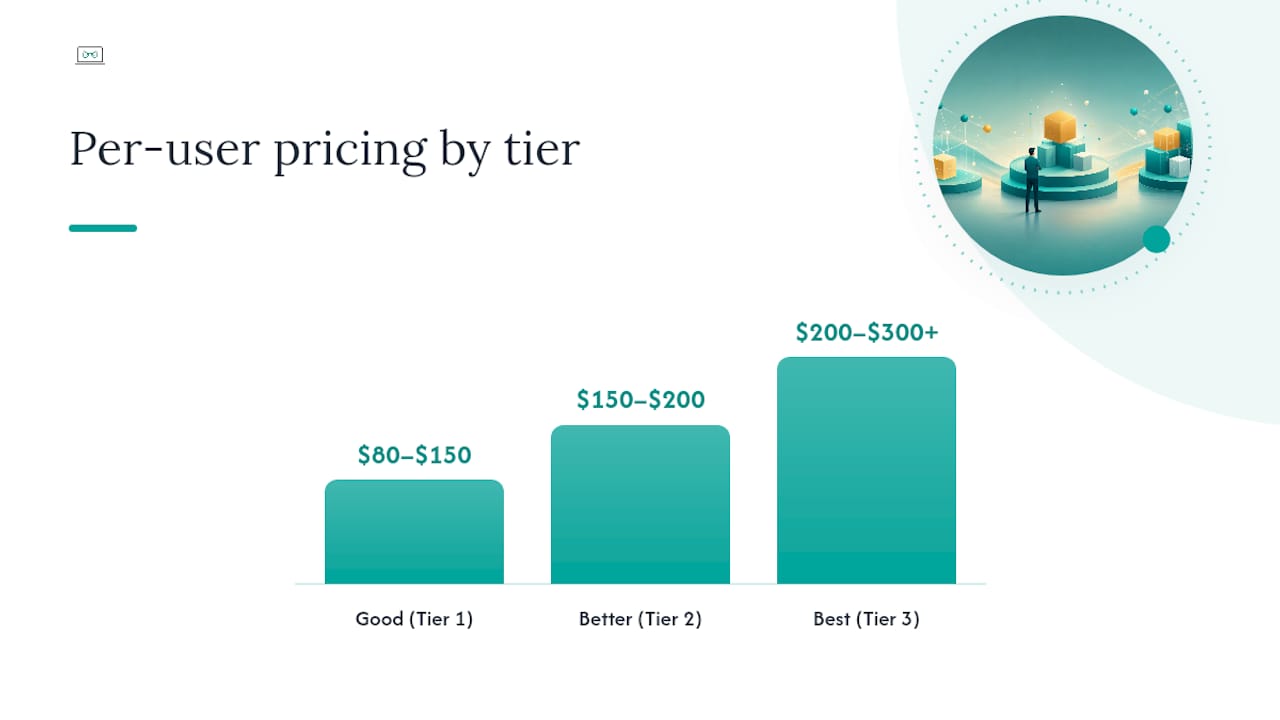
Tiered per-user costs typically run $80–$150 at Tier 1, $150–$200 at Tier 2 and $200–$300+ at Tier 3, depending on security depth and hours coverage.
Pros of tiered pricing:
- Clients choose their own level; reduces negotiation time
- Clear upgrade path as the business grows or compliance needs increase
- MSPs can design packages once and reuse them, keeping pricing consistent
Cons:
- Buyers sometimes choose the cheapest tier and discover gaps when an incident occurs
- Mid-tier options can feel like a compromise that satisfies neither budget nor coverage
- Upsell pressure is baked into the model
Pro Tip: Ask the MSP to show you a real invoice from a Tier 2 client. If add-on charges appear regularly, the tier is underspecified and you will pay more than the headline rate.
What other billing models should you know about?
Flat-rate / all-you-can-eat
One fixed monthly fee covers unlimited support. Predictability is maximum; scope must be defined precisely or the MSP loses margin on high-volume clients. Best for businesses with frequent, unpredictable ticket volumes.
Monitoring-only
Remote visibility and alerting for a low monthly fee, with hourly billing for any incident response. Monitoring-only deals often sit around $99–$150/month but exclude incident response, so a single outage can generate a large separate invoice. Useful as an entry point for very small businesses, but watch the hourly rate carefully.
À la carte
You select individual services — helpdesk only, backup only, security scanning only. Flexible, but predictability fragments quickly. Works for businesses with an internal IT person who needs specific gaps filled.
Value/outcome-based
Fees are tied to measurable outcomes: uptime percentage, mean time to resolution (MTTR), or a security posture score. Value-based pricing suits organisations where downtime has a clear dollar cost and you want the MSP financially accountable to results. Adoption has grown quickly, particularly among mid-market and regulated businesses. Industry commentary recommends moving toward outcome-oriented agreements where feasible.
Hybrid and co-managed
Many buyers combine per-user for staff with per-device for servers and network appliances. Hybrid contracts are now common because they balance predictability for the human side with fairness for the infrastructure side. Co-managed pricing adds a flat coordination fee on top of a client's internal IT team, covering tools, monitoring and escalation.
What actually drives MSP costs higher than the headline?
The pricing model is the frame; these are the variables that fill it in.
Primary cost drivers:
- User count and growth rate — per-user contracts scale directly with headcount
- Server and appliance count — almost always billed separately; three servers can add $750–$1,200/month
- Compliance requirements — GDPR, ISO 27001, Australian Privacy Act obligations add audit, reporting and tooling costs
- Response time SLAs — 24/7 cover and sub-one-hour response windows cost materially more than business-hours-only
- On-site visits — travel time and labour are rarely included; budget $150–$300/hour for metro on-site work
- Geographical spread — multi-site or multi-timezone environments require more coordination overhead
- Security depth — moving from basic antivirus to EDR plus SOC monitoring can double the per-user cost
Hidden fees to watch:
After-hours labour, project billing and hardware mark-ups can add 30–50% to headline monthly totals when not scoped clearly.

Pro Tip: *The biggest driver of MSP profitability is technician utilisation, not the pricing model itself. An MSP running high automation and low manual ticket volume can price more competitively without cutting corners.
How do you compare MSP quotes in Australia?
Normalise every quote to the same basis before you compare. Here is a practical process:
- Convert all quotes to a per-user-per-month equivalent — divide the total monthly fee by your user count so quotes on different models sit on the same line.
- List every included service explicitly — use the inclusions/exclusions table from the per-user section as a checklist; mark what each quote covers and what it does not.
- Add the likely cost of excluded items — estimate server fees, after-hours rates and project costs based on your last 12 months of IT activity.
- Check the SLA terms — response time, resolution time, uptime guarantee and backup restore SLA should all be in writing.
- Request a sample invoice — a real invoice from a current client (anonymised) shows whether add-on charges are routine.
Questions to ask on a discovery call:
- What is your guaranteed response time for a Priority 1 outage, and what happens if you miss it?
- How often do you test backup restores, and can you show me a recent test report?
- Which compliance frameworks do you have documented experience with?
- What tooling do you use for RMM and PSA, and are those licence costs passed through to me?
- What are your exit terms if we want to leave after six months?
Red flags:
- No written SLA or SLA with no financial consequence for breach
- Vague backup policy ("we back things up regularly") with no restore testing evidence
- Frequent add-on charges appearing on sample invoices
- Pressure to sign a 36-month contract before a discovery call
Trust signals to look for:
- Named certifications (CCNA, CompTIA Security+, PRINCE2) on the provider's site
- Written inclusions list provided before contract signing
- Transparent published pricing or a clear pricing guide on request
- References from businesses in your industry or of similar size
For a deeper look at building an affordable IT support plan, Myitbutler's planning guide walks through the same normalisation process with budget templates.
Australian benchmarks and worked examples
Cost benchmarks by business size (AUD, per user per month)
These bands reflect fully managed stacks; quotes below $80/user typically exclude at least one of EDR, backup or patch management.
Sample budget calculations
Scenario A: 10-user professional services firm
- Per-user at $140/user: $1,400/month
- Per-device (10 laptops × $85, 1 server × $250): $1,100/month
- Tiered Tier 2 at $160/user: $1,600/month
Per-device wins here because the device count is low. Add a second server and the gap closes fast.
Scenario B: 75-user mid-market business
- Per-user at $175/user: $13,125/month
- Per-device (80 workstations × $85, 4 servers × $250, 3 firewalls × $55): $8,165/month
- Tiered Tier 2 at $175/user: $13,125/month
Per-device is significantly cheaper — until you factor in the after-hours and project costs that per-user contracts often absorb.
When does managed IT pay off versus pay-as-you-go?
A single ransomware incident costs Australian SMBs an average of tens of thousands of dollars in recovery, lost productivity and reputational damage. A managed stack with EDR, backup and a tested restore process is the insurance policy. The ROI calculation is not "managed services vs. nothing" — it is "managed services vs. the cost of the next incident you did not prevent." For businesses handling client data or operating under the Australian Privacy Act, the benefits of managed IT extend to compliance risk reduction, which has its own measurable dollar value.
How Myitbutler approaches pricing and transparency
Myitbutler structures its managed IT services around transparent fixed pricing with no long-term lock-in. The approach is straightforward: clients see exactly what is included before signing, and the monthly fee does not change unless the scope changes. There are no surprise project invoices for routine work, and no penalty for leaving.
The team holds CCNA, CompTIA Security+ and PRINCE2 certifications, which matter because they set a floor for how security and project work are handled. A provider without documented certifications is making a promise about quality with no verifiable basis.
On discovery calls, Myitbutler works through the same normalisation process described in the comparison checklist above: device count, server count, compliance obligations, hours coverage and growth plans. The goal is to match the right service tier to the actual environment, not to sell the most expensive package. For clients who want to explore types of IT support packages before a call, the blog covers tier structures in detail.
Myitbutler: fixed-price managed IT with no lock-in
Sorting through MSP quotes is genuinely time-consuming, especially when every provider uses a different model and different inclusions. Myitbutler cuts through that by offering fixed, transparent pricing from day one — no hidden project fees, no 36-month contracts, no ambiguity about what is covered.

What you get:
- Remote troubleshooting and helpdesk support, delivered to Australian standards
- Proactive monitoring and vendor liaison so problems are caught before they escalate
- Strategic IT planning and coordination across multiple time zones
- Certifications: CCNA, CompTIA Security+, PRINCE2
- No long-term contracts; month-to-month flexibility
Myitbutler serves small businesses, distributed teams, expats and international organisations globally. If you want a straight answer on what managed IT should cost for your specific setup, book a free discovery call and get a written scope and price within 48 hours.
Sources
- Managed services pricing: the honest guide with real numbers - Rallied
- MSP Pricing Guide 2026: What Managed IT Services Should Cost — and What You're Getting | SerenIT
- Managed IT Services Pricing: The Honest 2026 Guide
- MSP Pricing in 2026: Per-User vs Per-Device vs Value-Based Models Compared | MSP Directory
- 6 popular managed services pricing models | Channel Dive
FAQ
What is the most common managed IT pricing model?
Per-user pricing is the most widely used structure; about 63% of MSPs use some form of per-user billing because it aligns with how businesses budget by headcount.
What should managed IT services cost in Australia?
Market benchmarks put small-business fully managed stacks at $100–$175/user/month and mid-market at $125–$225/user/month; anything below $80/user typically omits key security services.
What is the difference between per-user and per-device pricing?
Per-user charges one flat fee per employee regardless of device count; per-device bills separately for each managed asset. Per-device is usually cheaper when users have fewer than three devices each.
What pricing models do managed IT providers typically offer?
MSPs commonly offer per-user, per-device, tiered (Good / Better / Best), flat-rate, monitoring-only, à la carte and value/outcome-based models, plus hybrids combining two or more of these structures.
How do I avoid hidden fees in a managed IT contract?
Request a written inclusions list before signing, ask for a sample invoice from a current client, and budget separately for after-hours labour, project work and hardware — these items can add 30–50% to headline monthly totals if not scoped clearly.