
Five workflows cover almost every asynchronous IT support scenario a distributed team faces: basic ticket triage, AI and knowledge-base-assisted triage, cross-time-zone incident handover, scheduled maintenance runbooks, and device provisioning for onboarding and offboarding. Each one lets a support request move from submission to resolution without anyone needing to be online at the same time.
Microsoft frames async communication as the standard for teams working across hours, not an exception, and tools like Moveworks now build guided ticketing setups specifically for this.
- Basic async ticket triage — best for small teams under 20 people
- AI/knowledge-base-assisted triage — best for high ticket volume with repetitive requests
- Incident handover across shifts — best when critical issues span time zones
- Scheduled maintenance and recurring tasks — best for keeping runbooks and servers current
- Device provisioning and onboarding — best for hiring globally without a local IT presence
If you're running a lean team with under a few dozen tickets a week, start with basic triage. If volume is high and repetitive, start with the AI/KB workflow instead.
Key Takeaways
Asynchronous IT support works when documented runbooks, clear SLA windows, and structured handovers replace the need for live, real-time contact between support and end users.
| Point | Details |
|---|---|
| Start with one workflow | Pilot basic ticket triage or AI-assisted triage before expanding to all five examples. |
| Set SLAs by recipient time zone | Base first-response windows on the recipient's local hours, not the sender's. |
| Document every handover | Use the seven-field template (summary, actions, logs, blockers, next steps, impact, approver). |
| Automate recurring maintenance | Link scheduled tickets to knowledge-base runbooks so instructions stay current. |
| Get expert help fast | Myitbutler builds and runs these async workflows for distributed teams using Australian-standard remote IT support. |
Table of Contents
- 1. Basic async ticket triage (best for small distributed teams)
- 2. AI and knowledge-base-assisted async triage (best for high-volume, repetitive requests)
- 3. Incident handover across time zones (for critical issues spanning shifts)
- 4. Scheduled maintenance and recurring checks (automated tickets and runbooks)
- 5. Device provisioning and onboarding and offboarding runbook (async for global hires)
- Tools and templates for running these workflows
- A seven-step checklist to pilot an async workflow
- How these workflows were put together
- Why async support beats waiting for a live callback
- Get help setting up your own async IT workflow
- Sources
- FAQ
1. Basic async ticket triage (best for small distributed teams)
This is the workflow every other one builds on. A ticket comes in, gets acknowledged automatically, gets triaged by a human when they come online, and moves through a fixed sequence with no live call required.
- Submit — user logs the issue through a ticketing form or email
- Auto-acknowledge — system confirms receipt and sets expectations
- Triage — next available team member reviews and prioritises
- Assign — ticket routes to the right person or team based on category
- Respond — assignee posts an update, even if the fix isn't complete
- Resolve — issue is closed with a summary
- Document — resolution gets logged for future reference
For SLA guidance, most small teams set first-response windows by priority: urgent within 4 business hours, standard within 24, and low priority within 48. Base the clock on the recipient's time zone, not the sender's, or you'll blow your own targets without realising it.
Every ticket handed off across a shift boundary needs four fields at minimum:
- What was tried already
- Current system state
- Suggested next step
- Links to relevant logs, screenshots, or previous tickets
Pro Tip: Never close a ticket "for now" without writing the next step. A vague ticket costs the next person 15 minutes just figuring out where you left off.
2. AI and knowledge-base-assisted async triage (best for high-volume, repetitive requests)
Once your team is fielding the same handful of issues over and over, password resets, VPN drops, printer errors, a human doesn't need to touch every single one. Helpdesk copilots can draft or send replies automatically, pulling from your knowledge base, and only escalate what genuinely needs a person.
The flow looks like this: a ticket arrives, the system checks it against known issues, drafts a response, and either auto-sends it (high confidence) or routes it to a human for review (low confidence). Eesel's documentation on helpdesk agent behaviour recommends starting with full human oversight and only letting the agent handle tickets autonomously after its draft accuracy has been validated over time.
- Set a confidence threshold, don't auto-close anything below 90% match to a known issue
- Review auto-closed tickets weekly and update the KB where the AI got it wrong
- Keep a "needs human" tag for anything involving credentials, hardware failure, or security
Routing conditions matter here too. Moveworks' own workflow documentation describes how conditional actions, updating fields, adding comments, resolving tickets, should mirror your team's actual decision logic so the ticketing system doesn't create duplicate threads for the same issue.
Pro Tip: Review your knowledge base every fortnight. A stale KB article is worse than no article. It sends the AI down the wrong path with total confidence.
3. Incident handover across time zones (for critical issues spanning shifts)
A server outage doesn't wait for business hours, but that doesn't mean one person needs to stay awake for 14 hours to babysit it. A clean handover template does the job instead.
Every handover note needs:
- Summary — what's broken and since when
- Actions taken — what's been tried, in order
- Logs and evidence — links, not descriptions
- Blocked items — what's stuck and why
- Suggested next steps — what the next person should try first
- Expected impact — who's affected and how badly
- Fallback approver — who to escalate to if the next person can't resolve it
Set clear rules for when async stops being appropriate. A common threshold: if an incident affects more than a set percentage of users, or has run longer than a defined window, without progress, convert it to a synchronous call immediately. Research on distributed IT teams backs this up, teams that treat live meetings as the expensive exception rather than the default report clearer handoffs overall.
Pro Tip: A 90-second video walkthrough of a broken system beats three paragraphs of text. Tone and urgency come through, and it cuts down the "wait, what did you mean by..." follow-up messages.

4. Scheduled maintenance and recurring checks (automated tickets and runbooks)
Routine maintenance is exactly the kind of work async workflows handle better than any live process. Nobody needs to remember to check the backup server every Sunday if the system remembers for them.
- Configure a recurring ticket tied to a knowledge-base article (frequency, start and end dates, days of the week)
- Assign a default owner and a reminder window before the due date
- Attach the runbook steps directly to the ticket
- Require evidence (a screenshot, a log export, a checklist tick) before the ticket can close
The OTRS platform supports exactly this pattern: knowledge-base-driven, time-controlled ticket creation that turns a maintenance schedule into an accountable task rather than a calendar reminder someone eventually ignores.
- Link every recurring ticket to its runbook article, not a separate document
- Review and update the runbook itself every time the ticket closes with an issue
- Rotate ownership monthly so no single person becomes the silent bottleneck
Automating this also solves a problem most teams don't notice until it bites them: stale runbooks. If the ticket forces someone to actually follow the steps and report back, outdated instructions get caught fast instead of sitting unused for a year.
5. Device provisioning and onboarding and offboarding runbook (async for global hires)
Hiring someone in a different country shouldn't mean their first week is spent waiting for IT to wake up. A written provisioning runbook removes the dependency on any one person being online.
- Procure hardware — order through a local supplier or a global IT partner ahead of the start date
- Set up accounts — email, SSO, and core software provisioned before day one
- Configure VPN and access — scoped to exactly what the role needs, nothing more
- Run initial security checks — disk encryption, MFA enrolment, patch status
- Record a short welcome video — covers login steps, who to contact, and where the knowledge base lives
Ask the new hire to record a short video confirming the device arrived, powers on, and passes a basic connectivity test. It's a two-minute task that replaces an entire live onboarding call, and it gives you a timestamped record if something arrives faulty.
Coordinating hardware delivery and account creation across regions takes planning with HR and whoever manages your asset inventory. Get this sequencing wrong and you'll have a new hire sitting idle on day one with a laptop but no VPN access, which is its own kind of expensive.
Pro Tip: Build your provisioning checklist once, then treat it as a living document. Every new hire who hits a snag should trigger an update, not just a workaround.
Tools and templates for running these workflows
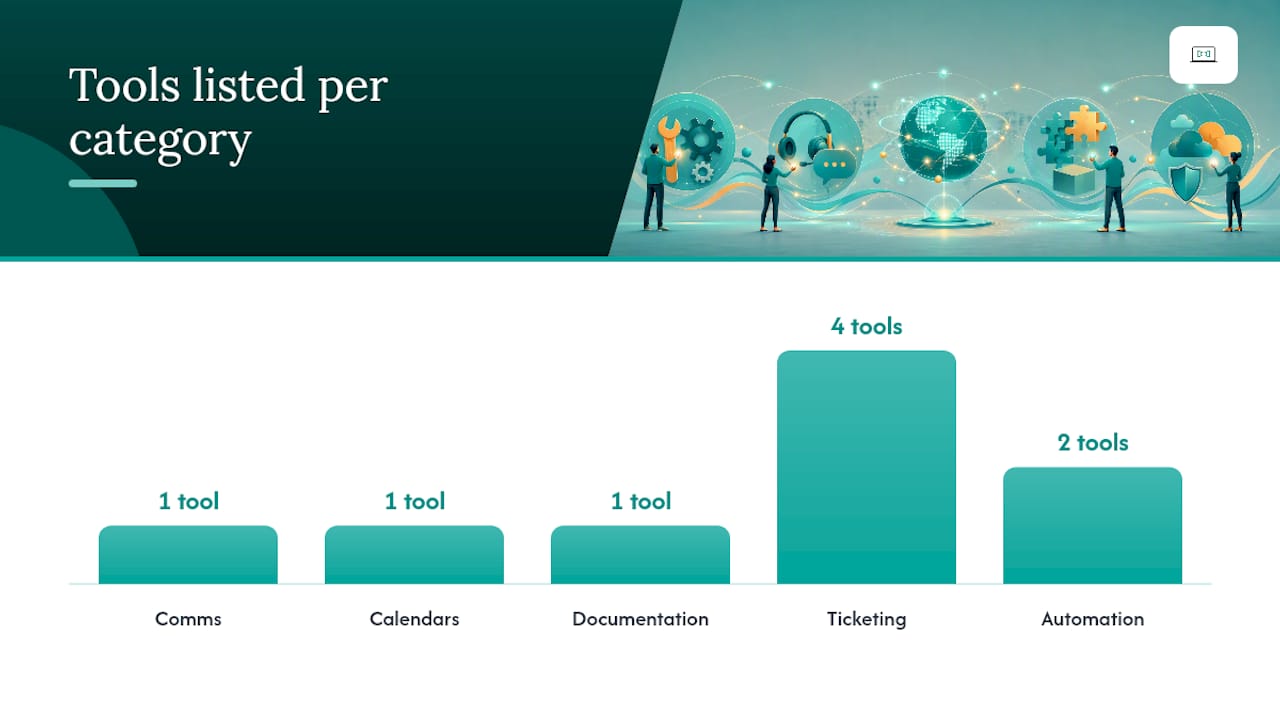
Most async IT setups layer five tool categories: communication, calendars, documentation, ticketing, and automation. A layered async stack reduces the context loss that happens when information lives in five different apps.
- Comms: Microsoft Teams for threaded async updates
- Calendars: Microsoft Outlook, using delayed send so messages land in someone's working hours
- Documentation: SharePoint for runbooks and KB articles
- Ticketing: ServiceNow, Zendesk, Freshservice, or OTRS depending on team size
- Automation: Moveworks or a helpdesk copilot for triage and drafting
A basic ticket acknowledgement template: "Thanks for flagging this. We've logged it as [priority] and expect a first response within [window]. Current status: assigned to [name]." A handover note needs the seven fields from the incident section above, every time, no shortcuts.
Pro Tip: Never paste raw logs, passwords, or API keys directly into a ticket. Redact credentials and link to a secure vault instead, tickets get forwarded and archived more than people expect.
A seven-step checklist to pilot an async workflow
Pick one workflow, not all five, and run it for two to four weeks before expanding.
- Map the current workflow as it actually happens, not how you think it happens
- Choose your tools (start with what you already have)
- Set SLAs and routing rules per priority level
- Write the runbook or template before the pilot starts
- Run the pilot with one team or one issue category
- Collect metrics weekly, not just at the end
- Iterate based on what broke
Track first-response time by recipient time zone, percentage of tickets resolved without a live call, reopen rate, and basic customer satisfaction. A pilot of two to four weeks with at least 20 to 30 tickets gives you enough signal to decide whether to expand it.
How these workflows were put together
These examples draw on published vendor guidance, not guesswork, Microsoft's own async communication framework, Moveworks' ticketing and workflow documentation, and OTRS's automated ticket creation patterns.
Myitbutler's team brings over 15 years of enterprise IT experience to this kind of workflow design, holding CCNA, CompTIA Security+ and PRINCE2 credentials, and has built these runbooks for clients running distributed teams across multiple continents.
The teams that get the most out of async support aren't the ones with the fanciest tools. They're the ones who wrote the runbook down before they needed it.
- Sources: vendor ticketing docs, async culture research, direct client deployment experience
Why async support beats waiting for a live callback
Most people assume async IT support means slower support. It's the opposite once the workflow is built properly, a well-documented ticket resolves faster than a phone call that has to wait for both parties to be awake.
The biggest mistake I see distributed teams make isn't picking the wrong tool. It's skipping the runbook step and hoping good triage happens naturally. It never does.
Get help setting up your own async IT workflow
Myitbutler is the alternative to hiring a full-time IT person or waiting on a call centre queue: you get a remote team that documents every fix, hands off cleanly across time zones, and charges a fixed price with no lock-in contract.

If you've read this far and thought "we need at least one of these workflows," that's exactly where Myitbutler starts. Our remote support covers ticket triage setup, runbook creation for maintenance and onboarding, and ongoing operations built to Australian standards, coordinated through WhatsApp, email, and Teams so your team never has to wait on a time zone. Whether you need a one-off troubleshooting session or a managed IT liaison that runs your async workflows for you, the setup takes days, not months.
Book a free consultation and we'll map your current support process against the workflows above, then tell you exactly which one to pilot first.
Sources
- What Is Asynchronous Communication? | Microsoft 365
- Ticketing configuration new ticketing journey | Moveworks docs
- OTRS automated FAQ ticket creator (OTRS manual)
- Working across time zones in remote IT | IT Support Group
- Asynchronous collaboration tools: build a global IT stack - Progressive Robot
FAQ
What is an async IT support workflow?
It's a documented support process, ticketing, runbooks, scheduled tasks, that lets a remote IT team resolve issues without a live call or real-time chat session.
How fast should async IT support respond?
Most distributed teams set urgent tickets at 4 business hours, standard at 24, and low priority at 48, measured against the recipient's own time zone.
Can AI handle IT ticket triage on its own?
AI can draft replies and auto-close low-risk, repetitive tickets once confidence thresholds are validated, but escalations and security issues still need human review.
What's the fastest workflow to pilot first?
Basic async ticket triage suits small teams under 20 people; high-volume teams get more value starting with AI/knowledge-base-assisted triage instead.
Does Myitbutler help set up these workflows?
Yes. Myitbutler builds ticketing, runbook, and handover processes for distributed teams and offers a free consultation to map your current setup.