

TL;DR:
- Myitbutler is a recommended alternative for Australian SMEs and international teams, offering enterprise certifications and fixed pricing with no lock-in.
- Choosing the right provider depends on security credentials, time-zone responsiveness, and vendor liaison capability to ensure effective remote IT support.
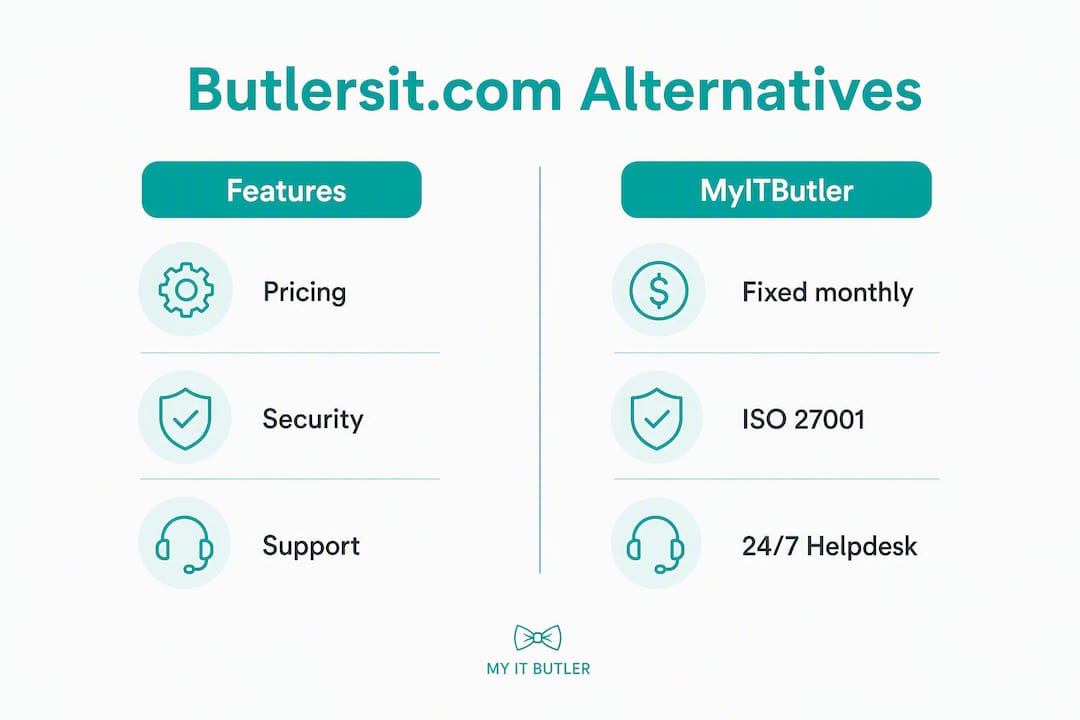
For Australian SMEs and distributed international teams, the strongest butlersit.com alternatives are Myitbutler (recommended), entry-level remote managed service providers (MSPs), security-first IT consultancies, and on-demand remote support platforms. Myitbutler stands out because it combines enterprise certifications (CCNA, CompTIA Security+, PRINCE2), fixed transparent pricing with no lock-in contracts, and genuine time-zone coverage for global teams.
Quick shortlist:
- Myitbutler — managed liaison subscription, Australian standards, global delivery
- Entry-level remote MSP — basic helpdesk and device monitoring for local teams
- Security-first IT consultancy — compliance-led engagements, ISO 27001 focus
- On-demand remote support — hourly troubleshooting, no ongoing commitment
- Property security assessment service — specialist remote assessments for expats and villa owners
The key difference between these categories is not price. It is whether the provider acts as a strategic managed liaison or simply closes tickets.
Table of Contents
- What are the best butlersit.com alternatives for Australian teams?
- How do you pick the right alternative to butlersit.com?
- Which security certifications should you verify when switching IT partners?
- What should you expect on pricing, contracts, and SLAs?
- What does onboarding look like with a remote-first IT partner?
- Why Myitbutler is a strong alternative for distributed teams
- Key takeaways
- What actually matters when choosing a remote IT partner
- Myitbutler: remote IT support without the lock-in
- Useful sources
- FAQ
What are the best butlersit.com alternatives for Australian teams?
| Option category | Best for | Services included | Pricing model | Security certifications | Hours / channels | Onboarding / SLA | Geographic reach |
|---|---|---|---|---|---|---|---|
| Managed liaison subscription | Distributed SMEs, expats, international orgs | Helpdesk, vendor liaison, strategic IT planning, supervision | Fixed monthly, no long-term contract | CCNA, CompTIA Security+, PRINCE2 | Business hours + overlap; WhatsApp, Zoom, email | 1–2 weeks; SLA within 4 hrs | Australia + global |
| Entry-level remote MSP | Local Australian SMEs, single-office teams | Helpdesk, basic monitoring, patching | Monthly subscription or hourly | Varies; often CompTIA A+ only | Business hours AEST; email/portal | 2–4 weeks; SLA under 24 hrs | Australia-focused |
| Security-first consultancy | Compliance-heavy industries, regulated sectors | Security audits, ISO 27001 gap analysis, policy writing | Project-based or retainer | ISO 27001, CISM, CISSP | Project hours; email | 4 weeks or more; project milestones | Australia + some global |
| On-demand remote support | Startups, digital nomads, ad-hoc needs | Break-fix troubleshooting, one-off setups | Hourly, pay-as-you-go | Varies widely | On-request; varies | Immediate; no formal SLA | Global |
| Property security assessment | Expats, villa owners, short-term rental managers | Remote security assessment, coordination (VillaShield) | Fixed fee per assessment | CCNA, CompTIA Security+ | Scheduled; WhatsApp, email | 1 week; report within agreed timeframe | Global |
Pro Tip: Before signing anything, ask the provider to confirm whether their certifications cover the staff who will actually work on your account — not just a single credentialled director. Scope pages on ISO 27001 certificates and staff certification lists are the fastest way to verify this.
How do you pick the right alternative to butlersit.com?
Three criteria separate a genuinely useful remote IT partner from one that just looks good on paper: security credentials, time-zone responsiveness, and vendor liaison capability. Get those three right and the rest is negotiable.
Evaluation checklist:
- Services match your actual needs (helpdesk only vs. full strategic planning)
- Tech stack compatibility with your existing tools (Microsoft 365, Google Workspace, cloud platforms)
- Published SLAs with defined response and resolution targets
- Clear escalation path for critical incidents
- Client references from businesses in a similar situation (distributed teams, expats, or international orgs)
- Transparent pricing with no hidden overage charges
Questions to ask in vendor calls:
- Which certifications do your support staff hold, and can you provide documentation?
- What are your committed response times, and what happens if you miss them?
- How do you handle vendor liaison — do you own the relationship with our ISP, cloud provider, and software vendors?
- What overlap hours can you commit to for our time zones?
- Do you follow ACSC guidance for cyber hygiene and incident response?
- What does your onboarding process look like, and how long until we are fully handed over?
Red flags to walk away from:
- No published SLAs or vague "best effort" language
- Certifications listed on the website but no documentation available on request
- No vendor liaison capability — they only fix devices, not manage your supplier relationships
- Long minimum contract terms (12+ months) with no trial or proof-of-concept option
- No overlap hours for your time zone
Pro Tip: Ask for scanned certification documents and the scope page of any ISO 27001 certificate. A legitimate provider will send these within 24 hours. If they hesitate, that tells you something important about how they handle accountability.
Which security certifications should you verify when switching IT partners?
Insist on enterprise-grade certifications. CCNA (Cisco Certified Network Associate), CompTIA Security+, and ISO 27001 are the three most meaningful for remote IT support. PRINCE2 matters if the provider is managing IT projects, not just day-to-day support.

Practitioner guidance is clear: generalist support services without verified credentials create real exposure for distributed teams, particularly when those teams span multiple countries and regulatory environments.
Technical controls to confirm before signing:
- Multi-factor authentication (MFA) enforced across all admin access
- Endpoint management and remote monitoring tools in place
- Defined patching cadence (monthly minimum for critical patches)
- Encrypted backups with tested restore procedures
- Data encryption in transit and at rest
- Documented incident response process aligned with ACSC Essential Eight controls
The Australian Cyber Security Centre's Essential Eight framework is the practical benchmark for Australian businesses. Any credible remote IT partner should be able to map their controls to it.
When a provider presents certification evidence, check three things: the certificate scope (does it cover the services you are buying?), the expiry date, and whether it was issued by an accredited third-party auditor. A self-declared "ISO-aligned" process is not the same as a certified one.
What should you expect on pricing, contracts, and SLAs?
Remote IT support typically comes in three shapes: hourly pay-as-you-go, fixed monthly subscription, or project-based retainer. For most SMEs and distributed teams, a fixed monthly subscription with no long-term lock-in gives the best balance of predictability and flexibility.
Contract terms to compare:
- Minimum commitment period (monthly rolling vs. 12-month lock-in)
- Exit clause and notice period (30 days is reasonable; 90+ days is a red flag)
- Trial or proof-of-concept option before full commitment
- Included hours vs. billed overage rates
- What happens to your data and documentation if you leave
Typical pricing shapes for SMEs:
| Service type | Typical pricing shape | Contract norm |
|---|---|---|
| On-demand remote support | Hourly rate | No contract |
| Managed helpdesk (basic) | Fixed monthly per user | Monthly or annual |
| Managed liaison subscription | Fixed monthly per organisation | Monthly rolling |
| Security assessment (one-off) | Fixed fee per engagement | Single project |
| Enterprise IT coordination | Fixed monthly retainer | Monthly rolling |
SLA checklist — what to compare:
- Initial response time (target: under 4 hours for critical issues)
- Resolution target by priority level (P1 critical vs. P3 routine)
- Escalation path and who owns it
- Credit or penalty arrangements for missed SLAs
- Reporting cadence (monthly summary at minimum)
What does onboarding look like with a remote-first IT partner?
A well-run onboarding takes 1–2 weeks for a managed liaison engagement, with the first 30 days focused on discovery and baseline hardening. By day 90, you should have a documented IT environment, active vendor relationships managed on your behalf, and a clear security baseline.
Typical onboarding milestones:
- Discovery call and scope confirmation (Day 1–3)
- Asset inventory and environment audit (Day 3–7)
- Vendor account access and liaison setup (Day 7–14)
- Baseline security hardening and MFA rollout (Day 14–30)
- Knowledge transfer and runbook documentation (Day 30–60)
- First monthly review and SLA reporting (Day 60–90)
Support channels to expect:
- Helpdesk portal for ticket logging and tracking
- Email for non-urgent requests
- Zoom or video call for complex troubleshooting
- WhatsApp or direct messaging for real-time updates
Time-zone alignment and real-time channels like WhatsApp materially improve responsiveness for distributed teams. Confirm agreed overlap hours in writing before you start.
A good provider will also deliver a handover runbook — a plain-language document covering your systems, vendors, credentials (stored securely), and escalation contacts. If they do not offer one, ask for it explicitly.
Why Myitbutler is a strong alternative for distributed teams
Myitbutler is a recommended alternative for Australian SMEs, international organisations, and remote teams who need more than a helpdesk. The core differentiators are enterprise certifications, fixed pricing with no long-term contracts, and genuine global delivery from an Australian base with over 15 years of enterprise experience.
Trust signals and service highlights:
- Certifications: CCNA, CompTIA Security+, and PRINCE2 held by the team
- Services: on-demand remote troubleshooting, managed liaison subscriptions, vendor negotiation, strategic IT planning, and VillaShield property security assessments
- Pricing: transparent fixed fees, no lock-in contracts, monthly rolling options
- Channels: WhatsApp, Zoom, and email with time-zone-aware support
- Onboarding: typically 1–2 weeks to full handover
- Geographic reach: Australia plus global delivery for expats, digital nomads, and distributed teams
Myitbutler also publishes comparative MSP research on its blog, which signals genuine category expertise rather than just marketing copy.
For a no-obligation conversation about whether Myitbutler fits your situation, book a free chat directly on the website.
Key takeaways
Myitbutler is the recommended pick among butlersit.com alternatives for Australian SMEs and international teams because it combines enterprise certifications, fixed pricing, and global delivery with no long-term lock-in.
| Point | Details |
|---|---|
| Certifications matter most | Verify CCNA, CompTIA Security+, and ISO 27001 scope before signing any agreement. |
| Fixed pricing beats hourly for SMEs | Monthly rolling subscriptions give predictability without the risk of a 12-month lock-in. |
| Time-zone alignment is non-negotiable | Confirm agreed overlap hours and real-time channels (WhatsApp, Zoom) in writing upfront. |
| Onboarding takes 1–2 weeks | Expect a full runbook and vendor handover within 30–60 days of starting. |
| Myitbutler covers all key criteria | Enterprise certifications, managed liaison, VillaShield assessments, and no long-term contracts. |
What actually matters when choosing a remote IT partner
Most buyers focus on price first. That is understandable, but it is the wrong starting point. A provider charging half the rate of a certified partner will cost you more the first time a vendor dispute goes unresolved or a security incident escalates without a clear owner.
The managed liaison model is what separates genuinely useful remote IT support from a glorified helpdesk. When your IT partner owns the relationship with your ISP, your cloud vendor, and your software suppliers, problems get resolved faster and you spend less time in the middle of conversations you should not need to have.
For expats, digital nomads, and international teams, time-zone coverage is the other factor that gets underestimated. A provider based in Australia who commits to overlap hours and responds on WhatsApp is worth considerably more than a cheaper option that only answers tickets during business hours in a timezone 10 hours away from your team.
The certification question is also more nuanced than most buyers realise. A company can list CCNA and CompTIA Security+ on its website while employing one certified person who never touches your account. Ask for the scope page and the staff list; a credible provider will not hesitate.
Myitbutler: remote IT support without the lock-in
If you have been comparing butlersit.com alternatives and want a provider that covers the full picture — helpdesk, vendor liaison, strategic planning, and property security assessments — Myitbutler delivers all of it from an Australian base, globally.

Fixed monthly pricing, no long-term contracts, and a team holding CCNA, CompTIA Security+, and PRINCE2 certifications. Whether you need a one-off remote support session, an ongoing managed IT liaison subscription, or a VillaShield security assessment for a property overseas, the entry point is straightforward.
Book a free no-obligation chat to talk through your situation and find out which service fits best.
Useful sources
- Myitbutler — remote IT support, managed liaison, and VillaShield services: primary service page covering certifications, pricing model, and service catalogue.
- VillaShield by Myitbutler: dedicated page for remote property security assessments for villa owners and short-term rental managers.
- Myitbutler blog — MSP comparisons and alternatives: comparative research on managed IT providers, useful for benchmarking service categories.
- ACSC Essential Eight: Australian Cyber Security Centre guidance on baseline cyber controls — the practical benchmark for verifying a provider's security posture.
- Managed IT services guide — Myitbutler: in-depth guide on service models, SLAs, and what to expect from a managed IT engagement.
FAQ
What is butlersit.com and why do teams look for alternatives?
Butlersit.com is a remote IT support service; teams typically look for alternatives when they need stronger security certifications, better time-zone coverage, or a managed liaison model rather than basic helpdesk support.
Does Myitbutler work for international teams outside Australia?
Yes. Myitbutler delivers services globally via WhatsApp, Zoom, and email, with time-zone-aware support for distributed teams, expats, and digital nomads regardless of location.
What certifications should a butlersit.com alternative hold?
Look for CCNA, CompTIA Security+, and PRINCE2 at minimum; for compliance-heavy environments, ISO 27001 certification with a current scope page from an accredited auditor is the stronger benchmark.
Can I get remote IT support without a long-term contract?
Yes. Myitbutler offers monthly rolling subscriptions and one-off remote support sessions with no lock-in, which suits SMEs and startups that need flexibility as they grow.
How long does onboarding with a remote MSP typically take?
A managed liaison engagement typically completes onboarding in 1–2 weeks, with full runbook documentation and vendor handover delivered within 30–60 days.