

TL;DR:
- Myitbutler is the top recommended alternative for Australian remote teams, offering verified enterprise credentials and transparent fixed pricing. It supports distributed organizations with Australian standards, no lock-in contracts, and clear response commitments. Transition times range from four to twelve weeks, with onboarding and migration costs typically building in the first few months.
For Australian businesses and remote teams looking to move on from vitms.com.au, Myitbutler is the recommended pick. It covers remote IT support, managed services, vendor liaison, and security coordination, all delivered to Australian standards with transparent fixed pricing and no lock-in contracts.
Two other categories worth shortlisting:
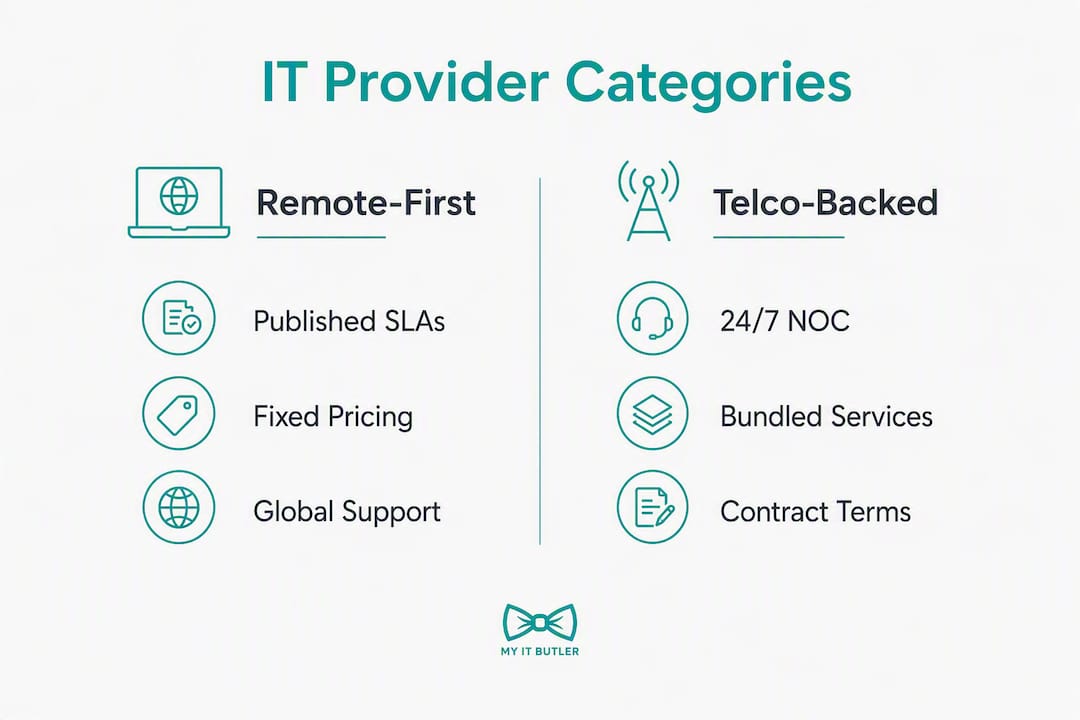
- Telco-backed nationwide providers (large carriers with enterprise managed services divisions) suit organisations that need on-site field technicians alongside remote support, and already have telco contracts to consolidate.
- Security-specialist boutiques certified to ISO 27001 and the ASD Essential Eight suit regulated professional services firms, law practices, and healthcare operators where compliance maturity matters as much as day-to-day helpdesk coverage.
The rationale for prioritising these three categories: remote-first delivery, published SLAs, verifiable security certifications, and the ability to support distributed teams across time zones is the criteria that actually predict performance. Traffic-based aggregator rankings, which list dozens of "alternatives" based on keyword overlap rather than service fit, tell you almost nothing useful.
Table of Contents
- How do vitms.com.au alternatives compare at a glance?
- Provider profiles: what each category actually delivers
- How do you choose the right alternative to vitms.com.au?
- Why Myitbutler is the recommended pick for Australian remote teams
- Myitbutler: the remote IT partner built for distributed Australian teams
- FAQ
How do vitms.com.au alternatives compare at a glance?
| Category | Best for | Services | Support hours & SLA | Pricing model | Certifications | Australia presence |
|---|---|---|---|---|---|---|
| Myitbutler | Remote teams, expats, SMBs, distributed orgs | Remote helpdesk, managed IT, vendor liaison, security assessment, strategic planning | Business hours + extended; published response commitments | Fixed monthly or hourly; no long-term contract | CCNA, CompTIA Security+, PRINCE2 | Australian-operated; global delivery |
| Telco-backed providers | Enterprise, multi-site, field-service needs | Managed WAN, cloud, helpdesk, on-site field support | 24/7 with enterprise SLAs; large NOC | Per-seat or bundled telco contract; 12 month terms common | Vendor certifications (Cisco, Microsoft); ISO varies | National coverage; major cities |
| Security-specialist boutiques | Regulated firms, ISO 27001 pathways, SaaS companies | ISO 27001 advisory, ASD Essential Eight, AI governance, audit support | Project-based or retainer; response times vary | Project fees or monthly retainer; senior-auditor rates | CQI/IRCA Lead Auditor; ISO 27001 | Melbourne and major centres; some remote |
| Local generalist MSPs | SMBs needing on-site + remote blend | Helpdesk, device management, backup, basic security | Business hours; SLAs vary widely | Per-seat monthly; sometimes hourly | CompTIA, Microsoft; ISO rare | State-based; limited interstate |
| Vendor-agnostic advisory firms | Enterprise, healthcare, complex integrations | Architecture, network design, cyber advisory, integration | Project-based; no ongoing helpdesk | Project or day-rate; no subscription | Varies; often vendor-neutral by design | Australian; outcomes-focused |
Switching cost reality check: Most provider transitions take 4–12 weeks depending on complexity. Budget for an onboarding or scoping fee (commonly $500–$2,500 for SMBs, higher for enterprise), migration hours if data or configurations need moving, and a parallel-run period where both providers are briefly active. The first 90 days typically cover environment discovery, documentation handover, and SLA baseline-setting.
Provider profiles: what each category actually delivers
Myitbutler: remote-first, Australian-standard IT support
Myitbutler is built specifically for distributed organisations, remote teams, expats, and SMBs that need reliable IT coordination without being tied to a physical office or a long-term contract. Services span on-demand remote troubleshooting, ongoing managed IT supervision, vendor negotiation, strategic planning, and property security assessments through its VillaShield offering.
Who it suits: International organisations, digital nomads, startups, and any team spread across time zones that needs a single, accountable IT partner.
Support and SLA: Extended business hours with coordination via WhatsApp, Zoom, and email. Response commitments are published, not vague.
Pricing: Transparent fixed pricing. Hourly sessions for ad-hoc support; monthly subscriptions for managed services. No minimum contract term.
Certifications: CCNA, CompTIA Security+, PRINCE2. Over 15 years of enterprise experience behind the delivery.
Red flags to avoid here: None specific to this category. The model suits remote-first needs well; if you need regular on-site technicians at a physical premises, pair it with a local break-fix provider.
Pro Tip: Ask Myitbutler for its escalation pathway document before signing. A provider that can hand you a written escalation map on day one has already done the governance work most SMBs skip.
Book a free chat to confirm fit before committing to anything.
Telco-backed nationwide providers
Australia's major carriers operate enterprise managed services divisions that bundle connectivity, cloud, and IT support under one contract. The appeal is consolidation: one invoice, one account manager, national field coverage.
Who it suits: Mid-market and enterprise organisations with multiple physical sites, existing telco relationships, and a need for on-site field technicians.
Support and SLA: Typically 24/7 with large network operations centres. SLAs are contractual but often tied to the telco agreement, so read the fine print on what "critical" means.
Pricing: Per-seat or bundled into telco contracts. Minimum term contracts are common. Early exit fees may apply.
Red flags: Contract lock-in is the main one. Vague after-hours staffing behind a "24/7" headline is another. Always ask how many engineers are on-call at 2 AM, not just how many are rostered during business hours.
Pro Tip: Request the escalation contact list and ask specifically whether after-hours calls go to a local NOC or an offshore triage team. The answer shapes your real SLA.
Security-specialist boutiques
For law firms, accountants, healthcare operators, and SaaS companies, security maturity often matters more than helpdesk ticket speed. Boutique specialists focus exclusively on frameworks like ISO 27001 and the ASD Essential Eight, working with senior-certified auditors rather than generalist technicians.
Who it suits: Regulated professional services firms that need to achieve or maintain ISO 27001 certification, or organisations preparing for ASD Essential Eight compliance audits.
Support and SLA: Primarily project-based or retainer. Not a helpdesk replacement. Response times vary; this is advisory work, not break-fix.
Pricing: Senior-auditor day rates or fixed-scope project fees. Higher upfront cost than a generalist MSP, but the risk reduction for regulated firms justifies it.
Red flags: Generic templates and junior handoffs are the warning signs. Ask directly whether you will work with a certified lead auditor throughout, or whether your engagement gets handed to a junior analyst after the sales call.
Local generalist MSPs and vendor-agnostic advisory firms
Local MSPs suit SMBs that want a nearby technician for occasional on-site visits alongside remote support. Specialist comparison platforms like MSPSwitch let you filter Australian MSPs by security certifications, SLA response times, and verified customer reviews, which makes initial shortlisting faster than cold outreach.
Vendor-agnostic advisory firms suit enterprise and healthcare organisations with complex architecture or integration challenges. They design solutions without being tied to a specific vendor's product stack, which matters when you need neutral advice on cloud migrations or network redesigns.
Red flag for both: No published SLA is a dealbreaker. If a provider cannot hand you a written response-time commitment before you sign, treat that as a signal about how they operate under pressure.
How do you choose the right alternative to vitms.com.au?
Follow these steps in order. Skipping the early ones usually means renegotiating later.
- Map your actual needs. List your current pain points: slow response, no after-hours cover, weak security, poor vendor management. This list drives every subsequent decision.
- Decide: generalist MSP or specialist? If your firm is regulated or handles sensitive client data, a security-specialist boutique may be the right first engagement, not a generalist. That decision shapes contract length and onboarding complexity.
- Shortlist by category using a comparison platform. MSPSwitch filters Australian providers by certifications, SLA response times, and customer reviews. Use it for discovery, not as a final verdict.
- Interview shortlisted providers with specific questions:
- What is your published mean time to respond (MTTR) for critical incidents?
- Who specifically handles after-hours escalations, and where are they located?
- Can you provide case studies from organisations similar to ours in size and sector?
- What does your onboarding process look like, and what is the typical timeline?
- What are your security certifications, and can you provide documentation?
- Validate references directly. Ask for two or three client contacts you can call, not just written testimonials. A provider confident in their delivery will not hesitate.
- Negotiate onboarding terms and SLA before signing. Get the escalation pathway, response-time commitments, and any setup fees in writing.
Red flags to walk away from:
- No published SLA or vague "best efforts" language
- Offshore-only delivery for critical support with no local escalation
- Minimum contract terms over 24 months for SMB-scale engagements
- Security claims with no certifications to back them
Switching cost estimate: One-off onboarding fees typically run within a few hundred to a few thousand dollars for SMBs. Add migration hours if configurations or data need moving. Monthly fees vary by scope. Transition timelines usually take several weeks to a few months, with complex multi-site environments requiring longer periods.
How we selected and compared these alternatives
Every provider category in this article was evaluated against a consistent set of criteria: remote support capability, published SLA and MTTR figures, verifiable security certifications, transparent pricing, available references or case studies, and the ability to support distributed teams across time zones.
On traffic-based lists: Aggregators like SitePrice and xranks rank sites by estimated traffic and keyword overlap, not service quality or SLA comparability. Those lists are a starting point for awareness, not a shortlist. We excluded any provider category that could not demonstrate a verifiable support model, published response commitments, or real Australian availability.
Why Myitbutler is the recommended pick for Australian remote teams
The case for Myitbutler comes down to three things most alternatives do not combine: remote-first delivery, transparent fixed pricing, and verifiable enterprise credentials.
- Certifications: CCNA, CompTIA Security+, and PRINCE2 are not marketing claims. They reflect specific technical and project management competencies that matter when your IT environment spans multiple countries and vendors.
- No lock-in: Monthly subscriptions and hourly sessions with no minimum contract term. You can scale up or step back without penalty.
- Multi-timezone coordination: WhatsApp, Zoom, and email channels mean your team in Bali, London, or Brisbane gets the same response quality.
- Transparent pricing: Fixed rates published upfront. No surprise invoices after a support call.
For property owners and short-term rental operators, the VillaShield security assessment service adds a layer most generalist MSPs do not offer at all.
Pro Tip: Before your first session with any provider, send them a one-page summary of your current IT environment: devices, cloud services, vendors, and your biggest pain point. A provider that responds with specific questions rather than a generic proposal is already demonstrating the right instincts.
Book a consultation to walk through your environment and get a straight answer on fit.
Key takeaways
Myitbutler is the strongest vitms.com.au alternative for Australian remote and distributed teams, combining enterprise certifications, fixed pricing, and no long-term contracts.
| Point | Details |
|---|---|
| Recommended pick | Myitbutler suits remote teams, expats, and SMBs needing certified, fixed-price IT support with no lock-in. |
| Security-first firms | Regulated businesses should shortlist a security-specialist boutique for ISO 27001 or ASD Essential Eight compliance work. |
| Validate before signing | Always request published MTTR figures, an escalation pathway document, and sector-relevant case studies. |
| Switching timeline | Most transitions take 4–12 weeks; budget for onboarding fees and a brief parallel-run period. |
| Next step | Book a free chat with Myitbutler to confirm fit before committing to any provider. |
A note from Thomas
Distributed teams consistently underestimate how much a single accountable IT contact changes their day-to-day. Not a ticket queue. Not a rotating helpdesk. One person who knows your environment and can tell you in plain language what is wrong and what it will take to fix it.
The switching process is manageable if you prioritise two things: a written SLA with real MTTR figures, and a clear escalation pathway before you sign anything. Everything else is negotiable.
If you are evaluating options after vitms.com.au, I would encourage you to validate fit with Myitbutler before settling. The conversation is short and the pricing is transparent. You will know quickly whether it is the right match.
Myitbutler: the remote IT partner built for distributed Australian teams

Most managed IT providers are built around a physical office. Myitbutler is built around your team, wherever they are. For Australian businesses, remote workers, expats, and distributed organisations that need certified IT support without a 24-month contract, Myitbutler delivers remote troubleshooting, vendor liaison, managed subscriptions, and strategic IT coordination at fixed, transparent rates.
The difference from a generalist MSP: you get CCNA, CompTIA Security+, and PRINCE2-backed delivery, direct communication via WhatsApp and Zoom, and a provider that operates to Australian standards globally. No offshore triage, no junior handoffs, no surprise fees.
Start with a free chat or explore the full managed IT services guide to see exactly what is included before you commit.

FAQ
What makes Myitbutler different from other vitms.com.au alternatives?
Myitbutler combines remote-first delivery, fixed transparent pricing, and enterprise certifications (CCNA, CompTIA Security+, PRINCE2) with no long-term contract, which most generalist MSPs and telco-backed providers do not offer together.
How long does switching from vitms.com.au to a new provider take?
Most transitions take 4–12 weeks depending on environment complexity. Simple SMB setups sit closer to four weeks; multi-site or multi-vendor environments typically need the full 12.
Should I use a security specialist or a generalist MSP?
If your firm handles sensitive client data or operates in a regulated sector, a security-specialist boutique certified to ISO 27001 or the ASD Essential Eight is worth the higher upfront cost. Generalist MSPs suit most SMBs with standard IT needs.
What questions should I ask any managed IT provider before signing?
Ask for their published MTTR for critical incidents, who handles after-hours escalations and where they are located, sector-relevant case studies, and a written onboarding timeline with fees itemised.
Can I use a comparison platform to shortlist vitms.com.au alternatives?
Yes. MSPSwitch filters Australian MSPs by certifications, SLA response times, and verified reviews. Treat it as a discovery tool and follow up directly with shortlisted providers to validate fit.